Installation | EDM Documentation (original) (raw)
Native binary installers are available athttps://assets.enthought.com/downloads/edm/for the following platforms:
.msifor Windows.pkgand.shfor macOS.debfor Debian/Ubuntu.rpmfor RHEL/Centos/Fedora.shfor Generic glibc Linux
GUI frontend
EDM installers exist in two flavors: full and cli only. Both install the EDM command-line tool (CLI). The full installers also contain the new EDM GUI frontend interface, an electron-based application to discover, install, and remove EDM application distribution bundles. The cli onlyinstallers (named edm_cli) do not include the GUI frontend. More information about the GUI frontend is available at EDM GUI frontend documentation
Warning
- If you are updating from a version of EDM prior to 1.10, please uninstall the prior installation first. If you are updating from version 1.10 or later, and are installing to the same location as the earlier version, then this is not required.
- Python environments created by EDM contain entry points that refer back to the edm installation folder. As a result installing a new EDM version in a different folder will cause problems with edm operations in old environments. The environment is still functional, however EDM will not be able to install/update and remove packages for that enviroment any more.
Debian/Ubuntu
Installing requires superuser privileges. To install the deb package:
$ dpkg -i edm_3.0.1_x86_64.deb
RHEL/Centos/Fedora
Installing requires superuser privileges. To install the .rpm package:
$ rpm -Uvh edm_3.0.1_x86_64.rpm
Generic glibc Linux
To install EDM using the .sh installer please use
$ sh edm_cli_3.0.1_linux_x86_64.sh
Follow the directions in the console. Using the generic linux installer the user can control the path to install the EDM application.
Windows
Windows installers support per-machine and per-user installation setups.
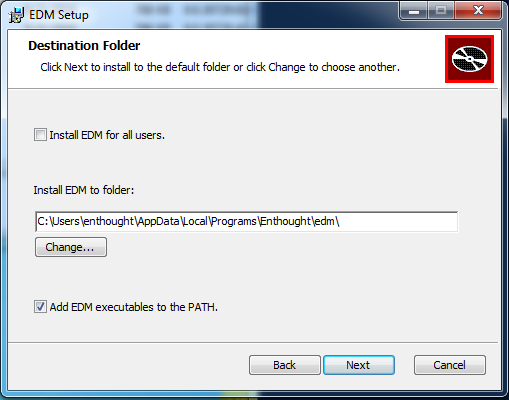
- A
per-userinstall, i.e. whenInstall EDM for all usersis not checked, means that the edm binaries will be stored in your own user profile on this machine, not usable by other users on the machine. - A
per-machineinstall, i.e. whenInstall EDM for all usersis checked, means that the edm binaries will be stored in a global folder (e.g.c:\Enthought\edm) and available to all users who have an account on this machine.
Install using msiexec
Installation can be automated using msiexec. Using Windows PowerShell:
msiexec.exe /qr /l*vm install.log /i edm_3.0.1_x86_64.msi EDMAPPDIR=`"c:\Program Files\edm`" ALLUSERS=1
Or using cmd.exe:
msiexec.exe /qr /l*vm install.log /i edm_3.0.1_x86_64.msi EDMAPPDIR="c:\Program Files\edm" ALLUSERS=1
The above commands will attempt a per-machine install of edm in thec:\Program Files\edm folder.
Warning
A per-machine install will fail if the installer is started without administrator privileges.
macOS
To install EDM using the pkg installer (recommended) please follow these steps:
- Locate the pkg installer file in the Finder.
- Right-click on the pkg installer.
- Select
Open. - When the popup dialog appears select
Opento continue.
To install EDM using the .sh installer (advanced users) open a terminal console window and run
$ sh edm_cli_3.0.1_osx_x86_64.sh
Follow the directions in the console. Using the macOS .sh installer, the user can control the path to install the EDM application.