Getting Started with Node.js Core Development (original) (raw)
Getting Started
- You will need
git. If you do not have it installed, download it and install it. (Windows users should select the option to use Unix tools from the command line.) - If you don't already have one, create a GitHub account.
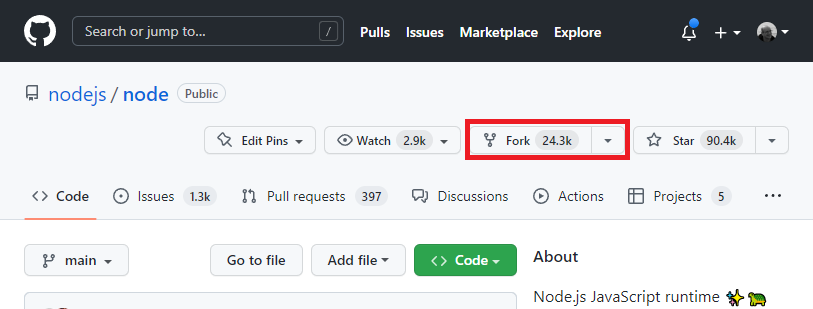
- Open the Node.js core repository web page.
- Use the "Fork" button to fork the repository:
- On the page for your own fork, use the "Code" button and copy the URL for cloning to your clipboard:
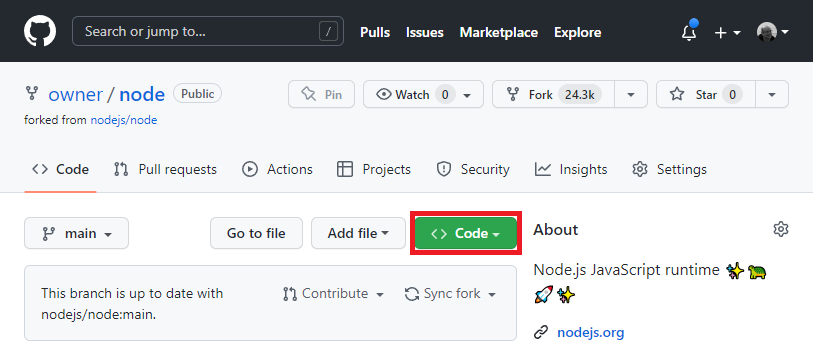
- Recommendation: Use the
SSHURL within the "Code" modal. Username and password authentication viaHTTPSis no longer supported, and you won't notice until you try to commit your local code back to the fork. Refer to the SSH documentation on GitHub if you need help setting this up. - On the command line, in your home directory or a directory you have for projects, run:
git clone <paste that URL here!> - When that is done:
cd node - Then (if using
SSHas recommended):git remote add upstream git@github.com:nodejs/node.git - Optional, but recommended: Configure `git` so that it knows who you are:
git config user.name "<Your Name Here!>"git config user.email "<Your Email Address Here!>"
Make sure your email address is also added to yourGitHub email list so that your commits will be properly associated with your account and you will be promoted to Contributor once your first commit is landed! - Follow the instructions to build Node.js. You should not install the version of Node.js built with these instructions. Follow the instructions to build and test only. Once you have
make testorvcbuild testrunning successfully, you are ready to start contributing. - If all your tests passed, you can look at the Next Steps page for suggestions on ways to find issues to work on. If you have tests that are failing, try to figure out why that is. If you need help, search/use the Node.js issue tracker.
