Create a heat map from data—Wolfram Documentation (original) (raw)
- See Also
- Related Guides
- Tech Notes
- See Also
* ArrayPlot
* ReliefPlot
* ListDensityPlot3D
* ListSliceDensityPlot3D
* ListContourPlot
* DensityPlot
* MatrixPlot
* Raster
* ListStreamDensityPlot
* ListVectorDensityPlot
* DataReversed - Related Guides
* Data Visualization
* Tabular Visualization
* Scientific Data Analysis
* Handling Arrays of Data
* GPU Computing
* Date & Time Visualization
* GPU Computing with NVIDIA
* GPU Computing with Apple - Tech Notes
* Plotting Lists of Data
- See Also
ListDensityPlot[{{f11,…,f1n},…,{fm1,…,fmn}}]
generates a smooth density plot from an array of values fij.
ListDensityPlot[{{x1,y1,f1},…,{x_k_,y_k_,f_k_}}]
generates a density plot with values fi defined at specified points {xi,yi}.
Details and Options
- ListDensityPlot is also known as heat map and intensity plot.
- Regular data {{f11,…,f1n},…,{fm1,…,fmn}} is plotted as a color
 at the point {x,y} where
  has value fij and c is a color-valued function.
 - Irregular data {{x1,y1,f1},…,{xk,yk,fk}} is plotted as a color
 at the point {x,y} where
  has value fi and c is a color-valued function.
 - The plot visualizes the set
 where
where  is a color-valued function and the region
  is the Cartesian product
  for regular data and the convex hull of {{x1,y1},…,{xn,yn}} for irregular data.
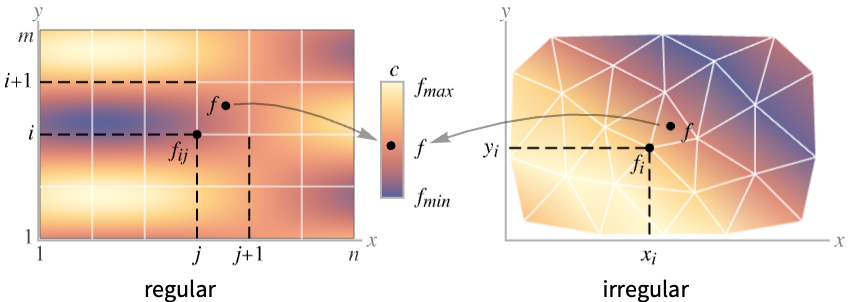
- For regular data {{f11,…,f1n},…,{fm1,…,fmn}}, the
 location for value fij is taken to be
  . Use the option DataRange to override that.
 - ListDensityPlot is intended for continuous data; ArrayPlot is intended for discrete data.
- By default, the color scale generates output in which larger values are shown as lighter colors.
- ListDensityPlot[data] can use the following forms and interpretations for data:
- | {<|xkeyx1,ykeyy1,fkeyf1|>,…,<|xkeyxn,ykeyyn,fkeyfn|>} | irregular
 triples {xi,yi,fi} |
| -------------------------------------------------------------- | ----------------------------------------------------------------------------------------------------------- |
| {{x1,y1},…,{xn,yn}}{f1,…,fn} | irregular triples {xi,yi,fi} |
| Dataset | values as a normal array |
| NumericArray | values as a normal array |
| QuantityArray | magnitudes |
| SparseArray | values as a normal array | - ListDensityPlot[Tabular[…]cspec] extracts and plots values from the tabular object using the column specification cspec.
- The following forms of column specifications cspec are allowed for plotting tabular data:
{colx,coly,colz} plot column z against columns x and y {{colx1,coly1,colz1},{colx2,coly2,colz2},…} plot column z1 against column x1 and y1 , z2 against x2 and y2, etc. - ListDensityPlot has the same options as Graphics, with the following additions and changes: [List of all options]
AspectRatio 1 ratio of height to width BoundaryStyle None how to draw RegionFunction boundaries BoxRatios Automatic effective 3D bounding box ratios ClippingStyle None how to draw values clipped by PlotRange ColorFunction Automatic how to color the plot ColorFunctionScaling True whether to scale the argument to ColorFunction DataRange Automatic the range of x and y values to assume for data Frame True whether to draw a frame around the plot FrameTicks Automatic frame tick marks InterpolationOrder None the polynomial degree in each variable of the interpolated density between data points LightingAngle None effective angle of the simulated light source MaxPlotPoints Automatic the maximum number of points to include Mesh None how many mesh lines in each direction to draw MeshFunctions {#1&,#2&} how to determine the placement of mesh lines MeshStyle Automatic the style for mesh lines Method Automatic the method to use for interpolation and data reduction PerformanceGoal $PerformanceGoal aspects of performance to try to optimize PlotFit None how to fit a curve to the points PlotFitElements Automatic fitted elements to show in the plot PlotLayout Automatic how to position densities PlotLegends None legends for color gradients PlotRange {Full,Full,Automatic} the range of f or other values to include PlotRangePadding Automatic how much to pad the range of values PlotRangeClipping True whether to clip at the plot range PlotTheme $PlotTheme overall theme for the plot RegionFunction (True&) how to determine whether a point should be included ScalingFunctions None how to scale individual coordinates VertexColors Automatic colors to assume at every point - DataRange determines the {x,y} position for value fij in the array {{f11,…,f1n},…,{fm1,…,fmn}}. Possible settings include:
Automatic,All uniform in x from 1 to n and in y from 1 to m {{xmin,xmax},{ymin,ymax}} uniform in x from xmin to xmax and in y from ymin to ymax - The case ListDensityPlot[{{a11,a12,a13},…}] can be interpreted as both regular and irregular data. With DataRange->Automatic it is interpreted as irregular {{x1,y1,f1},{x2,y2,f2},…} and with DataRangeAll it is interpreted as regular {{f11,…,f1n},…,{fm1,…,fmn}}.
- Possible settings for ScalingFunctions include:
sf scale the f-values {sx,sy} scale x and y axes {sx,sy,sf} scale x and y axes and f-values - Each scaling function si is either a string "scale" or {g,g-1}, where g-1 is the inverse of g.
- For ListDensityPlot[array], Mesh->Full draws a mesh that crosses at the position of each data point.
- The arguments supplied to functions in MeshFunctions and RegionFunction are x, y, f.
- ColorFunction is supplied with a single argument, given by default by the scaled value of f.
- Typical settings for PlotLegends include:
None no legend Automatic automatically determine legend from ColorFunction Placed[lspec,…] specify placement for legend - Possible settings for PlotLayout that show single densities in multiple plot panels include:
"Column" use separate densities in a column of panels "Row" use separate densities in a row of panels {"Column",k},{"Row",k} use k columns or rows {"Column",UpTo[k]},{"Row",UpTo[k]} use at most k columns or rows 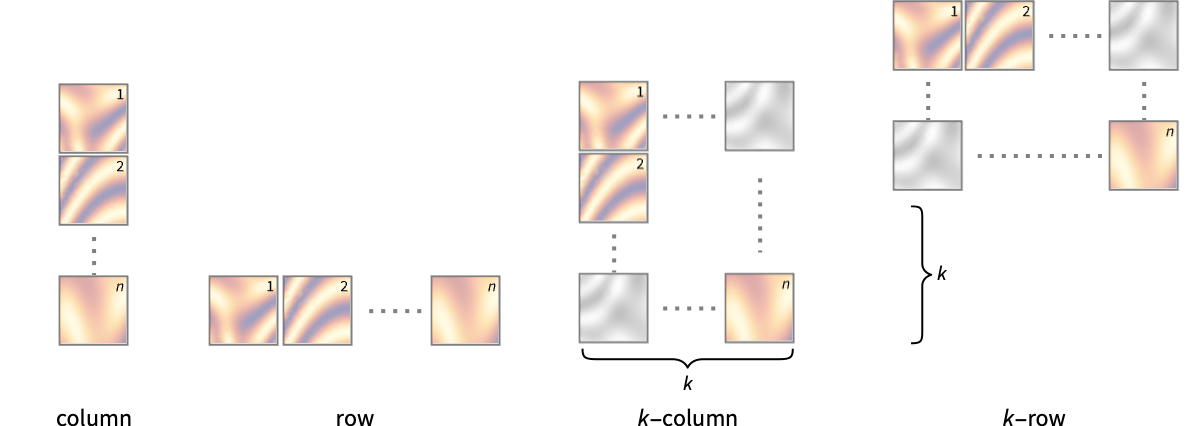
- The setting for VertexColors must be an array or list with the same structure as the array or list of values.
- An explicit setting for VertexColors overrides colors determined from ColorFunction.
- ListDensityPlot returns Graphics[GraphicsComplex[data]].
List of all options
AlignmentPoint Center the default point in the graphic to align with AspectRatio 1 ratio of height to width Axes False whether to draw axes AxesLabel None axes labels AxesOrigin Automatic where axes should cross AxesStyle {} style specifications for the axes Background None background color for the plot BaselinePosition Automatic how to align with a surrounding text baseline BaseStyle {} base style specifications for the graphic BoundaryStyle None how to draw RegionFunction boundaries BoxRatios Automatic effective 3D bounding box ratios ClippingStyle None how to draw values clipped by PlotRange ColorFunction Automatic how to color the plot ColorFunctionScaling True whether to scale the argument to ColorFunction ContentSelectable Automatic whether to allow contents to be selected CoordinatesToolOptions Automatic detailed behavior of the coordinates tool DataRange Automatic the range of x and y values to assume for data Epilog {} primitives rendered after the main plot FormatType TraditionalForm the default format type for text Frame True whether to draw a frame around the plot FrameLabel None frame labels FrameStyle {} style specifications for the frame FrameTicks Automatic frame tick marks FrameTicksStyle {} style specifications for frame ticks GridLines None grid lines to draw GridLinesStyle {} style specifications for grid lines ImageMargins 0. the margins to leave around the graphic ImagePadding All what extra padding to allow for labels etc. ImageSize Automatic the absolute size at which to render the graphic InterpolationOrder None the polynomial degree in each variable of the interpolated density between data points LabelStyle {} style specifications for labels LightingAngle None effective angle of the simulated light source MaxPlotPoints Automatic the maximum number of points to include Mesh None how many mesh lines in each direction to draw MeshFunctions {#1&,#2&} how to determine the placement of mesh lines MeshStyle Automatic the style for mesh lines Method Automatic the method to use for interpolation and data reduction PerformanceGoal $PerformanceGoal aspects of performance to try to optimize PlotFit None how to fit a curve to the points PlotFitElements Automatic fitted elements to show in the plot PlotLabel None an overall label for the plot PlotLayout Automatic how to position densities PlotLegends None legends for color gradients PlotRange {Full,Full,Automatic} the range of f or other values to include PlotRangeClipping True whether to clip at the plot range PlotRangePadding Automatic how much to pad the range of values PlotRegion Automatic the final display region to be filled PlotTheme $PlotTheme overall theme for the plot PreserveImageOptions Automatic whether to preserve image options when displaying new versions of the same graphic Prolog {} primitives rendered before the main plot RegionFunction (True&) how to determine whether a point should be included RotateLabel True whether to rotate y labels on the frame ScalingFunctions None how to scale individual coordinates Ticks Automatic axes ticks TicksStyle {} style specifications for axes ticks VertexColors Automatic colors to assume at every point
Examples
open all close all
Basic Examples (4)
Use an array of values to define heights for a density:
Wolfram Language code: ListDensityPlot[{{1, 1, 1, 1}, {1, 2, 1, 2}, {1, 1, 3, 1}, {1, 2, 1, 4}}, Mesh -> All]
Give explicit  ,
,  ,
,  coordinates for points in a density:
Wolfram Language code: ListDensityPlot[{{0, 0, 1}, {1, 0, 0}, {0, 1, 0}}, Mesh -> All]
A larger set of  ,
,  ,
,  samples:
Wolfram Language code: data = Table[With[{r = RandomReal[{0, 5}], t = RandomReal[{0, 2Pi}]}, {r Cos[t], r Sin[t], Sin[r ^ 2] / r ^ 2}], {10 ^ 4}];
Wolfram Language code: ListDensityPlot[data, PlotRange -> All]
Use a multipanel layout to show multiple datasets at the same time:
Wolfram Language code: ListDensityPlot[{IconizedObject[«Subscript[data, 1]»], IconizedObject[«Subscript[data, 2]»]}, PlotLayout -> "Row"]
Use different interpolations of data:
Wolfram Language code: data = Table[Sin[j ^ 2 + i], {i, 0, Pi, Pi / 5}, {j, 0, Pi, Pi / 5}];
Wolfram Language code: Table[ListDensityPlot[data, Mesh -> None, InterpolationOrder -> o, ColorFunction -> "SouthwestColors"], {o, {0, 1, 2, 3}}]
Scope (16)
Data (8)
For regular data consisting of  values, the
  and
and  data ranges are taken to be integer values:
Wolfram Language code: ListDensityPlot[Table[Sin[x y], {x, 0, 3, 0.1}, {y, 0, 3, 0.1}], Mesh -> All]
Provide explicit  and
and  data ranges by using DataRange:
Wolfram Language code: ListDensityPlot[Table[Sin[x y], {x, 0, 3, 0.1}, {y, 0, 3, 0.1}], DataRange -> {{0, 3}, {0, 3}}]
For irregular data consisting of  triples, the
  and
and  data ranges are inferred from data:
Wolfram Language code: data = Table[{x = RandomReal[{-1, 1}], y = RandomReal[{-1, 1}], x ^ 2 - y ^ 2}, {300}];
Wolfram Language code: ListDensityPlot[data, Mesh -> All]
Areas around where the data is nonreal are excluded:
Wolfram Language code: ListDensityPlot[ReplacePart[Partition[Range[100], 10], {{3, 3} -> None, {5, 7} -> I, {8, 4} -> Missing["NotAvailable"]}], Mesh -> All]
Use MaxPlotPoints to limit the number of points used:
Wolfram Language code: Table[ListDensityPlot[Table[Sin[x y], {x, 0, 3, 0.075}, {y, 0, 3, 0.075}], MaxPlotPoints -> mp, Mesh -> All], {mp, {Infinity, 20, 10}}]
PlotRange is selected automatically:
Wolfram Language code: ListDensityPlot[Table[1 / (x ^ 2 + y ^ 2), {x, -2, 2, 4 / 51}, {y, -2, 2, 4 / 51}]]
Use PlotRange to focus in on areas of interest:
Wolfram Language code: {ListDensityPlot[Table[x ^ 4 + y ^ 4 - x ^ 2 - y ^ 2 + 1, {x, -2, 2, 0.1}, {y, -2, 2, 0.1}]], ListDensityPlot[Table[x ^ 4 + y ^ 4 - x ^ 2 - y ^ 2 + 1, {x, -2, 2, 0.1}, {y, -2, 2, 0.1}], PlotRange -> {0, 2}, ClippingStyle -> None]}
Use RegionFunction to restrict the density to a region given by inequalities:
Wolfram Language code: data = Flatten[Table[{x, y, Sin[x ^ 2 + y ^ 2] / (x ^ 2 + y ^ 2)}, {x, -4, 4, 0.2}, {y, -4, 4, 0.2}], 1];//Quiet
Wolfram Language code: ListDensityPlot[data, PlotRange -> All, RegionFunction -> Function[{x, y, z}, Norm[{x, y}] < 4]]
Tabular Data (1)
Get tabular data:
Wolfram Language code: tabular = Tabular[Association["RawSchema" -> Association["ColumnProperties" -> Association["x" -> Association["ElementType" -> "Real64"], "y" -> Association["ElementType" -> "Real64"], "f" -> Association["ElementType" -> "Real64"], "g" -> Association["ElementType" -> "Real64"]], "KeyColumns" -> None, "Backend" -> "WolframKernel"], "BackendData" -> Association["ColumnData" -> DataStructure["ColumnTable", {{TabularColumn[Association["Data" -> {{-0.33582559210197255, 0.8803676729681109, -0.003450317591317193, -0.5776054861233806, -0.18944540146303104, 0.08137938087842855, 0.7104751091887305, -0.7249989427695543, 0.7189171513953225, 0.07484856016827364, 0.08394237912410371, -0.8397091750258563, -0.34613065738227494, 0.3153135739547788, 0.1915099877033827, 0.6156751086440714, -0.6764522289849321, 0.42594752908865297, 0.5452064158161848, -0.20490357958422162, 0.2656442175819875, 0.5930624991868867, -0.7653974593098988, -0.405399907196919, 0.4261842168600495, 0.007537997753683873, 0.02320951605378001, 0.029467822857674145, -0.7726538362038052, -0.8906519148256042, -0.38273234260173566, -0.04463951504268252, -0.16350850917765758, 0.4690419314081237, -0.07389578232631427, -0.17270808669527418, -0.5037831593577057, -0.03935310416421582, 0.15289554619000345, 0.4761074052545588, 0.01960730503071178, 0.346592918693779, -0.47057706227574775, -0.35440713666529167, -0.34731051462701956, -0.0457101610377397, 0.04848867532803812, 0.04010379877047812, 0.36938420883956324, -0.10815861126341457, 0.6830059609993497, -0.03055755892317922, 0.052870816573050865, 0.179789625890681, 0.023635433559453523, -0.030528341731038623, -0.21544153070879574, 0.5826821668876411, -0.20600453971631344, -0.42604275708726047, -0.3929283758555415, -0.5043728799993309, 0.04899025018573085, -0.6259318276915798, -0.7385675893002966, 0.02511690116030315, -0.4164641437703871, -0.44641422111020956, 0.05742014701654436, 0.18026818253918503, -0.25393260418265173, 0.6021117017355871, 0.37177688919047097, 0.11360855924293391, -0.25955329915886216, 0.5489751164992835, 0.23958190188503348, 0.39276345483198566, 0.3478442618183317, -0.3456381030733422, 0.4225740854243536, 0.050722540211116975, -0.4339376582341843, -0.8928688667944833, 0.2875870676301678, 0.04838535997016681, 0.17191625353893386, -0.040332095223106545, 0.2979213513808396, -0.25100379031925163, 0.018748029889601718, 0.3372233005229358, 0.5402016231417128, 0.05153948798389716, 0.06657679195492089, 0.507705731340098, 0.23183070367402803, 0.17700860995773013, -0.46345961004467046, -0.6014722768342563, -0.3922042067620207, 0.46797042738344224, -0.6158846471708826, -0.21699658897203888, -0.5884939906085117, 0.5155817648259232, 0.038469952543080936, -0.5307883875682963, 0.09721123850987222, 0.3363794736422771, 0.03788984473431475, -0.48615099167870535, 0.03748937070711202, 0.5612941694265542, 0.07205272450151311, 0.30972359067445165, -0.14344517208631288, -0.09100952129998968, -0.6066500430261582, -0.22052556751928473, 0.47003854859072286, 0.1595273318284402, -0.03860225460772638, 0.5251973641127975, -0.30222122163790915, -0.040424594644161975, 0.3704616954568948, 0.375203639020476, -0.15731117999349786, -0.5402663560146413, 0.0017958271756500443, 0.7042906004786842, -0.2581690297697128, -0.7406702017442801, 0.7443264602887835, -0.5384351417571395, 0.1597222348452349, 0.3260164469009681, 0.18083274349158138, 0.33096472385489184, -0.6405785635713598, 0.2571675133342489, 0.41891532310320506, -0.18246530531294006, 0.5807105548239027, 0.01799972403389352, -0.02399787933864095, 0.3512402551683941, -0.12710039402331913, -0.14875144251467443, 0.4836386106491894, 0.4045689471949738, -0.389211183018424, -0.4132772147311336, 0.4888407559699957, -0.3951245745675573, -0.7165591324044193, -0.20907255373597197, -0.22856965055876172, -0.3673381942839634, -0.1410469034783053, -0.009661409233815388, -0.39919895738938344, -0.37096936498542143, 0.662931082598076, -0.016494755798288147, 0.33106254724578527, 0.5559302765103005, -0.1895047357455171, 0.4457984306185924, -0.39170159845212427, 0.7480628908636631, 0.5124033874417243, 0.7707606882795327, -0.1872735900152881, 0.585417550107661, -0.3063201531061375, 0.5852948104227167, 0.5850235449060104, -0.2176121958842699, -0.6984400530394087, 0.03257926667939274, -0.9384991346972504, -0.059169774448424466, 0.5 ... Type" -> "Real64"]], TabularColumn[ Association["Data" -> {{0.8939921590638151, 0.09599126606056499, -1.4461887698687872, 0.3574534768754277, -1.121171318799583, -0.33073336818577137, 0.9259094587267503, 0.042022916683887426, 0.892305825288878, -0.5540058901593593, -0.03510132460611314, 0.18571071889023255, -0.2772288527592096, -0.7716551383714281, 0.4068956517806689, 0.36221629323967275, 0.8982381800002951, -0.40620115298861925, 0.3054024974923232, -0.6163159803789945, -0.07859957322062693, 0.28549955900599683, 0.3312036742634056, 0.26331224460193225, -0.05870202519594381, 0.00031555230999197326, -0.7436146779660238, -1.14390630001407, 0.1411388081014004, 0.046792707579414866, -0.3774362463202895, 0.022381136398829594, -0.4960159800986063, 0.3796350869710431, -1.138603222451506, -0.23455582228395613, 0.2659092692654318, -1.183528195744674, -0.4791210452818651, -0.29303339287164004, -0.5211330588561782, -0.13502698285089174, 0.7870363346872017, 0.8982544467986264, -0.22914999050005214, -0.2479061783114385, -0.4347495019488776, -0.08331096396423883, 0.8772708961908716, -0.27178839713175307, 0.9483092790315122, -0.4724839296008851, -1.0909555502232477, -0.9408472343160451, -1.3960488289616102, -0.5202140745791314, -0.19832524998359002, 0.7868474016813832, 0.35042789273021696, -0.22195854339794094, 1.0239338679811123, 1.241797268360188, -1.0053256713543575, 0.8794698395861581, 0.646958311741143, -0.30533288076463466, -0.12791364372821087, 0.5168966892467696, -0.854322017990838, 0.3237507945931768, -0.3365136569790853, -0.07542508011071905, -0.1896622911757588, -0.8151518333271205, -0.785903912584512, 0.9943540702594823, -0.09970798805958633, 0.8155460093130154, 0.2517100213619473, -0.5074402739814479, 1.054331521209021, -0.37095280525637275, -0.0033124165376286503, 0.00810519783609609, 0.604491487382795, -1.087039179804143, 0.3217896701925536, -0.9757724909993218, -0.5296157669589694, -0.44353010018306926, -0.9772156827519269, 0.9974526044782488, 1.0401382798005163, -1.333826721300462, -1.1657073859193974, 0.5988738776781478, -0.46515644169593257, -0.06189485735399641, 0.43024118140166445, -0.005056861065915311, 0.4969647835990133, 1.2389334026274614, 1.0969746972416095, 0.2699914383982267, -0.007263249176729766, 0.025694595799883486, 0.009334789628101163, 0.3959739514237559, -0.6919031699208391, -0.5727673459546412, -0.7526649101588971, 0.37676652058113047, -1.1097067424942098, 0.7907395601868871, -0.9921651497523799, -0.7285869946231459, -0.8828106067813857, -0.062486591022684154, 0.5791694114075633, -0.3234808446001126, -0.29576406882665246, -0.7873078267171731, -1.0345538770658507, 0.6447352486264667, -0.09256576962703741, -0.9165601254045901, -0.11276989000586415, 0.1559393927752605, -0.6024250703013618, 0.14448974619397612, -0.04760739467769851, 0.7709694771458564, -0.014742247510236057, 0.23626276607833294, 0.6638730651502748, -0.03186729016669311, -1.0357092218146797, 0.6433340083061274, -0.9411413021162254, 0.4909973640778654, 0.7189944529089185, 0.11055457421211713, 1.267850511973201, -0.9438375692417983, 0.17379076568211732, -0.10851220031896575, -1.2713361573907198, 0.3346883790200734, -0.0621077599435433, -0.04321780837452255, -0.18862788259467456, 0.021760098075714426, 0.8532897115032967, -0.28556892622426977, 0.15408641950632404, -0.1714149113043416, 0.39533058049223047, -0.4397787874261183, -0.9441709999324307, 0.6380059863875251, -1.079304150111603, -0.015220209887687373, 0.04287582799227833, -0.36459460042586384, 1.085392552357007, -1.4351301279221556, -0.2639348179992805, 1.0262808227866909, -0.6574884811876281, 0.03985598924795783, -0.3005474803479229, 0.6683106567979948, -0.23062780939455543, 0.5666187686239714, 0.37219192126078904, -0.02563679932918994, 0.4429249457425396, -0.04381111047074612, 0.187906287726331, -0.9973413808733808, 0.00426805123864777, -0.12866722429447683, 0.00749480936676912, -0.8515711317056425, -0.08786646448345839, 0.2606608909833542, 0.9058373813263996, 0.11471040362679649, 0.019510758576114784, 0.07867647334176021, 0.018095050021316034, -0.9234813248766701, 0.27933341322409344, -0.6676322195851319, -0.4217872567696394, -0.810239936029394, -0.9402166292180882, 0.17133206921427285, 1.2481069003723113, 0.9831436029884254}, {}, None}, "ElementType" -> "Real64"]]}}]]]];
Plot a shaded density plot of column f over columns x and y:
Wolfram Language code: ListDensityPlot[tabular -> {"x", "y", "f"}]
Plot multiple sets of columns, arranging the plots in a row:
Wolfram Language code: ListDensityPlot[tabular -> {{"x", "y", "f"}, {"x", "y", "g"}}, PlotLayout -> "Row"]
Include color bar legends for the plot:
Wolfram Language code: ListDensityPlot[tabular -> {{"x", "y", "f"}, {"x", "y", "g"}}, PlotLayout -> "Row", PlotLegends -> Automatic]
Presentation (7)
Add labels:
Wolfram Language code: ListDensityPlot[Table[Sin[i + j ^ 2], {i, 0, 3, 0.1}, {j, 0, 3, 0.1}], FrameLabel -> {j, i}, PlotLabel -> Sin[i + j ^ 2], ColorFunction -> "SunsetColors"]
Color the density by height:
Wolfram Language code: ListDensityPlot[Table[Sin[i + j ^ 2], {i, 0, 3, 0.05}, {j, 0, 3, 0.05}], ColorFunction -> Function[{z}, Hue[z]]]
Include a legend:
Wolfram Language code: ListDensityPlot[Table[Sin[i + j ^ 2], {i, 0, 3, 0.05}, {j, 0, 3, 0.05}], ColorFunction -> "SolarColors", PlotLegends -> Automatic]
Provide overlay meshes:
Wolfram Language code: ListDensityPlot[Table[Sin[i + j ^ 2], {i, 0, 3, 0.1}, {j, 0, 3, 0.1}], Mesh -> 8, ColorFunction -> "DeepSeaColors", MeshFunctions -> {Function[{x, y, z}, z]}, MeshStyle -> Directive[Dashed, Gray]]
Provide an interactive Tooltip for the density:
Wolfram Language code: ListDensityPlot[Tooltip[Table[Sin[i + j ^ 2], {i, 0, 3, 0.05}, {j, 0, 3, 0.05}], TraditionalForm@Sin[i + j ^ 2]], ColorFunction -> "SouthwestColors"]
Use a theme with simple ticks and a legend in a bold color scheme:
Wolfram Language code: ListDensityPlot[Table[Sin[i + j ^ 2], {i, 0, 3, 0.1}, {j, 0, 3, 0.1}], PlotTheme -> "Web"]
Use a multipanel layout to show multiple datasets at the same time:
Wolfram Language code: ListDensityPlot[{IconizedObject[«1-norm»], IconizedObject[«2-norm»]}, PlotLayout -> "Row"]
Use a column instead of a row:
Wolfram Language code: ListDensityPlot[{IconizedObject[«Subscript[L, 1] norm»], IconizedObject[«Subscript[L, 2] norm»]}, PlotLayout -> "Column"]
Options (98)
AspectRatio (4)
By default, ListDensityPlot uses the same width and height:
Wolfram Language code: ListDensityPlot[IconizedObject[«data»]]
Use a numerical value to specify the height to width ratio:
Wolfram Language code: ListDensityPlot[IconizedObject[«data»], AspectRatio -> 1 / 2]
AspectRatioAutomatic determines the ratio from the plot ranges:
Wolfram Language code: ListDensityPlot[IconizedObject[«data»], AspectRatio -> Automatic]
AspectRatioFull adjusts the height and width to tightly fit inside other constructs:
Wolfram Language code: plot = ListDensityPlot[IconizedObject[«data»], AspectRatio -> Full];
Wolfram Language code: {Framed[Pane[plot, {70, 100}]], Framed[Pane[plot, {100, 100}]], Framed[Pane[plot, {100, 50}]]}
Axes (4)
By default, ListDensityPlot uses a frame instead of axes:
Wolfram Language code: ListDensityPlot[IconizedObject[«data»]]
Use axes instead of a frame:
Wolfram Language code: ListDensityPlot[IconizedObject[«data»], Frame -> False, Axes -> True]
Use AxesOrigin to specify where the axes intersect:
Wolfram Language code: ListDensityPlot[IconizedObject[«data»], Frame -> False, Axes -> True, AxesOrigin -> {3, 3}]
Turn each axis on individually:
Wolfram Language code: {ListDensityPlot[IconizedObject[«data»], Frame -> False, Axes -> {True, False}], ListDensityPlot[IconizedObject[«data»], Frame -> False, Axes -> {False, True}]}
AxesLabel (4)
No axes labels are drawn by default:
Wolfram Language code: ListDensityPlot[IconizedObject[«data»], Frame -> False, Axes -> True]
Place a label on the  axis:
axis:
Wolfram Language code: ListDensityPlot[IconizedObject[«data»], Frame -> False, Axes -> True, AxesLabel -> y]
Specify axes labels:
Wolfram Language code: ListDensityPlot[IconizedObject[«data»], Frame -> False, Axes -> True, AxesLabel -> {x, y}]
Use units as labels:
Wolfram Language code: ListDensityPlot[QuantityArray[IconizedObject[«{m, s, K} data»], {"Meters", "Seconds", "Kelvins"}], Frame -> False, Axes -> True, AxesLabel -> Automatic]
AxesOrigin (2)
The position of the axes is determined automatically:
Wolfram Language code: ListDensityPlot[IconizedObject[«data»], Frame -> False, Axes -> True]
Specify an explicit origin for the axes:
Wolfram Language code: ListDensityPlot[IconizedObject[«data»], Frame -> False, Axes -> True, AxesOrigin -> {1, 1}]
AxesStyle (4)
Change the style for the axes:
Wolfram Language code: ListDensityPlot[IconizedObject[«data»], Frame -> False, Axes -> True, AxesStyle -> Red]
Specify the style of each axis:
Wolfram Language code: ListDensityPlot[IconizedObject[«data»], Frame -> False, Axes -> True, AxesStyle -> {Red, Blue}]
Use different styles for the ticks and the axes:
Wolfram Language code: ListDensityPlot[IconizedObject[«data»], Frame -> False, Axes -> True, AxesStyle -> Green, TicksStyle -> Black]
Use different styles for the labels and the axes:
Wolfram Language code: ListDensityPlot[IconizedObject[«data»], Frame -> False, Axes -> True, AxesStyle -> Green, LabelStyle -> Black]
BoundaryStyle (4)
No boundary is used by default:
Wolfram Language code: ListDensityPlot[Table[Sin[j ^ 2 + i], {i, 0, Pi, 0.1}, {j, 0, Pi, 0.1}]]
Use a red boundary around the edges of the surface:
Wolfram Language code: ListDensityPlot[Table[Sin[j ^ 2 + i], {i, 0, Pi, 0.1}, {j, 0, Pi, 0.1}], BoundaryStyle -> Red]
BoundaryStyle applies to holes cut by RegionFunction:
Wolfram Language code: ListDensityPlot[Table[Sin[j ^ 2 + i], {i, 0, Pi, 0.1}, {j, 0, Pi, 0.1}], BoundaryStyle -> Red, RegionFunction -> Function[{x, y, z}, Abs[z] ≥ 0.4]]
BoundaryStyle applies between Voronoi regions associated with the data:
Wolfram Language code: ListDensityPlot[{{10, 10, 1}, {6, 8, 10}, {7, 9, 9}, {1, 1, 2}, {4, 6, 4}, {7, 4, 9}, {10, 6, 8}}, InterpolationOrder -> 0, BoundaryStyle -> Red]
ClippingStyle (4)
Clipped regions are not shown by default:
Wolfram Language code: ListDensityPlot[Table[Im[Gamma[x + I y]], {y, -3.5, 3.5, 0.1}, {x, -3.5, 3.5, 0.1}]]
Color clipped regions like the rest of the density:
Wolfram Language code: ListDensityPlot[Table[Im[Gamma[x + I y]], {y, -3.5, 3.5, 0.1}, {x, -3.5, 3.5, 0.1}], ClippingStyle -> Automatic]
Use pink to fill the clipped regions:
Wolfram Language code: ListDensityPlot[Table[Im[Gamma[x + I y]], {y, -3.5, 3.5, 0.1}, {x, -3.5, 3.5, 0.1}], ClippingStyle -> Pink]
Use light red where the surface is clipped above and pink below:
Wolfram Language code: ListDensityPlot[Table[Im[Gamma[x + I y]], {y, -3.5, 3.5, 0.1}, {x, -3.5, 3.5, 0.1}], ClippingStyle -> {Pink, LightRed}]
ColorFunction (5)
Color by scaled  coordinate:
Wolfram Language code: ListDensityPlot[Table[y + Sin[x ^ 2 + y ^ 2], {x, -4, 4, 0.2}, {y, -4, 4, 0.2}], ColorFunction -> Hue]
Specify gray-level intensity by scaled  coordinate:
Wolfram Language code: ListDensityPlot[Table[x + Sin[3x + y ^ 2], {x, -3, 3, 0.1}, {y, -3, 3, 0.1}], ColorFunction -> GrayLevel]
Named color gradients color in the  direction:
Wolfram Language code: ListDensityPlot[Table[x + Sin[3x + y ^ 2], {x, -3, 3, 0.1}, {y, -3, 3, 0.1}], ColorFunction -> "SunsetColors"]
Use brightness to correspond to the height or density of a function:
Wolfram Language code: ListDensityPlot[Table[x + Sin[3x + y ^ 2], {x, -3, 3, 0.1}, {y, -3, 3, 0.1}], ColorFunction -> (Hue[2 / 5, 2 / 3, #]&)]
Use the interpolation between two colors to indicate the height or density of a function:
Wolfram Language code: ListDensityPlot[Table[x + Sin[3x + y ^ 2], {x, -3, 3, 0.1}, {y, -3, 3, 0.1}], ColorFunction -> (RGBColor[1 - #, #, 1]&)]
ColorFunctionScaling (1)
Get the natural range of values by setting ColorFunctionScaling to False:
Wolfram Language code: ListDensityPlot[Table[550 + 150 Sin[x]Sin[y], {x, 0, 2Pi, 0.1}, {y, 0, 2Pi, 0.1}], ColorFunction -> (ColorData["VisibleSpectrum"][#1]&), ColorFunctionScaling -> False]
DataRange (4)
Arrays of height values are displayed against the number of elements in each direction:
Wolfram Language code: ListDensityPlot[Table[Sin[i + j], {i, 0, 2Pi, 0.1}, {j, 0, 2Pi, 0.1}]]
Rescale to the sampling space:
Wolfram Language code: ListDensityPlot[Table[Sin[i + j], {i, 0, 2Pi, 0.1}, {j, 0, 2Pi, 0.1}], DataRange -> {{0, 2Pi}, {0, 2Pi}}]
Triples are interpreted as  ,
,  ,
,  coordinates:
Wolfram Language code: data = Flatten[Table[{i, j, Sin[i + j]}, {j, 0, 2Pi, 0.5}, {i, -3, 3}], 1];
Wolfram Language code: ListDensityPlot[data, Mesh -> All]
Force interpretation as arrays of height values:
Wolfram Language code: data = Table[Sin[i + j], {j, 0, 2Pi, 0.5}, {i, -1, 1}];
Wolfram Language code: ListDensityPlot[data, DataRange -> All, Mesh -> All]
The dataset is normally interpreted as a list of  triples:
Wolfram Language code: ListDensityPlot[data, Mesh -> All]
ImageSize (7)
Use named sizes such as Tiny, Small, Medium and Large:
Wolfram Language code: {ListDensityPlot[IconizedObject[«data»], ImageSize -> Tiny], ListDensityPlot[IconizedObject[«data»], ImageSize -> Small]}
Specify the width of the plot:
Wolfram Language code: {ListDensityPlot[IconizedObject[«data»], ImageSize -> 150], ListDensityPlot[IconizedObject[«data»], AspectRatio -> 1.5, ImageSize -> 150]}
Specify the height of the plot:
Wolfram Language code: {ListDensityPlot[IconizedObject[«data»], ImageSize -> {Automatic, 150}], ListDensityPlot[IconizedObject[«data»], AspectRatio -> 2, ImageSize -> {Automatic, 150}]}
Allow the width and height to be up to a certain size:
Wolfram Language code: {ListDensityPlot[IconizedObject[«data»], ImageSize -> UpTo[200]], ListDensityPlot[IconizedObject[«data»], AspectRatio -> 2, ImageSize -> UpTo[200]]}
Specify the width and height for a graphic, padding with space if necessary:
Wolfram Language code: ListDensityPlot[IconizedObject[«data»], ImageSize -> {200, 250}, Background -> StandardGray]
Setting AspectRatioFull will fill the available space:
Wolfram Language code: ListDensityPlot[IconizedObject[«data»], AspectRatio -> Full, ImageSize -> {200, 250}, Background -> StandardGray]
Use maximum sizes for the width and height:
Wolfram Language code: {ListDensityPlot[IconizedObject[«data»], ImageSize -> {UpTo[150], UpTo[100]}], ListDensityPlot[IconizedObject[«data»], AspectRatio -> 2, ImageSize -> {UpTo[150], UpTo[100]}]}
Use ImageSizeFull to fill the available space in an object:
Wolfram Language code: Framed[Pane[ListDensityPlot[IconizedObject[«data»], ImageSize -> Full, Background -> StandardGray], {200, 100}]]
Specify the image size as a fraction of the available space:
Wolfram Language code: Framed[Pane[ListDensityPlot[IconizedObject[«data»], ImageSize -> {Scaled[0.5], Scaled[0.5]}, Background -> StandardGray], {200, 100}]]
InterpolationOrder (5)
Densities are normally blended across polygons:
Wolfram Language code: ListDensityPlot[Table[Sin[j ^ 2 + i], {i, 0, Pi, 0.5}, {j, 0, Pi, 0.5}], PlotRange -> All, Mesh -> All]
Use zero-order or piecewise constant interpolation:
Wolfram Language code: ListDensityPlot[Table[Sin[j ^ 2 + i], {i, 0, Pi, 0.5}, {j, 0, Pi, 0.5}], Mesh -> None, InterpolationOrder -> 0, PlotRange -> All]
Use third-order spline interpolation to fit the data:
Wolfram Language code: ListDensityPlot[Table[Sin[j ^ 2 + i], {i, 0, Pi, 0.5}, {j, 0, Pi, 0.5}], Mesh -> None, InterpolationOrder -> 3, PlotRange -> All]
Interpolation order 0 to 5:
Wolfram Language code: Table[ListDensityPlot[Table[Sin[j ^ 2 + i], {i, 0, Pi, 0.5}, {j, 0, Pi, 0.5}], Mesh -> None, InterpolationOrder -> i, Mesh -> Full, PlotLabel -> i, PlotRange -> All], {i, 0, 5}]
For irregular data, zero-order interpolation gives Voronoi regions for each point:
Wolfram Language code: data = Flatten[Table[{r Sin[t], r Cos[t], Sqrt[r t]}, {t, 0, 2Pi, 0.5}, {r, 0, 2, 0.5}], 1];
Wolfram Language code: ListDensityPlot[data, Mesh -> All, InterpolationOrder -> 0]
MaxPlotPoints (4)
ListDensityPlot normally uses all the points in the dataset:
Wolfram Language code: ListDensityPlot[Table[Sin[j ^ 2 + i], {i, 0, Pi, 0.1}, {j, 0, Pi, 0.1}], Mesh -> All]
Wolfram Language code: data = Table[{x = RandomReal[Pi], y = RandomReal[Pi], Sin[x ^ 2 + y]}, {500}];
Wolfram Language code: ListDensityPlot[data, Mesh -> All]
Limit the number of points used in each direction:
Wolfram Language code: ListDensityPlot[Table[Sin[j ^ 2 + i], {i, 0, Pi, 0.1}, {j, 0, Pi, 0.1}], MaxPlotPoints -> 10, Mesh -> All]
MaxPlotPoints imposes a regular grid on irregular data:
Wolfram Language code: data = Table[{x = RandomReal[Pi], y = RandomReal[Pi], Sin[x ^ 2 + y]}, {500}];
Wolfram Language code: ListDensityPlot[data, Mesh -> All, MaxPlotPoints -> 10]
The grid does not extend beyond the convex hull of the original data:
Wolfram Language code: data = Select[RandomReal[3, {500, 3}], Norm[#] < Pi&];
Wolfram Language code: ListDensityPlot[data, Mesh -> All, MaxPlotPoints -> 10]
Mesh (7)
No mesh is used by default:
Wolfram Language code: ListDensityPlot[Table[Sin[j ^ 2 + i], {i, 0, Pi, 0.1}, {j, 0, Pi, 0.1}], Mesh -> None]
Show the initial and final sampling mesh:
Wolfram Language code: data = Table[Sin[j ^ 2 + i], {i, 0, Pi, 0.25}, {j, 0, Pi, 0.25}];
Wolfram Language code: {ListDensityPlot[data, Mesh -> Full], ListDensityPlot[data, Mesh -> All]}
The entire mesh for irregular data is a Delaunay triangulation:
Wolfram Language code: data = Table[{x = RandomReal[3], y = RandomReal[3], Sin[x ^ 2 + y]}, {100}];
Wolfram Language code: ListDensityPlot[data, Mesh -> All]
Use 5 mesh lines in each direction:
Wolfram Language code: ListDensityPlot[Table[Sin[j ^ 2 + i], {i, 0, Pi, 0.1}, {j, 0, Pi, 0.1}], Mesh -> 5]
Use 3 mesh lines in the  direction and 6 mesh lines in the
  direction:
Wolfram Language code: ListDensityPlot[Table[Sin[j ^ 2 + i], {i, 0, Pi, 0.1}, {j, 0, Pi, 0.1}], Mesh -> {3, 6}]
Use mesh lines at specific values:
Wolfram Language code: data = Flatten[Table[{i, j, Sin[i ^ 2 + j]}, {i, 0, Pi, 0.1}, {j, 0, Pi, 0.1}], 1];
Wolfram Language code: ListDensityPlot[data, Mesh -> {{1, 2}, {Pi / 2}}]
Use different styles for different mesh lines:
Wolfram Language code: data = Flatten[Table[{i, j, Sin[i ^ 2 + j]}, {i, -2, 2, 0.1}, {j, -2, 2, 0.1}], 1];
Wolfram Language code: ListDensityPlot[data, Mesh -> {{{0, Thick}}, {{0, Red}}}]
MeshFunctions (3)
Use the  value as the mesh function, giving a continuously colored contour plot:
Wolfram Language code: ListDensityPlot[Table[Sin[j ^ 2 + i], {i, 0, Pi, 0.1}, {j, 0, Pi, 0.1}], MeshFunctions -> {#3&}, Mesh -> 5]
Use mesh lines in the  and
and  directions:
Wolfram Language code: ListDensityPlot[Table[Sin[j ^ 2 + i], {i, 0, Pi, 0.1}, {j, 0, Pi, 0.1}], MeshFunctions -> {#1&, #2&}, Mesh -> {5, 5}]
Show where the real and imaginary parts of a function are constant over the complex plane:
Wolfram Language code: data = Flatten[Table[{x, y, Abs[ArcTan[x + I y]]}, {x, -2, 2, 0.1}, {y, -2, 2, 0.1}], 1];
Wolfram Language code: ListDensityPlot[data, Mesh -> 8, MeshFunctions -> {Function[{x, y, z}, Re[ArcTan[x + I y]]], Function[{x, y, z}, Im[ArcTan[x + I y]]]}, MeshStyle -> {Lighter[Red], Lighter[Green]}]
MeshStyle (3)
Mesh lines are partially transparent by default:
Wolfram Language code: ListDensityPlot[Table[Sin[j ^ 2 + i], {i, 0, Pi, 0.1}, {j, 0, Pi, 0.1}], Mesh -> 5]
Use red mesh lines:
Wolfram Language code: ListDensityPlot[Table[Sin[j ^ 2 + i], {i, 0, Pi, 0.1}, {j, 0, Pi, 0.1}], MeshStyle -> Directive[Opacity[0.5], Red], Mesh -> 5]
Use red mesh lines in the  direction and dashed mesh lines in the
  direction:
Wolfram Language code: ListDensityPlot[Table[Sin[j ^ 2 + i], {i, 0, Pi, 0.1}, {j, 0, Pi, 0.1}], MeshStyle -> {Directive[Opacity[0.5], Red], Dashed}, Mesh -> 5]
PerformanceGoal (2)
Generate a higher-quality plot:
Wolfram Language code: data = Table[Sin[j ^ 2 + i], {i, 0, Pi, 0.02}, {j, 0, Pi, 0.02}];
Wolfram Language code: Timing[ListDensityPlot[data, PerformanceGoal -> "Quality", DataRange -> {{0, Pi}, {0, Pi}}, RegionFunction -> Function[{x, y, z}, Norm[{x, y}] < Pi]]]
Emphasize performance, possibly at the cost of quality:
Wolfram Language code: data = Table[Sin[j ^ 2 + i], {i, 0, Pi, 0.02}, {j, 0, Pi, 0.02}];
Wolfram Language code: Timing[ListDensityPlot[data, PerformanceGoal -> "Speed", DataRange -> {{0, Pi}, {0, Pi}}, RegionFunction -> Function[{x, y, z}, Norm[{x, y}] < Pi]]]
PlotFit (4)
By default, density gradients can be very detailed:
Wolfram Language code: ListDensityPlot[IconizedObject[«data»]]
Fitting the data results in smoother plots:
Wolfram Language code: ListDensityPlot[IconizedObject[«data»], PlotFit -> Automatic]
Fit a quadratic surface to the data:
Wolfram Language code: ListDensityPlot[IconizedObject[«data»], PlotFit -> "Quadratic"]
Use KernelModelFit to approximate the data:
Wolfram Language code: ListDensityPlot[IconizedObject[«data»], PlotFit -> "Kernel"]
PlotLayout (3)
Place each density in a separate panel using shared axes:
Wolfram Language code: ListDensityPlot[{IconizedObject[«sin(x) cos(y)»], IconizedObject[«sin(2 x) cos(2 y)»], IconizedObject[«sin(3 x) cos(3 y)»]}, ImageSize -> Medium, PlotLayout -> "Column"]
Use a row instead of a column:
Wolfram Language code: ListDensityPlot[{IconizedObject[«sin(x) cos(y)»], IconizedObject[«sin(2 x) cos(2 y)»], IconizedObject[«sin(3 x) cos(3 y)»]}, ImageSize -> Medium, PlotLayout -> "Row"]
Use multiple columns or rows:
Wolfram Language code: ListDensityPlot[{IconizedObject[«sin(x) cos(y)»], IconizedObject[«sin(2 x) cos(2 y)»], IconizedObject[«sin(3 x) cos(3 y)»]}, ImageSize -> Medium, PlotLayout -> {"Column", 2}]
Prefer full columns or rows:
Wolfram Language code: ListDensityPlot[{IconizedObject[«sin(x) cos(y)»], IconizedObject[«sin(2 x) cos(2 y)»], IconizedObject[«sin(3 x) cos(3 y)»], IconizedObject[«sin(x) cos(4 y)»], IconizedObject[«sin(2 x) cos(5 y)»], IconizedObject[«sin(3 x) cos(y)»]}, ImageSize -> Medium, PlotLayout -> {"Column", UpTo[4]}]
Wolfram Language code: ListDensityPlot[{IconizedObject[«sin(x) cos(y)»], IconizedObject[«sin(2 x) cos(2 y)»], IconizedObject[«sin(3 x) cos(3 y)»], IconizedObject[«sin(x) cos(4 y)»], IconizedObject[«sin(2 x) cos(5 y)»], IconizedObject[«sin(3 x) cos(y)»]}, ImageSize -> Medium, PlotLayout -> {"Column", 4}]
PlotLegends (5)
No legend is used, by default:
Wolfram Language code: ListDensityPlot[Table[Sin[j ^ 2 + i], {i, 0, Pi, 0.02}, {j, 0, Pi, 0.02}]]
Include a legend:
Wolfram Language code: ListDensityPlot[Table[Sin[j ^ 2 + i], {i, 0, Pi, 0.02}, {j, 0, Pi, 0.02}], PlotLegends -> Automatic]
Legends automatically use the same colors as the density plot:
Wolfram Language code: ListDensityPlot[Table[Sin[j ^ 2 + i], {i, 0, Pi, 0.02}, {j, 0, Pi, 0.02}], ColorFunction -> "Rainbow", PlotLegends -> Automatic]
Use Placed to change legend placement:
Wolfram Language code: ListDensityPlot[Table[Sin[j ^ 2 + i], {i, 0, Pi, 0.02}, {j, 0, Pi, 0.02}], PlotLegends -> Placed[Automatic, Below]]
Use BarLegend to customize the legend:
Wolfram Language code: ListDensityPlot[Table[Sin[j ^ 2 + i], {i, 0, Pi, 0.02}, {j, 0, Pi, 0.02}], PlotLegends -> Placed[BarLegend[Automatic, LegendMargins -> {{0, 0}, {10, 5}}, LegendLabel -> "z-value", LabelStyle -> {Italic, FontFamily -> "Helvetica"}], Above]]
PlotRange (2)
Automatically compute the  range and clip extreme portions of it:
Wolfram Language code: ListDensityPlot[Table[1 / (x ^ 2 + y ^ 2), {x, -2, 2, 4 / 51}, {y, -2, 2, 4 / 51}]]
Use all points to compute the range:
Wolfram Language code: ListDensityPlot[Table[1 / (x ^ 2 + y ^ 2), {x, -2, 2, 4 / 51}, {y, -2, 2, 4 / 51}], PlotRange -> All]
PlotTheme (2)
Use a theme with simple ticks and a legend in a bright color scheme:
Wolfram Language code: ListDensityPlot[Table[Sin[j ^ 2 + i], {i, 0, Pi, 0.02}, {j, 0, Pi, 0.02}], PlotTheme -> "Business"]
Change the color scheme:
Wolfram Language code: ListDensityPlot[Table[Sin[j ^ 2 + i], {i, 0, Pi, 0.02}, {j, 0, Pi, 0.02}], PlotTheme -> "Business", ColorFunction -> "AvocadoColors"]
RegionFunction (4)
Plot over a region in  :
:
Wolfram Language code: ListDensityPlot[Table[Sin[j ^ 2 + i], {i, 0, Pi, 0.1}, {j, 0, Pi, 0.1}], RegionFunction -> Function[{x, y, z}, Abs[z] > 0.5], BoundaryStyle -> Red]
The region depends on DataRange:
Wolfram Language code: data = Table[Sin[j ^ 2 + i], {i, 0, Pi, 0.1}, {j, 0, Pi, 0.1}];
Wolfram Language code: ListDensityPlot[data, RegionFunction -> Function[{x, y, z}, Norm[{x, y}] < 3], BoundaryStyle -> Red]
Wolfram Language code: ListDensityPlot[data, RegionFunction -> Function[{x, y, z}, Norm[{x, y}] < 3], DataRange -> {{0, Pi}, {0, Pi}}, BoundaryStyle -> Red]
Regions do not have to be connected:
Wolfram Language code: ListDensityPlot[Table[Sin[j ^ 2 + i], {i, 0, Pi, 0.1}, {j, 0, Pi, 0.1}], RegionFunction -> Function[{x, y, z}, 0 < Mod[x ^ 2 + y ^ 2, 2] < 1], DataRange -> {{0, Pi}, {0, Pi}}, BoundaryStyle -> Red]
Use any logical combination of conditions:
Wolfram Language code: ListDensityPlot[Table[Sin[x + y ^ 2], {x, -2, 2, 0.1}, {y, -2, 2, 0.1}], RegionFunction -> Function[{x, y, z}, (x - 1 / 2) ^ 2 + y ^ 2 > 1 && (x + 1 / 2) ^ 2 + y ^ 2 > 1], BoundaryStyle -> Red, DataRange -> {{-2, 2}, {-2, 2}}]
ScalingFunctions (9)
By default, plots have linear scales in each direction:
Wolfram Language code: ListDensityPlot[Table[Max[x, y], {x, 0, 10, .1}, {y, 0, 10, .1}]]
Use a log scale in the  direction:
Wolfram Language code: ListDensityPlot[Table[Max[x, y], {x, 0, 10, .1}, {y, 0, 10, .1}], ScalingFunctions -> {None, "Log"}]
Use a linear scale in the  direction that shows smaller numbers at the top:
Wolfram Language code: ListDensityPlot[Table[Max[x, y], {x, 0, 10, .1}, {y, 0, 10, .1}], ScalingFunctions -> {None, "Reverse"}]
Use a reciprocal scale in the  direction:
Wolfram Language code: ListDensityPlot[Table[Max[x, y], {x, 0, 10, .1}, {y, 0, 10, .1}], ScalingFunctions -> {None, "Reciprocal"}, PlotRangePadding -> None]
Use different scales in the  and
and  directions:
Wolfram Language code: ListDensityPlot[Table[Max[x, y], {x, 0, 10, .1}, {y, 0, 10, .1}], ScalingFunctions -> {"Reverse", "Log"}]
Reverse the  axis without changing the
  axis:
axis:
Wolfram Language code: ListDensityPlot[Table[Max[x, y], {x, 0, 10, .1}, {y, 0, 10, .1}], ScalingFunctions -> {"Reverse", None}]
Use a scale defined by a function and its inverse:
Wolfram Language code: ListDensityPlot[Table[Max[x, y], {x, 0, 10, .1}, {y, 0, 10, .1}], ScalingFunctions -> {None, {-Log[#]&, Exp[-#]&}}]
Positions in Ticks and GridLines are automatically scaled:
Wolfram Language code: ListDensityPlot[Table[Max[x, y], {x, 0, 100, 1}, {y, 0, 100, 1}], ScalingFunctions -> {"Log", None}, FrameTicks -> {{Automatic, Automatic}, {2 ^ Range[10], Automatic}}, GridLines -> All]
PlotRange is automatically scaled:
Wolfram Language code: ListDensityPlot[Table[x ^ 2 + y ^ 2, {x, 0, 10.1}, {y, 0, 10, .1}], ScalingFunctions -> {None, "Log"}, PlotRange -> {Automatic, {1, 5}}]
VertexColors (2)
ListDensityPlot usually colors the density using a color function:
Wolfram Language code: data = Flatten[Table[{x, y, Sin[x y]}, {x, 0, 3, 0.1}, {y, 0, 3, 0.1}], 1];
Wolfram Language code: ListDensityPlot[data]
Specify random colors for each vertex:
Wolfram Language code: data = Flatten[Table[{x, y, Sin[x y]}, {x, 0, 3, 0.1}, {y, 0, 3, 0.1}], 1];
Wolfram Language code: colors = Table[RandomReal[], {31 31}];
Wolfram Language code: ListDensityPlot[data, VertexColors -> {colors}]
Applications (3)
Plot a probability density function of two variables:
Wolfram Language code: f = PDF[LogNormalDistribution[0, 1], x]PDF[LogNormalDistribution[0, 1], y]
Wolfram Language code: ListDensityPlot[Table[f, {x, 0, 3, .1}, {y, 0, 3, .1}], DataRange -> {{0, 3}, {0, 3}}]//Quiet
Compare to the empirical density function:
Wolfram Language code: data = BinCounts[Select[RandomReal[LogNormalDistribution[0, 1], {10 ^ 5, 2}], 0 ≤ #[[1]] ≤ 3 && 0 ≤ #[[2]] ≤ 3&], 0.1, 0.1];
Wolfram Language code: ListDensityPlot[data, DataRange -> {{0, 3}, {0, 3}}]
Show the regions closest to a set of points:
Wolfram Language code: data = MapIndexed[Flatten[{##}]&, RandomReal[1, {100, 2}]];
Wolfram Language code: ListDensityPlot[data, InterpolationOrder -> 0, ColorFunction -> Hue, Mesh -> All]
Show ozone density around the world:
Wolfram Language code: data = Import["ExampleData/ozonemap.hdf", {"Datasets", "TOTAL_OZONE"}];
Wolfram Language code: ListDensityPlot[Reverse@data, ColorFunction -> "DeepSeaColors", AspectRatio -> Automatic, DataRange -> {{-180, 180}, {-90, 90}}]
Use CountryData to add country outlines:
Wolfram Language code: outlines = Table[DeleteCases[CountryData[r, "SchematicPolygon"], Polygon[_Missing]], {r, {"SouthAmerica", "NorthAmerica", "Africa", "Europe", "Asia", "Australia"}}];
Wolfram Language code: ListDensityPlot[Reverse@data, ColorFunction -> "DeepSeaColors", AspectRatio -> Automatic, DataRange -> {{-180, 180}, {-90, 90}}, Epilog -> {FaceForm[], EdgeForm[Opacity[0.5]], outlines}, PlotRange -> {{-180, 180}, {-90, 90}}]
Properties & Relations (16)
ListDensityPlot is similar to ListPlot3D viewed from above:
Wolfram Language code: data = Table[Sin[u + v ^ 2], {u, 0, 3, .05}, {v, 0, 3, .05}];
Wolfram Language code: {ListPlot3D[data, ColorFunction -> "LakeColors", Mesh -> None, ViewPoint -> {0, 0, Infinity}], ListDensityPlot[data]}
ListDensityPlot and ListPlot3D view  as a function of
  and
and  :
:
Wolfram Language code: data1 = Flatten[Table[{Cos[ϕ] Sin[θ], Sin[ϕ] Sin[θ], -Cos[θ]}, {ϕ, 0., 2Pi, 0.4}, {θ, 0., Pi, 0.4}], 1];
The data has only one  value for each
  ,
,  pair:
pair:
Wolfram Language code: {ListDensityPlot[data1], ListPlot3D[data1, Mesh -> None, BoxRatios -> Automatic]}
Wolfram Language code: data2 = Flatten[Table[{Cos[ϕ] Sin[θ], Sin[ϕ] Sin[θ], Cos[θ]}, {ϕ, 0., 2Pi, (2Pi) / 25}, {θ, 0., Pi, Pi / 25}], 1];
The data has two  values for each
  ,
,  pair:
pair:
Wolfram Language code: {ListDensityPlot[data2], ListPlot3D[data2, Mesh -> None, BoxRatios -> Automatic]}
Use ListDensityPlot3D to plot 3D data:
Wolfram Language code: data = Table[x y z, {z, -1, 1, 2 / 40.}, {y, -1, 1, 2 / 40.}, {x, -1, 1, 2 / 40.}];
Wolfram Language code: ListDensityPlot3D[data]
ListDensityPlot associates colors with the vertices of polygons:
Wolfram Language code: {ListDensityPlot[{{1, 2}, {3, 4}}, ColorFunction -> (Switch[Round[#], 1, Red, 2, Green, 3, Blue, 4, Yellow]&), ColorFunctionScaling -> False, Mesh -> None], Graphics[Polygon[{{1, 1}, {2, 1}, {2, 2}, {1, 2}}, VertexColors -> {Red, Green, Yellow, Blue}], Frame -> True]}
Raster, ArrayPlot, MatrixPlot, and ReliefPlot associate colors with the whole polygon:
Wolfram Language code: {ArrayPlot[{{1, 2}, {3, 4}}, ColorRules -> {1 -> Red, 2 -> Green, 3 -> Blue, 4 -> Yellow}], Graphics[Raster[Apply[List, {{Blue, Yellow}, {Red, Green}}, {2}]]]}
Use ArrayPlot for arrays of discrete data:
Wolfram Language code: ArrayPlot[CellularAutomaton[30, {{1}, 0}, 50]]
Use MatrixPlot for structural plots of matrices:
Wolfram Language code: MatrixPlot[Import[ "ExampleData/bcsstk08.mtx.gz"]]
Use ReliefPlot for matrices corresponding to medical and geographic values:
Wolfram Language code: ReliefPlot[Import["http://exampledata.wolfram.com/hailey.dem.gz", "Data"], ColorFunction -> "GreenBrownTerrain", MaxPlotPoints -> 200]
Use DensityPlot for functions:
Wolfram Language code: {DensityPlot[Sin[x y], {x, 0, 3}, {y, 0, 3}], ListDensityPlot[Table[Sin[x y], {y, 0, 3, 0.1}, {x, 0, 3, 0.1}], DataRange -> {{0, 3}, {0, 3}}]}
Smoothly shade a map using color with GeoDensityPlot:
Wolfram Language code: GeoDensityPlot[IconizedObject[«locs»] -> IconizedObject[«vals»]]
Use ListPointPlot3D to show three-dimensional points:
Wolfram Language code: ListPointPlot3D[Table[Sin[j ^ 2 + i], {i, 0, Pi, 0.1}, {j, 0, Pi, 0.1}]]
ListDensityPlot produces smooth color variations:
Wolfram Language code: ListDensityPlot[Table[Boole[x + y > 10], {x, 10}, {y, 10}]]
Use ListContourPlot to get segmented colors:
Wolfram Language code: ListContourPlot[Table[Boole[x + y > 10], {x, 10}, {y, 10}], Contours -> 1]
Use ListPlot3D to create surfaces from continuous data:
Wolfram Language code: ListPlot3D[Table[Sin[j ^ 2 + i], {i, 0, Pi, 0.1}, {j, 0, Pi, 0.1}]]
Use ListLogPlot, ListLogLogPlot, and ListLogLinearPlot for logarithmic plots:
Wolfram Language code: ListLogPlot[Table[Fibonacci[k], {k, 0, 15}], Joined -> True]
Use ListPolarPlot for polar plots:
Wolfram Language code: ListPolarPlot[Table[{x, Sqrt[x]}, {x, 0, 2Pi, 0.1}]]
Use DateListPlot to show data over time:
Wolfram Language code: DateListPlot[{5, 11, 13, 24, 28, 31, 34, 39, 42, 47, 51, 66}, {2006, 1}, PlotStyle -> PointSize[Medium], Joined -> False]
Use ParametricPlot3D for three-dimensional parametric curves and surfaces:
Wolfram Language code: {ParametricPlot3D[{Cos[θ], Sin[θ], Sqrt[θ]}, {θ, 0, 6Pi}], ParametricPlot3D[{r ^ 2 Cos[θ], r ^ 2 Sin[θ], r Sqrt[θ]}, {r, 0, 1}, {θ, 0, 6Pi}]}
Possible Issues (2)
The appearance may depend on the source of the data:
Wolfram Language code: ListDensityPlot[Table[Sin[x + y ^ 2], {x, 0, 3, 0.1}, {y, 0, 3, 0.1}]]
Wolfram Language code: ListDensityPlot[Table[Sin[x + y ^ 2], {y, 0, 3, 0.1}, {x, 0, 3, 0.1}]]
An  ×3 matrix is by default interpreted as a list of triples:
Wolfram Language code: data = IdentityMatrix[3]
Wolfram Language code: ListDensityPlot[data, DataRange -> Automatic, Mesh -> All]
Use DataRange->All to force interpretation as a matrix of  values:
Wolfram Language code: ListDensityPlot[data, DataRange -> All, Mesh -> All]
Or provide an explicit list of data ranges to force interpretation as a matrix of  values:
Wolfram Language code: ListDensityPlot[data, DataRange -> {{0, 1}, {0, 1}}, Mesh -> All]
Neat Examples (1)
Visualize random points as discrete color blocks:
Wolfram Language code: ListDensityPlot[RandomReal[1, {50, 3}], InterpolationOrder -> 0, ColorFunction -> "SouthwestColors", BoundaryStyle -> Black]
Related Guides
▪
- Data Visualization ▪
- Tabular Visualization ▪
- Scientific Data Analysis ▪
- Handling Arrays of Data ▪
- GPU Computing ▪
- Date & Time Visualization ▪
- GPU Computing with NVIDIA ▪
- GPU Computing with Apple
Wolfram Research (1988), ListDensityPlot, Wolfram Language function, https://reference.wolfram.com/language/ref/ListDensityPlot.html (updated 2025).
Text
Wolfram Research (1988), ListDensityPlot, Wolfram Language function, https://reference.wolfram.com/language/ref/ListDensityPlot.html (updated 2025).
CMS
Wolfram Language. 1988. "ListDensityPlot." Wolfram Language & System Documentation Center. Wolfram Research. Last Modified 2025. https://reference.wolfram.com/language/ref/ListDensityPlot.html.
APA
Wolfram Language. (1988). ListDensityPlot. Wolfram Language & System Documentation Center. Retrieved from https://reference.wolfram.com/language/ref/ListDensityPlot.html
BibTeX
@misc{reference.wolfram_2026_listdensityplot, author="Wolfram Research", title="{ListDensityPlot}", year="2025", howpublished="\url{https://reference.wolfram.com/language/ref/ListDensityPlot.html}", note=[Accessed: 16-June-2026]}
BibLaTeX
@online{reference.wolfram_2026_listdensityplot, organization={Wolfram Research}, title={ListDensityPlot}, year={2025}, url={https://reference.wolfram.com/language/ref/ListDensityPlot.html}, note=[Accessed: 16-June-2026]}