13 Best Product Tour Software for your SaaS in 2026 [UPDATED Ultimate Guide] (original) (raw)
What are the best product tour software?
Here’s a quick overview of the top product tour tools for SaaS companies, 13 to be exact. We’ve listed what each tool is best known for, along with key pricing details, so you can compare options easily.
- Userpilot: Best for building product tours on both web and mobile apps. Starts at $299/month.
- Intercom: Best for combining product tours with live chat and customer support tools. Only available as an add-on, priced at $99/month (on top of Intercom’s base plan).
- Appcues: Best-known name in mobile onboarding with a wide range of UI patterns. Starts at $300/month.
- Pendo: Best for enterprise teams needing a complex, all-in-one digital adoption solution. No public pricing available.
- WalkMe: Best for employee onboarding in enterprises using desktop applications. No public pricing, but sources say it ranges from 9,000−9,000-9,000−50,000 per year.
- Whatfix: Best for building product tours for both end users and internal employees. Custom pricing only.
- Chameleon: Best UX-focused solution for building visually polished product tours. Has a free plan; paid plans start at $279/month.
- Hopscotch: Best for building basic linear product tours at the lowest price. Starts at $99/month.
- HelpHero: Best for startups looking for affordable, no-code product tours. Pricing is MAU-based; starts at $55/month for up to 1,000 MAU.
- UserGuiding: Best product tour tool for startups that also need built-in analytics. Starts at $174/month.
- Userflow: Best for building advanced web-based product tours with step-level logic. Starts at $240/month.
- Stonly: Best for combining product tours with interactive knowledge bases. No public pricing; reach out for a quote.
- Product Fruits: Best for AI-assisted onboarding and lightweight, easy-to-deploy overlays. Starts at $79/month for up to 1,500 MAU.
Best product tour software tools for SaaS companies
Now let’s go over the best tools to create product tours – what each one does well, who it’s best for, and how they stack up when it comes to the most critical features, user onboarding, analytics, and more.
What’s your primary goal with a product tour software?
How important is it for your product tour software to support both web and mobile apps?
Do you need advanced analytics to measure the impact of your product tours?
What is your biggest pain point with your current onboarding process?
Considering the product tour software options available, which feature is a must-have for you?
Ready to see how the right product tour software can transform your onboarding?
Book a demo today to see how Userpilot’s advanced features can help you increase user activation, improve feature adoption, and drive business growth.
Product tour software #1: Userpilot
Product tours are an effective way to show new users what a product can do and reduce the time-to-value (TTV) for them. Userpilot helps you build advanced product tours on both web and mobile apps, set contextual triggers, and target specific audiences, all without writing a single line of code.
Here are the Userpilot features that you can use to build a product tour for your users on web applications:
- Flow builder: Userpilot’s no-code flow builder has a variety of UI patterns to choose from, such as modals, slideouts, tooltips, and driven actions. All UI patterns are available for use regardless of which Userpilot plan you’re on. All you need to do is install the Chrome extension.
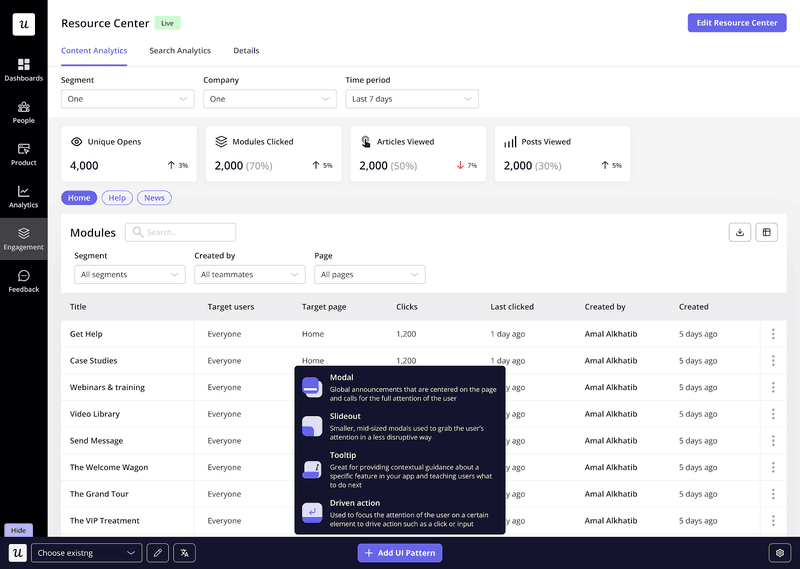
Build a flow with a variety of UI patterns on Userpilot.
- Contextual triggers: Userpilot lets you set triggers for your in-app flows to ensure that they appear at the most contextual moments. Flows can be triggered when users land on a specific page or when a tracked event occurs. There are also manual triggering options that you can tinker with.
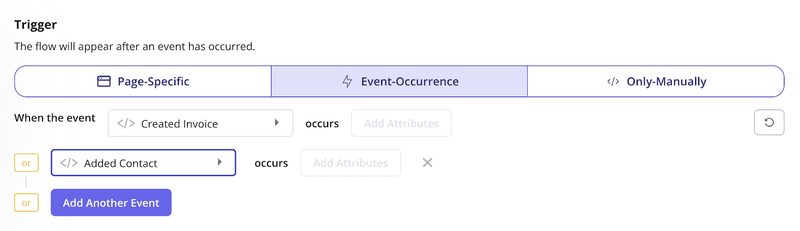
Set up event-based triggers on Userpilot.
- Audience targeting: You can use these settings to create flows that target a specific segment (i.e., new users, trial users, or even power users) or exclude certain users from seeing a flow if certain conditions are met. You can also prompt users at the perfect moment, based on behavior, segment, or even page context.
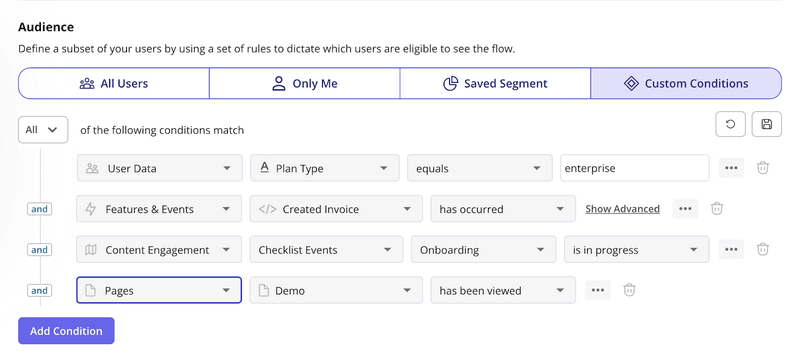
Target specific user segments on Userpilot.
For onboarding on mobile applications, you’ll have slideouts, carousels, and push notifications. They have the same logic triggers and audience settings as our flows for web apps. This is to ensure you can always deliver contextual experiences to your users with Userpilot.
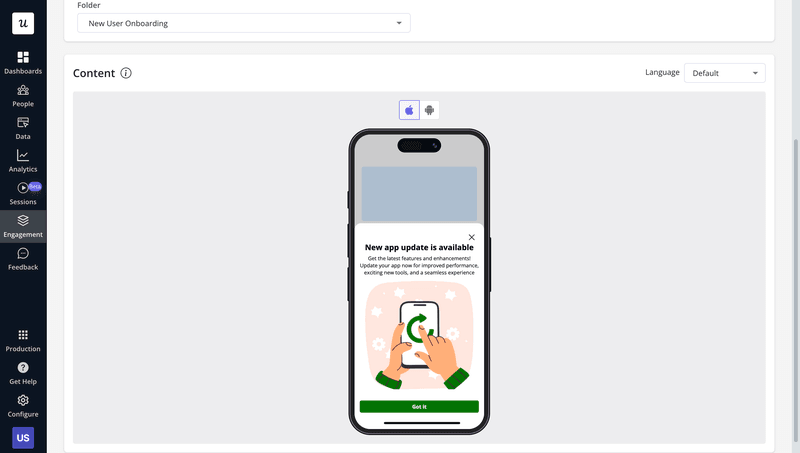
Onboard mobile users with Userpilot.
Pros of building your interactive product tours with Userpilot
- You can create interactive product tours directly on top of your app with Userpilot, mimicking how your users interact with it.
- You can build branched and fully interactive walkthroughs/product guides. Using our Driven Actions system, you can set custom events and event-based triggers for different elements of the tour.
For example, you can require a user to complete a text field or go to another page in your app before moving on. This turns a passive tour into a much more interactive and conducive learning process, which minimizes Time To First Value. In this way, Userpilot is highly focused on helping you drive user activation. - Userpilot is one of only two tools on the market that offer real-time, event-based triggering of the onboarding flows. This means you can react to your user behavior in real-time!
- We have a visual WYSIWYG builder with a comprehensive range of UX elements, including native tooltips, hotspots, checklists (super helpful for nudging users to complete individual tasks as part of the product tour), welcome screens, modals, microsurveys, slideouts, resource centers, and more.
- With a range of user segmentation and personalization options, you can build different experiences that are relevant to users with varying use cases.
- You can back up your product decisions with actionable insights from Trend analysis, spot drop-offs, improve trial-to-paid conversion rate with Funnels, and understand the impact of your efforts better with Cohort Analysis. Userpilot’s analytics can show you how onboarding flows influence feature usage, feature adoption, and time-to-value.
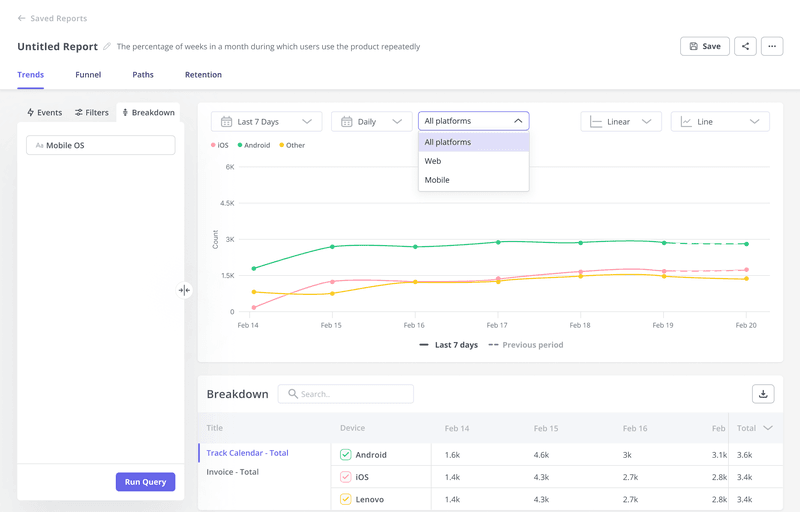
Understand feature usage across platforms with Userpilot.
- Userpilot is also quick and easy to deploy, requiring only a Chrome extension download and installation of a JS snippet across your site.
- You can easily pass all your in-app events and user attributes via Segment integration.
- As one of the very few tools that offer experimentation capabilities, Userpilot allows you to A/B test different versions of your onboarding experiences to achieve your growth goals.
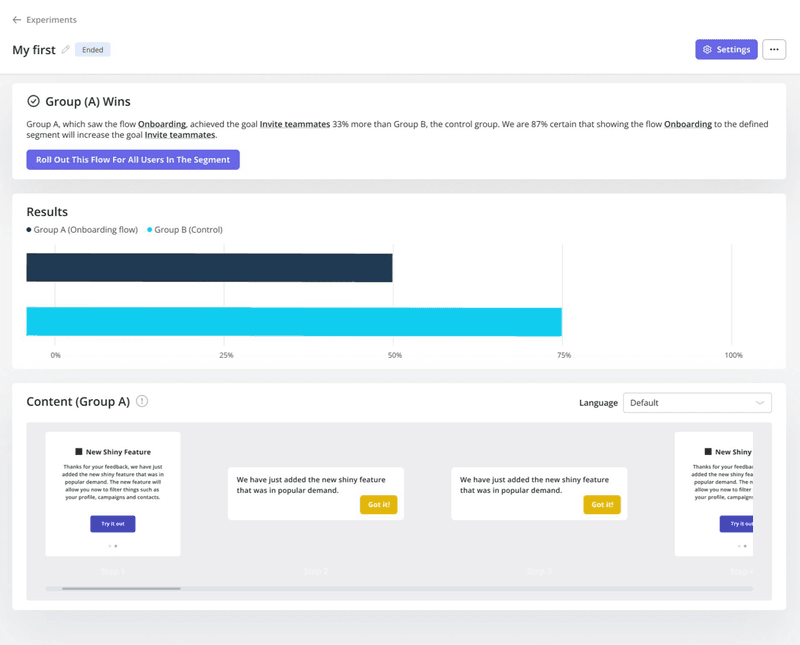
A/B test different content for your product tours.
- Plus, Userpilot has 14 survey templates to choose from that help you collect both qualitative and quantitative feedback from your users. These include customer satisfaction benchmarks like CSAT or CES surveys and open-ended questions about specific features.
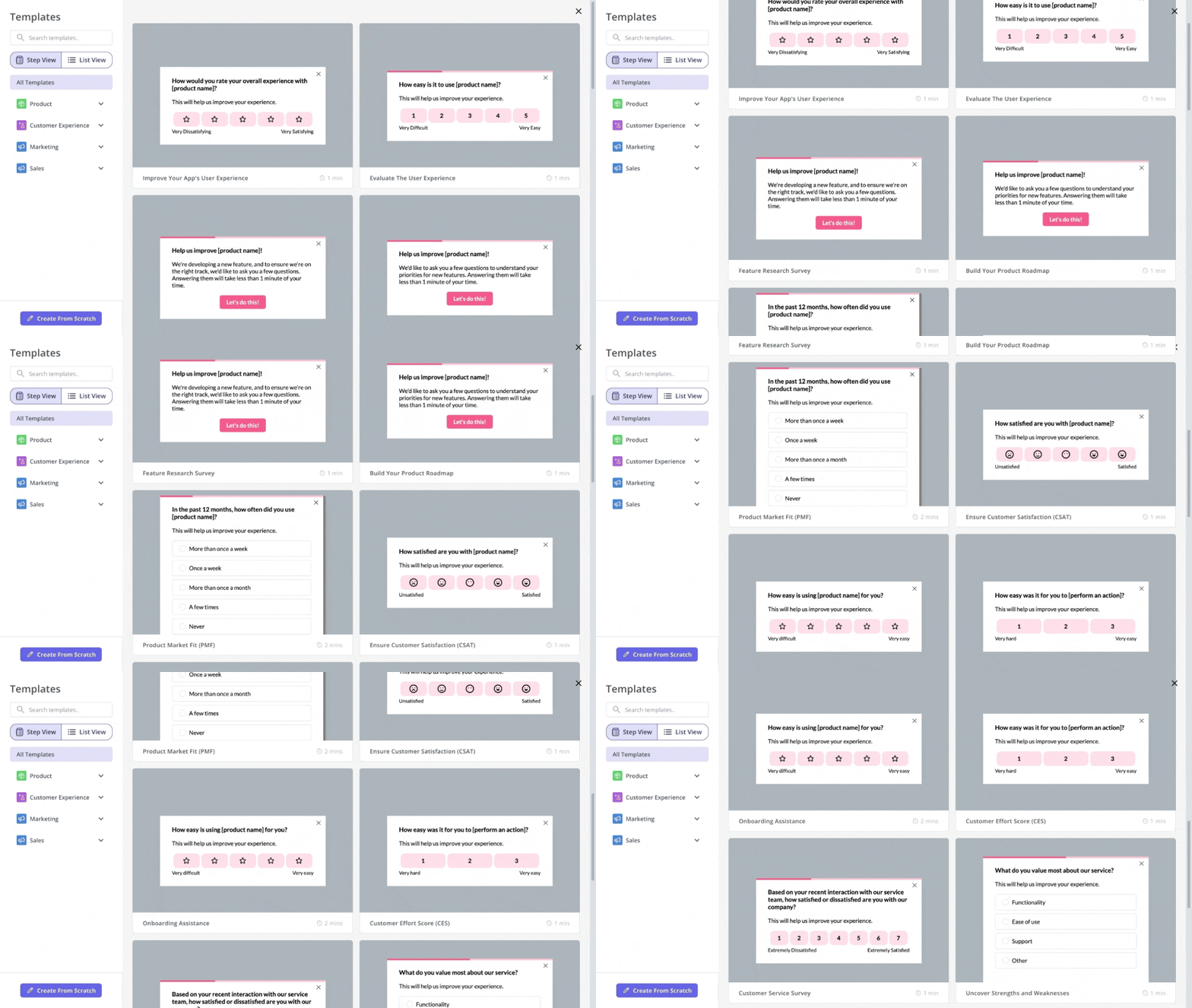
Survey templates in Userpilot.
- Userpilot has a wide range of one-click integrations, both with analytics tools (Amplitude, Heap, Mixpanel, Google Analytics), CRMs (HubSpot), and webhooks.
- It offers excellent value for money, with all important features being available without any limitations in all plans.
Cons of Userpilot
- It’s not suitable for employee onboarding on third-party apps such as Salesforce or HubSpot.
- The pricing might be steep for small startups or companies that are just starting and don’t know how many features they’ll use.
- Like any comprehensive platform with many features, Userpilot takes some time to get the hang of.
Userpilot pricing
Userpilot’s transparent pricing ranges from $299/month (billed annually) on the entry-level end to an Enterprise tier for larger companies.
Also, Userpilot’s entry-level plan includes access to all UI patterns and should include everything that most mid-market SaaS businesses need to get started.

Userpilot has three paid plans to choose from:
- Starter: The entry-level Starter plan starts at $299/month and includes features like segmentation, product analytics, reporting, user engagement, NPS feedback, and customization.
- Growth: The Growth plan starts with custom pricing and includes features like resource centers, advanced event-based triggers, unlimited feature tagging, AI-powered content localization, EU hosting options, and a dedicated customer success manager.
- Enterprise: The Enterprise plan uses custom pricing and includes all the features from Starter + Growth, plus custom roles/permissions, access to premium integrations, priority support, custom contract, SLA, SAML SSO, activity logs, security audit, and compliance (SOC 2/GDPR).
So whether you’re onboarding new customers or helping existing users find advanced features, Userpilot gives you the flexibility and depth you need to grow.
Product tour software #2: Intercom
You’re probably already familiar with Intercom – the conversational marketing platform that blends live chat, customer support, and in-app communication in one sleek package. But what many people don’t realize is that Intercom also offers a product walkthrough feature as part of its Proactive Support Plus add-on.
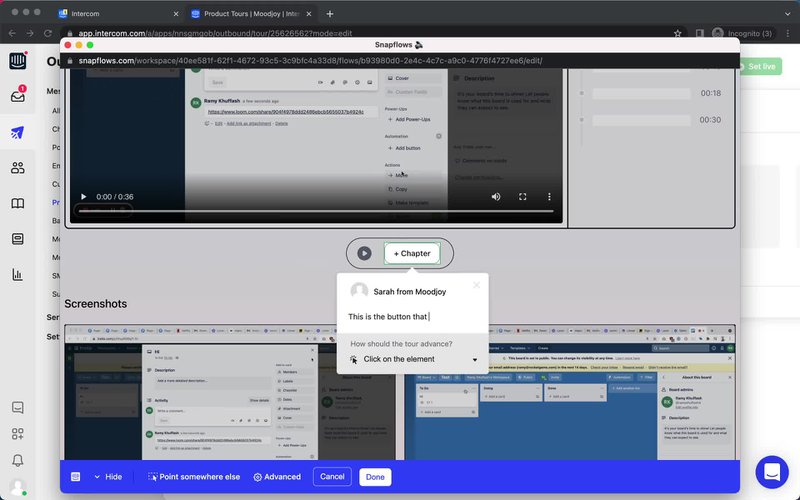
Editing a tooltip in Intercom (Image source: Pageflow).
If you already use Intercom and want to combine interactive support with lightweight, built-in guidance, it’s definitely for you. But I think you should know that Intercom is not the most advanced product tour tool on the market.
Intercom’s product tours are only suitable for really basic product tours, as we’ve discussed in an earlier blog.
Here’s why:
- It supports basic interactivity, like advancing the tour when users click on elements or fill in fields, but doesn’t allow for branched onboarding or conditional logic based on user choices.
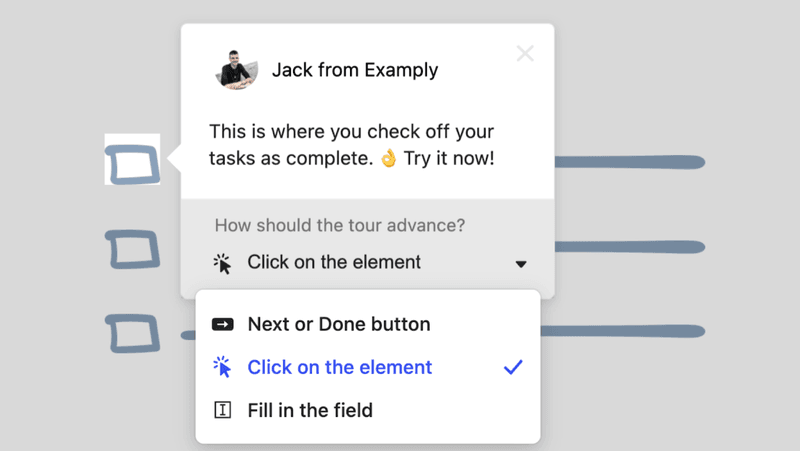
Intercom product tour.
- The UX is quite basic, which limits how contextual the cues given can be. There are no modals, slideouts, or hotspots. If you are supporting multiple use cases and multiple audience segments, or if your product has a lot of different functionality, this one-size-fits-all approach is problematic.
- Although it claims to be no-code, in truth, the styling you can employ without CSS coding is pretty limited. If you want complete control over the look and feel, you’re going to need a web developer on the case.
Also, product tours in Intercom aren’t available as a standalone feature. They come bundled in the Proactive Support Plus add-on, which costs $99/month on top of your existing Intercom subscription.
Pros of Intercom
✅ If you’re a diehard Intercom user and your onboarding needs are simple, it integrates seamlessly with the rest of their tools.
✅ You can combine tooltips and product tours with Intercom’s messaging, surveys, and help center for a cohesive and great customer service system.
✅ The frameless videos look great!
Cons of Intercom
❌ Primarily linear, but allows light interactivity like clicks and field inputs.
❌ Restricted range of user experiences.
❌ Styling requires coding – you can always tell if someone’s been using Intercom’s product tour software because the product tours always look the same.
❌ Pricing can be hard to estimate, as it’s based on seats plus add-ons, and scales quickly with team size or usage.
Intercom pricing
Like I said before, product tours come bundled with Intercom’s Proactive Support Plus add-on, which costs $99/month and also includes checklists, posts, surveys, and campaign tools.
You’ll need to add this on top of your regular Intercom plan, which starts at $29 per seat/month (billed annually). As your team grows or you need more features, the pricing can get a bit tricky to navigate.
Product tour software #3: Appcues
Appcues is one of the most well-established names in the customer onboarding space, and for good reason. They’ve been doing this for years and were among the first to offer no-code onboarding tools that actually looked and felt native.
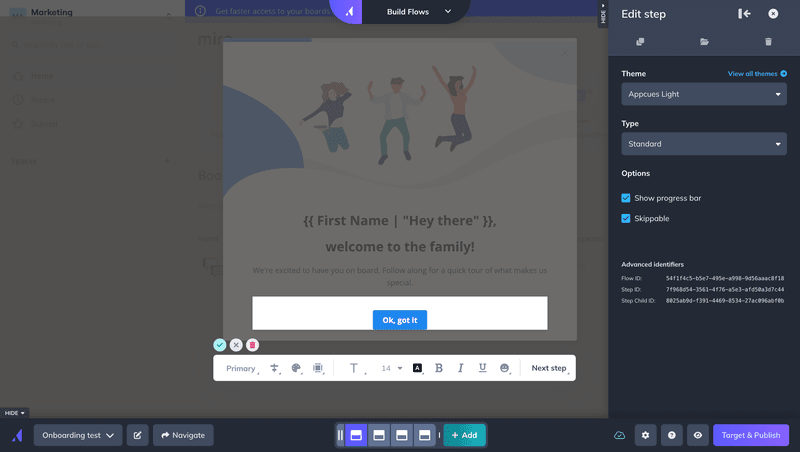
Appcues product tour software.
If you’re building a mobile app and want a reliable and polished user onboarding experience across platforms, it remains a go-to option. Their mobile SDKs make it so easy for you to onboard users across different platforms without needing you to build flows from scratch.
What I like about Appcues is that it supports the full range of UX elements, providing a wide range of design options for creating onboarding tours.
But here’s the catch: while Appcues supports event-triggered flows, meaning flows can launch in response to real-time behavior, it lacks the infrastructure to capture those events easily unless your data implementation is solid. You need to either manually send events from your codebase or use their Click-to-Track setup. So yes, it’s technically reactive, but expect setup friction unless your developers are involved.
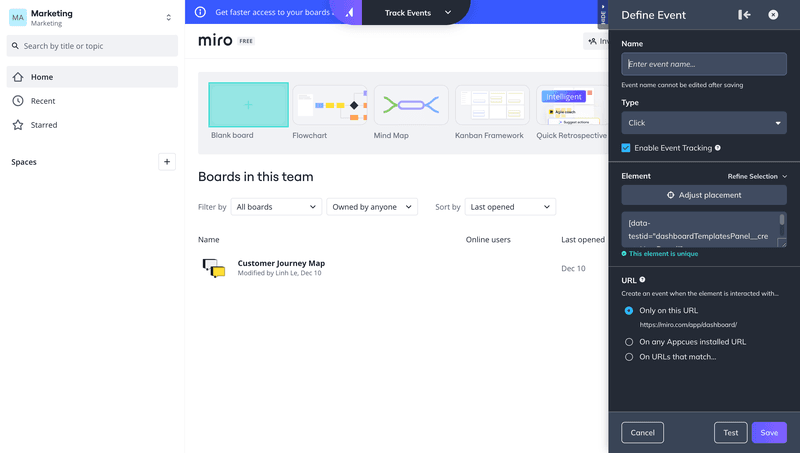
Basic event tracking in Appcues that results in limited data to trigger your tours contextually.
And even though you can create branching flows, the experience isn’t as dynamic or context-aware as tools that offer deeper behavioral targeting and goal-based triggers out of the box. Appcues still leans heavily on linear experiences, and many flows still feel passive unless you put in extra effort.
I also find Appcues a bit difficult to use. Perhaps that’s because they’ve added so many bits and pieces to the service over the years. But I don’t like having to switch between pages when I’m designing a flow.
Pros of Appcues
✅ Still a great tool for mobile onboarding with more mobile UI elements than most tools, i.e., Tooltips on Mobile.
✅ Lots of UX options mean that you can get really creative and make engaging product tour experiences that feel on-brand!
✅ Appcues produces loads of great content on their own blog and on Really Good UX.
Cons of Appcues
But as with any tool, Appcues has its limitations. And at this price point, it’s worth considering whether other options might offer similar or more advanced functionality for less.
❌ Appcues still lacks transition actions like driven actions, scroll position triggers, or page changes, which would make product tours more interactive and engaging.
❌ The lowest tier (Start plan) comes with some heavy restrictions. If you need features like checklists, more than 10 tracked events, or advanced audience segmentation, you’ll need to upgrade to the Grow plan, which starts at $750/month. As your MAUs increase, costs can add up quickly (which you can also track yourself with the MAU scale on their pricing page).
❌ No AI localization available, which means you can’t build tours in multiple languages with a click.
❌ And finally, the linear structure of Appcues’ onboarding flows really limits its ability to engage users or tailor experiences based on real-time behavior.
Appcues pricing
Appcues pricing starts at 300/monthfortheStartplan,whichincludesupto1,000monthlyactiveusers(MAUs).IfyouneedmoreadvancedfeatureslikeNPSsurveysoraresourcecenter,you’llneedtoupgradetotheGrowplan,whichstartsat300/month for the Start plan, which includes up to 1,000 monthly active users (MAUs). If you need more advanced features like NPS surveys or a resource center, you’ll need to upgrade to the Grow plan, which starts at 300/monthfortheStartplan,whichincludesupto1,000monthlyactiveusers(MAUs).IfyouneedmoreadvancedfeatureslikeNPSsurveysoraresourcecenter,you’llneedtoupgradetotheGrowplan,whichstartsat750/month.
While the entry-level pricing is in the same range as Userpilot’s Starter plan, it’s worth noting that Userpilot allows up to 2,000 MAUs at that tier (double what you get with Appcues) along with full access to UI patterns and more user segment options.
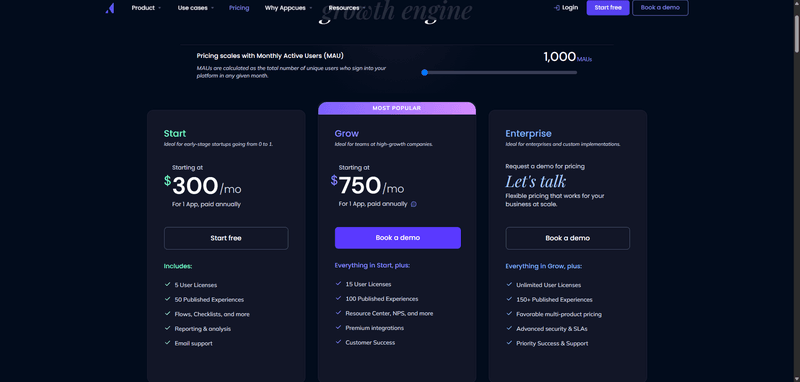
Appcues pricing.
Product tour software #4: Pendo
Pendo is a comprehensive digital adoption platform built for large-scale SaaS teams. It has impressive analytics, in-app feedback capabilities, and product adoption tools, all of which means that it’s perfect for enterprise use cases.

Pendo’s Visual Design Studio for building Guides.
For building product tours, it’s not the most intuitive nor cost-effective one. For example, compared to Userpilot, Pendo feels clunky:
🟡 There’s no standalone checklist unless you’re on the Ultimate plan with the Guides Pro add-on, which is as pricey as it sounds. AI localization is weak, and it doesn’t support RTL languages, which is a big miss for global teams.
🟡 Surveys (or “polls”) are tied to flows; you can’t trigger them independently to measure user sentiment and collect feedback post-tour or based on behavior. That’s a dealbreaker if you care about measuring tour effectiveness or gathering customer engagement insights in context.
Pros of Pendo
Despite the price and its steep learning curve, Pendo does have a few pros compared to its competitors:
✅ Pendo is known for its detailed and easy-to-use analytics tools like Paths, Retention, and Funnels. Userpilot also offers similar analytics features but with more flexibility in triggering experiences based on those insights. (Note: while these features are great for product teams, you might not need them if you’re just looking for a simple tour software.)
✅ Pendo has a shareable product-planning tool to organize customer feedback (especially on feature requests) and prioritize high-value features.
✅ It works on web apps and mobile apps, so if you need both, this might be a good choice for you.
Cons of Pendo
While Pendo positions itself as an “all-in-one” solution, acting on analytics in real-time still comes with limitations.
Here’s a short list of Pendo’s cons:
❌ Customizing fonts, spacing, padding, and layout responsiveness is less intuitive than in platforms like Userpilot or Appcues.
❌ Full checklist functionality (e.g., auto-completion, persistent states) is part of Guides Pro, which is typically available only on higher-tier plans (Ultimate).
If you’re looking for a tool that offers these features more intuitively and at a lower price tag, too, try Userpilot.

See the full comparison in our detailed Userpilot vs Pendo comparison.
Pendo pricing
Pendo’s pricing is divided across 5 tiers (Free, Base, Core, Pulse, and Ultimate), but none of the paid plans have public pricing. You’ll need to request a quote to get started, which makes it tricky to estimate costs upfront.
💡 According to Vendr, Pendo’s pricing ranges from $15,900 to over $140,000/year, depending on MAUs, plan level, and optional add-ons.
Here are reasons why Pendo’s pricing may be a great barrier to your product growth:
🟡 Base and Core plans come with a limited number of integrations, typically one included and the rest available as add-ons. Pulse and higher tiers can include more integrations, but the exact number may still require negotiation or depend on the contract.
🟡 To fully customize your guides, i.e., trigger them contextually, automate them, etc., you need to purchase all those functionalities as add-ons.
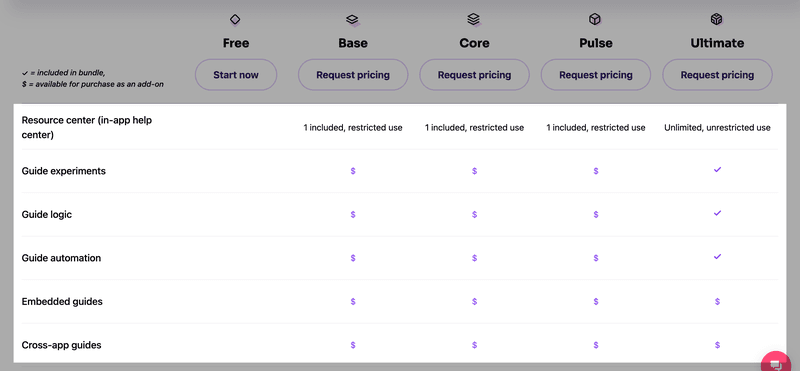
You need to purchase many things as add-ons, on top of an already expensive price tag.
🟡 NPS surveys are only bundled starting at Pulse but must be purchased as an add-on on Base and Core.
🟡 Key features like Data Sync, Orchestrate (for journey building), and advanced analytics (e.g., funnel and retention) are typically sold as add-ons or included in Ultimate plans only.
By contrast, Userpilot offers full access to UI patterns, in-app guidance, and analytics starting at $299/month, with transparent pricing and no hidden fees for core functionality.
Product tour software #5: WalkMe
If anything, WalkMe is even better known than Appcues. It’s often the first tool that comes to mind, especially for onboarding employees across complex, desktop-based applications.
WalkMe used to be on-premise software that required local installation, but now it is a pure SaaS solution, which is a significant improvement. They’ve added a ton of new features over the years, like automation, workflow guidance, and WalkMe’s context-intelligent algorithm.
But I feel like where WalkMe really shines is in helping internal teams navigate computer software or legacy systems like Salesforce or Oracle. It’s great for step-by-step employee training in environments where processes are long, clunky, or hard to follow on your own.
So what’s the catch? Well, it’s expensive. According to Vendr, the average annual contract value for WalkMe is approximately 78,817,withsomedealsreachingupto78,817, with some deals reaching up to 78,817,withsomedealsreachingupto405,000, depending on the organization’s size and requirements.
It’s also not the easiest to implement, and more suited for internal onboarding than customer-facing product tours.
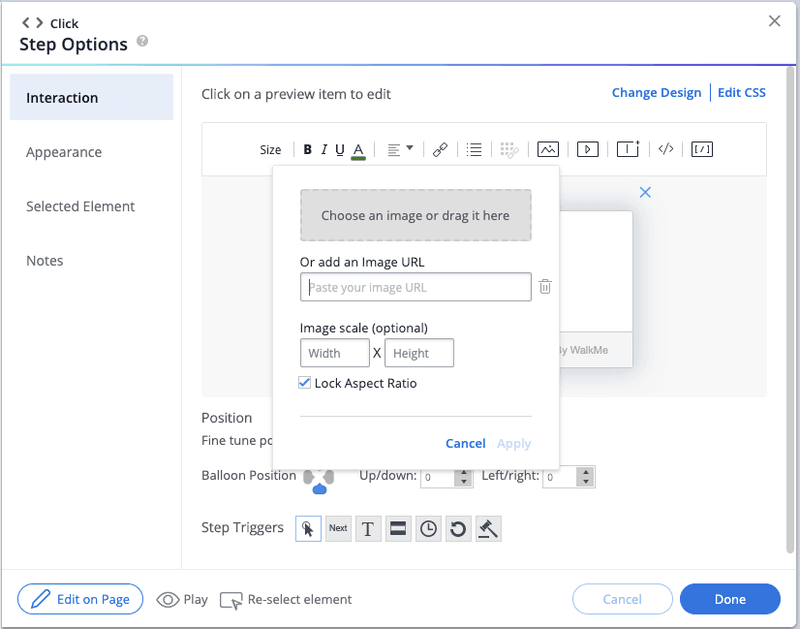
Step editor for building product tours in WalkMe.
Pros of WalkMe
✅ You can build non-linear onboarding paths with conditions, custom JS triggers, and reusable subflows.
✅ You can build unskippable flows (perfect for internal training).
✅ Auto-launch flows based on real-time user behavior, not many tools support this level of context-aware delivery.
✅ Works on third-party apps, so you can build user adoption flows on tools like Salesforce or HubSpot to train your employees.
Cons of WalkMe
❌ Easily one of the most expensive product tour software out there. Best suited for enterprise teams with big budgets.
❌ WalkMe can be difficult to implement and customize, especially for advanced use cases. While they now offer a no-code editor, you’ll still need a ton of technical setup and dev support to set up complex flows. (Read this case study of a customer who switched from WalkMe to Userpilot and saved dozens of dev hours.)
[Case Study] How Touchright Software saved hours of dev time after switching from Walkme to Userpilot
If you’re looking for a SaaS onboarding tool and are considering your options – read this story of Touchright. Learn why they decided to switch from Walkme to Userpilot and how this saved them hours of development time every month.

❌ While it can work for customer onboarding, it’s designed for internal use. Plus, collecting user feedback from external users isn’t a core strength.
❌ Poor value for money for smaller teams, with even the “startup plans” reportedly starting around 9,000–9,000–9,000–12,000 per year.
❌ No free trial to check how it works, except for specific features like UI Intelligence.
WalkMe pricing
WalkMe doesn’t disclose its pricing publicly. However, with average contracts around 78,000andsomescalingpast78,000 and some scaling past 78,000andsomescalingpast400K (based on Vendr data), WalkMe isn’t cheap.
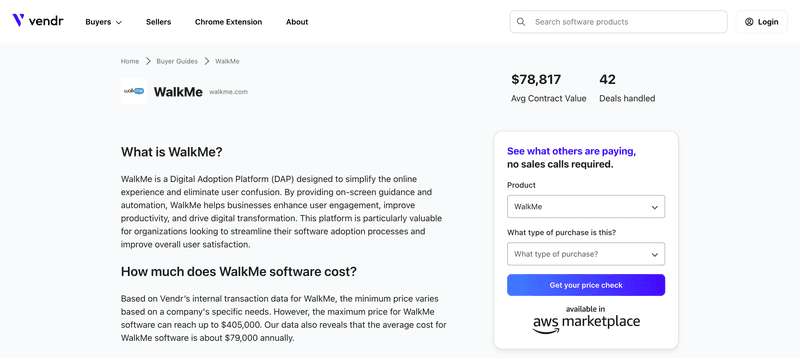
WalkMe pricing.
The platform is modular, meaning the base plan doesn’t include everything. Features like AI assistants (e.g., ActionBot), session replays, or advanced analytics often cost extra, which can quickly inflate your budget.
Therefore, unless you’re a large enterprise with complex workflows, it’s probably overkill.
Product tour software #6: Whatfix
Whatfix definitely earns points for versatility – it supports both user onboarding and employee training, which is a big plus if you’re juggling internal and external use cases. It also gives you a wide range of UX elements to work with: Flows, Smart Tips, popups, beacons, and more.
But after testing it out, I’d say it leans more toward structured enterprise training than agile product-led onboarding. The experience builder gets the job done, but it’s not the most intuitive or fast-moving if you’re trying to iterate quickly on product tours.
Styling can also be a bit of a blocker. You can match your brand, but only if you’re comfortable using CSS. Without it, your flows might feel a little generic.
Here’s what building a tooltip in Whatfix looks like:
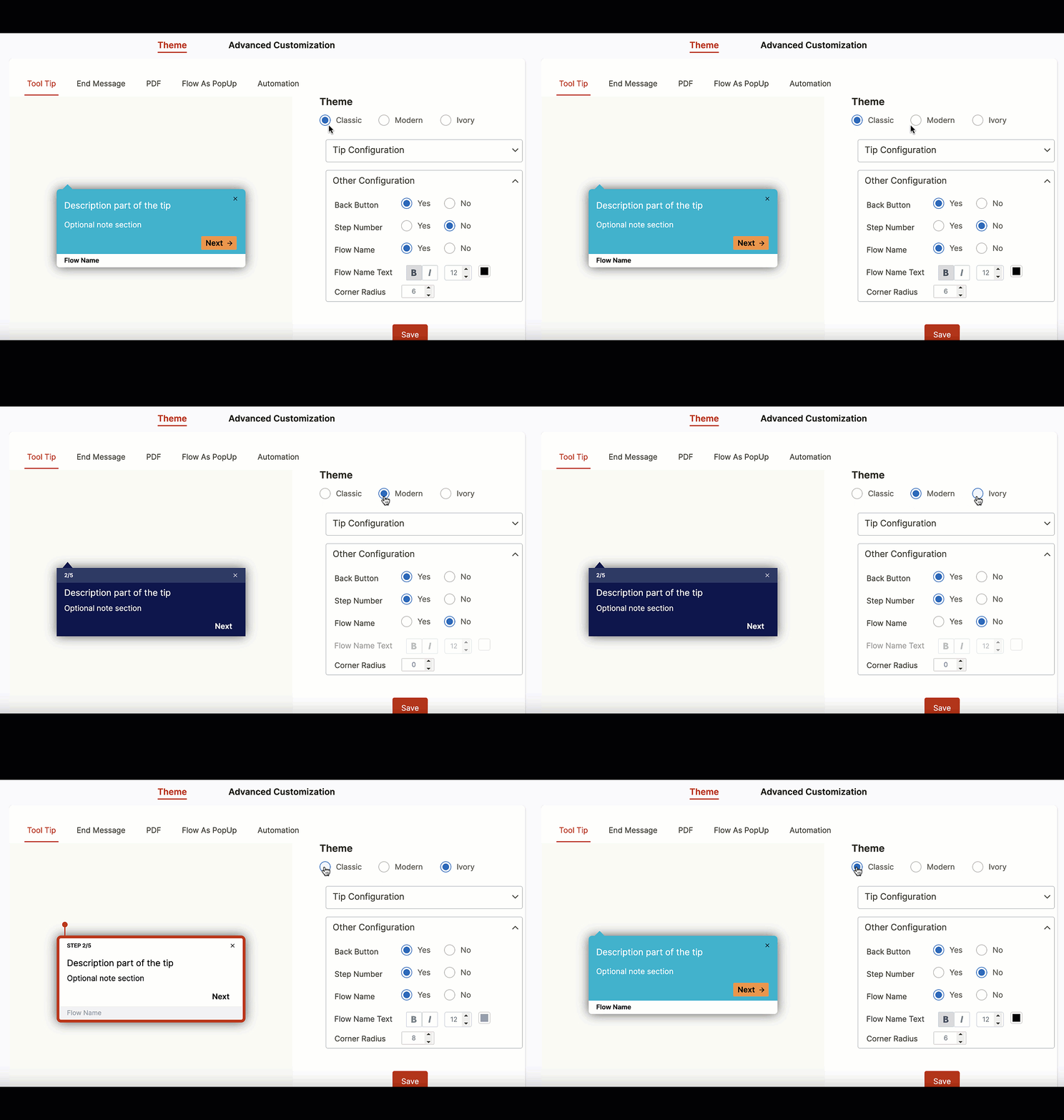
Product Tours Software: Whatfix.
Pros of Whatfix
✅ Stand out for its dual use cases: you can use it to onboard customers and train employees. If you’re managing both internal and external product education, that flexibility is a big plus.
✅ It also gives you a solid set of in-app UX patterns – Flows, Smart Tips (tooltips), Pop-ups, Beacons, and even Surveys.
Cons of Whatfix
❌ True customization still depends heavily on CSS.
❌ Whatfix offers basic analytics like completion rates, user actions, and funnel drop-offs. But if you’re looking for advanced reporting or real-time user behavior insights, you might find it a bit limited compared to tools like Pendo or Userpilot.
❌ Pricing remains quote-based, with no public tiers. There is a free trial, but you won’t know what you’re really getting (or paying) until you talk to sales.
Whatfix pricing
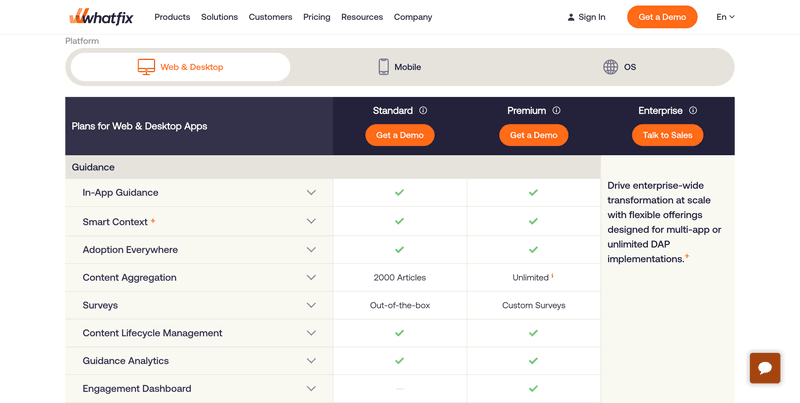
Like most enterprise-grade tools, Whatfix doesn’t list specific pricing tiers publicly. So you’ll need to book a demo or talk to sales to get a quote. But here’s what we do know:
Plans are split into Standard, Premium, and Enterprise tiers. All three include access to core onboarding features like in-app guidance, smart context, surveys, and content lifecycle management.
There’s no free trial, so it’s hard to test before you commit. And without upfront pricing, it might be tricky for you if your team is working with limited resources.
Product tour software #7: Chameleon
Chameleon is a solid pick if visual polish matters to you. The animations are top-tier: modals can slide, bounce, fade in, or even fire off confetti. It looks great out of the box. But if you’re expecting drag-and-drop freedom or modular layouts, that’s where it falls short.
You can’t add or remove sections in a modal or tooltip. Want to move your button to the top? Or insert a divider, image, or extra block of text between fields? Not happening. The layout is pretty much fixed, unlike tools like Userpilot, where you have full flexibility to build each step exactly how you want it.
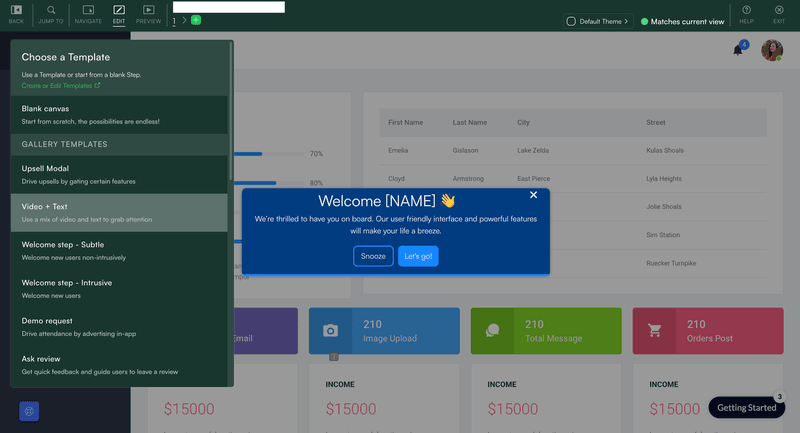
Product tour builder in Chameleon that doesn’t allow formatting the UI layouts.
That said, you still get all the standard UX elements (tooltips, hotspots, banners, etc.), and the Launcher is a nice touch for deploying checklists and surveys. Custom CSS is supported, which helps with branding, but you’ll need your dev team to get involved.
Overall, it has a lot of great features and can hold its own against rival tools like Appcues.
Pros of Chameleon
✅ Excellent animations and transitions (including confetti).
✅ Launcher widget for checklists, surveys, and links.
✅ Solid integration stack (Segment, Mixpanel, Heap, etc.).
✅ Custom CSS support for brand consistency.
Cons of Chameleon
❌ Fixed layout, you can’t rearrange or insert new sections inside modals or tooltips.
❌ Requires dev help for full styling, no visual layout control.
❌ Most advanced features gated behind an undisclosed Growth plan.
❌ Builder UI can feel rigid and unintuitive for content editing.
Chameleon pricing
As for pricing, the Startup plan starts at $279/month, but it’s quite limited: 1 Launcher, 5 microsurveys, and no A/B testing. Growth plan pricing isn’t listed publicly, which makes it tough to know what you’re getting into until you’re already in a sales call.
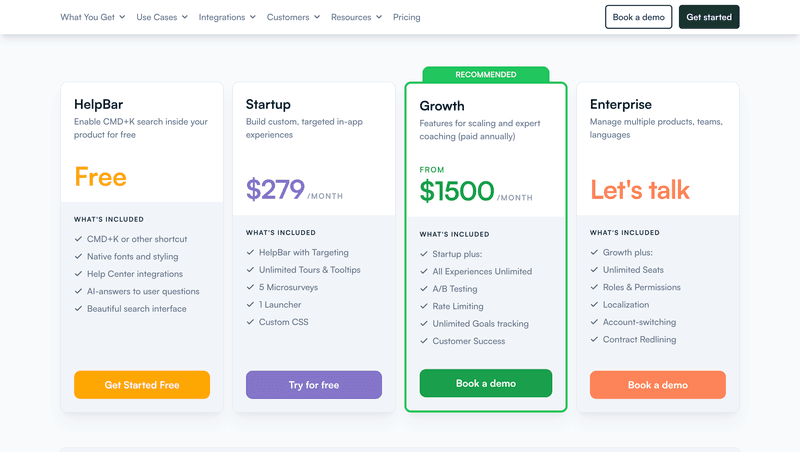
Chameleon pricing
Product tour software #8: Hopscotch
If you’re looking for the cheapest way to build product tours, you should look into Hopscotch. It’s best for teams that only need basic functionality like simple tooltips and linear tours.
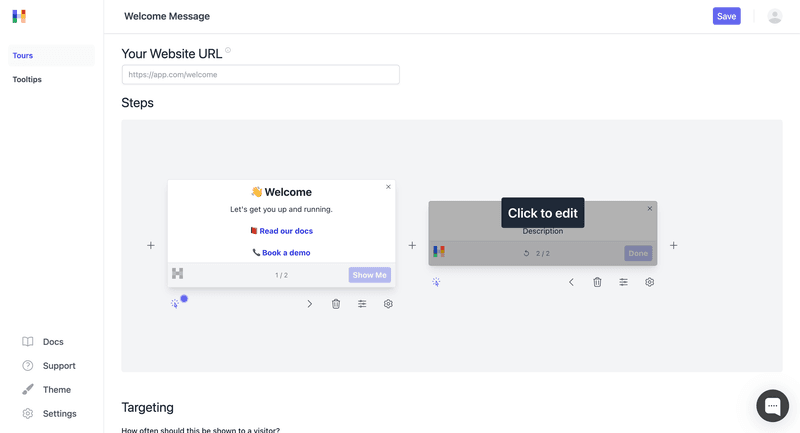
Hopscotch’s approach to building product tours is a bit different: you mainly build the steps on a canvas.
Hopscotch lets you create unlimited tours and tooltips with a no-code builder and Chrome extension. However, keep in mind that you won’t find anything more than just the very basics. There is no advanced logic, built-in surveys, or event-based triggers here.
Pros of Hopscotch:
✅ Definitely the most affordable product tour tool on this list.
✅ They offer unlimited product tours and tooltips across all plans.
✅ Has a no-code builder with support for custom CSS.
✅ Offers easy setup with a Chrome extension and JS snippet.
Cons of Hopscotch:
However, the low price definitely comes with some serious limitations on what you can achieve with the tool:
❌ The onboarding functionality is very limited. There are no event-based triggers or branching logic.
❌ It completely lacks any built-in feedback tools or surveys.
❌ There is no visual styling editor, and the UI customization is CSS-only.
Hopscotch pricing:
- Starter: $99/month for up to 3,000 monthly users.
- Growth: $249/month for up to 10,000 users and advanced integrations.
- Enterprise: Custom pricing for bigger teams with custom needs.
All Hopscotch plans come with unlimited tours and tooltips. You can also start a free trial, no credit card needed.
Product tour software #9: HelpHero
If you’re looking for an affordable no-code tool to build product tours, HelpHero is a solid choice, especially for startups. Plans start at just $55/month for up to 1,000 users, which makes it easy for you to get started without stretching your budget.
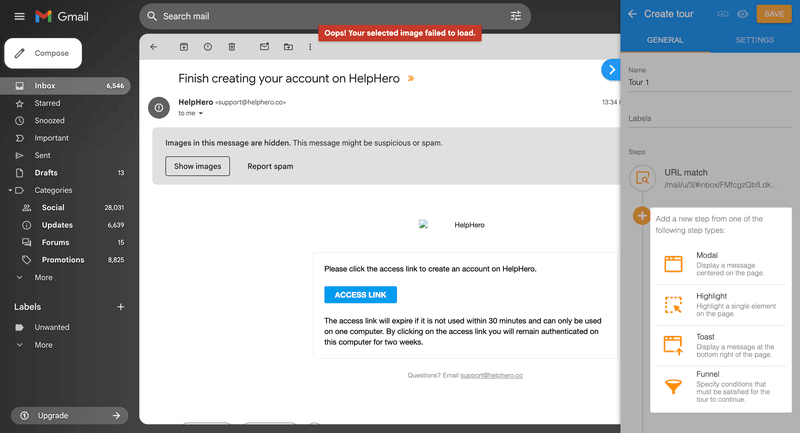
HelpHero product tour software.
It’s also super simple to use thanks to its Chrome Extension, which lets you build product onboarding tours directly on top of your app. The builder itself is a bit basic, in that the styling options are limited and there aren’t any templates, unlike Userpilot, for example. But it gets the job done.
The tours themselves are linear and rely on click-to-continue logic. Of course, this is not true interactivity of the sort Userpilot allows, but it’s a clever, no-fuss way to guide users step-by-step.
Pros of HelpHero
✅ Super affordable pricing that makes sense for even the smallest companies.
✅ Easy to use, with a no-code builder and Chrome Extension.
✅ A surprisingly wide range of UX elements, including tooltips, modals, and checklists.
✅ Simple integration with Intercom, making it a real competitor to Intercom’s product tours.
✅ Offers some basic engagement and usage analytics that can help a little with user retention.
Cons of HelpHero
❌ At the end of the day, the tours are just linear with no branching logic or driven actions.
❌ Styling options are limited unless you’re able to use CSS.
❌ A/B testing is only available if you’re comfortable implementing it via code.
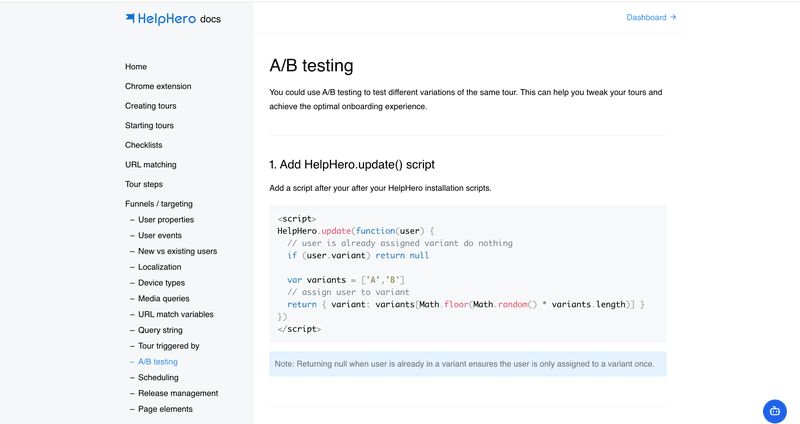
A/B testing in HelpHero.
❌ Pricing is MAU-based. If your user base scales quickly, the pricing advantage starts to shrink.
HelpHero pricing
- Up to 1,000 MAU: $55/month
- Up to 2,500 MAU: $115/month
- Up to 5,000 MAU: $179/month
- Up to 10,000 MAU: $249/month
- Up to 20,000 MAU: $299/month
- Startup / Enterprise plans: Custom pricing, contact sales for a quote.
All plans include full user access to HelpHero’s core features, and you can get 2 months free if you choose annual billing.
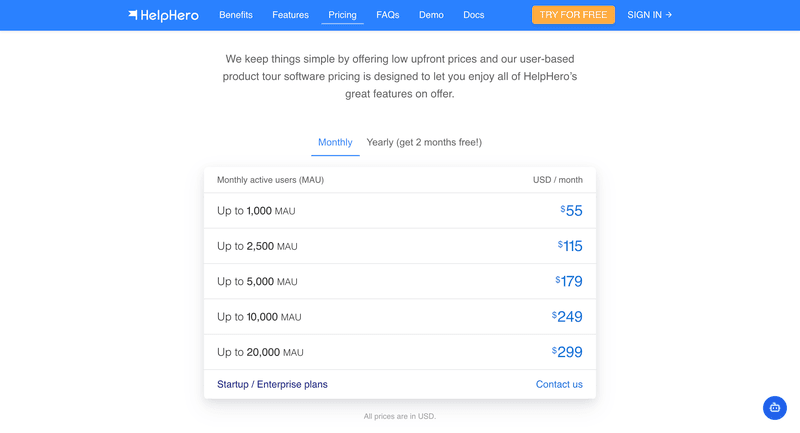
HelpHero pricing.
Product tour software #10: UserGuiding
UserGuiding is one of the best options for startups that want to create onboarding flows and track performance in one place, without having to totally blow their budget.
Honestly, it’s one of the few tools at this price point that goes beyond onboarding flows. You get a no-code builder and UI elements like tooltips, modals, checklists, and resource centers. All this plus built-in analytics, audience segmentation, and click tracking to help you measure what’s working.
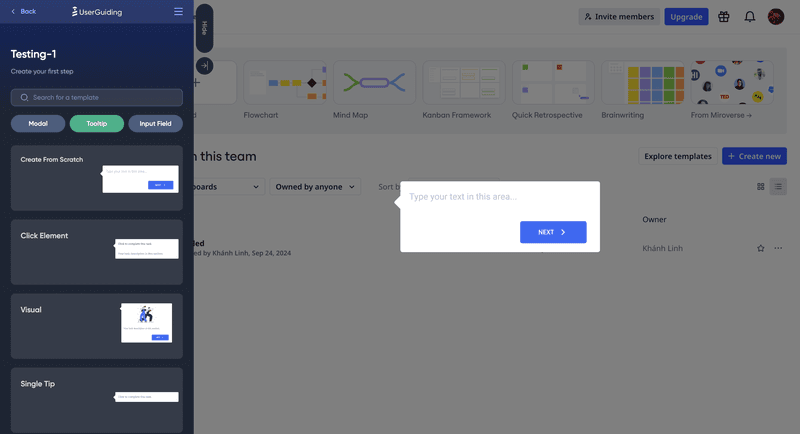
Product tour builder in UserGuiding.
If you’re a growing team that wants basic onboarding and actionable insights, UserGuiding is in that perfect sweet spot. And while it doesn’t offer deep customization or advanced integrations on the Starter plan, it packs serious value for the price.
Pros of UserGuiding
There are some advantages when it comes to choosing UserGuiding. Here are its pros:
✅ One of the most affordable tools that covers both onboarding and in-app analytics. It’s ideal for small startups or independent businesses on a budget.
✅ Has a no-code builder with a solid variety of UI patterns to choose from when building product tours, flows, and guides.
✅ Offers great built-in analytics, including click tracking, activity feeds, and performance reports.
✅ Unlike some of the more expensive options, you can choose to add a Resource Center (a bonus for self-service support).
✅ For a budget tool, UserGuiding still offers integrations with other applications, such as Mixpanel, HubSpot, Woopra, Slack, Webhook, etc.
Cons of Userguiding
Though UserGuiding is a solid product, many improvements are still needed. The cons of using UserGuiding include:
❌ It has limited functionality, particularly on the Starter plan. You’re restricted to a limited number of guides, checklists, and surveys, and UI elements show the UserGuiding branding.
❌ Technical knowledge is required to get the maximum out of this product.
❌ Customization and design options for UI patterns aren’t the greatest.
❌ Features like custom themes, localization, or CSS styling are only available on the Growth or Enterprise plans.
❌ Tools like HubSpot, Salesforce, and premium analytics integrations are only available on higher tiers.
UserGuiding pricing
UserGuiding looks affordable on paper, but each plan comes with strings attached.
- Starter plan: ($174/month) restricts you to 25 guides, 2 checklists, and 5 surveys and slaps their branding on everything.
- Growth plan: ($349/month) unlocks A/B testing, custom CSS, and localization, but only if you’re locked into annual billing. And even then, the UI feels clunky, and the analytics are basic.
- Enterprise tier: Hides behind sales calls, with no public pricing.
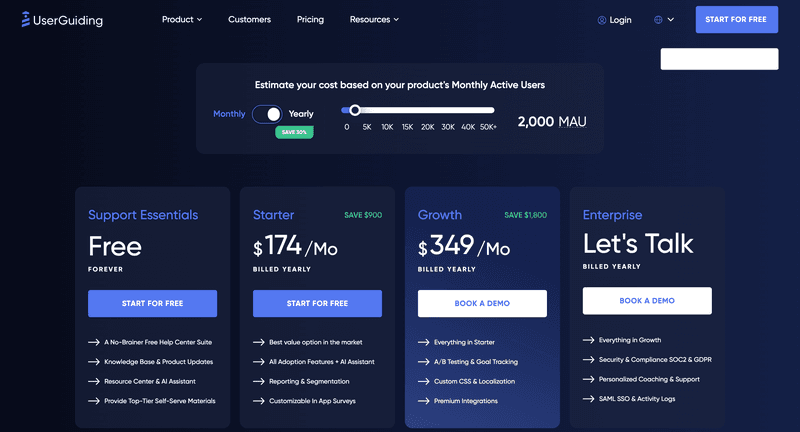
Note that these prices are applicable for up to only 2,000 MAU. For larger user bases, you can check out their cost scale on their pricing page or contact them directly. All plans come with a 14-day free trial with no credit card required.
Product tour software #11: Userflow
Userflow keeps things simple, and that’s what makes it powerful. It’s built specifically for web apps that want to create clean, dynamic product tours without any extra noise. It has a sharp focus on onboarding flows and avoids the trap of cluttered dashboards or bloated features, which might be exactly what some smaller teams might need.
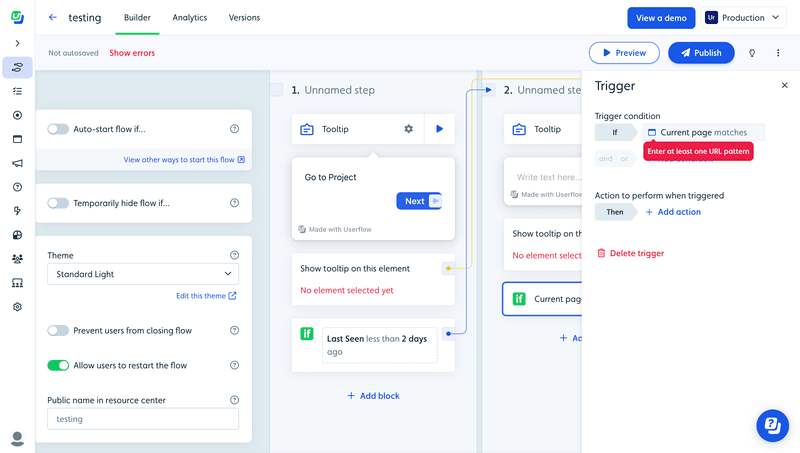
Product tour software in Userflow.
With branching logic, step-level conditions, and a lot of customization, it gives you more control than most tools on this list. But that said, it’s not trying to be an all-in-one platform. There’s no event tracking or robust analytics here, so if you need deeper behavioral insights, you’ll need to rely on integrations.
Pros of Userflow
✅ It’s easy to use (well… for some). Userflow’s drag-and-drop interface allows you to build flows in a central dashboard and see an overview of the entire tour at once. Some users find this visual approach more intuitive than building directly in-app. But it has some downsides we’ll discuss later.
✅ Product tours can be styled with your own branding, colors, and fonts. The platform supports interactive elements and dynamic logic to tailor the experience.
✅ Userflow provides simple analytics and feedback tools, enabling product teams to track user engagement and make data-driven improvements to the tour over time.
✅ Branching logic and step conditions: It’s one of the few tools that lets you build complex, logic-based onboarding flows with conditional paths at each step.
✅ Userflow allows product teams to A/B test different versions of product tours and compare the results, helping to determine the best approach for their users.
✅ The Userflow product tour tracking and analysis tool integrates with a lot of other tools, including Segment, Google Analytics, Intercom, HubSpot, Salesforce, and more.
Cons of Userflow
Although Userflow has many advantages, there are also quite a few drawbacks:
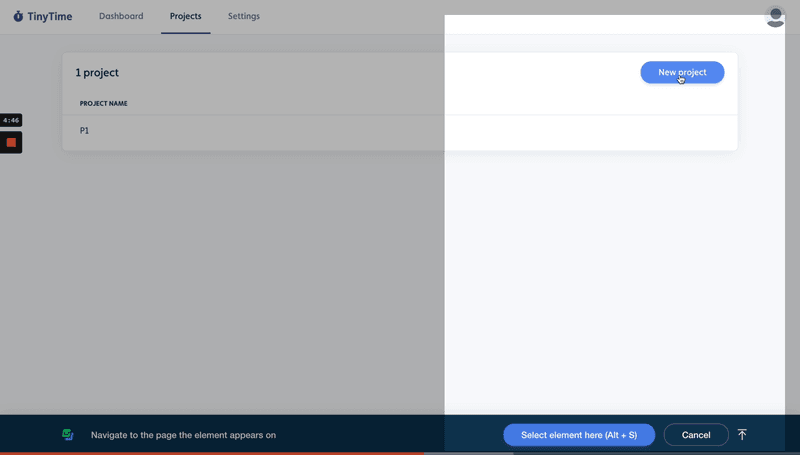
❌ You don’t build your flows directly on top of your app, which can be confusing (and I personally find it counterintuitive). In order to select an element you want to attach the tooltip to, you need to open a Chrome extension that takes a snapshot of your interface:
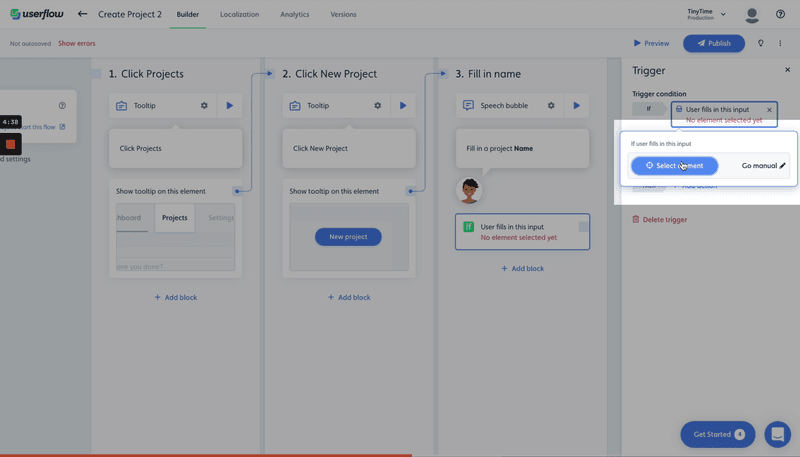
❌ This makes the whole process of building your product tour in Userflow a bit clunky:
❌ While Userflow provides a range of customization options, some users may find the level of control and flexibility limited compared to other tools or custom development.
❌ No built-in event tracking or full product analytics. You’ll need external tools (like Mixpanel or GA) if you want deeper behavioral insights.
❌ Some key features are gated. Localization, custom themes, and advanced targeting are only available on the Pro or Enterprise plans.
❌ Userflow is great for web apps. But since it doesn’t support native mobile onboarding, it’s not ideal if you’re building for both platforms.
Userflow pricing
- The Startup plan ($240/month) sounds fair, but it’s missing basics like localization, advanced targeting, and limits you to 2 survey questions – not great if you’re serious about feedback.
- The Pro plan ($680/month) fixes those gaps, but jumping from Startup means a big price hike just to access features many tools offer earlier.
- Enterprise? No public pricing, so be ready for a sales call.
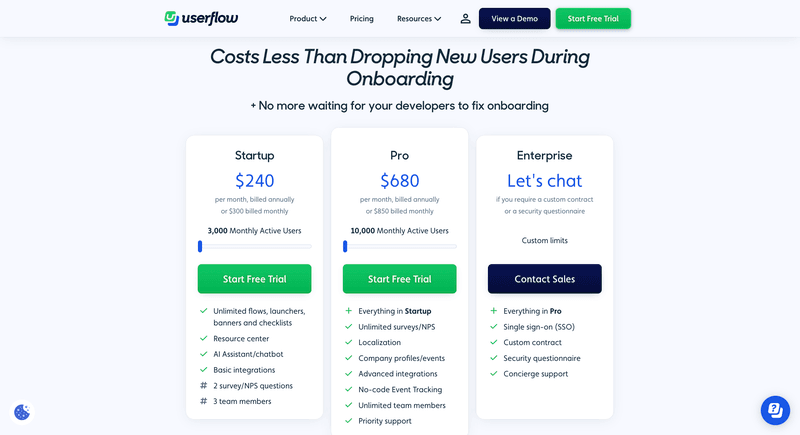
Userflow pricing.
Product tour software #12: Stonly
Stonly isn’t really a product tour tool, it’s more of a support platform with a bit of onboarding layered on top. It’s great if your main goal is to reduce support tickets.
You can build interactive step-by-step guides, pair them with a knowledge base, and use in-app triggers to surface help content contextually. It also has decent integrations (like Zendesk and Segment) and multilingual support.
But if you’re trying to build intuitive product tours? It’s clunky.
The tour builder lives inside the Stonly app, not directly on your site. You still need the Chrome extension, but it’s mostly just for selecting UI elements and previewing the guide.
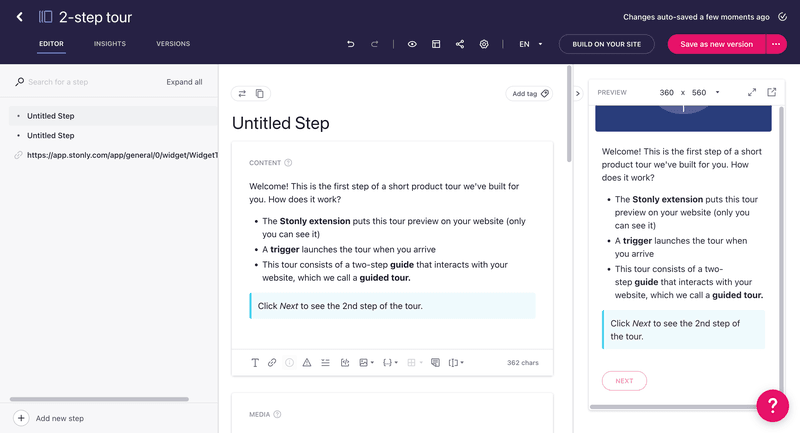
Stonly’s product tour software.
Any actual content or style edits happen in a pretty rigid editor that’s honestly more confusing than it should be. The whole process feels disconnected from your product UI, and unless you’re used to it, it’s easy to get lost.
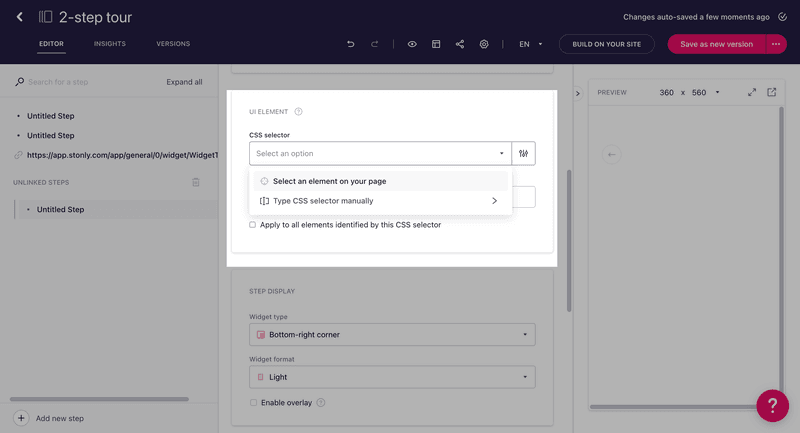
The Chrome extension is only for selecting elements, not building experiences directly on top of your applications.
Pros of Stonly
✅ Lets you combine interactive product tours with a full-featured knowledge base in one platform.
✅ Multilingual support for guides makes it easier for you to scale globally.
✅ Event-based targeting and segmentation to trigger guides contextually.
✅ Integrates with tools like Segment, Zendesk, Intercom, and Freshdesk
✅ Good fit for support-led teams that want to reduce tickets with step-by-step help.
Cons of Stonly
❌ The tour builder isn’t very intuitive. If you want to edit a flow, you’ll need to keep switching between the dashboard and the Chrome extension.
❌ Customizing the look and feel often requires CSS.
❌ UI is more structured for support content than freeform onboarding flows.
❌ Doesn’t offer advanced logic or personalization for dynamic user journeys.
❌ Pricing is based on guide views, which can get expensive as your user activity grows.
Stonly pricing
Stonly offers two main pricing plans, but good luck figuring out which one you need without talking to sales.
The Small Business plan includes up to 4,000 guide views per month. You get access to product tours, a knowledge base, surveys, and core integrations — but you’re capped on usage. If you exceed that guide view limit, your costs go up fast.
The Enterprise plan is entirely quote-based and unlocks features like SSO, audit logs, and priority support, but again, no pricing is listed anywhere.
If your users are even moderately active, the guide view model means you’ll be constantly watching usage or paying overages. Not ideal if you’re trying to stay within budget.
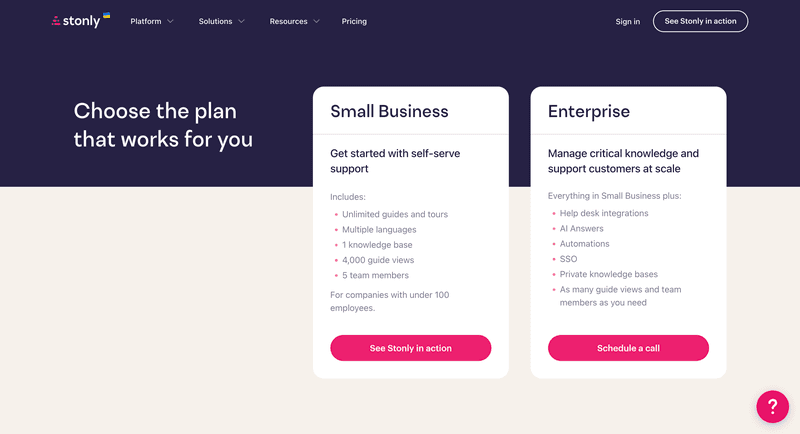
Stonly pricing.
Product tour software #13: Product Fruits
Product Fruits is one of the few onboarding tools leaning into AI, and doing it pretty well for its size. It has features like AI-generated onboarding flows, contextual tooltips, and lightweight widgets.
All of which make it a great fit for startups or lean product teams who want something lightweight, budget-friendly, and fast to launch.
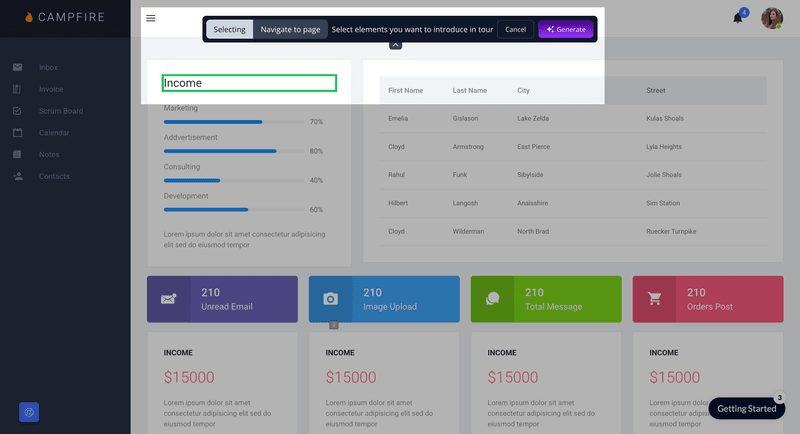
You can generate a tooltip by selecting the element and it will do the content and layout for you.
That said, the interface can feel a little clunky at times, and it’s not the most flexible option out there, especially as your needs grow. But for simple, AI-assisted onboarding, it’s a handy tool to have in your corner.
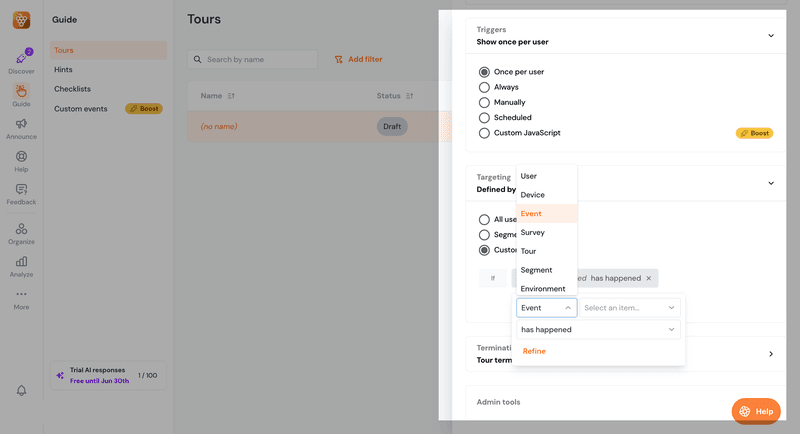
Basic targeting rules for product tours in Product Fruits.
Pros of Product Fruits
✅ Starting at just $79 per month, it’s easily one of the most affordable onboarding tools out there. Perfect for small teams on a budget.
✅ The AI flow builder is a nice touch and helps speed things up when you’re creating tours.
✅ Super easy to set up and comes with an impressive set of UI patterns like tooltips, modals, hotspots, and banners.
✅ You get a built-in knowledge base and checklists, even on the lower-tier plans.
✅ Has built-in analytics for tours and surveys, plus integrations with platforms like GA and Mixpanel.
Cons of Product Fruits
❌ The UI can feel a bit clunky, and the builder just isn’t as smooth as other tools on this list.
❌ Tours are mostly linear, with limited options for branching or dynamic personalization.
❌ Some handy features, like extra checklists or advanced customization, are locked behind higher plans.
❌ If you want full control over styling, you’ll need to get into CSS.
❌ Tour triggering can be a bit buggy, especially for more complex flows.
Product Fruits pricing
Product Fruits is budget-friendly. But like most budget tools, you’ll feel the limits pretty quickly.
- Core ($79/month for 1,500 MAUs): It’s affordable, but you’re stuck with just the basics, i.e., tours, checklists, and a simple knowledge base. No AI tools, no advanced targeting, and very limited customization. Feels more like a starter pack than a serious onboarding solution.
- Boost ($139/month): This unlocks NPS surveys, AI flows, integrations, and better targeting. But you’re still capped at 1,500 MAUs unless you pay more, and there’s no access to things like SSO or audit logs.
- Enterprise (custom pricing): You’ll need this tier if you want enterprise essentials like SSO, audit logs, or higher usage limits, but pricing is gated.
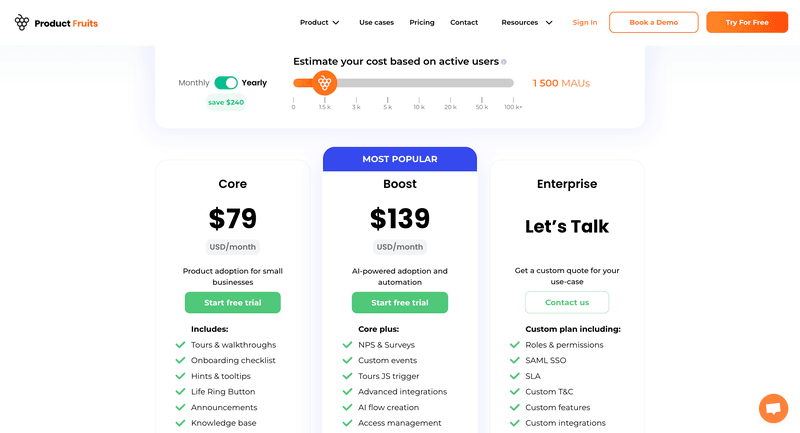
Product Fruits pricing.
There’s a 14-day free trial if you want to take it for a spin. Just keep in mind: while it’s budget-friendly upfront, the pricing scales with your user count, and the details aren’t super transparent on the site. So it’s worth double-checking with their team if you’re expecting to grow fast.
Beyond the product tour software – How to get the best results
When it comes to selecting the best product tour software, there is some general advice that is very relevant:
It’s not how much you’ve got – it’s how you use it that counts.
Badly designed, badly-targeted product tours don’t achieve the desired results, interactive or not. Good design is all about knowing your audience and knowing your user journey.
In this final section, we’ll share our thoughts on the things you should be doing to make sure your product tours and interactive walkthroughs can soar.
1. Segment and personalize as much as you can
Contextual microsurveys are brilliant for collecting information that allows you to customize onboarding without boring the user.
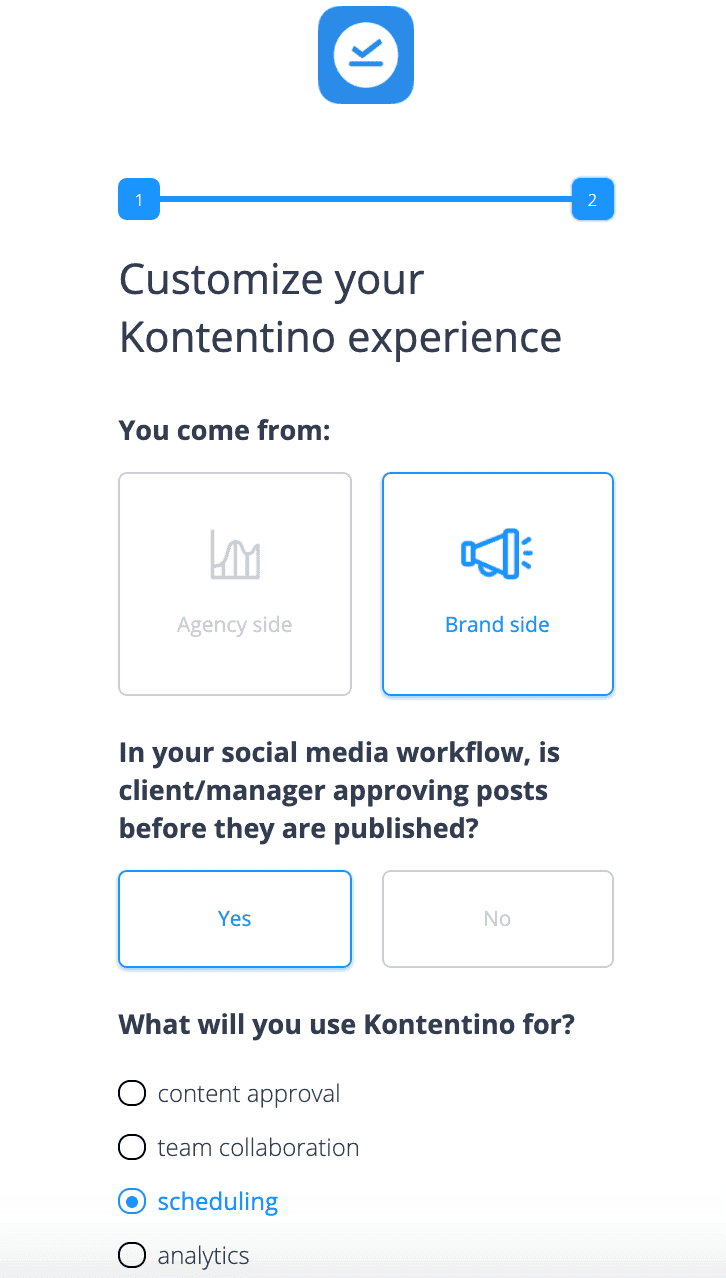
Microsurvey to personalize onboarding in Kontentino.
Just a few simple questions at strategic moments can give you essential insight into what is important to a user, what value means to them, and what they’re hoping to achieve.
Motivation and Ability are both dependent on giving people the right information at the time they need it, so the more you can segment users by these criteria, the more relevant you can make their bespoke tours.
2. Before or after sign-up?
Have you thought about onboarding people before they’re even signed-up users?
If you’re involved in Product-Led Marketing, then a product tour can be one of the best marketing tools imaginable! They can be part of your sales process, helping prospects experience product value even before sign-up.
This is something that SalesFlare actually did – basically using their entire walkthrough as an interactive product demo.
Ask yourself: Will this help users reach their “Aha!” moment faster than a signup form? If so, you might not need to gate the experience.
3. Don’t forget your help center
Your product tours will get users a long way, but there will always be some questions or problems you haven’t anticipated.
So you’re going to need to complement your walkthroughs with a help center that include:
- FAQs and Document Centers: When users proactively get into the weeds, it’s important that you cater to their more advanced needs.
- Live Chat: Sometimes, self-serve will only get you so far. Occasionally, a user will come across a problem that needs human help to solve.
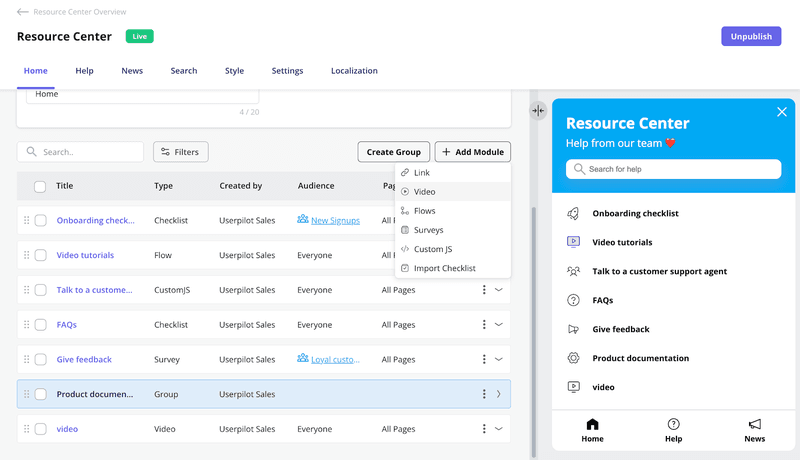
Userpilot Resource Center for support and onboarding.
Even if you have thought of everything, there will always be some users who need hand-holding and reassurance and who can’t get to grips with a tutorial.
Your activation strategy needs a comprehensive help center just as much as it needs product tours. Fortunately, that’s part of the Userpilot offering as well.
4. Iterate with analytics
One of the main problems we see again and again with product tours is that they are treated as “one-and-done” features.
Which is crazy!
A marketer would never just say, “Well, that’s the landing page sorted” and simply walk away. They look at the performance data and optimize over time!
So why would a product manager set up all his or her onboarding flows and just move on?
You need to be tying your product tours to activation or other KPIs and tracking the impact they have. If you’re not able to correlate interaction with your tours to users’ engagement or success metrics, you’re missing out on important opportunities to improve.
So, it’s vital to choose a walkthrough software that comes with event-tracking abilities or session replays, so that you can leverage in-app events to generate actionable insights.
For example, in Userpilot, you can spot drop-offs in the onboarding process and improve the trial-to-paid conversion rate with funnels:
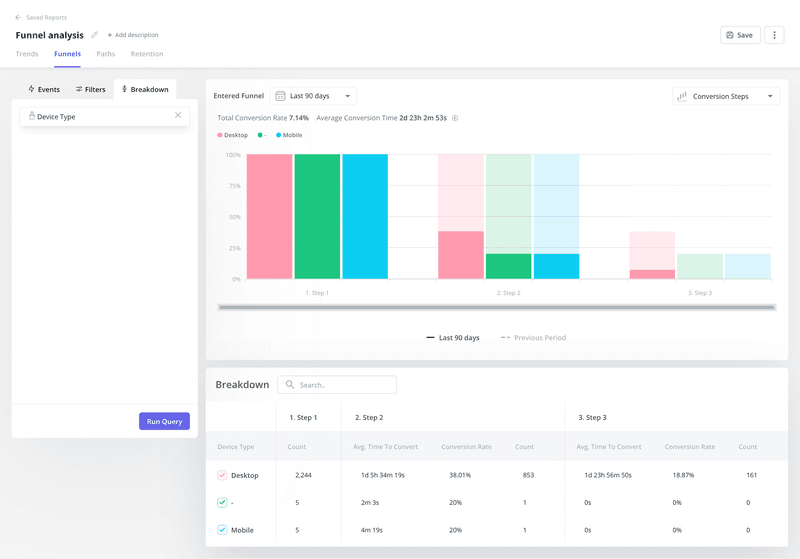
Funnel analysis in Userpilot.
5. Know your user journey inside out
If you’re going to produce a comprehensive onboarding system comprised of short, segmented, contextually-triggered interactive walkthroughs, you’re going to need to know your product, your audience, and their use cases inside and out.
To be able to hand-hold users through every step of the journey in detail… that’s a lot of work! No wonder so many people just avoid it and put a one-size-fits-all linear product tour in place instead.
This is where you just need to be an awesome product manager who can put themselves into every user scenario imaginable (and some that aren’t) and plan out the right solution to each problem. The software can only take you so far with that.
Choose the best product software tool for your use case
At the end of the day, the best tool for you will be the one most aligned with your needs and company type. Carefully review all the features competitors offer, and see which ones you’re going to actually use, and evaluate value for money. If you’d like a checklist and a simple framework that will help you compare tools and make an educated decision, check out the No-BS Guide to Choosing the Right User Engagement Platform by Natalia Kimlickova, our Senior Product Marketing Manager.
Userpilot strives to provide accurate information to help businesses determine the best solution for their particular needs. Due to the dynamic nature of the industry, the features offered by Userpilot and others often change over time. The statements made in this article are accurate to the best of Userpilot’s knowledge as of its publication/most recent update on May 30th, 2025.