jcuda.org - JCuda (original) (raw)
Java bindings for the CUDA runtime and driver API
With JCuda it is possible to interact with the CUDA runtime and driver API from Java programs. JCuda is the common platform for all libraries on this site.
You may obtain the latest version of JCuda in the Downloads section.
- Features - Which features are currently supported by JCuda
- JCuda runtime API - Application of the JCuda runtime API
- JCuda driver API - Application of the JCuda driver API
- OpenGL interoperability - Interaction of JCuda with OpenGL
- Pointer handling - How native pointers are treated in JCuda
- Asynchronous operations - Notes about asynchronous operations
Features
The following features are currently provided by JCuda:
- Support for the CUDA driver API
- Possibility to load own modules in the driver API
- Support for the CUDA runtime API
- Full interoperability among different CUDA based libraries, namely
- JCublas - Java bindings for CUBLAS, the NVIDIA CUDA BLAS library
- JCufft - Java bindings for CUBLAS, the NVIDIA CUDA FFT library
- JCudpp - Java bindings for the CUDA Data Parallel Primitives Library
- JCurand - Java bindings for CURAND, the NVIDIA CUDA random number generator
- JCusparse - Java bindings for CUSPARSE, the NVIDIA CUDA sparse matrix library
- JCusolver - Java bindings for CUSOLVER, the NVIDIA CUDA solver library
- JNvgraph - Java bindings for nvGRAPH, the NVIDIA CUDA graph library
- Comprehensive API documentation extracted from the documentations of the native libraries
- OpenGL interoperability
- Convenient error handling
Known limitations:
Please note that not all functionalities have been tested extensively on all operating systems, GPU devices and host architectures. There certainly are more limitations, which will be added to the following list as soon as I become aware of them:
- Not all usage patterns of pointers are supported. Particularly, some pointers should not be overwritten. See the notes aboutpointer handling.
- Stream callbacks are currently not supported. They will probably be supported in a future version.
- The new "Xt" libraries for BLAS and FFT are not supported yet
- The runtime API for occupancy calculation requires pointers to kernel functions, and is thus not supported in Java.
- The kernel API for CURAND is not supported
- The
cuStreamBatchMemOpfunction is not yet supported - Tell me about further limitations
JCuda runtime API
The main application of the JCuda runtime bindings is the interaction with existing libraries that are built based upon the CUDA runtime API.
Some Java bindings for libraries using the CUDA runtime API are available on this web site, namely,
- JCublas, the Java bindings for CUBLAS, the NVIDIA CUDA BLAS library
- JCufft, the Java bindings for CUFFT, the NVIDIA CUDA FFT library, and
- JCudpp, the Java bindings for CUDPP, the CUDA Data Parallel Primitives Library
- JCurand, the Java bindings for CURAND, the NVIDIA CUDA random number generator
- JCusparse, the Java bindings for CUSPARSE, the NVIDIA CUDA sparse matrix library
- JCusolver, the Java bindings for CUSOLVER, the NVIDIA CUDA solver library
- JNvgraph, the Java bindings for nvGRAPH, the NVIDIA CUDA graph library
The following snippet illustrates how one of these libraries may be used with the JCuda runtime API.
You may also want to download the complete, compileable JCuda runtime API sample from the samples page that shows how to use the runtime libraries.
| // Allocate memory on the device and copy the host data to the device Pointer deviceData = new Pointer(); cudaMalloc(deviceData, memorySize); float hostData[] = createInputData(); cudaMemcpy(deviceData, Pointer.to(hostData), memorySize, cudaMemcpyKind.cudaMemcpyHostToDevice); // Perform in-place complex-to-complex 1D transforms using JCufft cufftHandle plan = new cufftHandle(); JCufft.cufftPlan1d(plan, complexElements, cufftType.CUFFT_C2C, 1); JCufft.cufftExecC2C(plan, deviceData, deviceData, JCufft.CUFFT_FORWARD); // Copy the result from the device to the host and clean up cudaMemcpy(Pointer.to(hostData), deviceData, memorySize, cudaMemcpyKind.cudaMemcpyDeviceToHost); cudaFree(deviceData); |
|---|
| Java2html |
JCuda driver API
The main usage of the JCuda driver bindings is to load PTX- and CUBIN modules and execute the kernels from a Java application.
The following code snippet illustrates the basic steps of how to load a CUBIN file using the JCuda driver bindings, and how to execute a kernel from the module.
You may also want to download a completeJCuda driver sample from the samples page.
| // Initialize the driver and create a context for the first device. cuInit(0); CUdevice device = new CUdevice(); cuDeviceGet(device, 0); CUcontext context = new CUcontext(); cuCtxCreate(context, 0, device); // Load the PTX that contains the kernel. CUmodule module = new CUmodule(); cuModuleLoad(module, "sample.ptx"); // Obtain a handle to the kernel function. CUfunction function = new CUfunction(); cuModuleGetFunction(function, module, "functionName"); // Allocate the device input data, and copy the // host input data to the device CUdeviceptr deviceData = new CUdeviceptr(); cuMemAlloc(deviceData, memorySize); cuMemcpyHtoD(deviceData, hostData, memorySize); // Set up the kernel parameters Pointer kernelParameters = Pointer.to( Pointer.to(deviceData) ); // Call the kernel function. cuLaunchKernel(function, gx, gy, gz, // Grid dimension bx, by, bz, // Block dimension sharedMemorySize, stream, // Shared memory size and stream kernelParameters, null // Kernel- and extra parameters ); // Copy the data back from the device to the host and clean up cuMemcpyDtoH(hostData, deviceData, memorySize); cuMemFree(deviceData); |
|---|
| Java2html |
OpenGL interoperability
Just as CUDA supports interoperability with OpenGL, JCuda supports interoperability withJOGL andLWJGL
The OpenGL interoperability makes it possible to access memory that is bound to OpenGL from JCuda. Thus, JCuda can be used to write vertex coordinates that are computed in a CUDA kernel into Vertex Buffer Objects (VBO), or pixel data into Pixel Buffer Objects (PBO). These objects may then be rendered efficiently using JOGL or LWJGL. Additionally, JCuda allows CUDA kernels to access data that is created on Java side efficiently via texture references.
There are some samples for JCuda OpenGL interaction on the samples page.
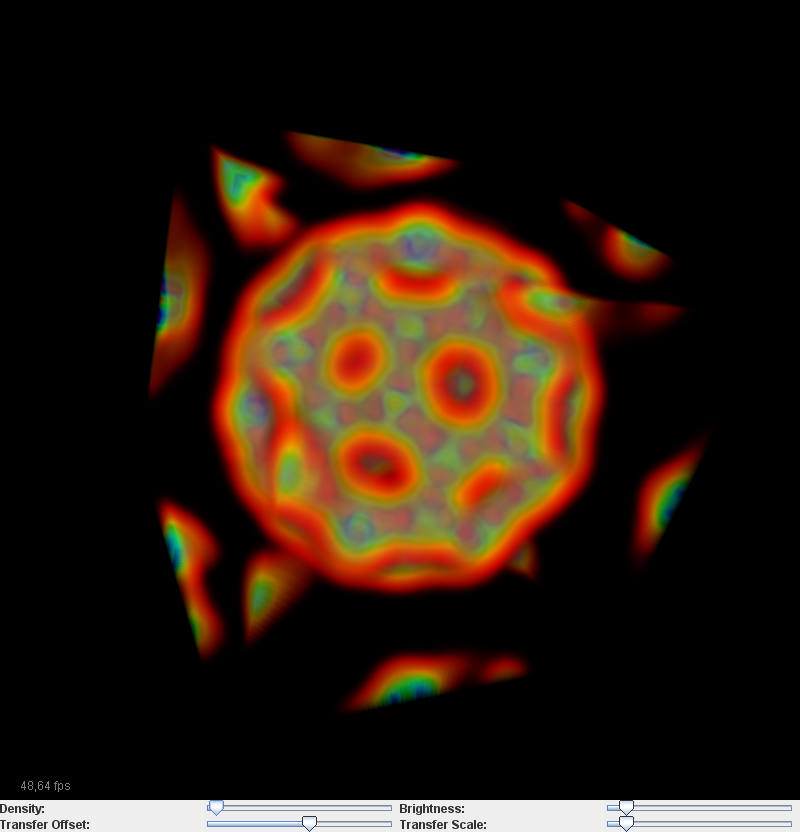
The following image is a screenshot of one of the sample applications that reads volume data from an input file, copies it into a 3D texture, uses a CUDA kernel to render the volume data into a PBO, and displays the resulting PBO with JOGL. It uses the kernels from the Volume rendering sample from the NVIDIA CUDA samples web site.
Pointer handling
The most obvious limitiation of Java compared to C is the lack of real pointers. All objects in Java are implicitly accessed via references. Arrays or objects are created using the **new** keyword, as it is done in C++. References may be **null**, as pointers may be in C/C++. So there are similarities between C/C++ pointers and Java references (and the name**Null_Pointer_Exception** is not a coincidence). But nevertheless, references are not suitable for emulating native pointers, since they do not allow_pointer arithmetic_, and may not be passed to the native libraries. Additionally, "references to references" are not possible.
To overcome these limitations, the Pointer class has been introduced in JCuda. It may be treated similar to a **void*** pointer in C, and thus may be used for native host or device memory, and for Java memory:
Pointer devicePointer = new Pointer();
JCuda.cudaMalloc(devicePointer, 4 * Sizeof.FLOAT);
float array[] = new float[8];
Pointer hostPointer = Pointer.to(array);
Pointer hostPointerWithOffset = hostPointer.withByteOffset(2 * Sizeof.FLOAT);
JCuda.cudaMemcpy(devicePointer, hostPointerWithOffset, 4 * Sizeof.FLOAT,
cudaMemcpyKind.cudaMemcpyHostToDevice);
Pointers may either be created by instantiating a new Pointer, which initially will be a **NULL** pointer, or by passing either a (direct or array-based) Buffer or a primitive Java array to one of the "to(...)" methods of the Pointer class.
Pointers to pointers
It is possible to pass an array of Pointer objects to the "to(...)" method, which is important to be able to allocate a 2D array (i.e. an array of Pointers) on the device, which may then be passed to the library or kernel. See the JCuda driver API example for how to pass a 2D array to a kernel.
However, there are limitations on how these pointers may be used. Particularly, not all types of pointers may be written to. When a pointer points to a direct buffer or array, then this pointer should not be overwritten. Future versions may support this, but currently, an attempt to overwrite such a pointer may cause unspecified behavior.
Asynchronous operations
There had been some confusion about the behavior of CUDA when it comes to asynchronous operations. This was mainly caused by the different kinds of memory that can be involved in an operation. Additionally, there are several options for transfering memory between Java and a C API like CUDA, which also had to be considered for JCuda. With CUDA 4.1, the synchronous/asynchronous behavior of CUDA was specified in more detail. Unfortunately, the unified addressing and concurrent execution of later CUDA versions adds another level of complexity. But at least the basic operations should be covered here.
The following sections contain quotes from the site describing theAPI synchronization behavior of CUDA.
Asynchronous operations in CUDA
The idea behind an asynchronous operation is that, when the function is called, the call returns immediately, even if the result of the function is not yet available. CUDA offers various types of asynchronous operations. The most important ones are
- the
cuLaunchKernelfunction in the Driver API - the
cudaMemcpyAsyncfunctions in the Runtime API - the
cuMemcpy*Asyncfunctions in the Driver API
Additionally, the runtime libraries offer methods to set a cudaStream_t that should be associated with the functions of the respective library, for example via cublasSetStream or cufftSetStream. For all APIs, the stream and event handling functions may be used to achieve proper synchronization between different calls that may be associated with different streams.
Synchronous and asynchronous memory copy operations
There are different functions for copying memory in CUDA:
cudaMemcpyandcuMemcpy*for synchronous memory copiescudaMemcpyAsyncandcuMemcpy*Asyncfor asynchronous memory copies
But in contrast to what the names suggest, the exact bahavior of these functions mainly depends on the type of the memory that they are operating on. The different types of memory considered here are
- Device memory: This is memory that was allocated with
cudaMallocorcuMemAlloc - Pageable host memory: This is "normal" host memory, like a pointer to a Java array that was created with
Pointer.to(array), or a pointer to a direct Java buffer that was created withPointer.to(directBuffer). - Pinned host memory: This is memory that was allocated on the host using the CUDA function
cudaHostAlloc. Memory transfers between pinned host memory and the device tend to be noticably faster than memory transfers between pageable host memory and the device.
The following lists describe the synchronization behavior of CUDA depending on the memory copy function that is used, and depending on the type of the memory that is involved. These lists are summarizing and partially quoting the information about the API synchronization behavior of CUDA
Synchronous memory copy operations:
- "For transfers from device memory to device memory, no host-side synchronization is performed."
This means that the the call to a memory copy function that only involves device memory may return immediately, even if the function is not marked as "asynchronous". - "For transfers from pageable host memory to device memory, a stream sync is performed before the copy is initiated. The function will return once the pageable buffer has been copied to the staging memory for DMA transfer to device memory, but the DMA to final destination may not have completed."
This means that for the host, the function behaves like a synchronous function: When the function returns, the host memory has been copied (and will only be transferred to the device internally). - "For transfers from pinned host memory to device memory, the function is synchronous with respect to the host."
"For transfers from device to either pageable or pinned host memory, the function returns only once the copy has completed."
"For transfers from any host memory to any host memory, the function is fully synchronous with respect to the host."
This means that the function is blocking until the copy has been completed.
Asynchronous memory copy operations:
- "For transfers from pageable host memory to device memory, host memory is copied to a staging buffer immediately (no device synchronization is performed). The function will return once the pageable buffer has been copied to the staging memory. The DMA transfer to final destination may not have completed."
This means that for the host, the function behaves like a synchronous function: When the function returns, the host memory has been copied (and will only be transferred to the device internally). - For transfers from any host memory to any host memory, the function is fully synchronous with respect to the host.
For transfers from device memory to pageable host memory, the function will return only once the copy has completed.
This means that the function is blocking until the copy has been completed. - For transfers between pinned host memory and device memory, the function is fully asynchronous.
For all other transfers, the function is fully asynchronous. If pageable memory must first be staged to pinned memory, this will be handled asynchronously with a worker thread.
Finally, these are the copy operations that are really asynchronous
Examples
The JCudaAsyncCopyTest program demonstrates the different forms of synchronous and asynchronous copy operations discussed here. It allocates memory blocks of different types (device, pinned host, pageable host with Java array, pageable host with direct Java buffer). Then it performs synchronous and asynchronous copy operations between all types of memory, and prints the timing results.
It can be seen that the only configuration where the data transfer between the host and the device is really asynchronous are the ones where data is copied from the device to pinned host memory or vice versa.
Asynchronous operations in CUBLAS and CUSPARSE
(Note: This section has to be validated against the API specification, and may be updated accordingly)
The most recent versions of CUBLAS and CUSPARSE (as defined in the header files "cublas_v2.h" and "cusparse_v2.h") are inherently asynchronous. This means that all functions return immediately when they are called, although the result of the computation may not yet be available. This does not impose any problems as long as the functions do not involve host memory. However, in the newest versions of CUBLAS and CUSPARSE, several functions have been introduced that may accept parameters or return results of computations either via pointers to device memory or via pointers to host memory.
These functions are also offered in JCublas2 and JCusparse2. When they are called with pointers to device memory, they are executed asynchronously and return immediately, writing the result to the device memory as soon as the computation is finished. But this is not possible when they are are called with pointers to Java arrays. In this case, the functions will block until the computation has completed. Note that the functions will not block when they receive a pointer to a direct buffer, but this has not been tested extensively.