pygame.draw — pygame v2.6.0 documentation (original) (raw)
pygame.draw
pygame module for drawing shapes
| pygame.draw.rect | — | draw a rectangle |
|---|---|---|
| pygame.draw.polygon | — | draw a polygon |
| pygame.draw.circle | — | draw a circle |
| pygame.draw.ellipse | — | draw an ellipse |
| pygame.draw.arc | — | draw an elliptical arc |
| pygame.draw.line | — | draw a straight line |
| pygame.draw.lines | — | draw multiple contiguous straight line segments |
| pygame.draw.aaline | — | draw a straight antialiased line |
| pygame.draw.aalines | — | draw multiple contiguous straight antialiased line segments |
Draw several simple shapes to a surface. These functions will work for rendering to any format of surface.
Most of the functions take a width argument to represent the size of stroke (thickness) around the edge of the shape. If a width of 0 is passed the shape will be filled (solid).
All the drawing functions respect the clip area for the surface and will be constrained to that area. The functions return a rectangle representing the bounding area of changed pixels. This bounding rectangle is the 'minimum' bounding box that encloses the affected area.
All the drawing functions accept a color argument that can be one of the following formats:
- a pygame.Colorpygame object for color representations object
- an
(RGB)triplet (tuple/list)- an
(RGBA)quadruplet (tuple/list)- an integer value that has been mapped to the surface's pixel format (see pygame.Surface.map_rgb()convert a color into a mapped color value and pygame.Surface.unmap_rgb()convert a mapped integer color value into a Color)
A color's alpha value will be written directly into the surface (if the surface contains pixel alphas), but the draw function will not draw transparently.
These functions temporarily lock the surface they are operating on. Many sequential drawing calls can be sped up by locking and unlocking the surface object around the draw calls (see pygame.Surface.lock()lock the Surface memory for pixel access andpygame.Surface.unlock()unlock the Surface memory from pixel access).
pygame.draw.rect()
draw a rectangle
rect(surface, color, rect) -> Rect
rect(surface, color, rect, width=0, border_radius=0, border_top_left_radius=-1, border_top_right_radius=-1, border_bottom_left_radius=-1, border_bottom_right_radius=-1) -> Rect
Draws a rectangle on the given surface.
Parameters
- surface (Surface) -- surface to draw on
- color (Color or int or tuple ( int , int , int , [ int ] )) -- color to draw with, the alpha value is optional if using a tuple
(RGB[A]) - rect (Rect) -- rectangle to draw, position and dimensions
- width (int) --
(optional) used for line thickness or to indicate that the rectangle is to be filled (not to be confused with the width value of therectparameter)if
width == 0, (default) fill the rectangleif
width > 0, used for line thicknessif
width < 0, nothing will be drawn
Changed in pygame 2.1.1: Drawing rects with width now draws the width correctly inside the rect's area, rather than using an internal call to draw.lines(), which had half the width spill outside the rect area. - border_radius (int) -- (optional) used for drawing rectangle with rounded corners. The supported range is [0, min(height, width) / 2], with 0 representing a rectangle without rounded corners.
- border_top_left_radius (int) -- (optional) used for setting the value of top left border. If you don't set this value, it will use the border_radius value.
- border_top_right_radius (int) -- (optional) used for setting the value of top right border. If you don't set this value, it will use the border_radius value.
- border_bottom_left_radius (int) -- (optional) used for setting the value of bottom left border. If you don't set this value, it will use the border_radius value.
- border_bottom_right_radius (int) --
(optional) used for setting the value of bottom right border. If you don't set this value, it will use the border_radius value.if
border_radius < 1it will draw rectangle without rounded cornersif any of border radii has the value
< 0it will use value of the border_radiusIf sum of radii on the same side of the rectangle is greater than the rect size the radii
will get scaled
Returns
a rect bounding the changed pixels, if nothing is drawn the bounding rect's position will be the position of the given rectparameter and its width and height will be 0
Return type
Changed in pygame 2.0.0: Added support for keyword arguments.
Changed in pygame 2.0.0.dev8: Added support for border radius.
pygame.draw.polygon()
draw a polygon
polygon(surface, color, points) -> Rect
polygon(surface, color, points, width=0) -> Rect
Draws a polygon on the given surface.
Parameters
- surface (Surface) -- surface to draw on
- color (Color or int or tuple ( int , int , int , [ int ] )) -- color to draw with, the alpha value is optional if using a tuple
(RGB[A]) - points (tuple ( coordinate ) or list ( coordinate )) -- a sequence of 3 or more (x, y) coordinates that make up the vertices of the polygon, each coordinate in the sequence must be a tuple/list/pygame.math.Vector2a 2-Dimensional Vector of 2 ints/floats, e.g.
[(x1, y1), (x2, y2), (x3, y3)] - width (int) --
(optional) used for line thickness or to indicate that the polygon is to be filledif width == 0, (default) fill the polygon
if width > 0, used for line thickness
if width < 0, nothing will be drawn
Note
When using
widthvalues> 1, the edge lines will grow outside the original boundary of the polygon. For more details on how the thickness for edge lines grow, refer to thewidthnotes of the pygame.draw.line()draw a straight line function.
Returns
a rect bounding the changed pixels, if nothing is drawn the bounding rect's position will be the position of the first point in thepoints parameter (float values will be truncated) and its width and height will be 0
Return type
Raises
- ValueError -- if
len(points) < 3(must have at least 3 points) - TypeError -- if
pointsis not a sequence orpointsdoes not contain number pairs
Note
For an aapolygon, use aalines() with closed=True.
Changed in pygame 2.0.0: Added support for keyword arguments.
pygame.draw.circle()
draw a circle
circle(surface, color, center, radius) -> Rect
circle(surface, color, center, radius, width=0, draw_top_right=None, draw_top_left=None, draw_bottom_left=None, draw_bottom_right=None) -> Rect
Draws a circle on the given surface.
Parameters
- surface (Surface) -- surface to draw on
- color (Color or int or tuple ( int , int , int , [ int ] )) -- color to draw with, the alpha value is optional if using a tuple
(RGB[A]) - center (tuple ( int or float , int or float ) or list ( int or float , int or float ) or Vector2( int or float , int or float )) -- center point of the circle as a sequence of 2 ints/floats, e.g.
(x, y) - radius (int or float) -- radius of the circle, measured from the
centerparameter, nothing will be drawn if theradiusis less than 1 - width (int) --
(optional) used for line thickness or to indicate that the circle is to be filledif
width == 0, (default) fill the circleif
width > 0, used for line thicknessif
width < 0, nothing will be drawnNote
When using
widthvalues> 1, the edge lines will only grow inward. - draw_top_right (bool) -- (optional) if this is set to True then the top right corner of the circle will be drawn
- draw_top_left (bool) -- (optional) if this is set to True then the top left corner of the circle will be drawn
- draw_bottom_left (bool) -- (optional) if this is set to True then the bottom left corner of the circle will be drawn
- draw_bottom_right (bool) --
(optional) if this is set to True then the bottom right corner of the circle will be drawnif any of the draw_circle_part is True then it will draw all circle parts that have the True
value, otherwise it will draw the entire circle.
Returns
a rect bounding the changed pixels, if nothing is drawn the bounding rect's position will be the center parameter value (float values will be truncated) and its width and height will be 0
Return type
Raises
- TypeError -- if
centeris not a sequence of two numbers - TypeError -- if
radiusis not a number
Changed in pygame 2.0.0: Added support for keyword arguments. Nothing is drawn when the radius is 0 (a pixel at the center coordinates used to be drawn when the radius equaled 0). Floats, and Vector2 are accepted for the center param. The drawing algorithm was improved to look more like a circle.
Changed in pygame 2.0.0.dev8: Added support for drawing circle quadrants.
pygame.draw.ellipse()
draw an ellipse
ellipse(surface, color, rect) -> Rect
ellipse(surface, color, rect, width=0) -> Rect
Draws an ellipse on the given surface.
Parameters
- surface (Surface) -- surface to draw on
- color (Color or int or tuple ( int , int , int , [ int ] )) -- color to draw with, the alpha value is optional if using a tuple
(RGB[A]) - rect (Rect) -- rectangle to indicate the position and dimensions of the ellipse, the ellipse will be centered inside the rectangle and bounded by it
- width (int) --
(optional) used for line thickness or to indicate that the ellipse is to be filled (not to be confused with the width value of therectparameter)if
width == 0, (default) fill the ellipseif
width > 0, used for line thicknessif
width < 0, nothing will be drawnNote
When using
widthvalues> 1, the edge lines will only grow inward from the original boundary of therectparameter.
Returns
a rect bounding the changed pixels, if nothing is drawn the bounding rect's position will be the position of the given rectparameter and its width and height will be 0
Return type
Changed in pygame 2.0.0: Added support for keyword arguments.
pygame.draw.arc()
draw an elliptical arc
arc(surface, color, rect, start_angle, stop_angle) -> Rect
arc(surface, color, rect, start_angle, stop_angle, width=1) -> Rect
Draws an elliptical arc on the given surface.
The two angle arguments are given in radians and indicate the start and stop positions of the arc. The arc is drawn in a counterclockwise direction from the start_angle to the stop_angle.
Parameters
- surface (Surface) -- surface to draw on
- color (Color or int or tuple ( int , int , int , [ int ] )) -- color to draw with, the alpha value is optional if using a tuple
(RGB[A]) - rect (Rect) -- rectangle to indicate the position and dimensions of the ellipse which the arc will be based on, the ellipse will be centered inside the rectangle
- start_angle (float) -- start angle of the arc in radians
- stop_angle (float) --
stop angle of the arc in radiansif
start_angle < stop_angle, the arc is drawn in a counterclockwise direction from thestart_angleto thestop_angleif
start_angle > stop_angle, tau (tau == 2 * pi) will be added to thestop_angle, if the resulting stop angle value is greater than thestart_anglethe abovestart_angle < stop_anglecase applies, otherwise nothing will be drawnif
start_angle == stop_angle, nothing will be drawn - width (int) --
(optional) used for line thickness (not to be confused with the width value of therectparameter)if
width == 0, nothing will be drawnif
width > 0, (default is 1) used for line thicknessif
width < 0, same aswidth == 0Note
When using
widthvalues> 1, the edge lines will only grow inward from the original boundary of therectparameter.
Returns
a rect bounding the changed pixels, if nothing is drawn the bounding rect's position will be the position of the given rectparameter and its width and height will be 0
Return type
Changed in pygame 2.0.0: Added support for keyword arguments.
pygame.draw.line()
draw a straight line
line(surface, color, start_pos, end_pos) -> Rect
line(surface, color, start_pos, end_pos, width=1) -> Rect
Draws a straight line on the given surface. There are no endcaps. For thick lines the ends are squared off.
Parameters
- surface (Surface) -- surface to draw on
- color (Color or int or tuple ( int , int , int , [ int ] )) -- color to draw with, the alpha value is optional if using a tuple
(RGB[A]) - start_pos (tuple ( int or float , int or float ) or list ( int or float , int or float ) or Vector2( int or float , int or float )) -- start position of the line, (x, y)
- end_pos (tuple ( int or float , int or float ) or list ( int or float , int or float ) or Vector2( int or float , int or float )) -- end position of the line, (x, y)
- width (int) --
(optional) used for line thickness
if width >= 1, used for line thickness (default is 1)
if width < 1, nothing will be drawn
Note
When usingwidthvalues> 1, lines will grow as follows.
For oddwidthvalues, the thickness of each line grows with the original line being in the center.
For evenwidthvalues, the thickness of each line grows with the original line being offset from the center (as there is no exact center line drawn). As a result, lines with a slope < 1 (horizontal-ish) will have 1 more pixel of thickness below the original line (in the y direction). Lines with a slope >= 1 (vertical-ish) will have 1 more pixel of thickness to the right of the original line (in the x direction).
Returns
a rect bounding the changed pixels, if nothing is drawn the bounding rect's position will be the start_pos parameter value (float values will be truncated) and its width and height will be 0
Return type
Raises
TypeError -- if start_pos or end_pos is not a sequence of two numbers
Changed in pygame 2.0.0: Added support for keyword arguments.
pygame.draw.lines()
draw multiple contiguous straight line segments
lines(surface, color, closed, points) -> Rect
lines(surface, color, closed, points, width=1) -> Rect
Draws a sequence of contiguous straight lines on the given surface. There are no endcaps or miter joints. For thick lines the ends are squared off. Drawing thick lines with sharp corners can have undesired looking results.
Parameters
- surface (Surface) -- surface to draw on
- color (Color or int or tuple ( int , int , int , [ int ] )) -- color to draw with, the alpha value is optional if using a tuple
(RGB[A]) - closed (bool) -- if
Truean additional line segment is drawn between the first and last points in thepointssequence - points (tuple ( coordinate ) or list ( coordinate )) -- a sequence of 2 or more (x, y) coordinates, where each_coordinate_ in the sequence must be a tuple/list/pygame.math.Vector2a 2-Dimensional Vector of 2 ints/floats and adjacent coordinates will be connected by a line segment, e.g. for the points
[(x1, y1), (x2, y2), (x3, y3)]a line segment will be drawn from(x1, y1)to(x2, y2)and from(x2, y2)to(x3, y3), additionally if theclosedparameter isTrueanother line segment will be drawn from(x3, y3)to(x1, y1) - width (int) --
(optional) used for line thickness
if width >= 1, used for line thickness (default is 1)
if width < 1, nothing will be drawn
Note
When usingwidthvalues> 1refer to thewidthnotes of line() for details on how thick lines grow.
Returns
a rect bounding the changed pixels, if nothing is drawn the bounding rect's position will be the position of the first point in thepoints parameter (float values will be truncated) and its width and height will be 0
Return type
Raises
- ValueError -- if
len(points) < 2(must have at least 2 points) - TypeError -- if
pointsis not a sequence orpointsdoes not contain number pairs
Changed in pygame 2.0.0: Added support for keyword arguments.
pygame.draw.aaline()
draw a straight antialiased line
aaline(surface, color, start_pos, end_pos) -> Rect
aaline(surface, color, start_pos, end_pos, blend=1) -> Rect
Draws a straight antialiased line on the given surface.
The line has a thickness of one pixel and the endpoints have a height and width of one pixel each.
The way a line and its endpoints are drawn:
If both endpoints are equal, only a single pixel is drawn (after rounding floats to nearest integer).
Otherwise if the line is not steep (i.e. if the length along the x-axis is greater than the height along the y-axis):
For each endpoint:
If
x, the endpoint's x-coordinate, is a whole number find which pixels would be covered by it and draw them.Otherwise:
Calculate the position of the nearest point with a whole number for its x-coordinate, when extending the line past the endpoint.
Find which pixels would be covered and how much by that point.
If the endpoint is the left one, multiply the coverage by (1 - the decimal part of
x).Otherwise multiply the coverage by the decimal part of
x.Then draw those pixels.
e.g.:
The left endpoint of the line
((1, 1.3), (5, 3))would cover 70% of the pixel(1, 1)and 30% of the pixel(1, 2)while the right one would cover 100% of the pixel(5, 3).The left endpoint of the line
((1.2, 1.4), (4.6, 3.1))would cover 56% (i.e. 0.8 * 70%) of the pixel(1, 1)and 24% (i.e. 0.8 * 30%) of the pixel(1, 2)while the right one would cover 42% (i.e. 0.6 * 70%) of the pixel(5, 3)and 18% (i.e. 0.6 * 30%) of the pixel(5, 4)while the rightThen for each point between the endpoints, along the line, whose x-coordinate is a whole number:
Find which pixels would be covered and how much by that point and draw them.
e.g.:
The points along the line
((1, 1), (4, 2.5))would be(2, 1.5)and(3, 2)and would cover 50% of the pixel(2, 1), 50% of the pixel(2, 2)and 100% of the pixel(3, 2).The points along the line
((1.2, 1.4), (4.6, 3.1))would be(2, 1.8)(covering 20% of the pixel(2, 1)and 80% of the pixel(2, 2)),(3, 2.3)(covering 70% of the pixel(3, 2)and 30% of the pixel(3, 3)) and(4, 2.8)(covering 20% of the pixel(2, 1)and 80% of the pixel(2, 2))
Otherwise do the same for steep lines as for non-steep lines except along the y-axis instead of the x-axis (using y instead of x, top instead of left and bottom instead of right).
Note
Regarding float values for coordinates, a point with coordinate consisting of two whole numbers is considered being right in the center of said pixel (and having a height and width of 1 pixel would therefore completely cover it), while a point with coordinate where one (or both) of the numbers have non-zero decimal parts would be partially covering two (or four if both numbers have decimal parts) adjacent pixels, _e.g._the point (1.4, 2) covers 60% of the pixel (1, 2) and 40% of the pixel (2,2).
Parameters
- surface (Surface) -- surface to draw on
- color (Color or int or tuple ( int , int , int , [ int ] )) -- color to draw with, the alpha value is optional if using a tuple
(RGB[A]) - start_pos (tuple ( int or float , int or float ) or list ( int or float , int or float ) or Vector2( int or float , int or float )) -- start position of the line, (x, y)
- end_pos (tuple ( int or float , int or float ) or list ( int or float , int or float ) or Vector2( int or float , int or float )) -- end position of the line, (x, y)
- blend (int) -- (optional) (deprecated) if non-zero (default) the line will be blended with the surface's existing pixel shades, otherwise it will overwrite them
Returns
a rect bounding the changed pixels, if nothing is drawn the bounding rect's position will be the start_pos parameter value (float values will be truncated) and its width and height will be 0
Return type
Raises
TypeError -- if start_pos or end_pos is not a sequence of two numbers
Changed in pygame 2.0.0: Added support for keyword arguments.
pygame.draw.aalines()
draw multiple contiguous straight antialiased line segments
aalines(surface, color, closed, points) -> Rect
aalines(surface, color, closed, points, blend=1) -> Rect
Draws a sequence of contiguous straight antialiased lines on the given surface.
Parameters
- surface (Surface) -- surface to draw on
- color (Color or int or tuple ( int , int , int , [ int ] )) -- color to draw with, the alpha value is optional if using a tuple
(RGB[A]) - closed (bool) -- if
Truean additional line segment is drawn between the first and last points in thepointssequence - points (tuple ( coordinate ) or list ( coordinate )) -- a sequence of 2 or more (x, y) coordinates, where each_coordinate_ in the sequence must be a tuple/list/pygame.math.Vector2a 2-Dimensional Vector of 2 ints/floats and adjacent coordinates will be connected by a line segment, e.g. for the points
[(x1, y1), (x2, y2), (x3, y3)]a line segment will be drawn from(x1, y1)to(x2, y2)and from(x2, y2)to(x3, y3), additionally if theclosedparameter isTrueanother line segment will be drawn from(x3, y3)to(x1, y1) - blend (int) -- (optional) (deprecated) if non-zero (default) each line will be blended with the surface's existing pixel shades, otherwise the pixels will be overwritten
Returns
a rect bounding the changed pixels, if nothing is drawn the bounding rect's position will be the position of the first point in thepoints parameter (float values will be truncated) and its width and height will be 0
Return type
Raises
- ValueError -- if
len(points) < 2(must have at least 2 points) - TypeError -- if
pointsis not a sequence orpointsdoes not contain number pairs
Changed in pygame 2.0.0: Added support for keyword arguments.
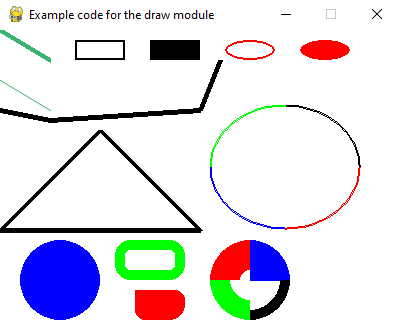
Example code for draw module.
import pygame from math import pi
Initialize pygame
pygame.init()
Set the height and width of the screen
size = [400, 300] screen = pygame.display.set_mode(size)
pygame.display.set_caption("Example code for the draw module")
Loop until the user clicks the close button.
done = False clock = pygame.time.Clock()
while not done: # This limits the while loop to a max of 60 times per second. # Leave this out and we will use all CPU we can. clock.tick(60)
for event in pygame.event.get():  # User did something
    if event.type == pygame.QUIT:  # If user clicked close
        done = True  # Flag that we are done so we exit this loop

# Clear the screen and set the screen background
screen.fill("white")

# Draw on the screen a green line from (0, 0) to (50, 30)
# 5 pixels wide. Uses (r, g, b) color - medium sea green.
pygame.draw.line(screen, (60, 179, 113), [0, 0], [50, 30], 5)

# Draw on the screen a green line from (0, 50) to (50, 80)
# Because it is an antialiased line, it is 1 pixel wide.
# Uses (r, g, b) color - medium sea green.
pygame.draw.aaline(screen, (60, 179, 113), [0, 50], [50, 80], True)

# Draw on the screen 3 black lines, each 5 pixels wide.
# The 'False' means the first and last points are not connected.
pygame.draw.lines(
    screen, "black", False, [[0, 80], [50, 90], [200, 80], [220, 30]], 5
)

# Draw a rectangle outline
pygame.draw.rect(screen, "black", [75, 10, 50, 20], 2)

# Draw a solid rectangle. Same color as "black" above, specified in a new way
pygame.draw.rect(screen, (0, 0, 0), [150, 10, 50, 20])

# Draw a rectangle with rounded corners
pygame.draw.rect(screen, "green", [115, 210, 70, 40], 10, border_radius=15)
pygame.draw.rect(
    screen,
    "red",
    [135, 260, 50, 30],
    0,
    border_radius=10,
    border_top_left_radius=0,
    border_bottom_right_radius=15,
)

# Draw an ellipse outline, using a rectangle as the outside boundaries
pygame.draw.ellipse(screen, "red", [225, 10, 50, 20], 2)

# Draw an solid ellipse, using a rectangle as the outside boundaries
pygame.draw.ellipse(screen, "red", [300, 10, 50, 20])

# This draws a triangle using the polygon command
pygame.draw.polygon(screen, "black", [[100, 100], [0, 200], [200, 200]], 5)

# Draw an arc as part of an ellipse.
# Use radians to determine what angle to draw.
pygame.draw.arc(screen, "black", [210, 75, 150, 125], 0, pi / 2, 2)
pygame.draw.arc(screen, "green", [210, 75, 150, 125], pi / 2, pi, 2)
pygame.draw.arc(screen, "blue", [210, 75, 150, 125], pi, 3 * pi / 2, 2)
pygame.draw.arc(screen, "red", [210, 75, 150, 125], 3 * pi / 2, 2 * pi, 2)

# Draw a circle
pygame.draw.circle(screen, "blue", [60, 250], 40)

# Draw only one circle quadrant
pygame.draw.circle(screen, "blue", [250, 250], 40, 0, draw_top_right=True)
pygame.draw.circle(screen, "red", [250, 250], 40, 30, draw_top_left=True)
pygame.draw.circle(screen, "green", [250, 250], 40, 20, draw_bottom_left=True)
pygame.draw.circle(screen, "black", [250, 250], 40, 10, draw_bottom_right=True)

# Go ahead and update the screen with what we've drawn.
# This MUST happen after all the other drawing commands.
pygame.display.flip()
Be IDLE friendly
pygame.quit()