Install (original) (raw)
Note for users with LiClipse
PyDev already comes preinstalled in LiClipse, so, this step can be skipped (note that if LiClipse is used, PyDev cannot be installed or update separately, as it must always be updated as a whole).
Requisites
PyDev requires Java 17 and Eclipse 4.6 (Neon) in order to run and only supports Python 2.6 onwards. I.e.:
- Python (2.6 or newer)
- Jython (2.6 or newer)
- IronPython (2.6 or newer) - excluding 2.7.6 and 2.7.7, which have a bug which makes them unusable in PyDev.
If you don't have Java 17, the update process may appear to succeed, but PyDev will simply not show in the target installation. Please double-check if you're using a Java 17 vm in about > installation details > configuration before trying to install PyDev.
Need to use older Eclipse/Java/Python
If you need to use an older version of Eclipse/Java/Python, below is the latest PyDev version to be used based on your requisites.
- Java 11: PyDev 11.0.0
- Python 3.6 to 3.7: PyDev 11.0.3
- Python 3.0 to 3.5: PyDev 9.3.0
- Python 2.6 or 2.7: PyDev 9.3.0
- Eclipse 4.18, Java 8: PyDev 8.2.0
- Eclipse 4.5, Java 8: PyDev 5.2.0
- Eclipse 3.8, Java 7: PyDev 4.5.5
- Eclipse 3.x, Java 6: PyDev 2.8.2
- Python 2.5 or older: PyDev 5.5.0
Note: Java 16 (which broke backward compatibility) is only supported in PyDev 9.0.0. Note: Eclipse 4.19 has a critical issue which prevents PyDev from working properly.
Before starting the install
The first thing to choose before the install is a folder where you have permissions to write (otherwise, remember to install Eclipse running as an Administrator and remember to run as an Administrator whenever any plugin needs to be updated).
PyDev Certificate
From version 5.9.0 onwards, PyDev is built with a certificate in the name of "Brainwy Software Ltda" (previously it used a self-signed certificate).
Installing with the update site
Note: Instructions are targeted at Eclipse 4.6 onwards
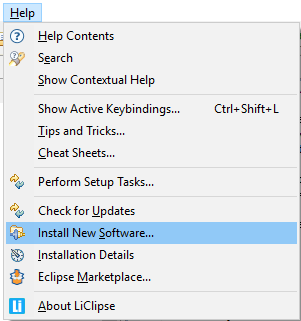
To install PyDev and PyDev Extensions using the Eclipse Update Manager, you need to use the Help > Install New Software... menu.
In the next screen, add the update site(s) you want to work with from the list below:
Latest version:
Nightly builds:
Browse other versions (open in browser to select URL for Eclipse):
and press so that Eclipse will query the update site you just entered for contents.
Before proceeding, it's recommended that you UNCHECK the**'Contact all update sites during install to find required software'**(it will still work if you don't do that, but it'll query all the update sites available, which is much slower than querying only the PyDev update site, which should be all that's needed to install PyDev).
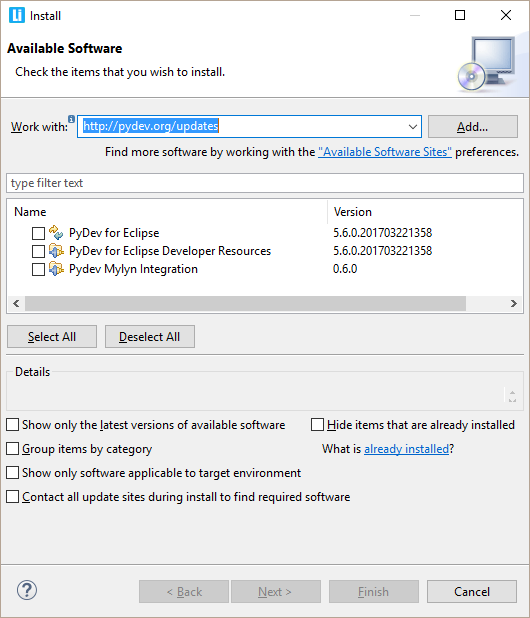
Now, select PyDev for Eclipse to install PyDev and click Next.
Now, read the license agreement and if you accept, select the accept radio button and click Finish.
At that point, Eclipse should automatically download the plugin contents and present you to a dialog asking if you want to restart (to which you should say yes).
Installing with the zip file
The available locations for the zip files are:
After downloading the zip file:
Extract the contents of the zip file in the eclipse/dropins folder and restart Eclipse.
If it doesn't work, try restarting Eclipse with the -clean flag (if you're a regular user and installing with admin, make sure you call-clean logged in as admin, so that Eclipse finds out about it).
If it's still not found, double check the requisites (such as the Java vm version).
Checking the installation
You can verify if it is correctly installed going to the menu 'window > preferences' and checking if there is a PyDev item under that.
Troubleshooting installation problems
Unable to load repository
While most times things work as explained, some users may have messages such as:
Unable to load the repository http://pydev.org/updates
Unknown Host: http://pydev.org/updates/content.xml
This means there's some issue accessing the update site in your current connection.
In that case, you can try using a direct URL for the download (all the http://pydev.org/updates/URLs are actually redirects to the final location). Currently, those redirects point to links on http://bintray.com, so, you can visit the related update site page (such as http://pydev.org/updates) in a browser and see to where it's being redirected (you may want to try that direct link withhttp or https to see if it makes a difference in your use case).
Possible issue on download
If you have any problem at this point with a message such as:
An error occurred while collecting items to be installed
No repository found containing:
org.python.pydev/osgi.bundle/1.4.7.2843
No repository found containing:
org.python.pydev.ast/osgi.bundle/1.4.7.2843
that might indicate that the mirror you selected is having some network problem at that time, so, please retry it later on (possibly with a direct URL such as in the Unable to load repository tip above).
PyDev does not appear after install!
Well, the main issue at this time is that PyDev requires Java 8 in order to run.
Tip: LiClipse (which is mostly a PyDev standalone plus some goodies) is pre-configured so that none of the hassle of installing PyDev into Eclipse nor any pre-requisite is needed ;)
Java 8 requisite
If you don't have Java 8, make sure you download/install the latest Java 8 JRE or JDK, try restarting to see if it got it automatically.
I.e.: in help > about > installation details > configuration check if it's actually using the Java 8 version you pointed at.
If it didn't get it automatically, follow the instructions from:
http://wiki.eclipse.org/Eclipse.ini to add the -vm argument to eclipse.ini on "Specifying the JVM" to specify the Java 8 vm.
Note on Mac OS: You can use the command "/usr/libexec/java_home -v 1.8" to get the base path for the JVM (though you also need to append "/bin/java" to the output of said command to the -vm arg in eclipse.ini).
Corrupted install
Eclipse sometimes is not able to correctly get the plugin, from the update site but will do no checking on whether it is really correct (no md5 checking), and when this happens, you'll usually get a ClassNotFoundException (similar to the example below).
When that happens, you should uninstall it and reinstall again with the update site... if that still fails, you could try to get the zip files, as it will at least give you a warning when it is corrupt.
Note that the chance of the files being corrupt in the server is pretty low, as that's something that's always checked in a new release, but if you're suspicious about it, please report it at https://www.brainwy.com/tracker/PyDevso that it can be double-checked.
Also, there have been reports with that error where the only solution that has been consistent has been removing all previous versions of PyDev and then installing the latest version.
EXAMPLE
Unable to create this part due to an internal error. Reason for the failure: The editor class could not be instantiated. This usually indicates that the editor's class name was mistyped in plugin.xml.
java.lang.ClassNotFoundException: org.python.pydev.editor.PyEdit
at
org.eclipse.osgi.framework.internal.core.BundleLoader.findClass(BundleLoader.java:405)
at
org.eclipse.osgi.framework.internal.core.BundleLoader.findClass(BundleLoader.java:350)
at
org.eclipse.osgi.framework.adaptor.core.AbstractClassLoader.loadClass(AbstractClassLoader.java:78)
at java.lang.ClassLoader.loadClass(ClassLoader.java:235) at
org.eclipse.osgi.framework.internal.core.BundleLoader.loadClass(BundleLoader.java:275)
...
Uninstalling
Follow the instructons below if at any time you wish to stop using the PyDev plugin (or any other Eclipse plugin):
Eclipse 3.5 onwards
If you installed with the update site, go to the menu help > about > installation details then on the Installed Software tab, select the plugins you want to uninstall and click Uninstall.
If you installed with the zip file, just remove the com.python.pydev and org.python.pydev features and plugins from the dropins folder.
PyDev development
PyDev is open source and depends on your contributions! This may be in the form of bug fixes, answers on stackoverflow, new features...
Another option is financially supporting it at:Patreon (which provides a way to support it monthly and get rewards starting with $1).
Or through 1-time contributions at:
Search PyDev-related content