RDKit Cookbook — The RDKit 2026.03.2 documentation (original) (raw)
Introduction
What is this?
This document provides example recipes of how to carry out particular tasks using the RDKit functionality from Python. The contents have been contributed by the RDKit community, tested with the latest RDKit release, and then compiled into this document. The RDKit Cookbook is written in reStructuredText, which supports Sphinx doctests, allowing for easier validation and maintenance of the RDKit Cookbook code examples, where appropriate.
What gets included?
The examples included come from various online sources such as blogs, shared gists, and the RDKit mailing lists. Generally, only minimal editing is added to the example code/notes for formatting consistency and to incorporate the doctests. We have made a conscious effort to appropriately credit the original source and authors. One of the first priorities of this document is to compile useful short examples shared on the RDKit mailing lists, as these can be difficult to discover. It will take some time, but we hope to expand this document into 100s of examples. As the document grows, it may make sense to prioritize examples included in the RDKit Cookbook based on community demand.
Feedback and Contributing
If you have suggestions for how to improve the Cookbook and/or examples you would like included, please contribute directly in the source document (the .rst file). Alternatively, you can also send Cookbook revisions and addition requests to the mailing list: <rdkit-discuss@lists.sourceforge.net> (you will need to subscribe first).
Note
The Index ID# (e.g., RDKitCB_##) is simply a way to track Cookbook entries and image file names. New Cookbook additions are sequentially index numbered, regardless of where they are placed within the document. As such, for reference, the next Cookbook entry is RDKitCB_41.
Drawing Molecules (Jupyter)
Include an Atom Index
Author: Takayuki Serizawa
Index ID#: RDKitCB_0
Summary: Draw a molecule with atom index numbers.
from rdkit import Chem from rdkit.Chem.Draw import IPythonConsole from rdkit.Chem import Draw IPythonConsole.ipython_useSVG=True #< set this to False if you want PNGs instead of SVGs
def mol_with_atom_index(mol): for atom in mol.GetAtoms(): atom.SetAtomMapNum(atom.GetIdx()) return mol
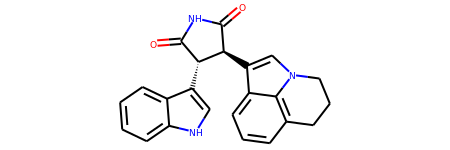
Test in a kinase inhibitor
mol = Chem.MolFromSmiles("C1CC2=C3C(=CC=C2)C(=CN3C1)[C@H]4C@@HC5=CNC6=CC=CC=C65")
Default
mol
With atom index
mol_with_atom_index(mol)
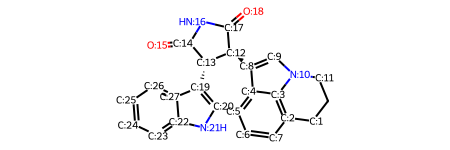
In contrast to the approach below, the atom index zero is not displayed.
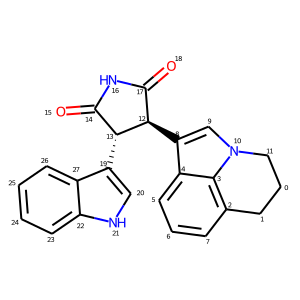
A simpler way to add atom indices is to adjust the IPythonConsole properties. This produces a similar image to the example above, the difference being that the atom indices are now near the atom, rather than at the atom position.
from rdkit import Chem from rdkit.Chem.Draw import IPythonConsole from rdkit.Chem import Draw IPythonConsole.drawOptions.addAtomIndices = True IPythonConsole.molSize = 300,300
mol = Chem.MolFromSmiles("C1CC2=C3C(=CC=C2)C(=CN3C1)[C@H]4C@@HC5=CNC6=CC=CC=C65") mol
Include a Bond Index
Author: Jeremy Monat
Source: Direct contribution to Cookbook
Index ID#: RDKitCB_40
Summary: Draw a molecule with bond index numbers.
from rdkit import Chem from rdkit.Chem import Draw from rdkit.Chem.Draw import IPythonConsole IPythonConsole.ipython_useSVG=True #< set this to False if you want PNGs instead of SVGs
Test in a kinase inhibitor
mol = Chem.MolFromSmiles("C1CC2=C3C(=CC=C2)C(=CN3C1)[C@H]4C@@HC5=CNC6=CC=CC=C65")
Default
mol

Add bond indices
IPythonConsole.drawOptions.addBondIndices = True IPythonConsole.molSize = 350,300 mol

Include a Calculation
Author: Greg Landrum
Index ID#: RDKitCB_23
Summary: Draw a molecule with a calculation value displayed (e.g., Gasteiger Charge)
from rdkit import Chem from rdkit.Chem import AllChem from rdkit.Chem.Draw import IPythonConsole IPythonConsole.molSize = 250,250
m = Chem.MolFromSmiles('c1ncncc1C(=O)[O-]') AllChem.ComputeGasteigerCharges(m) m

m2 = Chem.Mol(m) for at in m2.GetAtoms(): lbl = '%.2f'%(at.GetDoubleProp("_GasteigerCharge")) at.SetProp('atomNote',lbl) m2

Include Stereo Annotations
Author: Greg Landrum
Index ID#: RDKitCB_32
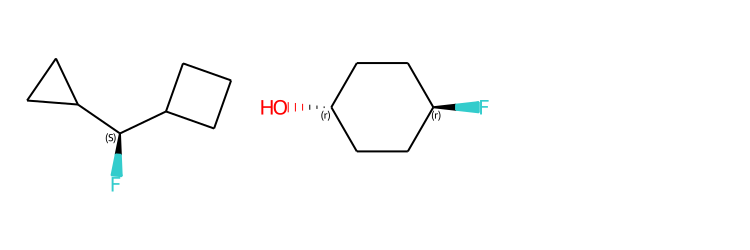
Summary: Draw a molecule with stereochemistry annotations displayed.
from rdkit import Chem from rdkit.Chem import Draw from rdkit.Chem.Draw import IPythonConsole IPythonConsole.drawOptions.addAtomIndices = False IPythonConsole.drawOptions.addStereoAnnotation = True
Default Representation uses legacy FindMolChiralCenters() code
m1 = Chem.MolFromSmiles('C1CC1C@HC1CCC1') m2 = Chem.MolFromSmiles('F[C@H]1CCC@HCC1') Draw.MolsToGridImage((m1,m2), subImgSize=(250,250))
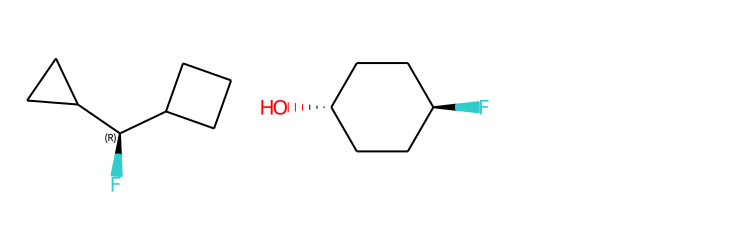
new stereochemistry code with more accurate CIP labels, 2020.09 release
from rdkit.Chem import rdCIPLabeler rdCIPLabeler.AssignCIPLabels(m1) rdCIPLabeler.AssignCIPLabels(m2) Draw.MolsToGridImage((m1,m2), subImgSize=(250,250))
Black and White Molecules
Author: Greg Landrum and Vincent Scalfani
Index ID#: RDKitCB_1
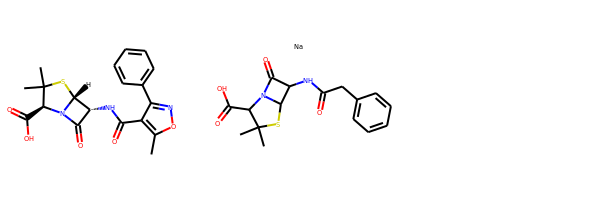
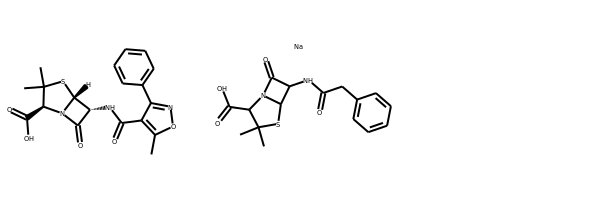
Summary: Draw a molecule in black and white.
from rdkit import Chem from rdkit.Chem.Draw import IPythonConsole from rdkit.Chem import Draw
ms = [Chem.MolFromSmiles(x) for x in ('Cc1onc(-c2ccccc2)c1C(=O)N[C@@H]1C(=O)N2C@@HC(C)(C)S[C@H]12','CC1(C)SC2C(NC(=O)Cc3ccccc3)C(=O)N2C1C(=O)O.[Na]')] Draw.MolsToGridImage(ms)
IPythonConsole.drawOptions.useBWAtomPalette() Draw.MolsToGridImage(ms)
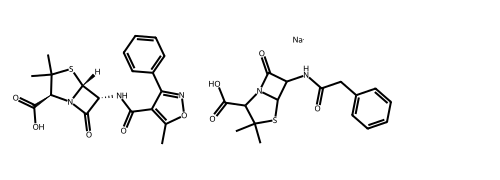
Alternatively, use the rdMolDraw2D package
from rdkit.Chem.Draw import rdMolDraw2D import io from PIL import Image
drawer = rdMolDraw2D.MolDraw2DCairo(500,180,200,180) drawer.drawOptions().useBWAtomPalette() drawer.DrawMolecules(ms) drawer.FinishDrawing() bio = io.BytesIO(drawer.GetDrawingText()) Image.open(bio)
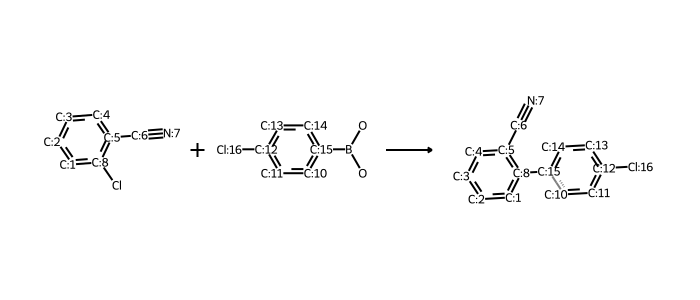
works for reactions too:
rxn is from https://github.com/rdkit/UGM_2020/blob/master/Notebooks/Landrum_WhatsNew.ipynb
from rdkit.Chem import rdChemReactions
rxn = rdChemReactions.ReactionFromSmarts("[cH:1]:1:[cH:2]:[cH:3]:[cH:4]:cH:5:[c:8]:1-[Cl].
[cH:10]:1:[cH:11]:cH:12:[cH:13]:[cH:14]:[cH:15]:1-B(-O)-O>>
[cH:1]:1:[cH:2]:[cH:3]:[cH:4]:cH:5:[c:8]:1-[cH:15]:1[cH:10]:[cH:11]:cH:12:[cH:13]:[cH:14]:1")
drawer = rdMolDraw2D.MolDraw2DCairo(700,300)
drawer.drawOptions().useBWAtomPalette()
drawer.DrawReaction(rxn)
drawer.FinishDrawing()
bio = io.BytesIO(drawer.GetDrawingText())
Image.open(bio)
Highlight a Substructure in a Molecule
Author: Greg Landrum
Index ID#: RDKitCB_2
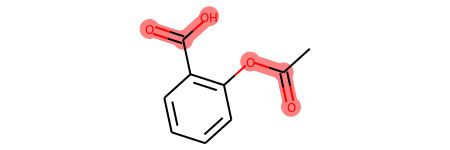
Summary: Draw a molecule with a substructure highlight in Jupyter.
from rdkit import Chem from rdkit.Chem.Draw import IPythonConsole
m = Chem.MolFromSmiles('c1cc(C(=O)O)c(OC(=O)C)cc1') substructure = Chem.MolFromSmarts('C(=O)O') print(m.GetSubstructMatches(substructure))
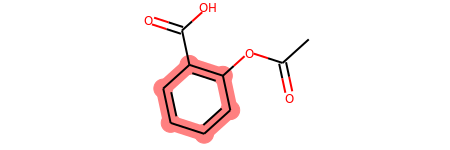
you can also manually set the atoms that should be highlighted:
m.__sssAtoms = [0,1,2,6,11,12] m
Highlight Molecule Differences
Author: Takayuki Serizawa
Index ID#: RDKitCB_36
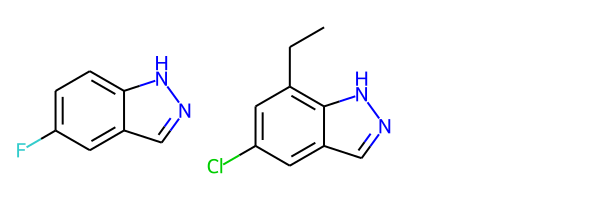
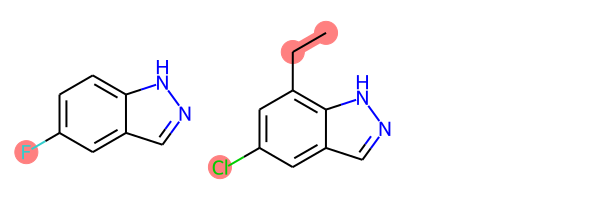
Summary: Highlight molecule differences based on maximum common substructure
from rdkit import Chem from rdkit.Chem import Draw from rdkit.Chem.Draw import IPythonConsole from rdkit.Chem import rdFMCS from rdkit.Chem.Draw import rdDepictor rdDepictor.SetPreferCoordGen(True) IPythonConsole.drawOptions.minFontSize=20
mol1 = Chem.MolFromSmiles('FC1=CC=C2C(=C1)C=NN2') mol2 = Chem.MolFromSmiles('CCC1=C2NN=CC2=CC(Cl)=C1')
Draw.MolsToGridImage([mol1, mol2])
def view_difference(mol1, mol2): mcs = rdFMCS.FindMCS([mol1,mol2]) mcs_mol = Chem.MolFromSmarts(mcs.smartsString) match1 = mol1.GetSubstructMatch(mcs_mol) target_atm1 = [] for atom in mol1.GetAtoms(): if atom.GetIdx() not in match1: target_atm1.append(atom.GetIdx()) match2 = mol2.GetSubstructMatch(mcs_mol) target_atm2 = [] for atom in mol2.GetAtoms(): if atom.GetIdx() not in match2: target_atm2.append(atom.GetIdx()) return Draw.MolsToGridImage([mol1, mol2],highlightAtomLists=[target_atm1, target_atm2])
view_difference(mol1,mol2)
Highlight Entire Molecule
Author: Vincent Scalfani
Index ID#: RDKitCB_38
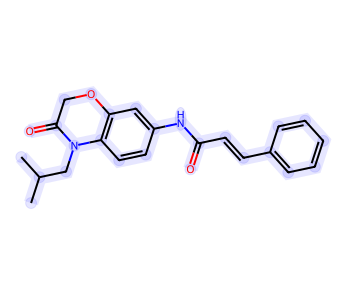
Summary: Highlight all atoms and bonds
from rdkit import Chem from rdkit.Chem.Draw import rdMolDraw2D import io from PIL import Image
mol = Chem.MolFromSmiles('CC(C)CN1C(=O)COC2=C1C=CC(=C2)NC(=O)/C=C/C3=CC=CC=C3') rgba_color = (0.0, 0.0, 1.0, 0.1) # transparent blue
atoms = [] for a in mol.GetAtoms(): atoms.append(a.GetIdx())
bonds = [] for bond in mol.GetBonds(): aid1 = atoms[bond.GetBeginAtomIdx()] aid2 = atoms[bond.GetEndAtomIdx()] bonds.append(mol.GetBondBetweenAtoms(aid1,aid2).GetIdx())
drawer = rdMolDraw2D.MolDraw2DCairo(350,300) drawer.drawOptions().fillHighlights=True drawer.drawOptions().setHighlightColour((rgba_color)) drawer.drawOptions().highlightBondWidthMultiplier=20 drawer.drawOptions().clearBackground = False rdMolDraw2D.PrepareAndDrawMolecule(drawer, mol, highlightAtoms=atoms, highlightBonds=bonds) bio = io.BytesIO(drawer.GetDrawingText()) Image.open(bio)
Highlight Molecule with Multiple Colors
Author: Vincent Scalfani
Index ID#: RDKitCB_39
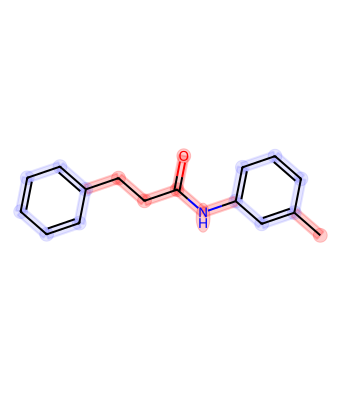
Summary: Highlight a molecule with different colors based on if the atom/bond is aromatic.
from rdkit import Chem from rdkit.Chem.Draw import rdMolDraw2D import io from PIL import Image from collections import defaultdict
mol = Chem.MolFromSmiles('CC1=CC(=CC=C1)NC(=O)CCC2=CC=CC=C2') colors = [(0.0, 0.0, 1.0, 0.1), (1.0, 0.0, 0.0, 0.2)]
athighlights = defaultdict(list) arads = {} for a in mol.GetAtoms(): if a.GetIsAromatic(): aid = a.GetIdx() athighlights[aid].append(colors[0]) arads[aid] = 0.3 else: aid = a.GetIdx() athighlights[aid].append(colors[1]) arads[aid] = 0.3
bndhighlights = defaultdict(list) for bond in mol.GetBonds(): aid1 = bond.GetBeginAtomIdx() aid2 = bond.GetEndAtomIdx()
if bond.GetIsAromatic():
    bid = mol.GetBondBetweenAtoms(aid1,aid2).GetIdx()
    bndhighlights[bid].append(colors[0])
else:
    bid = mol.GetBondBetweenAtoms(aid1,aid2).GetIdx()
    bndhighlights[bid].append(colors[1])
d2d = rdMolDraw2D.MolDraw2DCairo(350,400) d2d.DrawMoleculeWithHighlights(mol,"",dict(athighlights),dict(bndhighlights),arads,{}) d2d.FinishDrawing() bio = io.BytesIO(d2d.GetDrawingText()) Image.open(bio)
Without Implicit Hydrogens
Author: Greg Landrum
Index ID#: RDKitCB_17
Summary: Draw a molecule without implicit hydrogens
from rdkit import Chem from rdkit.Chem.Draw import IPythonConsole m = Chem.MolFromSmiles('Pt(Cl)(N)N') m
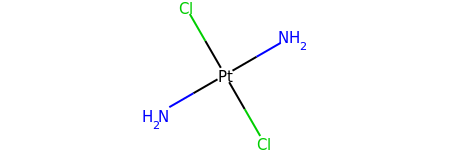
for atom in m.GetAtoms(): atom.SetProp("atomLabel", atom.GetSymbol()) m

With Abbreviations
Author: Greg Landrum
Index ID#: RDKitCB_34
Summary: Draw a molecule with functional group abbreviations
from rdkit import Chem from rdkit.Chem.Draw import IPythonConsole from rdkit.Chem import Draw from rdkit.Chem import rdAbbreviations
m = Chem.MolFromSmiles('COc1ccc(C(=O)[O-])cc1') m

abbrevs = rdAbbreviations.GetDefaultAbbreviations() nm = rdAbbreviations.CondenseMolAbbreviations(m,abbrevs) nm

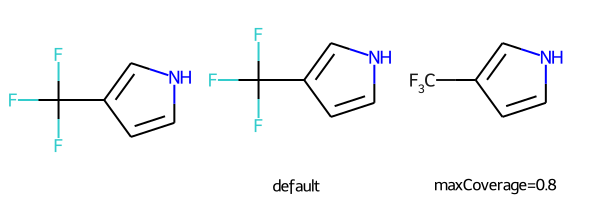
abbreviations that cover more than 40% of the molecule won't be applied by default
m = Chem.MolFromSmiles('c1c[nH]cc1C(F)(F)F') nm1 = rdAbbreviations.CondenseMolAbbreviations(m,abbrevs) nm2 = rdAbbreviations.CondenseMolAbbreviations(m,abbrevs,maxCoverage=0.8) Draw.MolsToGridImage((m,nm1,nm2),legends=('','default','maxCoverage=0.8'))
See available abbreviations and their SMILES
where * is the dummy atom that the group would attach to
abbrevs = rdAbbreviations.GetDefaultAbbreviations() labels = ["Abbrev", "SMILES"] line = '--------'
print(f"{labels[0]:<10} {labels[1]}") print(f"{line:<10} {line}") for a in abbrevs: print(f"{a.label:<10} {Chem.MolToSmiles(a.mol)}")
Abbrev SMILES
CO2Et *C(=O)OCC COOEt *C(=O)OCC OiBu *OCC(C)C nDec *CCCCCCCCCC nNon *CCCCCCCCC nOct *CCCCCCCC nHept *CCCCCCC nHex *CCCCCC nPent *CCCCC iPent *C(C)CCC tBu *C(C)(C)C iBu *C(C)CC nBu *CCCC iPr *C(C)C nPr *CCC Et *CC NCF3 *NC(F)(F)F CF3 *C(F)(F)F CCl3 *C(Cl)(Cl)Cl CN *C#N NC *[N+]#[C-] N(OH)CH3 *N(C)[OH] NO2 *N+[O-] NO *N=O SO3H *S(=O)(=O)[OH] CO2H *C(=O)[OH] COOH *C(=O)[OH] OEt *OCC OAc *OC(C)=O NHAc *NC(C)=O Ac *C(C)=O CHO *C=O NMe *NC SMe *SC OMe *OC CO2- *C(=O)[O-] COO- *C(=O)[O-]
Using CoordGen Library
Author: Greg Landrum
Index ID#: RDKitCB_37
Summary: Draw a molecule using CoordGen Library
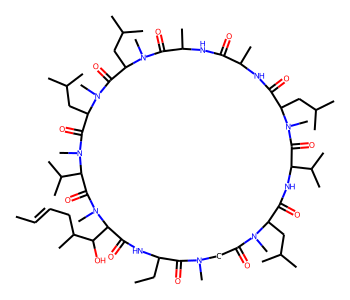
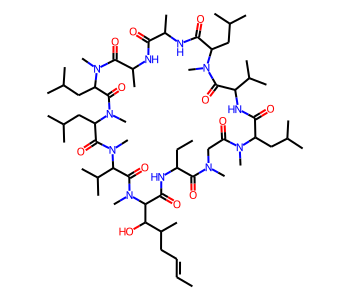
Some molecules like macrocycles are not represented well using the default RDKit drawing code. As a result, it may be preferable to use the CoordGen integration.
from rdkit import Chem from rdkit.Chem.Draw import IPythonConsole IPythonConsole.molSize = 350,300 from rdkit.Chem import Draw
default drawing
mol = Chem.MolFromSmiles("C/C=C/CC(C)C(O)C1C(=O)NC(CC)C(=O)N(C)CC(=O)N(C)C(CC(C)C)C(=O)NC(C(C)C)C(=O)N(C)C(CC(C)C)C(=O)NC(C)C(=O)NC(C)C(=O)N(C)C(CC(C)C)C(=O)N(C)C(CC(C)C)C(=O)N(C)C(C(C)C)C(=O)N1C") mol
with CoordGen
from rdkit.Chem import rdCoordGen rdCoordGen.AddCoords(mol) mol
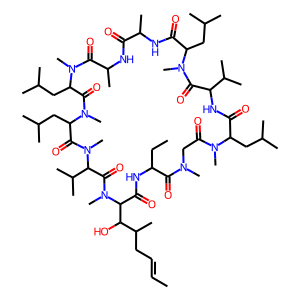
It is also possible to use CoordGen with the MolDraw2D class. Here is one way to do that:
from rdkit import Chem from rdkit.Chem import Draw from rdkit.Chem.Draw import rdMolDraw2D from rdkit.Chem import rdDepictor rdDepictor.SetPreferCoordGen(True) from rdkit.Chem.Draw import IPythonConsole from IPython.display import SVG
mol = Chem.MolFromSmiles("C/C=C/CC(C)C(O)C1C(=O)NC(CC)C(=O)N(C)CC(=O)N(C)C(CC(C)C)C(=O)NC(C(C)C)C(=O)N(C)C(CC(C)C)C(=O)NC(C)C(=O)NC(C)C(=O)N(C)C(CC(C)C)C(=O)N(C)C(CC(C)C)C(=O)N(C)C(C(C)C)C(=O)N1C") drawer = rdMolDraw2D.MolDraw2DSVG(300,300) drawer.drawOptions().addStereoAnnotation = False drawer.DrawMolecule(mol) drawer.FinishDrawing() SVG(drawer.GetDrawingText())
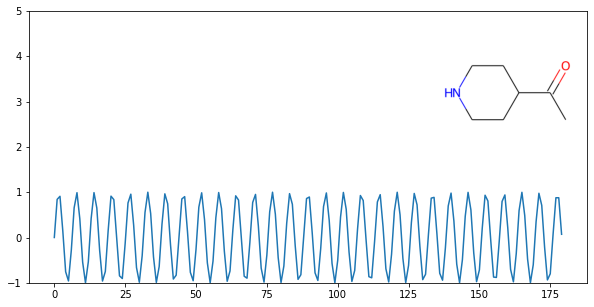
On a Plot
Author: Takayuki Serizawa
Index ID#: RDKitCB_35
Summary: Draw a molecule on a matplotlib plot.
import matplotlib.pyplot as plt import numpy as np from rdkit import Chem from rdkit.Chem.Draw import IPythonConsole
x = np.arange(0, 180, 1) y = np.sin(x)
mol = Chem.MolFromSmiles('C1CNCCC1C(=O)C') im = Chem.Draw.MolToImage(mol)
fig = plt.figure(figsize=(10,5)) plt.plot(x, y) plt.ylim(-1, 5) ax = plt.axes([0.6, 0.47, 0.38, 0.38], frameon=True) ax.imshow(im) ax.axis('off')
plt.show() # commented out to avoid creating plot with doctest
Bonds and Bonding
Hybridization Type and Count
Author: Jean-Marc Nuzillard and Andrew Dalke
Index ID#: RDKitCB_26
Summary: Get hybridization type and count
from rdkit import Chem m = Chem.MolFromSmiles("CN1C=NC2=C1C(=O)N(C(=O)N2C)C") for x in m.GetAtoms(): print(x.GetIdx(), x.GetHybridization())
0 SP3 1 SP2 2 SP2 3 SP2 4 SP2 5 SP2 6 SP2 7 SP2 8 SP2 9 SP2 10 SP2 11 SP2 12 SP3 13 SP3
if you want to count hybridization type (e.g., SP3):
from rdkit import Chem m = Chem.MolFromSmiles("CN1C=NC2=C1C(=O)N(C(=O)N2C)C") print(sum((x.GetHybridization() == Chem.HybridizationType.SP3) for x in m.GetAtoms()))
Rings, Aromaticity, and Kekulization
Count Ring Systems
Author: Greg Landrum
Index ID#: RDKitCB_3
Summary: Count ring systems in a molecule
from rdkit import Chem from rdkit.Chem.Draw import IPythonConsole
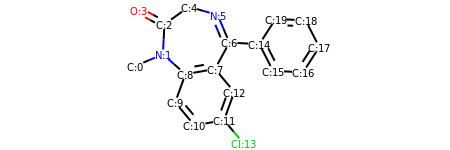
def GetRingSystems(mol, includeSpiro=False): ri = mol.GetRingInfo() systems = [] for ring in ri.AtomRings(): ringAts = set(ring) nSystems = [] for system in systems: nInCommon = len(ringAts.intersection(system)) if nInCommon and (includeSpiro or nInCommon>1): ringAts = ringAts.union(system) else: nSystems.append(system) nSystems.append(ringAts) systems = nSystems return systems mol = Chem.MolFromSmiles('CN1C(=O)CN=C(C2=C1C=CC(=C2)Cl)C3=CC=CC=C3') print(GetRingSystems(mol))
[{1, 2, 4, 5, 6, 7, 8, 9, 10, 11, 12}, {14, 15, 16, 17, 18, 19}]
Draw molecule with atom index (see RDKitCB_0)
def mol_with_atom_index(mol): for atom in mol.GetAtoms(): atom.SetAtomMapNum(atom.GetIdx()) return mol mol_with_atom_index(mol)
Identify Aromatic Rings
Author: Benjamin Datko and Greg Landrum
Index ID#: RDKitCB_8
Summary: Identify which rings are aromatic in a molecule
from rdkit import Chem m = Chem.MolFromSmiles('c1cccc2c1CCCC2') m

ri = m.GetRingInfo()
You can interrogate the RingInfo object to tell you the atoms that make up each ring:
print(ri.AtomRings())
((0, 5, 4, 3, 2, 1), (6, 7, 8, 9, 4, 5))
or the bonds that make up each ring:
print(ri.BondRings())
((9, 4, 3, 2, 1, 0), (6, 7, 8, 10, 4, 5))
To detect aromatic rings, I would loop over the bonds in each ring and
flag the ring as aromatic if all bonds are aromatic:
def isRingAromatic(mol, bondRing): for id in bondRing: if not mol.GetBondWithIdx(id).GetIsAromatic(): return False return True
print(isRingAromatic(m, ri.BondRings()[0]))
print(isRingAromatic(m, ri.BondRings()[1]))
Identify Aromatic Atoms
Author: Paolo Tosco
Index ID#: RDKitCB_9
Summary: Differentiate aromatic carbon from olefinic carbon with SMARTS
from rdkit import Chem mol = Chem.MolFromSmiles("c1ccccc1C=CCC") aromatic_carbon = Chem.MolFromSmarts("c") print(mol.GetSubstructMatches(aromatic_carbon))
((0,), (1,), (2,), (3,), (4,), (5,))
The RDKit includes a SMARTS extension that allows hybridization queries,
here we query for SP2 aliphatic carbons:
olefinic_carbon = Chem.MolFromSmarts("[C^2]") print(mol.GetSubstructMatches(olefinic_carbon))
There is also an alternative, more efficient approach, using the rdqueries module:
from rdkit import Chem from rdkit.Chem import rdqueries
mol = Chem.MolFromSmiles("c1ccccc1C=CCC") q = rdqueries.IsAromaticQueryAtom() print([x.GetIdx() for x in mol.GetAtomsMatchingQuery(q)])
q = rdqueries.HybridizationEqualsQueryAtom(Chem.HybridizationType.SP2) print([x.GetIdx() for x in mol.GetAtomsMatchingQuery(q)])
qcombined = rdqueries.IsAliphaticQueryAtom() qcombined.ExpandQuery(q) print([x.GetIdx() for x in mol.GetAtomsMatchingQuery(qcombined)])
Stereochemistry
Identifying Stereochemistry
Author: Vincent Scalfani
Index ID#: RDKitCB_30
Summary: Find chiral centers and double bond stereochemistry.
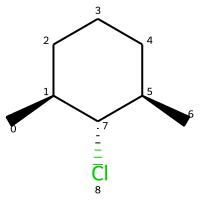
from rdkit import Chem from rdkit.Chem import Draw from rdkit.Chem.Draw import IPythonConsole IPythonConsole.drawOptions.addAtomIndices = True IPythonConsole.drawOptions.addStereoAnnotation = False IPythonConsole.molSize = 200,200
m = Chem.MolFromSmiles("C[C@H]1CCCC@@H[C@@H]1Cl") m
legacy FindMolChiralCenters()
print(Chem.FindMolChiralCenters(m,force=True,includeUnassigned=True,useLegacyImplementation=True))
[(1, 'S'), (5, 'R'), (7, 'R')]
new stereochemistry code
print(Chem.FindMolChiralCenters(m,force=True,includeUnassigned=True,useLegacyImplementation=False))
[(1, 'S'), (5, 'R'), (7, 'r')]
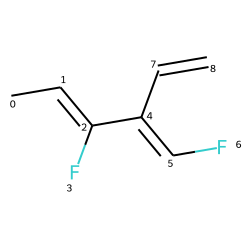
Identifying Double Bond Stereochemistry
IPythonConsole.molSize = 250,250 mol = Chem.MolFromSmiles(r"C\C=C(/F)\C(=C\F)\C=C") mol
Using GetStereo()
for b in mol.GetBonds(): print(b.GetBeginAtomIdx(),b.GetEndAtomIdx(), b.GetBondType(),b.GetStereo())
0 1 SINGLE STEREONONE 1 2 DOUBLE STEREOZ 2 3 SINGLE STEREONONE 2 4 SINGLE STEREONONE 4 5 DOUBLE STEREOE 5 6 SINGLE STEREONONE 4 7 SINGLE STEREONONE 7 8 DOUBLE STEREONONE
Double bond configuration can also be identified with new
stereochemistry code using Chem.FindPotentialStereo()
si = Chem.FindPotentialStereo(mol) for element in si: print(f' Type: {element.type}, Which: {element.centeredOn}, Specified: {element.specified}, Descriptor: {element.descriptor} ')
Type: Bond_Double, Which: 1, Specified: Specified, Descriptor: Bond_Cis Type: Bond_Double, Which: 4, Specified: Specified, Descriptor: Bond_Trans
Manipulating Molecules
Create Fragments
Author: Paulo Tosco
Index ID#: RDKitCB_7
Summary: Create fragments of molecules on bonds
from rdkit import Chem from rdkit.Chem.Draw import IPythonConsole, MolsToGridImage
I have put explicit bonds in the SMILES definition to facilitate comprehension:
mol = Chem.MolFromSmiles("O-C-C-C-C-N") mol1 = Chem.Mol(mol) mol2 = Chem.Mol(mol) mol1

Chem.FragmentOnBonds() will fragment all specified bond indices at once, and return a single molecule
with all specified cuts applied. By default, addDummies=True, so empty valences are filled with dummy atoms:
mol1_f = Chem.FragmentOnBonds(mol1, (0, 2, 4)) mol1_f

This molecule can be split into individual fragments using Chem.GetMolFrags():
MolsToGridImage(Chem.GetMolFrags(mol1_f, asMols=True))
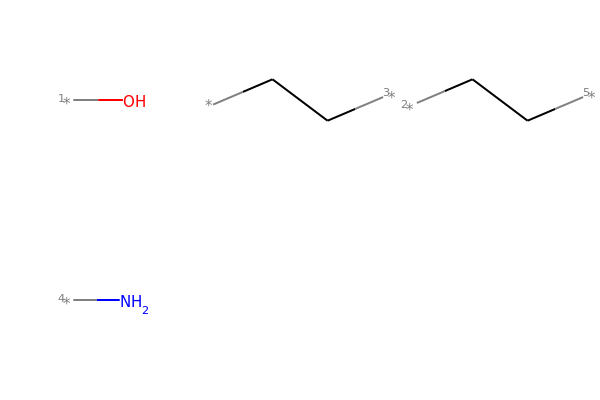
Chem.FragmentOnSomeBonds() will fragment according to all permutations of numToBreak bonds at a time
(numToBreak defaults to 1), and return tuple of molecules with numToBreak cuts applied. By default,
addDummies=True, so empty valences are filled with dummy atoms:
mol2_f_tuple = Chem.FragmentOnSomeBonds(mol2, (0, 2, 4))


Finally, you can manually cut bonds using Chem.RWMol.RemoveBonds:
with Chem.RWMol(mol) as rwmol: for b_idx in [0, 2, 4]: b = rwmol.GetBondWithIdx(b_idx) rwmol.RemoveBond(b.GetBeginAtomIdx(), b.GetEndAtomIdx())
And then call Chem.GetMolFrags() to get sanitized fragments where empty valences were filled with implicit hydrogens:
MolsToGridImage(Chem.GetMolFrags(rwmol, asMols=True))

Largest Fragment
Author: Andrew Dalke and Susan Leung
Index ID#: RDKitCB_31
Summary: Select largest fragment from a molecule
from rdkit import Chem from rdkit.Chem import rdmolops mol = Chem.MolFromSmiles('CCOC(=O)C(C)(C)OC1=CC=C(C=C1)Cl.CO.C1=CC(=CC=C1C(=O)NC@@HC(=O)O)NCC2=CN=C3C(=N2)C(=O)NC(=N3)N')
mol_frags = rdmolops.GetMolFrags(mol, asMols = True) largest_mol = max(mol_frags, default=mol, key=lambda m: m.GetNumAtoms()) print(Chem.MolToSmiles(largest_mol))
Nc1nc2ncc(CNc3ccc(C(=O)NC@@HC(=O)O)cc3)nc2c(=O)[nH]1
The same result can also be achieved with MolStandardize:
from rdkit import Chem from rdkit.Chem.MolStandardize import rdMolStandardize mol = Chem.MolFromSmiles('CCOC(=O)C(C)(C)OC1=CC=C(C=C1)Cl.CO.C1=CC(=CC=C1C(=O)NC@@HC(=O)O)NCC2=CN=C3C(=N2)C(=O)NC(=N3)N')
setup standardization module
largest_Fragment = rdMolStandardize.LargestFragmentChooser() largest_mol = largest_Fragment.choose(mol) print(Chem.MolToSmiles(largest_mol))
Nc1nc2ncc(CNc3ccc(C(=O)NC@@HC(=O)O)cc3)nc2c(=O)[nH]1
Sidechain-Core Enumeration
Author: Chris Earnshaw, Stephen Roughley, Greg Landrum (Vincent Scalfani added loop example)
Index ID#: RDKitCB_29
Summary: Replace sidechains on a core and enumerate the combinations.
from rdkit import Chem from rdkit.Chem import Draw from rdkit.Chem import AllChem
core is '*c1c(C)cccc1(O)'
chain is 'CN*'
rxn = AllChem.ReactionFromSmarts('[c:1][#0].[#0][:2]>>[c:1]-[:2]') reacts = (Chem.MolFromSmiles('c1c(C)cccc1(O)'),Chem.MolFromSmiles('CN')) products = rxn.RunReactants(reacts) # tuple print(len(products))
print(Chem.MolToSmiles(products[0][0])) # [0][0] to index out the rdchem mol object
The above reaction-based approach is flexible, however if you can generate your
sidechains in such a way that the atom you want to attach to the core
is the first one (atom zero), there's a somewhat easier way to do this
kind of simple replacement:
core = Chem.MolFromSmiles('*c1c(C)cccc1(O)') chain = Chem.MolFromSmiles('NC') products = Chem.ReplaceSubstructs(core,Chem.MolFromSmarts('[#0]'),chain) # tuple print(Chem.MolToSmiles(products[0]))
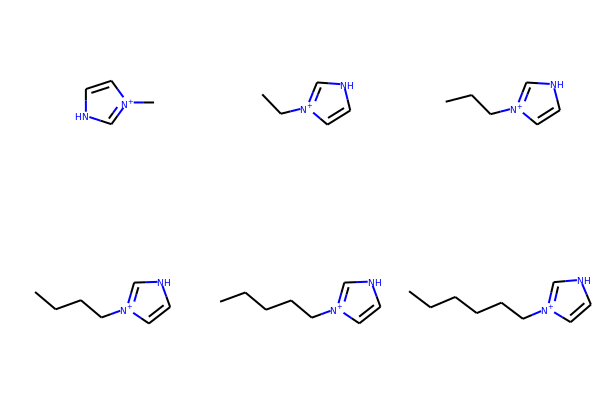
Here is an example in a loop for an imidazolium core with alkyl chains
core = Chem.MolFromSmiles('*[n+]1cc[nH]c1') chains = ['C','CC','CCC','CCCC','CCCCC','CCCCCC'] chainMols = [Chem.MolFromSmiles(chain) for chain in chains]
product_smi = [] for chainMol in chainMols: product_mol = Chem.ReplaceSubstructs(core,Chem.MolFromSmarts('[#0]'),chainMol) product_smi.append(Chem.MolToSmiles(product_mol[0])) print(product_smi)
['C[n+]1cc[nH]c1', 'CC[n+]1cc[nH]c1', 'CCC[n+]1cc[nH]c1', 'CCCC[n+]1cc[nH]c1', 'CCCCC[n+]1cc[nH]c1', 'CCCCCC[n+]1cc[nH]c1']
View the enumerated molecules:
Draw.MolsToGridImage([Chem.MolFromSmiles(smi) for smi in product_smi])
Neutralizing Molecules
Author: Noel O’Boyle (Vincent Scalfani adapted code for RDKit)
Index ID#: RDKitCB_33
Summary: Neutralize charged molecules by atom.
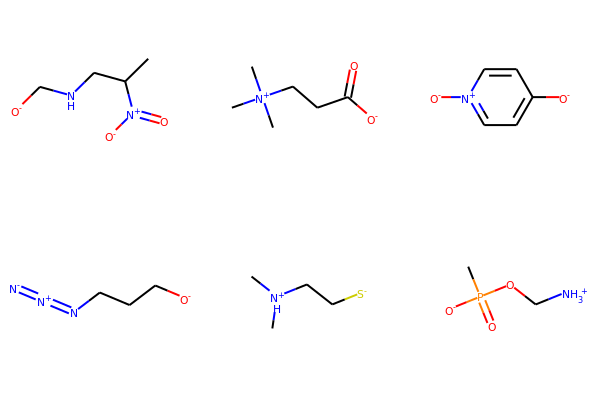
This neutralize_atoms() algorithm is adapted from Noel O’Boyle’s nocharge code. It is a neutralization by atom approach and neutralizes atoms with a +1 or -1 charge by removing or adding hydrogen where possible. The SMARTS pattern checks for a hydrogen in +1 charged atoms and checks for no neighbors with a negative charge (for +1 atoms) and no neighbors with a positive charge (for -1 atoms), this is to avoid altering molecules with charge separation (e.g., nitro groups).
The neutralize_atoms() function differs from the rdMolStandardize.Uncharger behavior. See the MolVS documentation for Uncharger:
https://molvs.readthedocs.io/en/latest/api.html#molvs-charge
“This class uncharges molecules by adding and/or removing hydrogens. In cases where there is a positive charge that is not neutralizable, any corresponding negative charge is also preserved.”
As an example, rdMolStandardize.Uncharger will not change charges on C[N+](C)(C)CCC([O-])=O, as there is a positive charge that is not neutralizable. In contrast, the neutralize_atoms() function will attempt to neutralize any atoms it can (in this case to C[N+](C)(C)CCC(=O)O). That is, neutralize_atoms() ignores the overall charge on the molecule, and attempts to neutralize charges even if the neutralization introduces an overall formal charge on the molecule. See below for a comparison.
from rdkit import Chem from rdkit.Chem import AllChem from rdkit.Chem import Draw
list of SMILES
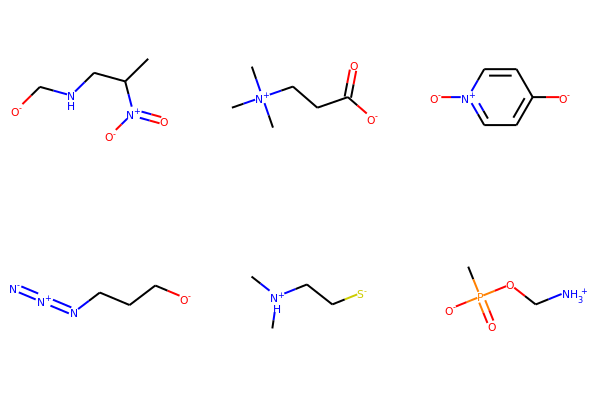
smiList = ['CC(CNC[O-])N+=O', 'CN+(C)CCC([O-])=O', '[O-]C1=CC=N+C=C1', '[O-]CCCN=[N+]=[N-]', 'CNH+CC[S-]', 'CP([O-])(=O)OC[NH3+]']
Create RDKit molecular objects
mols = [Chem.MolFromSmiles(m) for m in smiList]
display
Draw.MolsToGridImage(mols,molsPerRow=3,subImgSize=(200,200))
def neutralize_atoms(mol): pattern = Chem.MolFromSmarts("[+1!h0!$([]~[-1,-2,-3,-4]),-1!$([]~[+1,+2,+3,+4])]") at_matches = mol.GetSubstructMatches(pattern) at_matches_list = [y[0] for y in at_matches] if len(at_matches_list) > 0: for at_idx in at_matches_list: atom = mol.GetAtomWithIdx(at_idx) chg = atom.GetFormalCharge() hcount = atom.GetTotalNumHs() atom.SetFormalCharge(0) atom.SetNumExplicitHs(hcount - chg) atom.UpdatePropertyCache() return mol
Neutralize molecules by atom
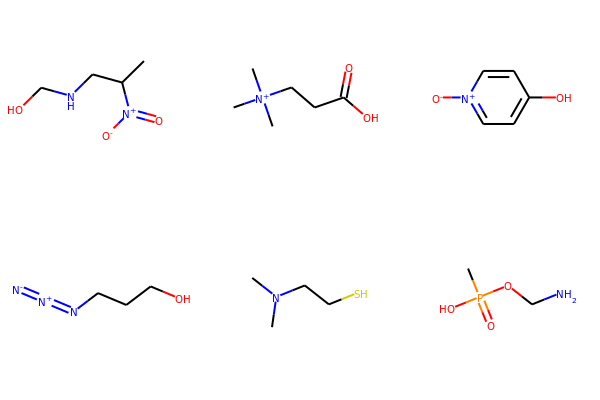
for mol in mols: neutralize_atoms(mol) print(Chem.MolToSmiles(mol))
CC(CNCO)N+[O-] CN+(C)CCC(=O)O [O-][n+]1ccc(O)cc1 [N-]=[N+]=NCCCO CN(C)CCS CP(=O)(O)OCN
Draw.MolsToGridImage(mols,molsPerRow=3, subImgSize=(200,200))
Compare to rdMolStandardize.Uncharger results:
from rdkit.Chem.MolStandardize import rdMolStandardize un = rdMolStandardize.Uncharger() mols2 = [Chem.MolFromSmiles(m) for m in smiList]
for mol2 in mols2: un.uncharge(mol2) print(Chem.MolToSmiles(mol2))
CC(CNC[O-])N+[O-] CN+(C)CCC(=O)[O-] [O-]c1ccn+cc1 [N-]=[N+]=NCCC[O-] CNH+CC[S-] CP(=O)([O-])OC[NH3+]
Draw.MolsToGridImage(mols2,molsPerRow=3,subImgSize=(200,200))
Substructure Matching
Functional Group with SMARTS queries
Author: Paulo Tosco
Index ID#: RDKitCB_10
Summary: Match a functional group (e.g., alcohol) with a SMARTS query
from rdkit import Chem from rdkit.Chem.Draw import IPythonConsole sucrose = "C([C@@H]1C@HO)O" sucrose_mol = Chem.MolFromSmiles(sucrose) primary_alcohol = Chem.MolFromSmarts("[CH2][OH1]") print(sucrose_mol.GetSubstructMatches(primary_alcohol))
((0, 22), (13, 14), (17, 18))
secondary_alcohol = Chem.MolFromSmarts("[CH1][OH1]") print(sucrose_mol.GetSubstructMatches(secondary_alcohol))
((2, 21), (3, 20), (4, 19), (9, 16), (10, 15))
Macrocycles with SMARTS queries
Author: Ivan Tubert-Brohman and David Cosgrove (Vincent Scalfani added example)
Index ID#: RDKitCB_13
Summary: Match a macrocycle ring with a SMARTS query
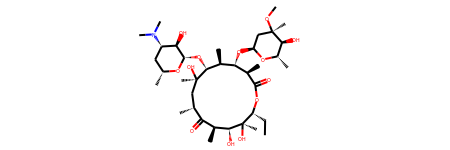
from rdkit import Chem from rdkit.Chem.Draw import IPythonConsole from rdkit.Chem import Draw erythromycin = Chem.MolFromSmiles("CC[C@@H]1C@@(C)O") erythromycin
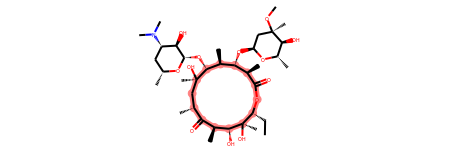
Define SMARTS pattern with ring size > 12
This is an RDKit SMARTS extension
macro = Chem.MolFromSmarts("[r{12-}]") print(erythromycin.GetSubstructMatches(macro))
((2,), (3,), (4,), (5,), (6,), (8,), (9,), (10,), (11,), (12,), (13,), (14,), (15,), (17,))
Returning Substructure Matches as SMILES
Author: Andrew Dalke
Index ID#: RDKitCB_18
Summary: Obtain SMILES of the matched substructure.
from rdkit import Chem pat = Chem.MolFromSmarts("[NX1]#[CX2]") #matches nitrile mol = Chem.MolFromSmiles("CCCC#N") # Butyronitrile atom_indices = mol.GetSubstructMatch(pat) print(atom_indices)
print(Chem.MolFragmentToSmiles(mol, atom_indices)) # returns the nitrile
Note however that if only the atom indices are given then Chem.MolFragmentToSmiles() will include all bonds
which connect those atoms, even if the original SMARTS does not match those bonds. For example:
pat = Chem.MolFromSmarts("~**") # match 4 linear atoms
mol = Chem.MolFromSmiles("C1CCC1") # ring of size 4
atom_indices = mol.GetSubstructMatch(pat)
print(atom_indices)
print(Chem.MolFragmentToSmiles(mol, atom_indices)) # returns the ring
If this is important, then you need to pass the correct bond indices to MolFragmentToSmiles().
This can be done by using the bonds in the query graph to get the bond indices in the molecule graph.
def get_match_bond_indices(query, mol, match_atom_indices): bond_indices = [] for query_bond in query.GetBonds(): atom_index1 = match_atom_indices[query_bond.GetBeginAtomIdx()] atom_index2 = match_atom_indices[query_bond.GetEndAtomIdx()] bond_indices.append(mol.GetBondBetweenAtoms( atom_index1, atom_index2).GetIdx()) return bond_indices
bond_indices = get_match_bond_indices(pat, mol, atom_indices) print(bond_indices)
print(Chem.MolFragmentToSmiles(mol, atom_indices, bond_indices))
Within the Same Fragment
Author: Greg Landrum
Index ID#: RDKitCB_20
Summary: Match a pattern only within the same fragment.
p = Chem.MolFromSmarts('O.N')
define a function where matches are contained in a single fragment
def fragsearch(m,p): matches = [set(x) for x in m.GetSubstructMatches(p)] frags = [set(y) for y in Chem.GetMolFrags(m)] # had to add this line for code to work for frag in frags: for match in matches: if match.issubset(frag): return match return False
m1 = Chem.MolFromSmiles('OCCCN.CCC') m1

m2 = Chem.MolFromSmiles('OCCC.CCCN') m2
print(m1.HasSubstructMatch(p))
print(m2.HasSubstructMatch(p))
Descriptor Calculations
Molecule Hash Strings
Author: Vincent Scalfani and Takayuki Serizawa
Index ID#: RDKitCB_21
Summary: Calculate hash strings for molecules with the NextMove MolHash functionality within RDKit.
Reference Note: Examples from O’Boyle and Sayle [2]
from rdkit import Chem from rdkit.Chem import rdMolHash import rdkit
s = Chem.MolFromSmiles('CC(C(C1=CC(=C(C=C1)O)O)O)N(C)C(=O)OCC2=CC=CC=C2') s

View all of the MolHash hashing functions types with the names method.
molhashf = rdMolHash.HashFunction.names print(molhashf)
{'AnonymousGraph': rdkit.Chem.rdMolHash.HashFunction.AnonymousGraph, 'ElementGraph': rdkit.Chem.rdMolHash.HashFunction.ElementGraph, 'CanonicalSmiles': rdkit.Chem.rdMolHash.HashFunction.CanonicalSmiles, 'MurckoScaffold': rdkit.Chem.rdMolHash.HashFunction.MurckoScaffold, 'ExtendedMurcko': rdkit.Chem.rdMolHash.HashFunction.ExtendedMurcko, 'MolFormula': rdkit.Chem.rdMolHash.HashFunction.MolFormula, 'AtomBondCounts': rdkit.Chem.rdMolHash.HashFunction.AtomBondCounts, 'DegreeVector': rdkit.Chem.rdMolHash.HashFunction.DegreeVector, 'Mesomer': rdkit.Chem.rdMolHash.HashFunction.Mesomer, 'HetAtomTautomer': rdkit.Chem.rdMolHash.HashFunction.HetAtomTautomer, 'HetAtomProtomer': rdkit.Chem.rdMolHash.HashFunction.HetAtomProtomer, 'RedoxPair': rdkit.Chem.rdMolHash.HashFunction.RedoxPair, 'Regioisomer': rdkit.Chem.rdMolHash.HashFunction.Regioisomer, 'NetCharge': rdkit.Chem.rdMolHash.HashFunction.NetCharge, 'SmallWorldIndexBR': rdkit.Chem.rdMolHash.HashFunction.SmallWorldIndexBR, 'SmallWorldIndexBRL': rdkit.Chem.rdMolHash.HashFunction.SmallWorldIndexBRL, 'ArthorSubstructureOrder': rdkit.Chem.rdMolHash.HashFunction.ArthorSubstructureOrder, 'HetAtomTautomerv2': rdkit.Chem.rdMolHash.HashFunction.HetAtomTautomerv2, 'HetAtomProtomerv2': rdkit.Chem.rdMolHash.HashFunction.HetAtomProtomerv2}
Generate MolHashes for molecule 's' with all defined hash functions.
for i, j in molhashf.items(): print(i, rdMolHash.MolHash(s, j))
AnonymousGraph 1(()()()(*)2*2)*1 ElementGraph CC(C(O)C1CCC(O)C(O)C1)N(C)C(O)OCC1CCCCC1 CanonicalSmiles CC(C(O)c1ccc(O)c(O)c1)N(C)C(=O)OCc1ccccc1 MurckoScaffold c1ccc(CCNCOCc2ccccc2)cc1 ExtendedMurcko c1ccc(C()C(*)N()C(=)OCc2ccccc2)cc1 MolFormula C18H21NO5 AtomBondCounts 24,25 DegreeVector 0,8,10,6 Mesomer CC(C(O)[C]1[CH][CH]CC[CH]1)N(C)COC[C]1[CH][CH][CH][CH][CH]1_0 HetAtomTautomer CC(C([O])[C]1[CH][CH]CC[CH]1)N(C)COC[C]1[CH][CH][CH][CH][CH]1_3_0 HetAtomProtomer CC(C([O])[C]1[CH][CH]CC[CH]1)N(C)COC[C]1[CH][CH][CH][CH][CH]1_3 RedoxPair CC(C(O)[C]1[CH][CH]CC[CH]1)N(C)COC[C]1[CH][CH][CH][CH][CH]1 Regioisomer *C.*CCC.*O.*O.O.OC(=O)N().C.c1ccccc1.c1ccccc1 NetCharge 0 SmallWorldIndexBR B25R2 SmallWorldIndexBRL B25R2L10 ArthorSubstructureOrder 00180019010012000600009b000000 HetAtomTautomerv2 [CH3]-CH-N-C-[O]-[CH2]-[c]1:[cH]:[cH]:[cH]:[cH]:[cH]:1_5_0 HetAtomProtomerv2 [CH3]-CH-N-C-[O]-[CH2]-[c]1:[cH]:[cH]:[cH]:[cH]:[cH]:1_5
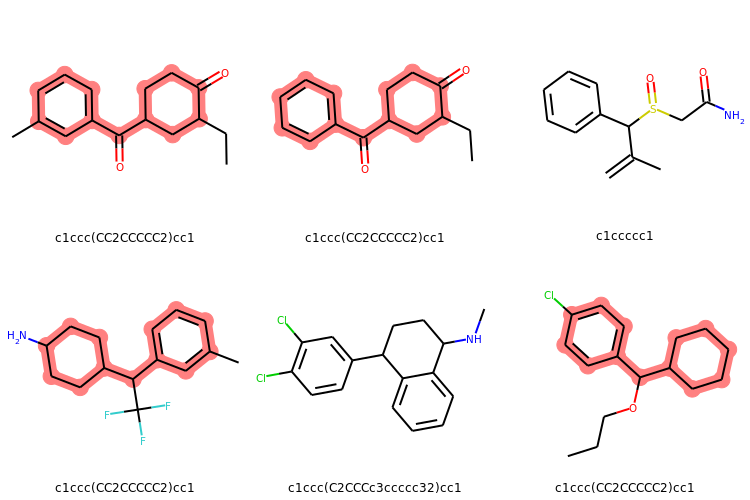
Murcko Scaffold Hashes (from slide 16 in [ref2])
Create a list of SMILES
mList = ['CCC1CC(CCC1=O)C(=O)C1=CC=CC(C)=C1','CCC1CC(CCC1=O)C(=O)C1=CC=CC=C1',
'CC(=C)C(C1=CC=CC=C1)S(=O)CC(N)=O','CC1=CC(=CC=C1)C(C1CCC(N)CC1)C(F)(F)F',
'CNC1CCC(C2=CC(Cl)=C(Cl)C=C2)C2=CC=CC=C12','CCCOC(C1CCCCC1)C1=CC=C(Cl)C=C1']
Loop through the SMILES mList and create RDKit molecular objects
mMols = [Chem.MolFromSmiles(m) for m in mList]
Calculate Murcko Scaffold Hashes
murckoHashList = [rdMolHash.MolHash(mMol, rdkit.Chem.rdMolHash.HashFunction.MurckoScaffold) for mMol in mMols] print(murckoHashList)
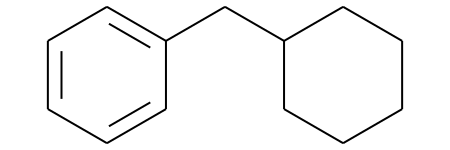
['c1ccc(CC2CCCCC2)cc1', 'c1ccc(CC2CCCCC2)cc1', 'c1ccccc1', 'c1ccc(CC2CCCCC2)cc1', 'c1ccc(C2CCCc3ccccc32)cc1', 'c1ccc(CC2CCCCC2)cc1']
Get the most frequent Murcko Scaffold Hash
def mostFreq(list): return max(set(list), key=list.count) mostFreq_murckoHash = mostFreq(murckoHashList) print(mostFreq_murckoHash)
mostFreq_murckoHash_mol = Chem.MolFromSmiles('c1ccc(CC2CCCCC2)cc1') mostFreq_murckoHash_mol
Display molecules with MurkoHash as legends and highlight the mostFreq_murckoHash
highlight_mostFreq_murckoHash = [mMol.GetSubstructMatch(mostFreq_murckoHash_mol) for mMol in mMols] Draw.MolsToGridImage(mMols,legends=[murckoHash for murckoHash in murckoHashList], highlightAtomLists = highlight_mostFreq_murckoHash, subImgSize=(250,250), useSVG=False)
Regioisomer Hashes (from slide 17 in [ref2])
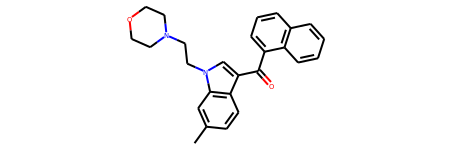
Find Regioisomer matches for this molecule
r0 = Chem.MolFromSmiles('CC1=CC2=C(C=C1)C(=CN2CCN1CCOCC1)C(=O)C1=CC=CC2=C1C=CC=C2') r0
Calculate the regioisomer hash for r0
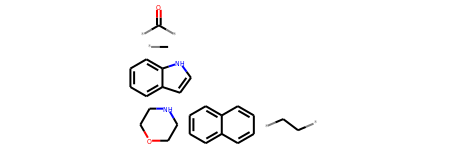
r0_regioHash = rdMolHash.MolHash(r0,rdkit.Chem.rdMolHash.HashFunction.Regioisomer) print(r0_regioHash)
*C.C()=O.CC.C1COCCN1.c1ccc2[nH]ccc2c1.c1ccc2ccccc2c1
r0_regioHash_mol = Chem.MolFromSmiles('*C.C()=O.CC.C1COCCN1.c1ccc2[nH]ccc2c1.c1ccc2ccccc2c1') r0_regioHash_mol
Create a list of SMILES
rList = ['CC1=CC2=C(C=C1)C(=CN2CCN1CCOCC1)C(=O)C1=CC=CC2=C1C=CC=C2',
'CCCCCN1C=C(C2=CC=CC=C21)C(=O)C3=CC=CC4=CC=CC=C43',
'CC1COCCN1CCN1C=C(C(=O)C2=CC=CC3=C2C=CC=C3)C2=C1C=CC=C2',
'CC1=CC=C(C(=O)C2=CN(CCN3CCOCC3)C3=C2C=CC=C3)C2=C1C=CC=C2',
'CC1=C(CCN2CCOCC2)C2=C(C=CC=C2)N1C(=O)C1=CC=CC2=CC=CC=C12',
'CN1CCN(C(C1)CN2C=C(C3=CC=CC=C32)C(=O)C4=CC=CC5=CC=CC=C54)C']
Loop through the SMILES rList and create RDKit molecular objects
rMols = [Chem.MolFromSmiles(r) for r in rList]
Calculate Regioisomer Hashes
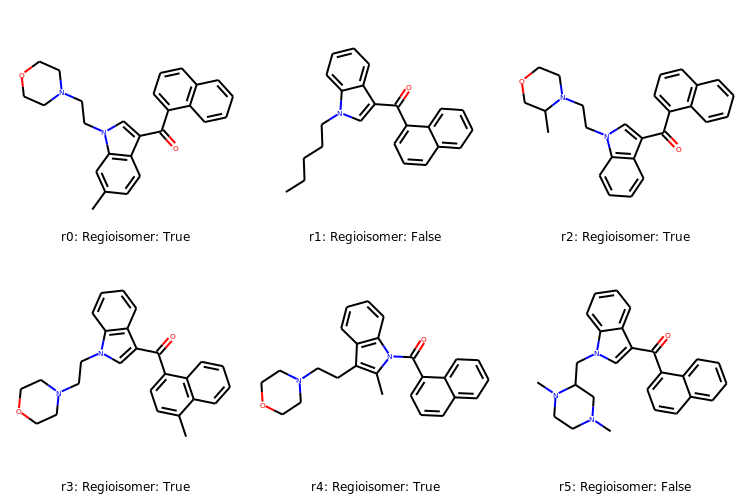
regioHashList = [rdMolHash.MolHash(rMol, rdkit.Chem.rdMolHash.HashFunction.Regioisomer) for rMol in rMols] print(regioHashList)
['*C.C()=O.CC.C1COCCN1.c1ccc2[nH]ccc2c1.c1ccc2ccccc2c1', 'C()=O.*CCCCC.c1ccc2[nH]ccc2c1.c1ccc2ccccc2c1', '*C.C()=O.CC.C1COCCN1.c1ccc2[nH]ccc2c1.c1ccc2ccccc2c1', '*C.C()=O.CC.C1COCCN1.c1ccc2[nH]ccc2c1.c1ccc2ccccc2c1', '*C.C()=O.CC.C1COCCN1.c1ccc2[nH]ccc2c1.c1ccc2ccccc2c1', '*C.*C.C()=O.C.C1CNCCN1.c1ccc2[nH]ccc2c1.c1ccc2ccccc2c1']
rmatches =[] for regioHash in regioHashList: if regioHash == r0_regioHash: print('Regioisomer: True') rmatches.append('Regioisomer: True') else: print('Regioisomer: False') rmatches.append('Regioisomer: False')
Regioisomer: True Regioisomer: False Regioisomer: True Regioisomer: True Regioisomer: True Regioisomer: False
Create some labels
index = ['r0: ','r1: ','r2: ','r3: ','r4: ','r5: '] labelList = [rmatches + index for rmatches,index in zip(index,rmatches)]
Display molecules with labels
Draw.MolsToGridImage(rMols,legends=[label for label in labelList], subImgSize=(250,250), useSVG=False)
note, that r0 is the initial molecule we were interested in.
Contiguous Rotatable Bonds
Author: Paulo Tosco
Index ID#: RDKitCB_22
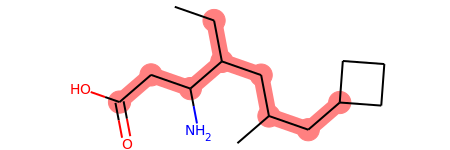
Summary: Calculate the largest number of contiguous rotable bonds.
from rdkit import Chem from rdkit.Chem.Lipinski import RotatableBondSmarts
mol = Chem.MolFromSmiles('CCC(CC(C)CC1CCC1)C(CC(=O)O)N') mol
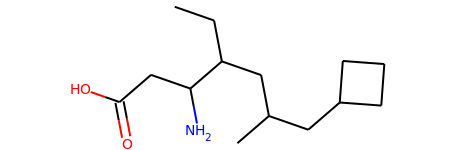
def find_bond_groups(mol): """Find groups of contiguous rotatable bonds and return them sorted by decreasing size""" rot_atom_pairs = mol.GetSubstructMatches(RotatableBondSmarts) rot_bond_set = set([mol.GetBondBetweenAtoms(*ap).GetIdx() for ap in rot_atom_pairs]) rot_bond_groups = [] while (rot_bond_set): i = rot_bond_set.pop() connected_bond_set = set([i]) stack = [i] while (stack): i = stack.pop() b = mol.GetBondWithIdx(i) bonds = [] for a in (b.GetBeginAtom(), b.GetEndAtom()): bonds.extend([b.GetIdx() for b in a.GetBonds() if ( (b.GetIdx() in rot_bond_set) and (not (b.GetIdx() in connected_bond_set)))]) connected_bond_set.update(bonds) stack.extend(bonds) rot_bond_set.difference_update(connected_bond_set) rot_bond_groups.append(tuple(connected_bond_set)) return tuple(sorted(rot_bond_groups, reverse = True, key = lambda x: len(x)))
Find groups of contiguous rotatable bonds in mol
bond_groups = find_bond_groups(mol)
As bond groups are sorted by decreasing size, the size of the first group (if any)
is the largest number of contiguous rotatable bonds in mol
largest_n_cont_rot_bonds = len(bond_groups[0]) if bond_groups else 0
print(largest_n_cont_rot_bonds)
((1, 2, 3, 5, 6, 10, 11, 12),)
Writing Molecules
Kekule SMILES
Author: Paulo Tosco
Index ID#: RDKitCB_4
Summary: Kekulize a molecule and write Kekule SMILES
from rdkit import Chem smi = "CN1C(NC2=NC=CC=C2)=CC=C1" mol = Chem.MolFromSmiles(smi) print(Chem.MolToSmiles(mol))
Chem.Kekulize(mol) print(Chem.MolToSmiles(mol, kekuleSmiles=True))
Isomeric SMILES without isotopes
Author: Andrew Dalke
Index ID#: RDKitCB_5
Summary: Write Isomeric SMILES without isotope information (i.e., only stereochemistry)
from rdkit import Chem def MolWithoutIsotopesToSmiles(mol): atom_data = [(atom, atom.GetIsotope()) for atom in mol.GetAtoms()] for atom, isotope in atom_data:
restore original isotope values
   if isotope:
       atom.SetIsotope(0)
smiles = Chem.MolToSmiles(mol) for atom, isotope in atom_data: if isotope: atom.SetIsotope(isotope) return smiles
mol = Chem.MolFromSmiles("[19F]13C@H[35Cl]") print(MolWithoutIsotopesToSmiles(mol))
N.B. There are two limitations noted with this Isomeric SMILES without isotopes method including with isotopic hydrogens, and a requirement to recalculate stereochemistry. See the source discussion linked above for further explanation and examples.
Reactions
Reversing Reactions
Author: Greg Landrum
Index ID#: RDKitCB_6
Summary: Decompose a reaction product into its reactants
Reference Note: Example reaction from Hartenfeller [1]
from rdkit import Chem from rdkit.Chem import AllChem from rdkit.Chem import Draw
Pictet-Spengler rxn
rxn = AllChem.ReactionFromSmarts('[cH1:1]1:c:2:[c:3]:[c:4]:[c:5]:[c:6]:1.[#6:11]-[CH1;R0:10]=[OD1]>>[c:1]12:c:2:[c:3]:[c:4]:[c:5]:[c:6]:1') rxn
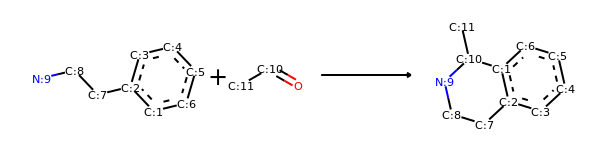
rxn2 = AllChem.ChemicalReaction() for i in range(rxn.GetNumReactantTemplates()): rxn2.AddProductTemplate(rxn.GetReactantTemplate(i)) for i in range(rxn.GetNumProductTemplates()): rxn2.AddReactantTemplate(rxn.GetProductTemplate(i)) rxn2.Initialize()
reacts = [Chem.MolFromSmiles(x) for x in ('NCCc1ccccc1','C1CC1C(=O)')] ps = rxn.RunReactants(reacts) ps0 = ps[0] for p in ps0: Chem.SanitizeMol(p) Draw.MolsToGridImage(ps0)
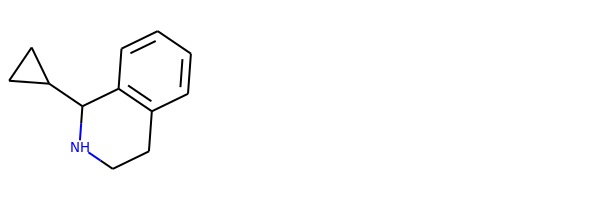
reacts = ps0 rps = rxn2.RunReactants(reacts) rps0 = rps[0] for rp in rps0: Chem.SanitizeMol(rp) Draw.MolsToGridImage(rps0)
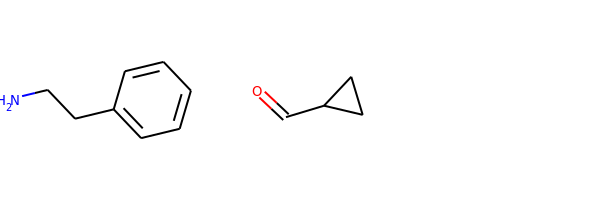
N.B. This approach isn’t perfect and won’t work for every reaction. Reactions that include extensive query information in the original reactants are very likely to be problematic.
Reaction Fingerprints and Similarity
Author: Greg Landrum
Index ID#: RDKitCB_27
Summary: Construct a reaction fingerprint and compute similarity
Reference Note: Reaction fingerprinting algorithm [6]
from rdkit import Chem from rdkit.Chem import rdChemReactions from rdkit.Chem import DataStructs
construct the chemical reactions
rxn1 = rdChemReactions.ReactionFromSmarts('CCCO>>CCC=O') rxn2 = rdChemReactions.ReactionFromSmarts('CC(O)C>>CC(=O)C') rxn3 = rdChemReactions.ReactionFromSmarts('NCCO>>NCC=O')
construct difference fingerprint (subtracts reactant fingerprint from product)
fp1 = rdChemReactions.CreateDifferenceFingerprintForReaction(rxn1) fp2 = rdChemReactions.CreateDifferenceFingerprintForReaction(rxn2) fp3 = rdChemReactions.CreateDifferenceFingerprintForReaction(rxn3)
print(DataStructs.TanimotoSimilarity(fp1,fp2))
The similarity between fp1 and fp2 is zero because as far as the reaction
fingerprint is concerned, the parts which change within the reactions have
nothing in common with each other.
In contrast, fp1 and fp3 have some common parts
print(DataStructs.TanimotoSimilarity(fp1,fp3))
Error Messages
Explicit Valence Error - Partial Sanitization
Author: Greg Landrum
Index ID#: RDKitCB_15
Summary: Create a mol object with skipping valence check, followed by a partial sanitization. N.B. Use caution, and make sure your molecules actually make sense before doing this!
from rdkit import Chem from rdkit.Chem import rdqueries
The default RDKit behavior is to reject hypervalent P, so you need to set sanitize=False:
m = Chem.MolFromSmiles('FP-(F)(F)(F)F.CN(C)C(F)=N+C',sanitize=False) m

The arrangement of the six F around the P is not the octahedral arrangement we would expect because the RDKit has not assigned a hybridization to the P (or any other atoms):
Build a query for the P
q = rdqueries.AtomNumEqualsQueryAtom(15)
Select the first and only P
phosphorus = m.GetAtomsMatchingQuery(q)[0]
print(phosphorus.GetHybridization())
Next, you probably want to at least do a partial sanitization so that the molecule is actually useful. In this case, setting the hybridization is key:
Regenerate computed properties like implicit valence and ring information
m.UpdatePropertyCache(strict=False)
Apply several sanitization rules
Chem.SanitizeMol(m,Chem.SanitizeFlags.SANITIZE_FINDRADICALS|Chem.SanitizeFlags.SANITIZE_KEKULIZE|Chem.SanitizeFlags.SANITIZE_SETAROMATICITY|Chem.SanitizeFlags.SANITIZE_SETCONJUGATION|Chem.SanitizeFlags.SANITIZE_SETHYBRIDIZATION|Chem.SanitizeFlags.SANITIZE_SYMMRINGS,catchErrors=True) m

Now the expected octahedral arrangement of the six F around the P exists because the hybridization of P has been assigned as SP3D2:
print(phosphorus.GetHybridization())
Detect Chemistry Problems
Author: Greg Landrum
Index ID#: RDKitCB_14
Summary: Identify and capture error messages when creating mol objects.
from rdkit import Chem m = Chem.MolFromSmiles('CN(C)(C)C', sanitize=False) problems = Chem.DetectChemistryProblems(m) print(len(problems))
print(problems[0].GetType()) print(problems[0].GetAtomIdx()) print(problems[0].Message())
AtomValenceException 1 Explicit valence for atom # 1 N, 4, is greater than permitted
m2 = Chem.MolFromSmiles('c1cncc1',sanitize=False) problems = Chem.DetectChemistryProblems(m2) print(len(problems))
print(problems[0].GetType()) print(problems[0].GetAtomIndices()) print(problems[0].Message())
KekulizeException (0, 1, 2, 3, 4) Can't kekulize mol. Unkekulized atoms: 0 1 2 3 4
Miscellaneous Topics
Explicit Valence and Number of Hydrogens
Author: Michael Palmer and Greg Landrum
Index ID#: RDKitCB_11
Summary: Calculate the explicit valence, number of explicit and implicit hydrogens, and total number of hydrogens on an atom. See the link for an important explanation about terminology and implementation of these methods in RDKit. Highlights are presented below.
Most of the time (exception is explained below), explicit refers to atoms that are in the graph and implicit refers to atoms that are not in the graph (i.e., Hydrogens). So given that the ring is aromatic (e.g.,in pyrrole), the explicit valence of each of the atoms (ignoring the Hs that are not present in the graph) in pyrrole is 3. If you want the Hydrogen count, use GetTotalNumHs(); the total number of Hs for each atom is one:
from rdkit import Chem pyrrole = Chem.MolFromSmiles('C1=CNC=C1') for atom in pyrrole.GetAtoms(): print(atom.GetSymbol(), atom.GetExplicitValence(), atom.GetTotalNumHs())
C 3 1 C 3 1 N 3 1 C 3 1 C 3 1
In RDKit, there is overlapping nomenclature around the use of the words “explicit” and “implicit” when it comes to Hydrogens. When you specify the Hydrogens for an atom inside of square brackets in the SMILES, it becomes an “explicit” hydrogen as far as atom.GetNumExplicitHs() is concerned. Here is an example:
pyrrole = Chem.MolFromSmiles('C1=CNC=C1') mol1 = Chem.MolFromSmiles('C1=CNCC1') mol2 = Chem.MolFromSmiles('C1=C[NH]CC1')
for atom in pyrrole.GetAtoms(): print(atom.GetSymbol(), atom.GetExplicitValence(), atom.GetNumImplicitHs(), atom.GetNumExplicitHs(), atom.GetTotalNumHs())
C 3 1 0 1 C 3 1 0 1 N 3 0 1 1 C 3 1 0 1 C 3 1 0 1
for atom in mol1.GetAtoms(): print(atom.GetSymbol(), atom.GetExplicitValence(), atom.GetNumImplicitHs(), atom.GetNumExplicitHs(), atom.GetTotalNumHs())
C 3 1 0 1 C 3 1 0 1 N 2 1 0 1 C 2 2 0 2 C 2 2 0 2
for atom in mol2.GetAtoms(): print(atom.GetSymbol(), atom.GetExplicitValence(), atom.GetNumImplicitHs(), atom.GetNumExplicitHs(), atom.GetTotalNumHs())
C 3 1 0 1 C 3 1 0 1 N 3 0 1 1 C 2 2 0 2 C 2 2 0 2
Wiener Index
Author: Greg Landrum
Index ID#: RDKitCB_12
Summary: Calculate the Wiener index (a topological index of a molecule)
from rdkit import Chem def wiener_index(m): res = 0 amat = Chem.GetDistanceMatrix(m) num_atoms = m.GetNumAtoms() for i in range(num_atoms): for j in range(i+1,num_atoms): res += amat[i][j] return res
butane = Chem.MolFromSmiles('CCCC') print(wiener_index(butane))
isobutane = Chem.MolFromSmiles('CC(C)C') print(wiener_index(isobutane))
Organometallics with Dative Bonds
Author: Greg Landrum
Index ID#: RDKitCB_19
Summary: Process organometallic SMILES by detecting single bonds between metals and replacing with dative bonds.
from rdkit import Chem from rdkit.Chem.Draw import IPythonConsole
def is_transition_metal(at): n = at.GetAtomicNum() return (n>=22 and n<=29) or (n>=40 and n<=47) or (n>=72 and n<=79) def set_dative_bonds(mol, fromAtoms=(7,8)): """ convert some bonds to dative
Replaces some single bonds between metals and atoms with atomic numbers in fomAtoms
with dative bonds. The replacement is only done if the atom has "too many" bonds.

Returns the modified molecule.

"""
pt = Chem.GetPeriodicTable()
rwmol = Chem.RWMol(mol)
rwmol.UpdatePropertyCache(strict=False)
metals = [at for at in rwmol.GetAtoms() if is_transition_metal(at)]
for metal in metals:
    for nbr in metal.GetNeighbors():
        if nbr.GetAtomicNum() in fromAtoms and \
           nbr.GetExplicitValence()>pt.GetDefaultValence(nbr.GetAtomicNum()) and \
           rwmol.GetBondBetweenAtoms(nbr.GetIdx(),metal.GetIdx()).GetBondType() == Chem.BondType.SINGLE:
            rwmol.RemoveBond(nbr.GetIdx(),metal.GetIdx())
            rwmol.AddBond(nbr.GetIdx(),metal.GetIdx(),Chem.BondType.DATIVE)
return rwmol
m = Chem.MolFromSmiles('CN(C)(C)[Pt]', sanitize=False) m2 = set_dative_bonds(m) m2

we can check the bond between nitrogen and platinum
print(m2.GetBondBetweenAtoms(1,4).GetBondType())
It also shows up in the output SMILES
This is an RDKit extension to SMILES
print(Chem.MolToSmiles(m2))
Enumerate SMILES
Author: Guillaume Godin and Greg Landrum
Index ID#: RDKitCB_24
Summary: Enumerate variations of SMILES strings for the same molecule.
create a mol object
mol = Chem.MolFromSmiles('CC(N)C1CC1')
Generate 100 random SMILES
smis = [] for i in range(100): smis.append(Chem.MolToSmiles(mol,doRandom=True,canonical=False))
remove duplicates
smis_set = list(set(smis)) print(smis_set) # output order will be random; doctest skipped
['NC(C)C1CC1', 'C1(C(N)C)CC1', 'C(N)(C)C1CC1', 'CC(C1CC1)N', 'C1C(C(N)C)C1', 'C1C(C1)C(N)C', 'C(C1CC1)(C)N', 'C1(CC1)C(C)N', 'C1C(C(C)N)C1', 'C1CC1C(C)N', 'C(C1CC1)(N)C', 'C1(C(C)N)CC1', 'C1C(C1)C(C)N', 'C(C)(C1CC1)N', 'C1CC1C(N)C', 'C1(CC1)C(N)C', 'C(N)(C1CC1)C', 'NC(C1CC1)C', 'CC(N)C1CC1', 'C(C)(N)C1CC1']
If you need the multiple random SMILES strings to be reproducible,
the 2020.09 release has an option for this:
m = Chem.MolFromSmiles('Oc1ncc(OC(CC)C)cc1') print(Chem.MolToRandomSmilesVect(m,5)) # output order random; doctest skipped
['c1c(cnc(O)c1)OC(CC)C', 'c1c(cnc(c1)O)OC(CC)C', 'c1cc(O)ncc1OC(CC)C', 'O(C(CC)C)c1ccc(nc1)O', 'O(C(C)CC)c1cnc(cc1)O']
by default the results are not reproducible:
print(Chem.MolToRandomSmilesVect(m,5)) # output order random; doctest skipped
['c1nc(O)ccc1OC(CC)C', 'n1cc(OC(CC)C)ccc1O', 'c1c(OC(C)CC)ccc(O)n1', 'CCC(Oc1ccc(nc1)O)C', 'O(c1cnc(cc1)O)C(C)CC']
But we can provide a random number seed:
m = Chem.MolFromSmiles('Oc1ncc(OC(CC)C)cc1') s1 = Chem.MolToRandomSmilesVect(m,5,randomSeed=0xf00d) print(s1)
['Oc1ccc(OC(CC)C)cn1', 'CC(CC)Oc1cnc(O)cc1', 'c1(O)ncc(cc1)OC(C)CC', 'c1cc(cnc1O)OC(CC)C', 'c1c(OC(CC)C)cnc(c1)O']
s2 = Chem.MolToRandomSmilesVect(m,5,randomSeed=0xf00d) print(s2 == s1)
Reorder Atoms
Author: Jeffrey Van Santen and Paolo Tosco
Index ID#: RDKitCB_28
Summary: Create a canonical order of atoms independent of input.
from rdkit import Chem from rdkit.Chem.Draw import MolsToGridImage
m = Chem.MolFromSmiles("c1(C@HCC)cccc2ccccc12") m1 = Chem.MolFromSmiles("c12ccccc1c(ccc2)C@HCC") print(Chem.MolToSmiles(m) == Chem.MolToSmiles(m1))
check if current canonical atom ordering matches
m_neworder = tuple(zip(*sorted([(j, i) for i, j in enumerate(Chem.CanonicalRankAtoms(m))])))[1] m1_neworder = tuple(zip(*sorted([(j, i) for i, j in enumerate(Chem.CanonicalRankAtoms(m1))])))[1] print(m_neworder == m1_neworder)
add atom numbers in images
def addAtomIndices(mol): for i, a in enumerate(mol.GetAtoms()): a.SetAtomMapNum(i)
addAtomIndices(m) addAtomIndices(m1) MolsToGridImage((m, m1))
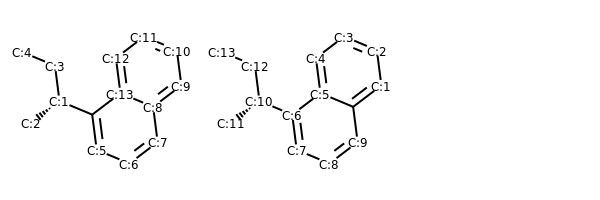
renumber atoms with same canonical ordering
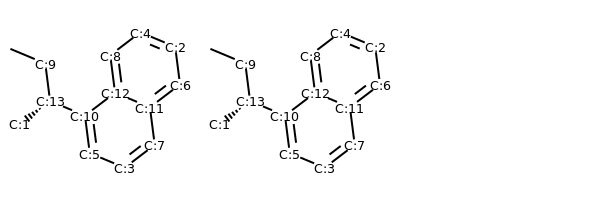
m_renum = Chem.RenumberAtoms(m, m_neworder) m1_renum = Chem.RenumberAtoms(m1, m1_neworder) addAtomIndices(m_renum) addAtomIndices(m1_renum) MolsToGridImage((m_renum, m1_renum))
Conformer Generation with ETKDG
Author: Shuzhe Wang
Source: Direct contribution to Cookbook
Index ID#: RDKitCB_25
Summary: Showcase various tricks for conformer generation with ETKDG
from rdkit import Chem from rdkit.Chem import AllChem
To yield more chemically meaningful conformers, Riniker and Landrum implemented the experimental torsion knowledge distance geometry (ETKDG) method [3] which uses torsion angle preferences from the Cambridge Structural Database (CSD) to correct the conformers after distance geometry has been used to generate them. The configs of various conformer generation options are stored in a EmbedParameter object. To explicitly call the ETKDG EmbedParameter object:
At the moment this is the default conformer generation routine in RDKit. A newer set of torsion angle potentials were published in 2016 [4], to use these instead:
params = AllChem.ETKDGv2()
In 2020, we devised some improvements to the ETKDG method for sampling small rings and macrocycles [5].
this includes addtional small ring torsion potentials
params = AllChem.srETKDGv3()
this includes additional macrocycle ring torsion potentials and macrocycle-specific handles
params = AllChem.ETKDGv3()
to use the two in conjunction, do:
params = AllChem.ETKDGv3() params.useSmallRingTorsions = True
a macrocycle attached to a small ring
mol = Chem.MolFromSmiles("C(OC(CCCCCCC(OCCSC(CCCCCC1)=O)=O)OCCSC1=O)N1CCOCC1") mol = Chem.AddHs(mol) AllChem.EmbedMultipleConfs(mol, numConfs = 3 , params = params)
One additional tool we used in the paper is changing the bounds matrix of a molecule during distance geometry. The following code modifies the default molecular bounds matrix, with the idea of confining the conformational space of the molecule:
from rdkit.Chem import rdDistGeom import rdkit.DistanceGeometry as DG
mol = Chem.MolFromSmiles("C1CCC1C") mol = Chem.AddHs(mol) bm = rdDistGeom.GetMoleculeBoundsMatrix(mol) bm[0,3] = 1.21 bm[3,0] = 1.20 bm[2,3] = 1.21 bm[3,2] = 1.20 bm[4,3] = 1.21 bm[3,4] = 1.20 DG.DoTriangleSmoothing(bm)
params.SetBoundsMat(bm)
Another tool we introduced is setting custom pairwise Coulombic interactions (CPCIs), which mimics additional electrostatic interactions between atom pairs to refine the embedded conformers. The setter takes in a dictionary of integer tuples as keys and reals as values. The following one-liner sets a repulsive (+ve) interaction of strength 0.9 e^2 between the atom indexed 0 and indexed 3, with the idea of keeping these two atoms further apart.
params.SetCPCI({ (0,3) : 0.9 } )
To use the EmbedParameter for conformer generation:
params.useRandomCoords = True
Note this is only an illustrative example, hydrogens are not added before conformer generation to keep the indices apparant
AllChem.EmbedMultipleConfs(mol, numConfs = 3 , params = params)
Both of these setters can be used to help sampling all kinds of molecules as the users see fit. Nevertheless, to facilitate using them in conformer generation of macrocycles, we devised the python package github.com/rinikerlab/cpeptools to provide chemcially intuitive bound matrices and CPCIs for macrocycles. Example usage cases are shown in the README.
References
License

This document is copyright (C) 2007-2020 by Greg Landrum and Vincent Scalfani.
This work is licensed under the Creative Commons Attribution-ShareAlike 4.0 License. To view a copy of this license, visit http://creativecommons.org/licenses/by-sa/4.0/or send a letter to Creative Commons, 543 Howard Street, 5th Floor, San Francisco, California, 94105, USA.
The intent of this license is similar to that of the RDKit itself. In simple words: “Do whatever you want with it, but please give us some credit.”