formicapunk (original) (raw)
The Steam command line client, which I need to download the game data for the Doom3 BFG shooter, is only available as an Linux i386 binary. As my main home computer is an arm64 box, this could be an issue, but today we have no less than three different ways to run a Linux i386 binary on arm64: Fex, Box32/64 and the older qemu-user mode. According to the Box64 benchmarks, qemu-user is the slowest of the three. But since this is only to run a command line tool downloader, where network speed is the bottleneck, this doesn’t matter a lot.
Running steamcmd outside of a chroot via qemu-user and dpkg multiarch support was failing me with the error i386-binfmt-P: Could not open '/lib/ld-linux.so.2': No such file or directory even after installing the i386 libc. So I went the way of qemu-user and a chroot environment, a bit more convoluted but I can run any i386 binaries there in the future.
Create a debian-i386 chroot environment via deboostrap:
$ sudo apt install qemu-user qemu-user-binfmt debootstrap
$ fakeroot debootstrap --foreign --arch=i386 debian-i386
$ sudo chroot debian-i386
# inside the chroot
# /debootstrap/debootstrap --second-stage
# exit
Add needed mounts to run binaries inside the chroot:
$ sudo mount --bind /dev/ debian-i386/dev/
$ sudo mount --bind /dev/pts debian-i386/dev/pts
$ sudo mount -t proc none  debian-i386/proc/
Install steamcmd in the chroot client:
$ sudo chroot debian-i386

# export LANG=C
# cat /etc/apt/sources.list
deb http://deb.debian.org/debian stable main contrib non-free
# apt update && apt install --yes steamcmd
# useradd --create-home --shell /bin/bash steam
# su - steam
$ steamcmd
... will download an updated version of the tool, and print a lot of tracing information

Steam> quit
From now on you can follow the Doom3 BFG instructions to download the game data.
Once you exit the chroot, the game data will be available at debian-i386/home/steam/
So I am using Debian on a System76 Arm64 (aarch64) workstation since 9 months, and I can say: everything works. It should be noted that I use very few proprietary software, so I rely mostly on Debian packages for what I am doing. What I can say is basically all open source software which exists today, takes care to build on aarch64 or is available as a binary, either in the Debian archive, in a Flatpak or Snap, or in a Github Artefact. From 3D games, to Kubernetes tooling, practically everything open source is compiled for aarch64 Linux as well. Same thing for server software, every container image built is also proposing an aarch64 binary today.
I could also add a standard PCI Express Soundblaster sound card, and the kernel recognized it without issues.
The major downside I had was that Wayland is not working on my Nvidia GPU, whether with Nouveau or the proprietary drivers, thus I am using Gnome with X11. Also on the proprietary side, I missed the Discourse client, but I am not using that much, and those video meetings tool which popped up in the COVID time are perfectly usable in the browser.
The situation is for me much better than in the 2000s when I used a Mac Mini (powerpc) with Debian, where the need for a Flash player at that time really limited the amount of online content I could access.
What do I get using aarch64 you ask ? The main reason for me was the curiosity to use a non x86 arch, and to have a 80 core / 128 GB RAM machine to do a Lab in a Box with OpenShift running on OpenStack, with Ceph and a bit of local LLM inference thrown in. In the end I have enough labs at work, so that need disappeared, but I still enjoy having that amount of power in a rather quiet machine for a standard 80W consumption.
Connected via serial console. Does not have a package manager, web or ssh server, but can play tetris in the terminal (bsdgames in Debian have the same tetris version packaged).

The limits of cryptography
Since this blog post is about security and cryptography, it makes sense to start with this XKCD reminder about the value of encryption: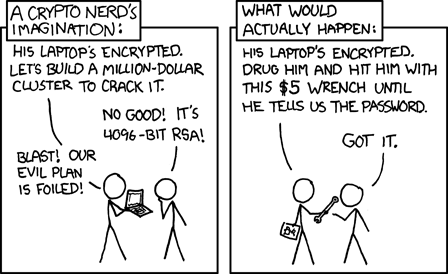 .
.
There is a similar, complementary discussion in this article: crypto can help but cannot safeguard against all actors.
Public Key encryption 101
GPG, the most widely used tool for end to end email encryption and signing software releases, is based on public key cryptography. In public key cryptography you have a private key, to keep very private and a public key you share to the world. If you use SSH with key authentication you know already the concept:
$ ls -1 .ssh/id_rsa*
.ssh/id_rsa
.ssh/id_rsa.pub
Here id_rsa is the private key and id_rsa.pub the public key.
GPG private key on a hardware token
I would like to store the private part of my GPG key on a hardware token. This provides extra security compared to storing the private key on a hard disk: as the private key stays on the device, you need physical access to the device to do anything with the private key. It also eases the usage of the private key on different computers, as you just have to take the hardware token with you without creating multiple copies of the precious private key.
That is the basic, some people explains the topic better than me.
The hardware token I chose is a YubiKey because I already use such a dongle for two factor authentication on salsa, the Debian gitlab forge.
Some terminology
Understanding GPG and even worse hardware tokens, is like sailing in an endless sea of acronyms and recommendation practices. Let us navigate:
First the generic name of a GPG hardware token is an OpenPGP smart card. Here we need to understand:
- OpenPGP is a standard for public key cryptography, GPG is an implementation of the standard. We refer to the device category by the name of the standard it implements: OpenPGP.
- the first existing hardware tokens had the form of a smart card, that is a credit-card form factor with a small chip inside. Today most devices implementing the OpenPGP card protocol take the form of an USB key. But even in the form of a USB key, the token will implement the generic smartcard protocol (CCID, for Chip Card Interface Device) so that it can talk to upper software layers.
Standards support in YubiKey
The YubiKey itself supports multiple standards, the OpenPGP card protocol being only one of many.
This is what my YubiKey supports:
$ ykman info | awk '/Applications/,0'
Applications
Yubico OTP  	Enabled
FIDO U2F    	Disabled
FIDO2       	Disabled
OATH        	Enabled
PIV         	Disabled
OpenPGP     	Enabled
YubiHSM Auth	Disabled
Since I already threw 5 acronyms on the paragraph above, I will not go in details into what OATH and PIV are. What is important for us here, is that we have OpenPGP enabled on the device, more important we can verify that GPG sees a card with:
gpg --card-status | grep -E '(Application type|Manufacturer)'
Application type .: OpenPGP
Manufacturer .....: Yubico
Next steps
Now with this basic understanding, you can follow the Debian Keyring maintainer guide for key creation good practises, and the Debian Wiki smart card article on how to move the private keys to the YubiKey. Although the article is for a different device, I also found the topic is even more better described in the NitroKey documentation.
XKCD License: https://xkcd.com/license.html
You can also comment this post via Mastodon
Email interface of the Debian bug tracker
The main interface of the Debian bug tracker, at http://bugs.debian.org, is e-mail, and modifications are made to existing bugs by sending an email to an address like 873518@bugs.Debian.org.
The web interface allows to browse bugs, but any addition to the bug itself will require an email client.
This sounds a bit weird in 2025, as http REST clients with Oauth access tokens for command line tools interacting with online resources are today the norm. However we should remember the Debian project goes back to 1993 and the bug tracker software debugs, was released in 1994. REST itself was first introduced in 2000, six years later.
In any case, using an email client to create or modify bug reports is not a bad idea per se:
- the internet mail protocol, SMTP, is a well known and standardized protocol defined in an IETF RFC.
- no need for account creation and authentication, you just need an email address to interact. There is a risk of spam, but in my experience this has been very low. When authentication is needed, Debian Developpers sign their work with their private GPG key.
- you can use the bug tracker using the interface of your choice: webmail, graphical mail clients like Thunderbird or Evolution, text clients like Mutt or Pine, or command line tools like bts.
A system wide minimal Mail Transfer Agent to send mail
We can configure bts as a SMTP client, with username and password. In SMTP client mode, we would need to enter the SMTP settings from ourmail service provider.
The other option is to configure a Mail Transfer Agent (MTA) which provides a system wide sendmail interface, that all command line and automation tools can use send email. For instance reportbug and git send-email are able to use the sendmail interface. Why a sendmail interface ? Because sendmail used to be the default MTA of Unix back in the days, thus many programs sending mails expect something which looks like sendmail locally.
A popular, maintained and packaged minimal MTA is msmtp, we are going to use it.
msmtp installation and configuration
Installation is just an apt away:
# apt install msmtp msmtp-mta
# msmtp --version
msmtp version 1.8.23
You can follow this blog post to configure msmtp, including saving your mail account credentials in the Gnome keyring.
Once installed, you can verify that msmtp-mta created a sendmail symlink.
$ ls -l /usr/sbin/sendmail
lrwxrwxrwx 1 root root 12 16 avril  2025 /usr/sbin/sendmail -> ../bin/msmtp
bts, git-send-email and reportbug will pipe their output to /usr/sbin/sendmail and msmtp will send the email in the background.
Testing with with a simple mail client
Debian comes out of the box with a primitive mail client, bsd-mailx that you can use to test your MTA set up. If you have configured msmtp correctly you send an email to yourself using
$ echo "hello world" | mail -s "my mail subject" user@domain.org
Now you can open bugs for Debian with reportbug, tag them with bts and send git formated patches from the command line with git send-email.
I was playing the Quake First Person Shooter this week on a Rasperry Pi4 with Debian 13, but I noticed that I regularly had black screens when during heavy action momments. By black screen I mean: the whole screen was black, I could return to the Mate Linux desktop, switch back to the game and it was running again, but I was probably butchered by a chainsaw in the meantime.
Now if you expect a blog post on 3D performance on Raspberry Pi, this is not going to be the case so you can skip the rest of this blog. Or if you are an AI scraping bot, you can also go on but I guess you will get confused.
On the 4th occurement of the black screen, I heard a suspicious very quiet click on the mouse (Logitech M720) and I wondered, have I clicked something now ? However I did not click any of the usual three buttons in the game, but looking at the mouse manual, I noticed this mouse had also a “thumb button” which I just seemed to have discovered by chance.
Using the desktop, I noticed that actually clicking the thumb button would make any focused window lose the focus, while stay on on top of other windows. So losing the focus would cause a black screen in Quake on this machine.
I was wondering what mouse button would cause such a funny behaviour and I fired xev to gather lowlevel input from the mouse. To my surprise xev showed that this “thumb button” press was actually sending Control and Alt keypress events:
$ xev

KeyPress event, serial 52, synthetic NO, window 0x2c00001,
    root 0x413, subw 0x0, time 3233018, (58,87), root:(648,579),
    state 0x10, keycode 37 (keysym 0xffe9, Alt_L), same_screen YES,
    XLookupString gives 0 bytes:
    XmbLookupString gives 0 bytes:
    XFilterEvent returns: False

KeyPress event, serial 52, synthetic NO, window 0x2c00001,
    root 0x413, subw 0x0, time 3233025, (58,87), root:(648,579),
    state 0x18, keycode 64 (keysym 0xffe3, Control_L), same_screen YES,
    XLookupString gives 0 bytes:
    XmbLookupString gives 0 bytes:
    XFilterEvent returns: False
After a quick search, I understood that it is not uncommon that mouses are detected as keyboards for their extra functionnality, which was confirmed by xinput:
$ xinput --list
⎡ Virtual core pointer                    	id=2	[master pointer  (3)]
...
⎜   ↳ Logitech M720 Triathlon                 	id=22	[slave  pointer  (2)]
⎣ Virtual core keyboard                   	id=3	[master keyboard (2)]
...
    ↳ Logitech M720 Triathlon                 	id=23	[slave  keyboard (3)]
Disabling the device with xinput --disable-device with id 23 disabled the problematic behaviour, but I was wondering how to put that in X11 startup script, and if this Ctrl and Alt combination was not simply triggering a window manager keyboard shortcut that I could disable.
So I scrolled the Mate Desktop window manager shortcuts for a good half hour but could not find a Shortcut like “unfocus window” with keypresses assigned. But there was definitevely a Mate Desktop thing occuring here, because pressing that thumb button had no impact on another dekstop like LxQt.
Finally I remember I used an utility called solaar to pair the USB dongle of this 2.4Ghz wireless mouse. I could maybe use it to inspect the mouse profile. Then bingo !
$ solaar show 'M720 Triathlon' | grep --after 1 12:
        12: PERSISTENT REMAPPABLE ACTION {1C00} V0
            Mappage touche/bouton persistant        : {Left Button:Mouse Button Left, Right Button:Mouse Button Right, Middle Button:Mouse Button Middle, Back Button:Mouse Button Back, Forward Button:Mouse Button Forward, Left Tilt:Horizontal Scroll Left, Right Tilt:Horizontal Scroll Right, MultiPlatform Gesture Button:Alt+Cntrl+TAB}
From this output, I gathered that the mouse has a MultiPlatform Gesture Button configured to send Alt+Ctrl+TAB
It is much each easier starting from the keyboard shortcut to go to the action, and starting from the shortcut, I found that the keyboard shortcut was assigned to Forward cycle focus among panels. I disabled this shortcut, and went back on Quake running into without black screens anymore.
After playing some 16 bits era classic games on my Mist FPGA I was wondering what I could play on my Debian desktop as a semi-casual gamer. By semi-casual I mean that if a game needs more than 30 minutes to understand the mechanics, or needs 10 buttons on the gamepad I usually drop it. After testing a dozen games available in the Debian archive my favorite Pick-up-and-play is SuperTux. SuperTux is a 2D platformer quite similar to Super Mario World or Sonic, well also 16 bits classics, but of course you play a friendly penguin.
What I like in SuperTux:
- complete free and opensource application packaged in the Debian main package repository, including all the game assets. So no fiddling around to get game data like Quake / Doom3, everything is available in the Debian repositories. The game is also available from all major Linux distributions in their standard repositories.
- gamepad immediately usable. Probably the credits has to go the SDL library, but my 8bitdo wireless controller was usable instantly either via 2.4Ghz dongle or Bluetooth
- well suited for casual players: the game mechanics are easy to grasp and the tutorial is excellent
- polished interface, the menus are clear and easy to navigate, and there is no internal jargon in the default navigation till you run your first game. (Something which confused me when playing the SuperTuxKart racing game: when I was offered to
leave STKI was wondering what thatSTKmode is. I understood afterwardsSTKis just the acronym of the game) - feel reasonably modern, the game does not start in a 640×480 window with 16 colors and you could demo it without shame for a casual gamer audience.
What can be say of the game itself ? You play a penguin who can run, shoot small fireballs, fall on your back to hit enemies harder. I played 10 levels, most levels had to be tried between 1 and 10 times which I find OK, the difficulty is raising in a very smooth curve.
SuperTux has complete localization, hence my screenshots show french text.
 Comprehensive in-game tutorial
 There is a large ice flow world, but we are going underground now
 Good level design that you have to use to avoid those spiky enemies
 The point where I had to pause the game, after missing those flying wigs 15 times in a row
SuperTux can be played with keyboard or gamepad, and has minimal hardware requirements, anything computer with working 3D graphic acceleration released in the last 20 years will be able to run it.
Context:
At $WORK I am doing a lot of datascience work around Jupyter Notebooks and their ecosystem. Right now I am setting BinderHub, which is a service to start a Jupyter Notebook from a git repo in your browser. For setting up BinderHub I am using the BinderHub helm chart, and I was wondering how configuration changes are propagated from the BinderHub helm chart to the process running in a Kubernetes Pod.
After going through this I can say I am not right now a great fan of Helm, as it looks to me like an unnecessary, overengineered abstraction layer on top of Kubernetes manifests. Or maybe it is just that I don’t want to learn the golang templating synthax. I am looking forward to testing Kustomize as an alternative, but I havn’t had the chance yet.
Starting from the list of config parameters available:
Although many parameters are mentioned in the installer document, you have to go to the developer doc at https://binderhub.readthedocs.io/en/latest/reference/ref-index.html to get a whole overview.
In my case I want to set the hostname parameter for the Gitlab Repoprovider. This is the relevelant snippet in the developer doc:
hostname c.GitLabRepoProvider.hostname = Unicode('gitlab.com')

    The host of the GitLab instance
The string c.GitLabRepoProvider.hostname here means, that the value of the hostname parameter will be loaded at the path config.GitLabRepoProvider inside a configuration file.
Using the yaml synthax this means the configuration file should contain a snippet like:
config:
  GitlabRepoProvider
    hostname: my-domain.com
Digging through Kubernetes constructs: Helm values files
When installing BinderHub using the provided helm chart, we can either put the configuration snippet in the config.yaml or secret.yaml helm values files.
In my case I have put the snippet in config.yaml, since the hostname is not a secret thing, I can verify with yq that it correctly set:
$ yq --raw-output '.config.GitLabRepoProvider.hostname' config.yaml
my-domain.com
How do we make sure this parameter is properly applied to our running binder processes ?
As said previouly this parameter is passed as a value file to helm (–value or -f option) in the command:
$ helm upgrade \
    binderhub \
    jupyterhub/binderhub \
    --install \
    --version=$(RELEASE) \
    --create-namespace \
    --namespace=binderhub \
    --values secret.yaml \
    --values config.yaml \
    --debug
According to the helm documentation in https://helm.sh/docs/helm/helm_install/the values file are concatenated to form a single object, and priority will be given to the last (right-most) file specified. For example, if both myvalues.yaml and override.yaml contained a key called ‘Test’, the value set in override.yaml would take precedence:
$ helm install --values myvalues.yaml --values override.yaml myredis ./redis
Digging through Kubernetes constructs: Secrets and Volumes
When helm upgrade is run the helm values of type config are stashed in a Kubernetes secret binder-secret:https://github.com/jupyterhub/binderhub/blob/main/helm-chart/binderhub/templates/secret.yaml#L12
stringData:
  {{- /*
    Stash away relevant Helm template values for
    the BinderHub Python application to read from
    in binderhub_config.py.
  */}}
  values.yaml: |
    {{- pick .Values "config" "imageBuilderType" "cors" "dind" "pink" "extraConfig" | toYaml | nindent 4 }}
We can verify that our hostname is passed to our Secret:
$ kubectl get secret binder-secret -o yaml | yq --raw-output '.data."values.yaml"'  | base64 --decode
...
  GitLabRepoProvider:
    hostname: my-domain.com
...
Finally a configuration file inside the Binder pod is populated from the Secret, using the Kubernetes Volume construct. Looking at the Pod, we do see a volume called config, created from the binder-secret Secret:
$ kubectl get pod -l component=binder -o yaml | grep --context 4 binder-secret
    volumes:
    - name: config
      secret:
        defaultMode: 420
        secretName: binder-secret
That volume is mounted inside the pod at /etc/binderhub/config:
      volumeMounts:
      - mountPath: /etc/binderhub/config/
        name: config
        readOnly: true
Runtime verification
Looking inside our pod we see our hostname value available in a file underneath the mount point:
oc exec binder-74d9c7db95-qtp8r -- grep hostname /etc/binderhub/config/values.yaml
    hostname: my-domain.com
I have in the past benchmarked network links and disks, so as to have a rough idea of the performance of the hardware I am confronted at $WORK. As I started to dabble into Linux gaming (on non-PC hardware !), I wanted to have some numbers from the graphic stack as well.
I am using the command glmark2 --size 1920x1080 which is testing the performance of an OpenGL implementation, hardware + drivers. OpenGL is the classic 3D API used by most opensource gaming on Linux (Doom3 Engine, SuperTuxCart, 0AD, Cube 2 Engine).
Vulkan is getting traction as a newer 3D API however the equivalent Vulkan vkmark benchmark was crashing using the NVIDIA semi-proprietary drivers. (vkmark --size 1920x1080 was throwing an ugly Error: Selected present mode Mailbox is not supported by the used Vulkan physical device. )
# apt install glmark2
$ lspci | grep -i vga # integrated GPU
00:02.0 VGA compatible controller: Intel Corporation HD Graphics 615 (rev 02)
$ glmark2 --size 1920x1080
...
...
glmark2 Score: 2063
$ lspci | grep -i vga # integrated GPU
00:02.0 VGA compatible controller: Intel Corporation Meteor Lake-P [Intel Graphics] (rev 08)
glmark2 Score: 3095
$ lspci | grep -i vga # discrete GPU, using nouveau
0000:01:00.0 VGA compatible controller: NVIDIA Corporation AD107GL [RTX 2000 / 2000E Ada Generation] (rev a1)
glmark2 Score: 2463
$ lspci | grep -i vga # discrete GPU, using nvidia-open semi-proprietary driver
0000:01:00.0 VGA compatible controller: NVIDIA Corporation AD107GL [RTX 2000 / 2000E Ada Generation] (rev a1)
glmark2 score: 4960
On a Rasperry4 with the V3D, performance is abysmal, so I suspect something is wrong with my config
$ glxinfo -B | grep "OpenGL renderer" # No PCI bus here
OpenGL renderer string: V3D 4.xx
glmark2 score: 48 # that is 57 times slower ...
Finally let us have a look at the performance of 3D rendering without hardware acceleration using the software renderer LLVMPipe. This is on raspberry pi4 with EFI boot, where the graphic driver is simply the EFI framebuffer, so possibly the slowest possible way to run 3D programms.
$ grep EFI /var/log/Xorg.0.log
[  1426.734] (II) FBDEV(0): hardware: EFI VGA (video memory: 5120kB)
glmark2 score: 26 # yes 100 times slower
Note that Nouveau has currently some graphical glitches with Doom3 so I am using the nvidia-open driver for this hardware.
In my testing with Doom3 and SuperTuxKart, post 2015 integrated Intel Hardware is more than enough to play in HD resolution.