การเรียกใช้โค้ด (original) (raw)
เริ่มใช้งาน
โมเดล
ความสามารถหลัก
เครื่องมือและเอเจนต์
API ที่เผยแพร่อยู่
คำแนะนำ
ทรัพยากร
นโยบาย
การเรียกใช้โค้ด
Gemini API มีเครื่องมือการเรียกใช้โค้ดที่ช่วยให้โมเดลสามารถ สร้างและรันโค้ด Python จากนั้นโมเดลจะเรียนรู้ซ้ำๆ จาก ผลการเรียกใช้โค้ดจนกว่าจะได้เอาต์พุตสุดท้าย คุณสามารถใช้การ ดำเนินการโค้ดเพื่อสร้างแอปพลิเคชันที่ได้รับประโยชน์จากการให้เหตุผลตามโค้ด เช่น คุณสามารถใช้การดำเนินการกับโค้ดเพื่อแก้สมการหรือประมวลผลข้อความ นอกจากนี้ คุณยังใช้ไลบรารีที่รวมอยู่ในการดำเนินการโค้ด เพื่อทำงานที่เฉพาะเจาะจงมากขึ้นได้ด้วย
Gemini สามารถเรียกใช้โค้ดใน Python เท่านั้น คุณยังคงขอให้ Gemini สร้างโค้ดในภาษาอื่นได้ แต่โมเดลจะใช้เครื่องมือ การดำเนินการโค้ดเพื่อรันโค้ดนั้นไม่ได้
เปิดใช้การดำเนินการโค้ด
หากต้องการเปิดใช้การเรียกใช้โค้ด ให้กำหนดค่าเครื่องมือเรียกใช้โค้ดในโมเดล ซึ่งจะช่วยให้โมเดลสร้างและเรียกใช้โค้ดได้
Python
from google import genai
from google.genai import types

client = genai.Client()

response = client.models.generate_content(
    model="gemini-2.5-flash",
    contents="What is the sum of the first 50 prime numbers? "
    "Generate and run code for the calculation, and make sure you get all 50.",
    config=types.GenerateContentConfig(
        tools=[types.Tool(code_execution=types.ToolCodeExecution)]
    ),
)

for part in response.candidates[0].content.parts:
    if part.text is not None:
        print(part.text)
    if part.executable_code is not None:
        print(part.executable_code.code)
    if part.code_execution_result is not None:
        print(part.code_execution_result.output)
JavaScript
import { GoogleGenAI } from "@google/genai";

const ai = new GoogleGenAI({});

let response = await ai.models.generateContent({
  model: "gemini-2.5-flash",
  contents: [
    "What is the sum of the first 50 prime numbers? " +
      "Generate and run code for the calculation, and make sure you get all 50.",
  ],
  config: {
    tools: [{ codeExecution: {} }],
  },
});

const parts = response?.candidates?.[0]?.content?.parts || [];
parts.forEach((part) => {
  if (part.text) {
    console.log(part.text);
  }

  if (part.executableCode && part.executableCode.code) {
    console.log(part.executableCode.code);
  }

  if (part.codeExecutionResult && part.codeExecutionResult.output) {
    console.log(part.codeExecutionResult.output);
  }
});
Go
package main

import (
    "context"
    "fmt"
    "os"
    "google.golang.org/genai"
)

func main() {

    ctx := context.Background()
    client, err := genai.NewClient(ctx, nil)
    if err != nil {
        log.Fatal(err)
    }

    config := &genai.GenerateContentConfig{
        Tools: []*genai.Tool{
            {CodeExecution: &genai.ToolCodeExecution{}},
        },
    }

    result, _ := client.Models.GenerateContent(
        ctx,
        "gemini-2.5-flash",
        genai.Text("What is the sum of the first 50 prime numbers? " +
                  "Generate and run code for the calculation, and make sure you get all 50."),
        config,
    )

    fmt.Println(result.Text())
    fmt.Println(result.ExecutableCode())
    fmt.Println(result.CodeExecutionResult())
}
REST
curl "https://generativelanguage.googleapis.com/v1beta/models/gemini-2.5-flash:generateContent" \
-H "x-goog-api-key: $GEMINI_API_KEY" \
-H 'Content-Type: application/json' \
-d ' {"tools": [{"code_execution": {}}],
    "contents": {
      "parts":
        {
            "text": "What is the sum of the first 50 prime numbers? Generate and run code for the calculation, and make sure you get all 50."
        }
    },
}'
เอาต์พุตอาจมีลักษณะดังต่อไปนี้ ซึ่งได้รับการจัดรูปแบบเพื่อให้อ่านง่าย
Okay, I need to calculate the sum of the first 50 prime numbers. Here's how I'll
approach this:

1.  **Generate Prime Numbers:** I'll use an iterative method to find prime
    numbers. I'll start with 2 and check if each subsequent number is divisible
    by any number between 2 and its square root. If not, it's a prime.
2.  **Store Primes:** I'll store the prime numbers in a list until I have 50 of
    them.
3.  **Calculate the Sum:**  Finally, I'll sum the prime numbers in the list.

Here's the Python code to do this:

def is_prime(n):
  """Efficiently checks if a number is prime."""
  if n <= 1:
    return False
  if n <= 3:
    return True
  if n % 2 == 0 or n % 3 == 0:
    return False
  i = 5
  while i * i <= n:
    if n % i == 0 or n % (i + 2) == 0:
      return False
    i += 6
  return True

primes = []
num = 2
while len(primes) < 50:
  if is_prime(num):
    primes.append(num)
  num += 1

sum_of_primes = sum(primes)
print(f'{primes=}')
print(f'{sum_of_primes=}')

primes=[2, 3, 5, 7, 11, 13, 17, 19, 23, 29, 31, 37, 41, 43, 47, 53, 59, 61, 67,
71, 73, 79, 83, 89, 97, 101, 103, 107, 109, 113, 127, 131, 137, 139, 149, 151,
157, 163, 167, 173, 179, 181, 191, 193, 197, 199, 211, 223, 227, 229]
sum_of_primes=5117

The sum of the first 50 prime numbers is 5117.
เอาต์พุตนี้รวมส่วนเนื้อหาหลายส่วนที่โมเดลแสดงผลเมื่อใช้ การดำเนินการโค้ด
text: ข้อความในบรรทัดที่โมเดลสร้างขึ้นexecutableCode: โค้ดที่โมเดลสร้างขึ้นเพื่อเรียกใช้codeExecutionResult: ผลลัพธ์ของโค้ดที่เรียกใช้งานได้
รูปแบบการตั้งชื่อสำหรับส่วนต่างๆ เหล่านี้จะแตกต่างกันไปตามภาษาโปรแกรม
ใช้การรันโค้ดในแชท
นอกจากนี้ คุณยังใช้การดำเนินการโค้ดเป็นส่วนหนึ่งของการแชทได้ด้วย
Python
from google import genai
from google.genai import types

client = genai.Client()

chat = client.chats.create(
    model="gemini-2.5-flash",
    config=types.GenerateContentConfig(
        tools=[types.Tool(code_execution=types.ToolCodeExecution)]
    ),
)

response = chat.send_message("I have a math question for you.")
print(response.text)

response = chat.send_message(
    "What is the sum of the first 50 prime numbers? "
    "Generate and run code for the calculation, and make sure you get all 50."
)

for part in response.candidates[0].content.parts:
    if part.text is not None:
        print(part.text)
    if part.executable_code is not None:
        print(part.executable_code.code)
    if part.code_execution_result is not None:
        print(part.code_execution_result.output)
JavaScript
import {GoogleGenAI} from "@google/genai";

const ai = new GoogleGenAI({});

const chat = ai.chats.create({
  model: "gemini-2.5-flash",
  history: [
    {
      role: "user",
      parts: [{ text: "I have a math question for you:" }],
    },
    {
      role: "model",
      parts: [{ text: "Great! I'm ready for your math question. Please ask away." }],
    },
  ],
  config: {
    tools: [{codeExecution:{}}],
  }
});

const response = await chat.sendMessage({
  message: "What is the sum of the first 50 prime numbers? " +
            "Generate and run code for the calculation, and make sure you get all 50."
});
console.log("Chat response:", response.text);
Go
package main

import (
    "context"
    "fmt"
    "os"
    "google.golang.org/genai"
)

func main() {

    ctx := context.Background()
    client, err := genai.NewClient(ctx, nil)
    if err != nil {
        log.Fatal(err)
    }

    config := &genai.GenerateContentConfig{
        Tools: []*genai.Tool{
            {CodeExecution: &genai.ToolCodeExecution{}},
        },
    }

    chat, _ := client.Chats.Create(
        ctx,
        "gemini-2.5-flash",
        config,
        nil,
    )

    result, _ := chat.SendMessage(
                    ctx,
                    genai.Part{Text: "What is the sum of the first 50 prime numbers? " +
                                          "Generate and run code for the calculation, and " +
                                          "make sure you get all 50.",
                              },
                )

    fmt.Println(result.Text())
    fmt.Println(result.ExecutableCode())
    fmt.Println(result.CodeExecutionResult())
}
REST
curl "https://generativelanguage.googleapis.com/v1beta/models/gemini-2.5-flash:generateContent" \
-H "x-goog-api-key: $GEMINI_API_KEY" \
-H 'Content-Type: application/json' \
-d '{"tools": [{"code_execution": {}}],
    "contents": [
        {
            "role": "user",
            "parts": [{
                "text": "Can you print \"Hello world!\"?"
            }]
        },{
            "role": "model",
            "parts": [
              {
                "text": ""
              },
              {
                "executable_code": {
                  "language": "PYTHON",
                  "code": "\nprint(\"hello world!\")\n"
                }
              },
              {
                "code_execution_result": {
                  "outcome": "OUTCOME_OK",
                  "output": "hello world!\n"
                }
              },
              {
                "text": "I have printed \"hello world!\" using the provided python code block. \n"
              }
            ],
        },{
            "role": "user",
            "parts": [{
                "text": "What is the sum of the first 50 prime numbers? Generate and run code for the calculation, and make sure you get all 50."
            }]
        }
    ]
}'
อินพุต/เอาต์พุต (I/O)
เริ่มตั้งแต่ Gemini 2.0 Flash การดำเนินการโค้ดจะรองรับอินพุตไฟล์และเอาต์พุตกราฟ ความสามารถในการป้อนข้อมูลและเอาต์พุตเหล่านี้ช่วยให้คุณอัปโหลดไฟล์ CSV และไฟล์ข้อความ ถามคำถามเกี่ยวกับไฟล์ และให้ระบบสร้างกราฟ Matplotlib เป็นส่วนหนึ่งของคำตอบได้ ระบบจะแสดงไฟล์เอาต์พุตเป็นรูปภาพในบรรทัดในคำตอบ
ราคา I/O
เมื่อใช้ I/O การเรียกใช้โค้ด ระบบจะเรียกเก็บเงินจากโทเค็นอินพุตและโทเค็นเอาต์พุต
โทเค็นอินพุต:
- พรอมต์ของผู้ใช้
โทเค็นเอาต์พุต:
- โค้ดที่โมเดลสร้างขึ้น
- เอาต์พุตการรันโค้ดในสภาพแวดล้อมของโค้ด
- โทเค็นการคิด
- ข้อมูลสรุปที่โมเดลสร้างขึ้น
รายละเอียด I/O
เมื่อทำงานกับ I/O การดำเนินการโค้ด โปรดทราบรายละเอียดทางเทคนิคต่อไปนี้
- รันไทม์สูงสุดของสภาพแวดล้อมของโค้ดคือ 30 วินาที
- หากสภาพแวดล้อมของโค้ดสร้างข้อผิดพลาด โมเดลอาจตัดสินใจ สร้างเอาต์พุตโค้ดใหม่ ซึ่งอาจเกิดขึ้นได้สูงสุด 5 ครั้ง
- ขนาดไฟล์อินพุตสูงสุดจะจำกัดตามหน้าต่างโทเค็นของโมเดล ใน AI Studio เมื่อใช้ Gemini Flash 2.0 ขนาดไฟล์อินพุตสูงสุดคือ 1 ล้านโทเค็น (ประมาณ 2 MB สำหรับไฟล์ข้อความของอินพุตประเภทที่รองรับ) หากคุณอัปโหลดไฟล์ที่มีขนาดใหญ่เกินไป AI Studio จะไม่อนุญาตให้คุณส่งไฟล์
- การดำเนินการโค้ดจะทำงานได้ดีที่สุดกับไฟล์ข้อความและ CSV
- ส่งไฟล์อินพุตใน
part.inlineDataหรือpart.fileData(อัปโหลดผ่าน Files API) และระบบจะส่งคืนไฟล์เอาต์พุตเป็นpart.inlineDataเสมอ
| เลี้ยวเดียว | สองทาง (Multimodal Live API) | |
|---|---|---|
| รุ่นที่รองรับ | โมเดล Gemini 2.0 และ 2.5 ทั้งหมด | เฉพาะโมเดลทดลองของ Flash |
| ประเภทไฟล์อินพุตที่รองรับ | .png, .jpeg, .csv, .xml, .cpp, .java, .py, .js, .ts | .png, .jpeg, .csv, .xml, .cpp, .java, .py, .js, .ts |
| รองรับไลบรารีการพล็อต | Matplotlib, seaborn | Matplotlib, seaborn |
| การใช้เครื่องมืออเนกประสงค์ | ใช่ (การรันโค้ด + การอ้างอิงเท่านั้น) | ใช่ |
การเรียกเก็บเงิน
โดยไม่มีค่าใช้จ่ายเพิ่มเติมสำหรับการเปิดใช้การดำเนินการโค้ดจาก Gemini API ระบบจะเรียกเก็บเงินจากคุณตามอัตราปัจจุบันของโทเค็นอินพุตและเอาต์พุตโดยอิงตาม โมเดล Gemini ที่คุณใช้
สิ่งอื่นๆ ที่ควรทราบเกี่ยวกับการเรียกเก็บเงินสำหรับการดำเนินการโค้ดมีดังนี้
- ระบบจะเรียกเก็บเงินจากคุณเพียงครั้งเดียวสำหรับโทเค็นอินพุตที่คุณส่งไปยังโมเดล และจะเรียกเก็บเงินจากคุณสำหรับโทเค็นเอาต์พุตสุดท้ายที่โมเดลส่งกลับมาให้คุณ
- ระบบจะนับโทเค็นที่แสดงโค้ดที่สร้างขึ้นเป็นโทเค็นเอาต์พุต โค้ดที่สร้างขึ้น อาจมีข้อความและเอาต์พุตหลายรูปแบบ เช่น รูปภาพ
- ผลลัพธ์การเรียกใช้โค้ดจะนับเป็นโทเค็นเอาต์พุตด้วย
รูปแบบการเรียกเก็บเงินแสดงในแผนภาพต่อไปนี้
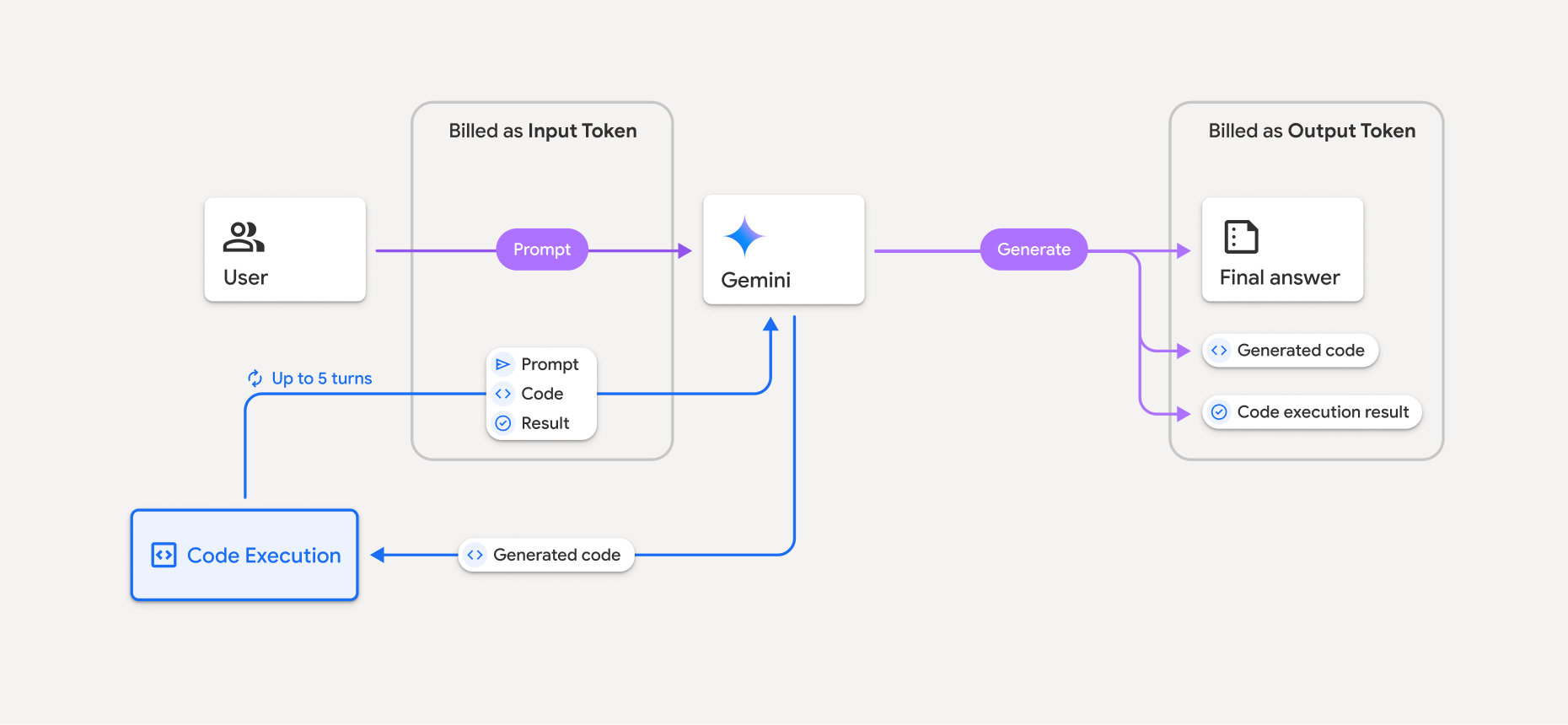
- ระบบจะเรียกเก็บเงินจากคุณตามอัตราปัจจุบันของโทเค็นอินพุตและเอาต์พุตโดยอิงตาม โมเดล Gemini ที่คุณใช้
- หาก Gemini ใช้การเรียกใช้โค้ดเมื่อสร้างคำตอบ ระบบจะติดป้ายกำกับพรอมต์ต้นฉบับ โค้ดที่สร้างขึ้น และผลลัพธ์ของโค้ดที่เรียกใช้เป็น_โทเค็นกลาง_ และจะเรียกเก็บเงินเป็น_โทเค็นอินพุต_
- จากนั้น Gemini จะสร้างข้อมูลสรุปและส่งคืนโค้ดที่สร้างขึ้น ผลลัพธ์ของโค้ดที่เรียกใช้ และข้อมูลสรุปสุดท้าย ระบบจะเรียกเก็บเงินตาม_โทเค็นเอาต์พุต_
- Gemini API จะรวมจำนวนโทเค็นระดับกลางไว้ในการตอบกลับจาก API เพื่อให้คุณทราบว่าเหตุใดจึงได้รับโทเค็นอินพุตเพิ่มเติมจากพรอมต์เริ่มต้น
ข้อจำกัด
- โมเดลจะสร้างและเรียกใช้โค้ดได้เท่านั้น แต่จะคืนค่าอาร์ติแฟกต์อื่นๆ เช่น ไฟล์สื่อ ไม่ได้
- ในบางกรณี การเปิดใช้การดำเนินการโค้ดอาจทำให้เกิดการถดถอยในด้านอื่นๆ ของเอาต์พุตโมเดล (เช่น การเขียนเรื่องราว)
- ความสามารถของโมเดลต่างๆ ในการใช้การดำเนินการโค้ดให้สำเร็จนั้นแตกต่างกัน
คุณสามารถใช้เครื่องมือการดำเนินการโค้ดร่วมกับการอ้างอิงจาก Google Search เพื่อ ขับเคลื่อน Use Case ที่ซับซ้อนยิ่งขึ้น
ไลบรารีที่รองรับ
สภาพแวดล้อมการเรียกใช้โค้ดมีไลบรารีต่อไปนี้
- attrs
- หมากรุก
- contourpy
- fpdf
- geopandas
- imageio
- jinja2
- joblib
- jsonschema
- jsonschema-specifications
- lxml
- matplotlib
- mpmath
- numpy
- opencv-python
- openpyxl
- การสร้างแพ็กเกจ
- แพนด้า
- หมอน
- protobuf
- pylatex
- pyparsing
- PyPDF2
- python-dateutil
- python-docx
- python-pptx
- reportlab
- scikit-learn
- scipy
- seaborn
- หก
- striprtf
- sympy
- จัดตาราง
- tensorflow
- toolz
- xlrd
คุณติดตั้งไลบรารีของคุณเองไม่ได้
ขั้นตอนถัดไป
- ลองใช้Colab สำหรับการดำเนินการกับโค้ด
- ดูข้อมูลเกี่ยวกับเครื่องมืออื่นๆ ของ Gemini API
เนื้อหาของหน้าเว็บนี้ได้รับอนุญาตภายใต้ใบอนุญาตที่ต้องระบุที่มาของครีเอทีฟคอมมอนส์ 4.0 และตัวอย่างโค้ดได้รับอนุญาตภายใต้ใบอนุญาต Apache 2.0 เว้นแต่จะระบุไว้เป็นอย่างอื่น โปรดดูรายละเอียดที่นโยบายเว็บไซต์ Google Developers Java เป็นเครื่องหมายการค้าจดทะเบียนของ Oracle และ/หรือบริษัทในเครือ
อัปเดตล่าสุด 2025-11-06 UTC