Safety and factuality guidance (original) (raw)
Generative artificial intelligence models are powerful tools, but they are not without their limitations. Their versatility and applicability can sometimes lead to unexpected outputs, such as outputs that are inaccurate, biased, or offensive. Post-processing, and rigorous manual evaluation are essential to limit the risk of harm from such outputs.
The models provided by the Gemini API can be used for a wide variety of generative AI and natural language processing (NLP) applications. Use of these functions is only available through the Gemini API or the Google AI Studio web app. Your use of Gemini API is also subject to the Generative AI Prohibited Use Policy and theGemini API terms of service.
Part of what makes large language models (LLMs) so useful is that they're creative tools that can address many different language tasks. Unfortunately, this also means that large language models can generate output that you don't expect, including text that's offensive, insensitive, or factually incorrect. What's more, the incredible versatility of these models is also what makes it difficult to predict exactly what kinds of undesirable output they might produce. While the Gemini API has been designed with Google's AI principles in mind, the onus is on developers to apply these models responsibly. To aid developers in creating safe, responsible applications, the Gemini API has some built-in content filtering as well as adjustable safety settings across 4 dimensions of harm. Refer to thesafety settings guide to learn more. It also offers Grounding with Google Search enabled to improve factuality, though this may be disabled for developers whose use cases are more creative and not information-seeking.
This document is meant to introduce you to some safety risks that can arise when using LLMs, and recommend emerging safety design and development recommendations. (Note that laws and regulations may also impose restrictions, but such considerations are beyond the scope of this guide.)
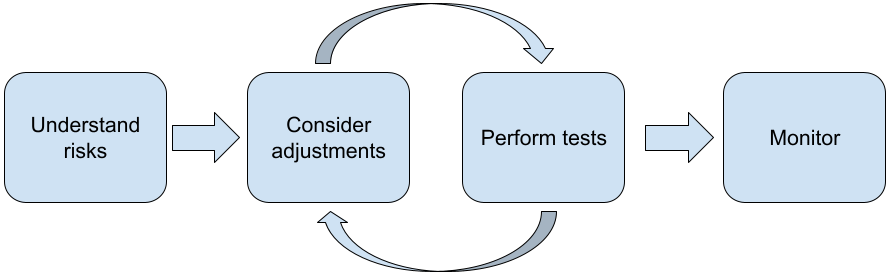
The following steps are recommended when building applications with LLMs:
- Understanding the safety risks of your application
- Considering adjustments to mitigate safety risks
- Performing safety testing appropriate to your use case
- Soliciting feedback from users and monitoring usage
The adjustment and testing phases should be iterative until you reach performance appropriate for your application.
Understand the safety risks of your application
In this context, safety is being defined as the ability of an LLM to avoid causing harm to its users, for example, by generating toxic language or content that promotes stereotypes. The models available through the Gemini API have been designed with Google’s AI principles in mind and your use of it is subject to the Generative AI Prohibited Use Policy. The API provides built-in safety filters to help address some common language model problems such as toxic language and hate speech, and striving for inclusiveness and avoidance of stereotypes. However, each application can pose a different set of risks to its users. So as the application owner, you are responsible for knowing your users and the potential harms your application may cause, and ensuring that your application uses LLMs safely and responsibly.
As part of this assessment, you should consider the likelihood that harm could occur and determine its seriousness and mitigation steps. For example, an app that generates essays based on factual events would need to be more careful about avoiding misinformation, as compared to an app that generates fictional stories for entertainment. A good way to begin exploring potential safety risks is to research your end users, and others who might be affected by your application's results. This can take many forms including researching state of the art studies in your app domain, observing how people are using similar apps, or running a user study, survey, or conducting informal interviews with potential users.
Advanced tips
- Speak with a diverse mix of prospective users within your target population about your application and its intended purpose so as to get a wider perspective on potential risks and to adjust diversity criteria as needed.
- The AI Risk Management Frameworkreleased by the U.S. government's National Institute of Standards and Technology (NIST) provides more detailed guidance and additional learning resources for AI risk management.
- DeepMind's publication on theethical and social risks of harm from language modelsdescribes in detail the ways that language model applications can cause harm.
Consider adjustments to mitigate safety and factuality risks
Now that you have an understanding of the risks, you can decide how to mitigate them. Determining which risks to prioritize and how much you should do to try to prevent them is a critical decision, similar to triaging bugs in a software project. Once you've determined priorities, you can start thinking about the types of mitigations that would be most appropriate. Often simple changes can make a difference and reduce risks.
For example, when designing an application consider:
- Tuning the model output to better reflect what is acceptable in your application context. Tuning can make the output of the model more predictable and consistent and therefore can help mitigate certain risks.
- Providing an input method that facilities safer outputs. The exact input you give to an LLM can make a difference in the quality of the output. Experimenting with input prompts to find what works most safely in your use-case is well worth the effort, as you can then provide a UX that facilitates it. For example, you could restrict users to choose only from a drop-down list of input prompts, or offer pop-up suggestions with descriptive phrases which you've found perform safely in your application context.
- Blocking unsafe inputs and filtering output before it is shown to the user. In simple situations, blocklists can be used to identify and block unsafe words or phrases in prompts or responses, or require human reviewers to manually alter or block such content.
- Using trained classifiers to label each prompt with potential harms or adversarial signals. Different strategies can then be employed on how to handle the request based on the type of harm detected. For example, If the input is overtly adversarial or abusive in nature, it could be blocked and instead output a pre-scripted response.Advanced tip: If signals determine the output to be harmful, the application can employ the following options:
- Provide an error message or pre-scripted output.
- Try the prompt again, in case an alternative safe output is generated, since sometimes the same prompt will elicit different outputs.
- Putting safeguards in place against deliberate misuse such as assigning each user a unique ID and imposing a limit on the volume of user queries that can be submitted in a given period. Another safeguard is to try and protect against possible prompt injection. Prompt injection, much like SQL injection, is a way for malicious users to design an input prompt that manipulates the output of the model, for example, by sending an input prompt that instructs the model to ignore any previous examples. See theGenerative AI Prohibited Use Policyfor details about deliberate misuse.
- **Adjusting functionality to something that is inherently lower risk.**Tasks that are narrower in scope (e.g., extracting keywords from passages of text) or that have greater human oversight (e.g., generating short-form content that will be reviewed by a human), often pose a lower risk. So for instance, instead of creating an application to write an email reply from scratch, you might instead limit it to expanding on an outline or suggesting alternative phrasings.
- Adjusting harmful content safety settings to decrease how likely you are to see responses that could be harmful. The Gemini API provides safety settings that you can adjust during the prototyping stage to determine if your application requires more or less restrictive safety configuration. You can adjust these settings across five filter categories to restrict or allow certain types of content. Refer to the safety settings guide to learn about the adjustable safety settings available through the Gemini API.
- Decrease potential factual inaccuracies or hallucinations by enabling Grounding with Google Search. Remember, many AI models are experimental and may present factually inaccurate information, hallucinate, or otherwise produce problematic outputs. The Grounding with Google Search feature connects the Gemini model to real-time web content and works with all available languages. This allows Gemini to provide more accurate answers and cite verifiable sources beyond the models knowledge cutoff.
Perform safety testing appropriate to your use case
Testing is a key part of building robust and safe applications, but the extent, scope and strategies for testing will vary. For example, a just-for-fun haiku generator is likely to pose less severe risks than, say, an application designed for use by law firms to summarize legal documents and help draft contracts. But the haiku generator may be used by a wider variety of users which means the potential for adversarial attempts or even unintended harmful inputs can be greater. The implementation context also matters. For instance, an application with outputs that are reviewed by human experts prior to any action being taken might be deemed less likely to produce harmful outputs than the identical application without such oversight.
It's not uncommon to go through several iterations of making changes and testing before feeling confident that you're ready to launch, even for applications that are relatively low risk. Two kinds of testing are particularly useful for AI applications:
- Safety benchmarking involves designing safety metrics that reflect the ways your application could be unsafe in the context of how it is likely to get used, then testing how well your application performs on the metrics using evaluation datasets. It's good practice to think about the minimum acceptable levels of safety metrics before testing so that 1) you can evaluate the test results against those expectations and 2) you can gather the evaluation dataset based on the tests that evaluate the metrics you care about most.
Advanced tips:- Beware of over-relying on “off the shelf” approaches as it's likely you'll need to build your own testing datasets using human raters to fully suit your application's context.
- If you have more than one metric you'll need to decide how you'll trade off if a change leads to improvements for one metric to the detriment of another. Like with other performance engineering, you may want to focus on worst-case performance across your evaluation set rather than average performance.
- Adversarial testing involves proactively trying to break your application. The goal is to identify points of weakness so that you can take steps to remedy them as appropriate. Adversarial testing can take significant time/effort from evaluators with expertise in your application — but the more you do, the greater your chance of spotting problems, especially those occurring rarely or only after repeated runs of the application.
- Adversarial testing is a method for systematically evaluating an ML model with the intent of learning how it behaves when provided with malicious or inadvertently harmful input:
* An input may be malicious when the input is clearly designed to produce an unsafe or harmful output-- for example, asking a text generation model to generate a hateful rant about a particular religion.
* An input is inadvertently harmful when the input itself may be innocuous, but produces harmful output -- for example, asking a text generation model to describe a person of a particular ethnicity and receiving a racist output. - What distinguishes an adversarial test from a standard evaluation is the composition of the data used for testing. For adversarial tests, select test data that is most likely to elicit problematic output from the model. This means probing the model's behavior for all the types of harms that are possible, including rare or unusual examples and edge-cases that are relevant to safety policies. It should also include diversity in the different dimensions of a sentence such as structure, meaning and length. You can refer to the Google's Responsible AI practices in fairnessfor more details on what to consider when building a test dataset.Advanced tips:
- Use automated testinginstead of the traditional method of enlisting people in 'red teams' to try and break your application. In automated testing, the 'red team' is another language model that finds input text that elicit harmful outputs from the model being tested.
- Adversarial testing is a method for systematically evaluating an ML model with the intent of learning how it behaves when provided with malicious or inadvertently harmful input:
Monitor for problems
No matter how much you test and mitigate, you can never guarantee perfection, so plan upfront how you'll spot and deal with problems that arise. Common approaches include setting up a monitored channel for users to share feedback (e.g., thumbs up/down rating) and running a user study to proactively solicit feedback from a diverse mix of users — especially valuable if usage patterns are different to expectations.
Advanced tips
- When users give feedback to AI products, it can greatly improve the AI performance and the user experience over time by, for example, helping you choose better examples for prompt tuning. TheFeedback and Control chapterin Google's People and AI guidebookhighlights key considerations to take into account when designing feedback mechanisms.
Next steps
- Refer to thesafety settings guide to learn about the adjustable safety settings available through the Gemini API.
- See the intro to prompting to get started writing your first prompts.