Chrome Proxy Settings in 2026: Windows, Mac & Linux (original) (raw)
Chrome has no built-in proxy panel. On Windows and macOS, it uses the operating system’s proxy settings, so configuration happens at the OS level. Two methods set a proxy for Chrome: a command-line launch flag and a browser extension.
How Chrome handles proxies
- By default, Chrome inherits the system proxy from Windows, macOS, or your Linux desktop environment.
- Changing the proxy through Chrome’s menu opens the operating system’s proxy settings, which apply to all apps, not just Chrome.
- To route only Chrome through a proxy, launch it with the
--proxy-serverflag or use a proxy extension.
Set a proxy in Chrome on macOS
- To open Chrome settings, click the three-dot menu in the top-right corner, then navigate to settings.
- Scroll down and click on “System”.
- Click Open your computer’s proxy settings option.
- This will open the Proxies page in Network options because Chrome lacks in-app proxy server settings. Select the type of proxy server that you wish to set up. Click OK after entering the proxy server information.
Disclaimer: Chrome’s proxy settings can also be accessed by clicking the three-dot menu in the top-right corner > selecting Settings > typing proxy into the search bar at the top of the settings page > “Open your computer’s proxy settings” option will appear in the search results.
Set a proxy in Chrome on Windows
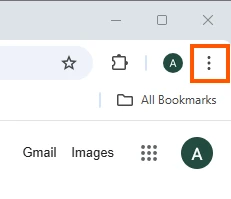
- Open your Chrome browser and click the three-dot menu icon.
- Select Settings from the dropdown menu.
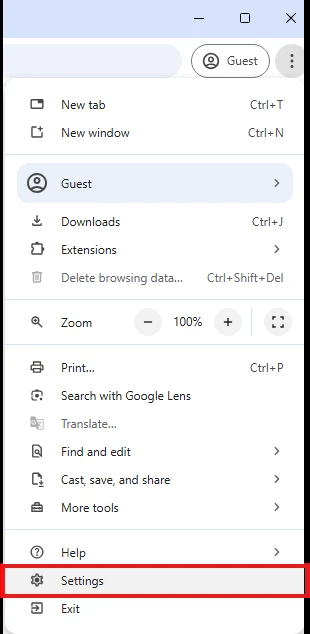
- Click the System section and Open your computer’s proxy settings. This will open proxy settings window.
- Switch to On in the manual proxy setup section.
- Enter the necessary proxy details such as IP address and port number provided by your proxy service provider.
Set a proxy in Chrome on Linux
Chrome on Linux reads the desktop environment’s network settings. On GNOME:
- Open Settings → Network → Network Proxy.
- Set the mode to Manual and enter the host and port for each protocol.
Chrome also respects the http_proxy, https_proxy, and no_proxy environment variables when launched from a terminal. For a proxy that applies only to Chrome, use the command-line flag below.
Don’t miss our benchmarks and data-driven insights. The button opens Google; selecting AIMultiple confirms that you wish to see AIMultiple more often in Google search results.
 Add as preferred source
Set a proxy for Chrome only (command-line flag)
The --proxy-server flag applies a proxy to a single Chrome instance without changing system settings.
Windows:
macOS:
Linux:
Options:
- SOCKS5:
--proxy-server="socks5://203.0.113.10:1080" - Exclude hosts:
--proxy-bypass-list="*.example.com;localhost"
Close all running Chrome windows before using the flag. Chrome routes a new launch to the existing process and otherwise ignores the flag. To keep a normal session open at the same time, add a separate profile: --user-data-dir="/tmp/chrome-proxy".
How to disable Chrome proxy settings?
To disable your Chrome proxy settings, take these steps:
System Preferences > Network > Advanced > Proxies > Uncheck all protocols > click OK and then Apply.
FAQs
Google Chrome proxy settings enable users to hide their IP addresses for improved privacy, to avoid limitations, or to cache frequently viewed information.
The target website may block your IP address because it detects that you are using a proxy server, or the proxy server may be misconfigured. To address such conflicts, you can also clear your cache and cookies from Chrome’s settings.
Cite this research
Pick the format that matches where you're publishing. Pasting the link version into your CMS preserves the backlink.
Gulbahar Karatas (2026) - "Chrome Proxy Settings in 2026: Windows, Mac & Linux". Published online at AIMultiple.com. Retrieved June 3, 2026, from: https://aimultiple.com/chrome-proxy-settings [Online Resource]
Karatas, G. (2026, June 3). Chrome Proxy Settings in 2026: Windows, Mac & Linux. AIMultiple. https://aimultiple.com/chrome-proxy-settings
@misc{karatas2026, author = {Karatas, Gulbahar}, title = {{Chrome Proxy Settings in 2026: Windows, Mac & Linux}}, year = {2026}, month = jun, howpublished = {\url{https://aimultiple.com/chrome-proxy-settings}}, note = {AIMultiple. Retrieved June 3, 2026} }

Gulbahar Karatas
Industry Analyst
Gülbahar is an AIMultiple industry analyst focused on web data collection, applications of web data and application security.