AppBar class - material library (original) (raw)
A Material Design app bar.
An app bar consists of a toolbar and potentially other widgets, such as aTabBar and a FlexibleSpaceBar. App bars typically expose one or more common actions with IconButtons which are optionally followed by aPopupMenuButton for less common operations (sometimes called the "overflow menu").
App bars are typically used in the Scaffold.appBar property, which places the app bar as a fixed-height widget at the top of the screen. For a scrollable app bar, see SliverAppBar, which embeds an AppBar in a sliver for use in a CustomScrollView.
The AppBar displays the toolbar widgets, leading, title, and actions, above the bottom (if any). The bottom is usually used for a TabBar. If a flexibleSpace widget is specified then it is stacked behind the toolbar and the bottom widget. The following diagram shows where each of these slots appears in the toolbar when the writing language is left-to-right (e.g. English):
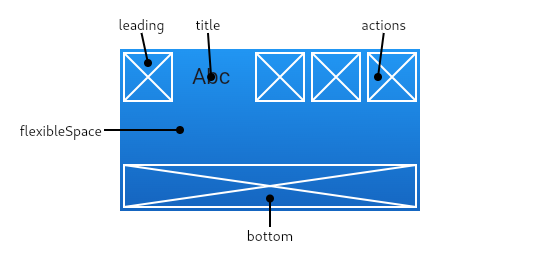
If the leading widget is omitted, but the AppBar is in a Scaffold with a Drawer, then a button will be inserted to open the drawer. Otherwise, if the nearest Navigator has any previous routes, a BackButton is inserted instead. This behavior can be turned off by setting the automaticallyImplyLeadingto false. In that case a null leading widget will result in the middle/title widget stretching to start.
If the actions widget list is omitted or empty, but the AppBar is in a Scaffold with an end Drawer, then a button will be inserted to open the end drawer. This behavior can be turned off by setting the automaticallyImplyActionsto false.
The AppBar insets its content based on the ambient MediaQuery's padding, to avoid system UI intrusions. It's taken care of by Scaffold when used in the Scaffold.appBar property. When animating an AppBar, unexpectedMediaQuery changes (as is common in Hero animations) may cause the content to suddenly jump. Wrap the AppBar in a MediaQuery widget, and adjust its padding such that the animation is smooth.
This sample shows an AppBar with two simple actions. The first action opens a SnackBar, while the second action navigates to a new page.
To create a local project with this code sample, run:
flutter create --sample=material.AppBar.1 mysample
Material Design 3 introduced new types of app bar.
To create a local project with this code sample, run:
flutter create --sample=material.AppBar.2 mysample
Troubleshooting
Why don't my TextButton actions appear?
If the app bar's actions contains TextButtons, they will not be visible if their foreground (text) color is the same as the app bar's background color.
In Material v2 (i.e., when ThemeData.useMaterial3 is false), the default app bar backgroundColor is the overall theme'sColorScheme.primary if the overall theme's brightness isBrightness.light. Unfortunately this is the same as the defaultButtonStyle.foregroundColor for TextButton for light themes. In this case a preferable text button foreground color isColorScheme.onPrimary, a color that contrasts nicely withColorScheme.primary. To remedy the problem, overrideTextButton.style:
To create a local project with this code sample, run:
flutter create --sample=material.AppBar.3 mysample
This example shows how to listen to a nested Scrollable's scroll notification in a nested scroll view using the notificationPredicate property and use it to make scrolledUnderElevation take effect.
To create a local project with this code sample, run:
flutter create --sample=material.AppBar.4 mysample
See also:
- Scaffold, which displays the AppBar in its Scaffold.appBar slot.
- SliverAppBar, which uses AppBar to provide a flexible app bar that can be used in a CustomScrollView.
- TabBar, which is typically placed in the bottom slot of the AppBarif the screen has multiple pages arranged in tabs.
- IconButton, which is used with actions to show buttons on the app bar.
- PopupMenuButton, to show a popup menu on the app bar, via actions.
- FlexibleSpaceBar, which is used with flexibleSpace when the app bar can expand and collapse.
- material.io/design/components/app-bars-top.html
- m3.material.io/components/top-app-bar
- Cookbook: Place a floating app bar above a list
Inheritance
Implemented types
Constructors
AppBar({Key? key, Widget? leading, bool automaticallyImplyLeading = true, Widget? title, List<Widget>? actions, bool automaticallyImplyActions = true, Widget? flexibleSpace, PreferredSizeWidget? bottom, double? elevation, double? scrolledUnderElevation, ScrollNotificationPredicate notificationPredicate = defaultScrollNotificationPredicate, Color? shadowColor, Color? surfaceTintColor, ShapeBorder? shape, Color? backgroundColor, Color? foregroundColor, IconThemeData? iconTheme, IconThemeData? actionsIconTheme, bool primary = true, bool? centerTitle, double? titleSpacing, double toolbarOpacity = 1.0, double bottomOpacity = 1.0, double? toolbarHeight, double? leadingWidth, TextStyle? toolbarTextStyle, TextStyle? titleTextStyle, SystemUiOverlayStyle? systemOverlayStyle, bool forceMaterialTransparency = false, bool useDefaultSemanticsOrder = true, Clip? clipBehavior, EdgeInsetsGeometry? actionsPadding, bool animateColor = false})
Creates a Material Design app bar.
Properties
A list of Widgets to display in a row after the title widget.
final
actionsIconTheme → IconThemeData?
The color, opacity, and size to use for the icons that appear in the app bar's actions.
final
actionsPadding → EdgeInsetsGeometry?
The padding between the actions and the end of the AppBar.
final
Whether the color should be animated.
final
automaticallyImplyActions → bool
Controls whether we should try to imply the actions widget if null.
final
automaticallyImplyLeading → bool
Controls whether we should try to imply the leading widget if null.
final
The fill color to use for an app bar's Material.
final
This widget appears across the bottom of the app bar.
final
How opaque the bottom part of the app bar is.
final
centerTitle → bool?
Whether the title should be centered.
final
clipBehavior → Clip?
The content will be clipped (or not) according to this option.
final
The z-coordinate at which to place this app bar relative to its parent.
final
Whether the title should be wrapped with header Semantics.
final
This widget is stacked behind the toolbar and the tab bar. Its height will be the same as the app bar's overall height.
final
forceMaterialTransparency → bool
Forces the AppBar's Material widget type to be MaterialType.transparency(instead of Material's default type).
final
The default color for Text and Icons within the app bar.
final
The hash code for this object.
no setterinherited
The color, opacity, and size to use for toolbar icons.
final
Controls how one widget replaces another widget in the tree.
finalinherited
A widget to display before the toolbar's title.
final
Defines the width of AppBar.leading widget.
final
notificationPredicate → ScrollNotificationPredicate
A check that specifies which child's ScrollNotifications should be listened to.
final
A size whose height is the sum of toolbarHeight and the bottom widget's preferred height.
final
Whether this app bar is being displayed at the top of the screen.
final
A representation of the runtime type of the object.
no setterinherited
scrolledUnderElevation → double?
The elevation that will be used if this app bar has something scrolled underneath it.
final
shadowColor → Color?
The color of the shadow below the app bar.
final
shape → ShapeBorder?
The shape of the app bar's Material as well as its shadow.
final
The color of the surface tint overlay applied to the app bar's background color to indicate elevation.
final
systemOverlayStyle → SystemUiOverlayStyle?
Specifies the style to use for the system overlays (e.g. the status bar on Android or iOS, the system navigation bar on Android).
final
The primary widget displayed in the app bar.
final
The spacing around title content on the horizontal axis. This spacing is applied even if there is no leading content or actions. If you wanttitle to take all the space available, set this value to 0.0.
final
The default text style for the AppBar's title widget.
final
Defines the height of the toolbar component of an AppBar.
final
How opaque the toolbar part of the app bar is.
final
The default text style for the AppBar's leading, andactions widgets, but not its title.
final
useDefaultSemanticsOrder → bool
Whether to use the default semantic ordering for the app bar's children for accessibility traversal order.
final
Methods
createElement()→ StatefulElement
Creates a StatefulElement to manage this widget's location in the tree.
inherited
createState()→ State<AppBar>
Creates the mutable state for this widget at a given location in the tree.
override
debugDescribeChildren()→ List<DiagnosticsNode>
Returns a list of DiagnosticsNode objects describing this node's children.
inherited
debugFillProperties(DiagnosticPropertiesBuilder properties)→ void
Add additional properties associated with the node.
inherited
noSuchMethod(Invocation invocation)→ dynamic
Invoked when a nonexistent method or property is accessed.
inherited
toDiagnosticsNode({String? name, DiagnosticsTreeStyle? style})→ DiagnosticsNode
Returns a debug representation of the object that is used by debugging tools and by DiagnosticsNode.toStringDeep.
inherited
toString({DiagnosticLevel minLevel = DiagnosticLevel.info})→ String
A string representation of this object.
inherited
toStringDeep({String prefixLineOne = '', String? prefixOtherLines, DiagnosticLevel minLevel = DiagnosticLevel.debug, int wrapWidth = 65})→ String
Returns a string representation of this node and its descendants.
inherited
toStringShallow({String joiner = ', ', DiagnosticLevel minLevel = DiagnosticLevel.debug})→ String
Returns a one-line detailed description of the object.
inherited
A short, textual description of this widget.
inherited
Operators
operator ==(Object other)→ bool
The equality operator.
inherited
Static Methods
preferredHeightFor(BuildContext context, Size preferredSize)→ double
Used by Scaffold to compute its AppBar's overall height. The returned value is the same preferredSize.height unless AppBar.toolbarHeight was null andAppBarTheme.of(context).toolbarHeight is non-null. In that case the return value is the sum of the theme's toolbar height and the height of the app bar's AppBar.bottom widget.