More intuitive privacy and security controls in Chrome (original) (raw)

Keeping you safe and secure online is part of Chrome’s DNA. Along with providing strong default protections, we aim to give you accessible, intuitive, and useful controls so you can make choices that are right for you. So, today we’ve started rolling out new tools and a redesign of Chrome’s privacy and security settings on desktop, to help you control your safety on the web.
Easy to understand controls
With this redesign, we’ve made the controls even easier to find and understand, with simplified language and visuals:
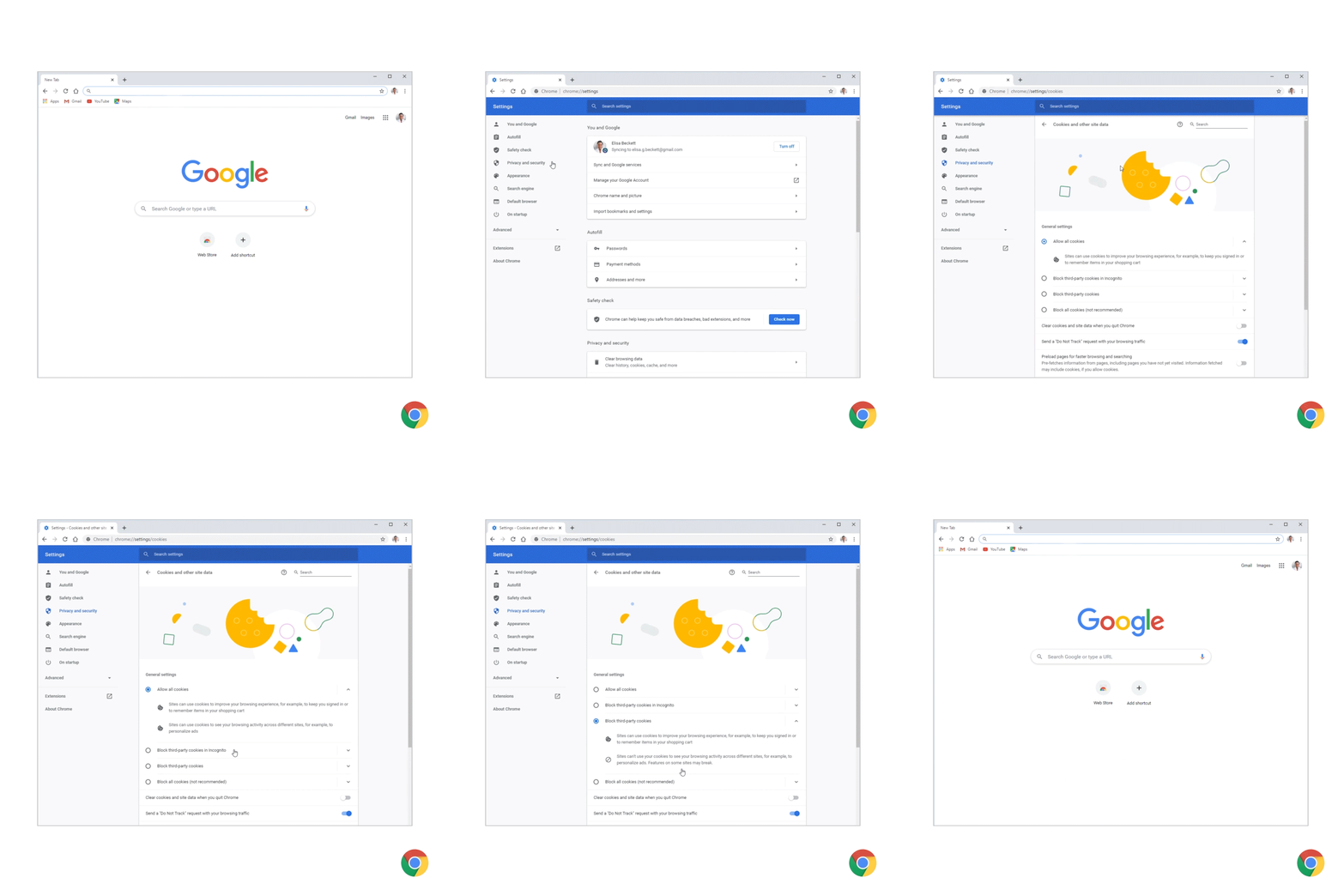
- It’s easier to manage cookies. You can choose if and how cookies are used by websites you visit, with options to block third-party cookies in regular or Incognito mode, and to block all cookies on some or all websites.
- In Site Settings, we’ve reorganized the controls into two distinct sections to make it easier to find the most sensitive website permissions: access to your location, camera or microphone, and notifications. A new section also highlights the most recent permissions activity.
- At the top of Chrome settings, you’ll see “You and Google” (previously “People”), where you can find sync controls. These controls put you in charge of what data is shared with Google to store in your Google Account and made available across all your devices.
- Because many people regularly delete their browsing history, we’ve moved that control, “Clear browsing data”, to the top of the Privacy & Security section.
Clearer, more accessible controls to help you manage cookies.
Safety check in Chrome
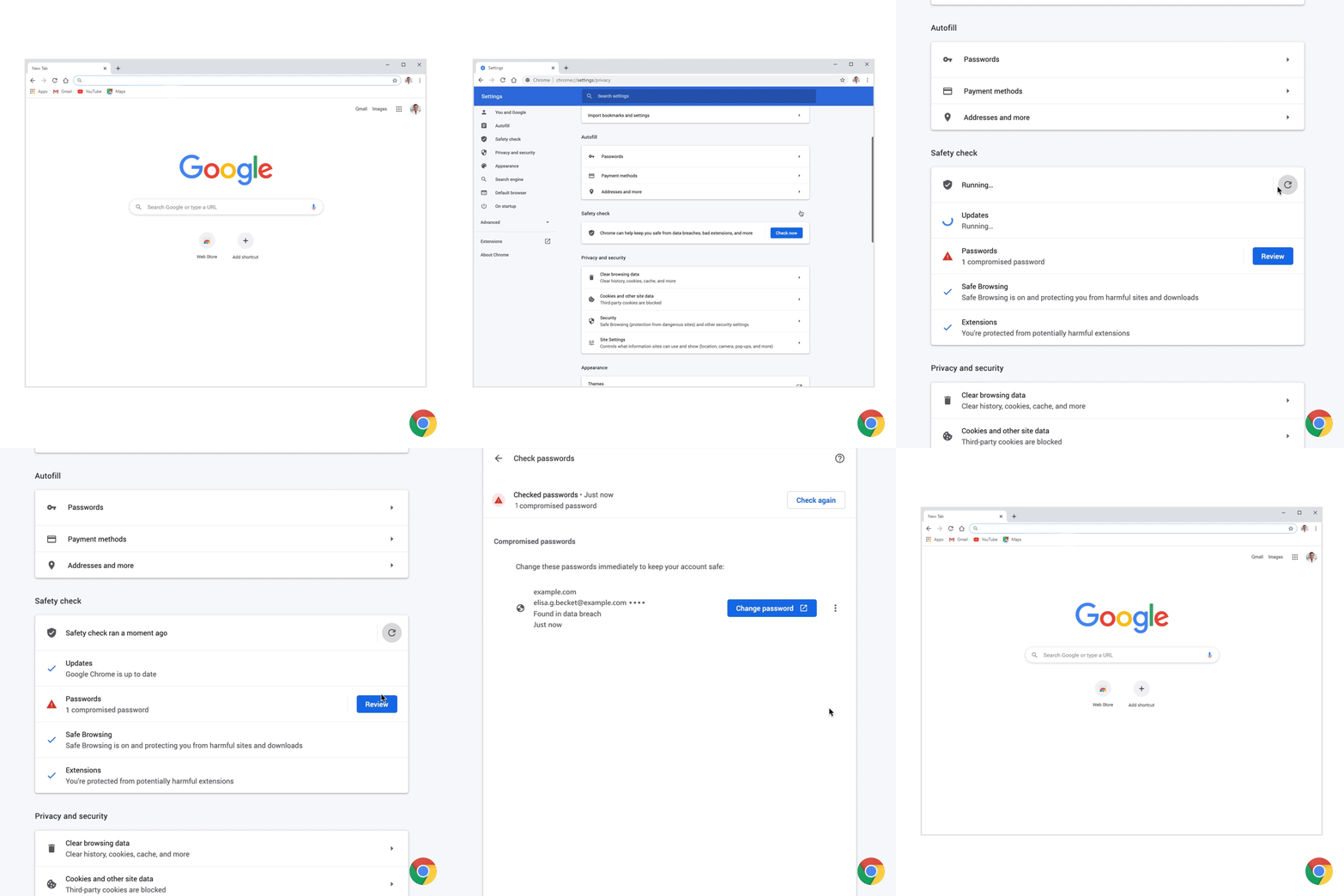
With our new safety check in settings, you can quickly confirm the safety of your experience in Chrome.
- The new tool will tell you if the passwords you’ve asked Chrome to remember have been compromised, and if so, how to fix them.
- It will flag if Safe Browsing, Google’s technology to warn before you visit a dangerous site or download a harmful app or extension, is turned off.
- The safety check tool also has a new additional way to quickly see if your version of Chrome is up to date, i.e. if it’s updated with the latest security protections.
- If malicious extensions are installed, it will tell you how and where to remove them.
Check if your passwords have been compromised and if so, fix them with Chrome’s help.
Third-party cookie controls in Incognito mode
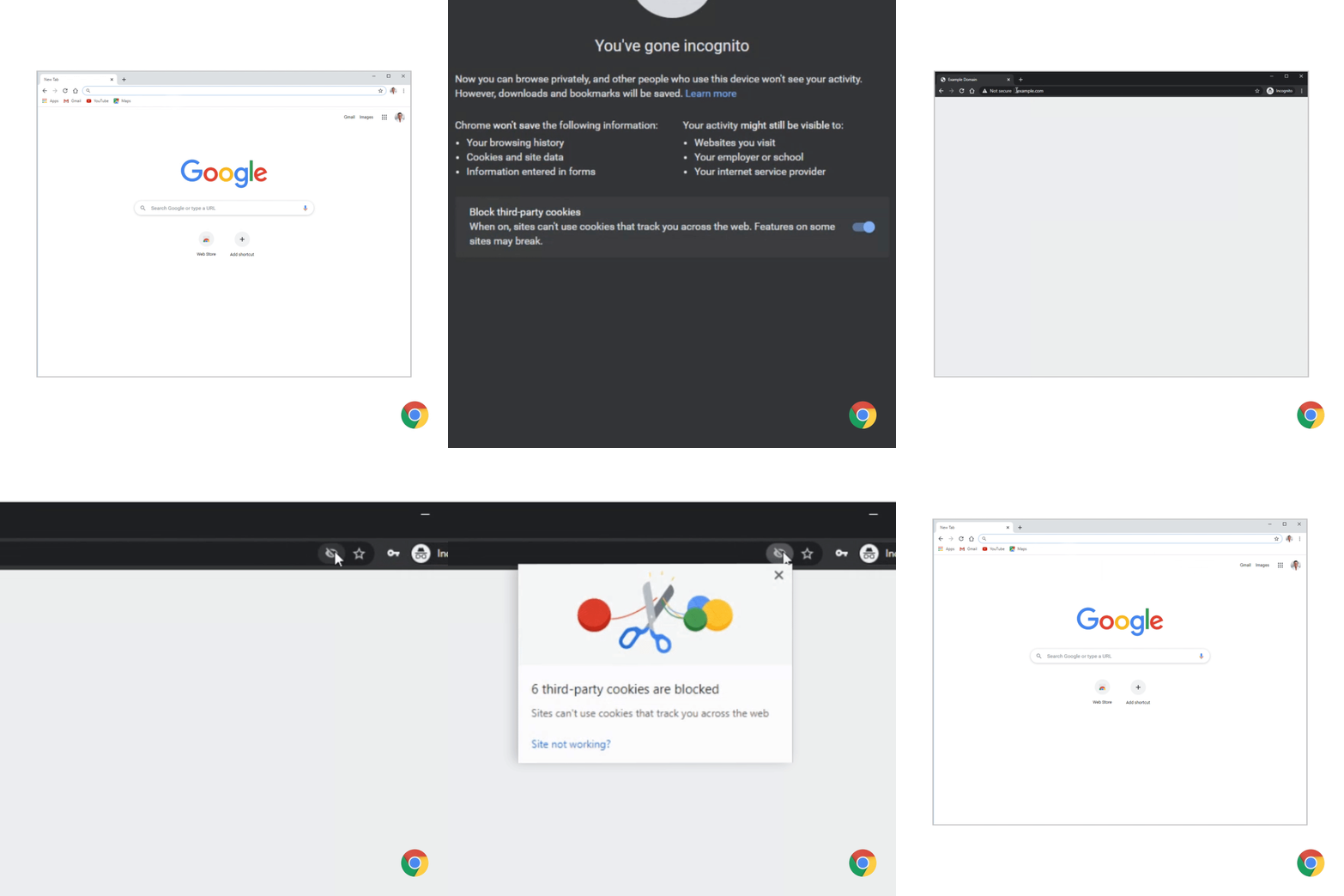
In Incognito mode, where people come for a more private browsing experience, Chrome doesn’t save your browsing history, information entered in forms or browser cookies. While we continue to work on our long-term effort to make the web more private and secure with Privacy Sandbox, we want to strengthen the Incognito protections in the meantime. In addition to deleting cookies every time you close the browser window in Incognito, we will also start blocking third-party cookies by default within each Incognito session and include a prominent control on the New Tab Page. You can allow third-party cookies for specific sites by clicking the “eye” icon in the address bar. This feature will gradually roll out, starting on desktop operating systems and on Android.
Incognito mode blocks third-party cookies within each session.
A new home for your extensions
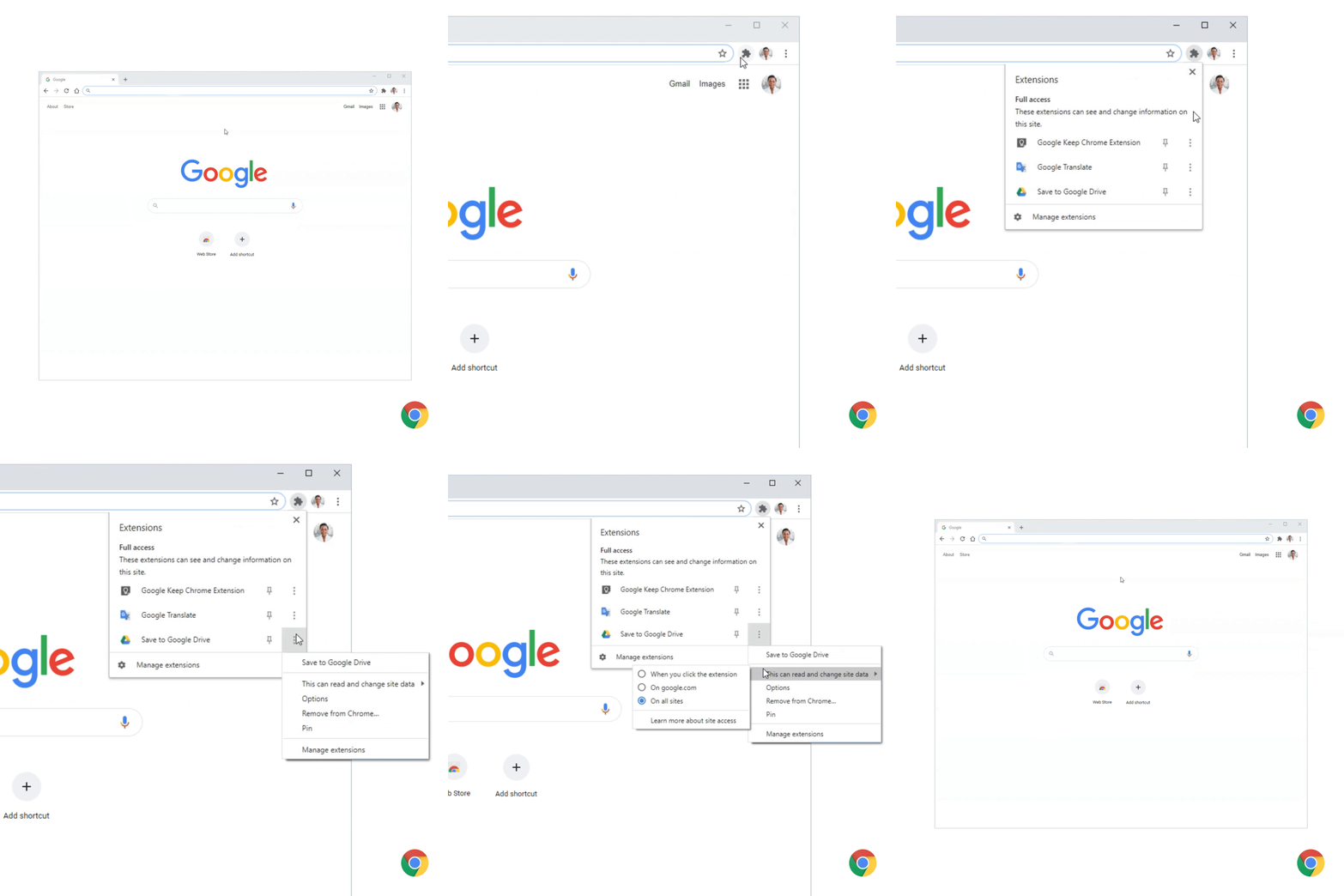
Starting today you’ll start to see a new puzzle icon for your extensions on your toolbar. It’s a neat way to tidy up your toolbar, and gives you more control over what data extensions can access on sites you visit. With this addition, you’ll still be able to pin your favorite extensions to the toolbar.
Opening menu displays your extensions and shows you what data they can currently access.
Upgraded security with Enhanced Safe Browsing protection and Secure DNS
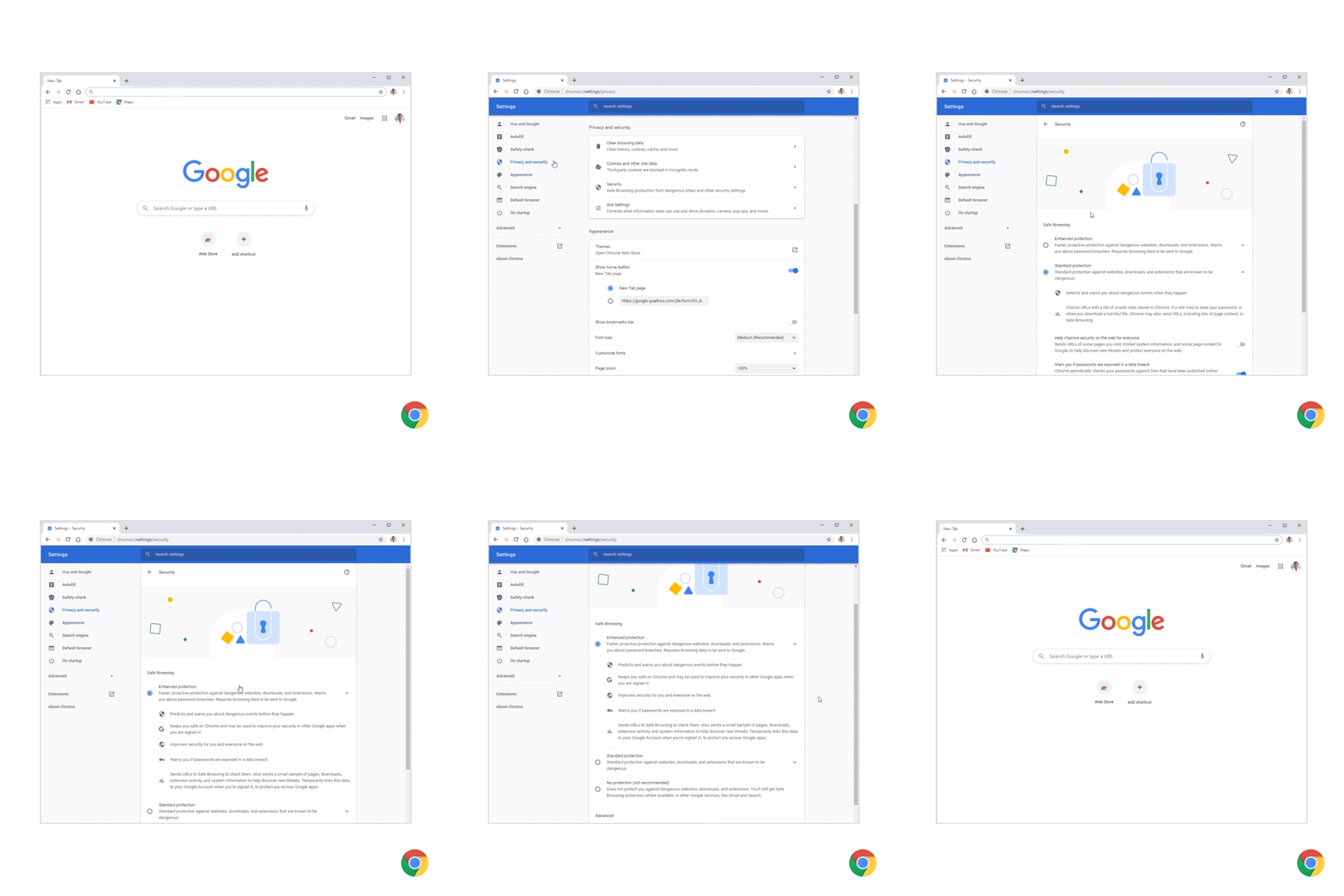
We’re bringing you two major security upgrades that you can opt in to. First, Enhanced Safe Browsing gives you more proactive and tailored protections from phishing, malware and other web-based threats. If you turn on Enhanced Safe Browsing, Chrome proactively checks whether pages and downloads are dangerous by sending information about them to Google Safe Browsing. If you’re signed in to Chrome, then Chrome and other Google apps you use (Gmail, Drive, etc.) will further protect you based on a holistic view of threats you encounter on the web and attacks against your Google Account. Over the next year, we’ll be adding even more protections to this mode including tailored warnings for phishing sites and file downloads, and cross-product alerts.
Enhanced Safe Browsing offers the highest-level of security.
We’re also launching Secure DNS, a feature designed to improve your security and privacy while browsing the web. When you access a website, your browser first needs to determine which server is hosting it, using a step known as a "DNS (Domain Name System) lookup." Chrome's Secure DNS feature uses DNS-over-HTTPS to encrypt this step, thereby helping prevent attackers from observing what sites you visit or sending you to phishing websites. By default, Chrome will automatically upgrade you to DNS-over-HTTPS if your current service provider supports it. You can also configure a different secure DNS provider in the Advanced security section, or disable the feature altogether.
Secure DNS can be configured to use your current ISP's service if available (default), another provider from a list, or a custom provider.
These new updates and features, including our redesigned Privacy and Security settings, will be coming to Chrome on desktop platforms in upcoming weeks. We’ll continue to focus on features that protect your privacy and security as you’re browsing the web with Chrome, in addition to giving you clear and useful choices around managing your data.