Fragments in Vue.js - LogRocket Blog (original) (raw)
Vue.js was created by Evan You and 250+ community lovers.

It’s a very progressive framework for building user interfaces. It consists of an approachable core library that focuses on the view layer only, as well as an ecosystem of supporting libraries that helps you tackle complexity in large Single-Page Applications.
In this post, you will be introduced to watchers — an exciting concept that will help you build mastery in Vue.js.
Achieving accessibility in Vue
To achieve accessibility on the web, you need to design pages, tools, and technologies that everyone can use.
Here, ‘everyone’ includes people with auditory, cognitive, neurological, physical, speech, and visual impairments.
Accessibility support is necessary to allow assistive technology like screen readers to interpret web pages and applications. For these technologies to work, developers need to think in terms of accessibility and build accessible applications.
Before we start
This post is intended for all levels of frontend developers that use Vue.js, so being conversant with beginner concepts and installation processes is not required to understand these concepts.
Here are a few prerequisites you should already have before you start to use Vue CLI 3 through this article.
You will need:
- Node.js 10.x and above installed. You can verify if you do by running node -v in your terminal/command prompt.
- The Node Package Manager 6.7 or above (NPM) also installed.
- A code editor: Visual Studio Code is highly recommended. here’s why
- Vue’s latest version installed globally on your machine.
- Vue CLI 3.0 installed on your machine. To do this, uninstall the old CLI version first:
npm uninstall -g vue-cli
Then install the new one:
npm install -g @vue/cli
OR
- Download a Vue starter project here
- Unzip the downloaded project
- Navigate into the unzipped file and run the command to keep all the dependencies up-to-date:
npm install
The problem: multiple root nodes
While building your presentation inside the template section of your Vue component, you might notice that you can only have one root HTML tag inside the template tag.

🚀 Sign up for The Replay newsletter
The Replay is a weekly newsletter for dev and engineering leaders.
Delivered once a week, it's your curated guide to the most important conversations around frontend dev, emerging AI tools, and the state of modern software.
Over 200k developers use LogRocket to create better digital experiences
 Learn more →
Inside of this root HTML tag, you can have as many child nodes as you want, so it is impossible to have more than one root node in a Vue component.
If you opened the project in VS Code, navigate to the src folder, then the components folder, and then open the app.js file. Your app.js file should look like this:

You can see that the div is the only root node in the template. If you tried to add an extra root node like this:
Header inside root node 2
You’d see that as you save it, Vue compiler will flag an error about having multiple root nodes.
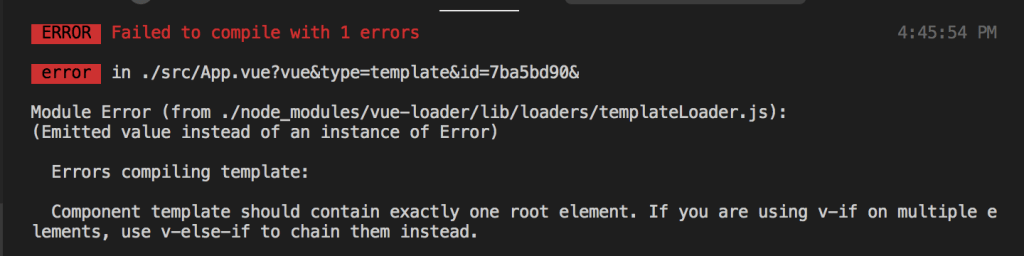
The extra wrapper node technique
To find a way around this, Vue developers often create an extra (and mostly unnecessary) root wrapper node inside which they can create child nodes to suit their wireframes.
This tag can be a span or a div tag. Most Vue developers use div tags a lot to ensure their code block for a return statement does not lead to errors that break the application.
These extra tags do absolutely nothing except prevent errors.
Header inside root node 2
The problem with this method is that it is not accessible.
Now, according to HTML guidelines, semantics tags like list items should be wrapped with either ordered or un-ordered list tags. Similarly, table items should wrapped by the table tags as their parent tags.
More great articles from LogRocket:
- Don't miss a moment with The Replay, a curated newsletter from LogRocket
- Learn how LogRocket's Galileo AI watches sessions for you and proactively surfaces the highest-impact things you should work on
- Use React's useEffect to optimize your application's performance
- Switch between multiple versions of Node
- Discover how to use the React children prop with TypeScript
- Explore creating a custom mouse cursor with CSS
- Advisory boards aren’t just for executives. Join LogRocket’s Content Advisory Board. You’ll help inform the type of content we create and get access to exclusive meetups, social accreditation, and swag
Demo
Let’s use the App.vue component to render a list that we’ll create in the Test.vue component.
Open your App.vue file and copy the lines of code below in the template section:
Then, in the Test.vue component, put the list items in the template section like this:
The code block above will not return errors by the compiler. It would actually be passed into the App.vue component to render the list correctly.
But if you inspect the elements your dev tools, you will see that it does not return semantic HTML
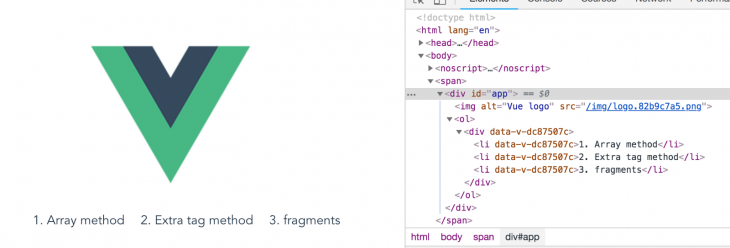
If this semantic is not followed, your HTML code might work alright, but it won’t be picked up by assistive devices like a screen reader or announcer.
This is why this method (which is widely used) is now frowned upon. Generally, there’s a push to write accessible code.
Solution: fragments
This concept started when the React team released version 16. It’s the solution to the accessibility gap that has been created by developer behavior.
The team found a way to create an HTML tag that would not read as a node by the DOM and called it fragments.
This works exactly like your div or span tag, but it doesn’t change the overall structure of your code, therefore keeping your DOM tree semantic.
React fragment syntax
render() { return ( <React.fragment > <ChildA / > <ChildB / > <ChildC / > </React.fragment> ); }
This shows up in the DOM like this:
<ChildA / > <ChildB / > <ChildC / >
Fragments are the invisible wrapper tags that do not affect the node structure of the DOM, thereby achieving accessibility.
Fragments in Vue
The Vue team has not yet built an official fragment feature, but there is a great plugin built by Vue community member Julien Barbay.
This plugin simply acts like a wrapper. Then, on Vue compile, it gets commented out on the DOM.
This is a very efficient way to use fragments in Vue 2.x
The syntax looks like this:
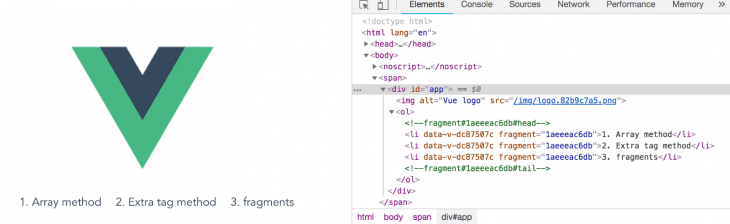
In the DOM, it renders like this:
<ChildA / > <ChildB / > <ChildC / >
You can see that both lines are commented out so the DOM is semantic and the code is accessible. To use, first install the plugin inside your Vue project:
npm install -s vue-fragment
Then import it and you are ready to use it in your Test.vue file like this:
You can see that the div tag was replaced by the fragment. Now, the whole presentation becomes accessible.
Conclusion
In this post you have learnt how to use fragments in Vue and seen why it’s really important to write code with accessibility in mind.
The Vue team has promised to bring in a fragment feature in the upcoming Vue version 3 release.
The plugin by Julien is a really helpful one, which you can use today.
Happy hacking!
LogRocket understands everything users do in your Vue apps.
Debugging Vue.js applications can be difficult, especially when users experience issues that are difficult to reproduce. If you’re interested in monitoring and tracking Vue mutations and actions for all of your users in production, try LogRocket.

LogRocket lets you replay user sessions, eliminating guesswork by showing exactly what users experienced. It captures console logs, errors, network requests, and pixel-perfect DOM recordings — compatible with all frameworks.
With Galileo AI, you can instantly identify and explain user struggles with automated monitoring of your entire product experience.
Modernize how you debug your Vue apps — start monitoring for free.