YouTube Shorts: What It Is and How to Use It (original) (raw)
Vertical, short-form, mobile — these three words describe the video format popularized by TikTok that every social platform is looking to co-opt, and YouTube is no different. Although the platform is known for its longer-form video content, it added a new feature in September 2020: YouTube Shorts.
This addition should come as no surprise, as YouTube is all about video, and increasingly, users prefer short videos to any other format when consuming content. This report shows that 73 percent of people prefer to watch a short video when learning about a new product or service. The same report also shows that people watch about 19 hours of online video per week. Essentially, the more content you can fit into that time span, the more you can communicate to your audience.
If you want to get your head around YouTube Shorts and possibly incorporate it into your strategy, then this article is for you.
YouTube Shorts are a new vertical video format optimized for mobile – YouTube’s answer to short-form content. If you already create short-form video content on TikTok and Instagram, then getting started with Shorts should be easy. It’s a great place to get started, as you can repurpose existing content and crosspost across platforms you’re already active on.
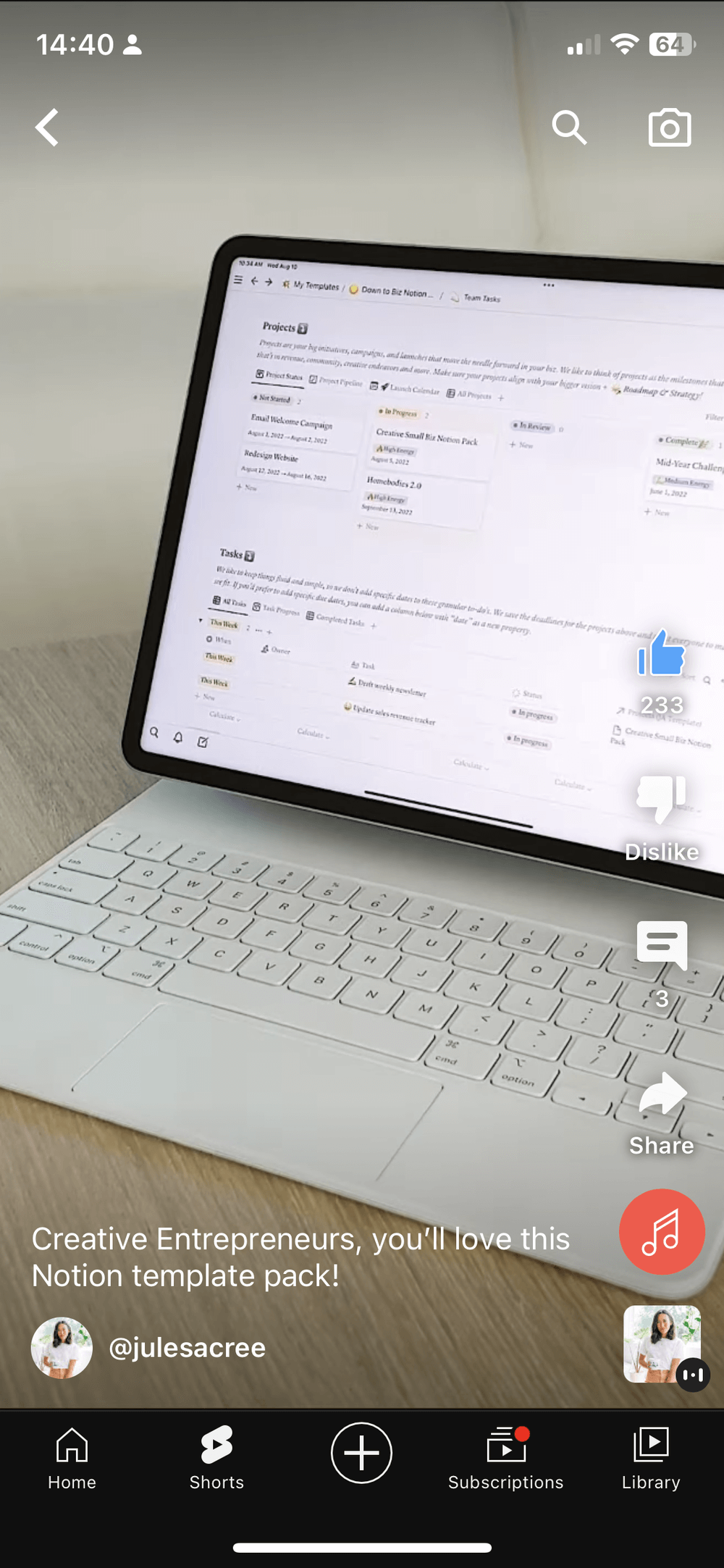
While YouTube Shorts may seem like yet another platform on your full plate, but it has its perks. Some benefits of creating on the platform include:
- Shorts get an average of 15 billion views per dayacross the world
- A new channel for your audience to discover your content
- If you’re looking to become a creator on the platform, it can ease you into YouTube and help build an audience while you figure out your strategy for long-form video
- It’s another place to distribute video content you may have created elsewhere (TikTok, Reels)
Does this sound appealing (and relevant) for you or your brand? Jump in and upload your first Short using the steps outlined below.
How to make and upload YouTube Shorts
There is no separate app for YouTube Shorts — it lives in your existing account. You can either create a new video within the YouTube app or upload an existing or edited video. The latter is especially ideal if you’re repurposing TikToks, Instagram Reels, or longer YouTube videos. To create new Shorts natively in YouTube:
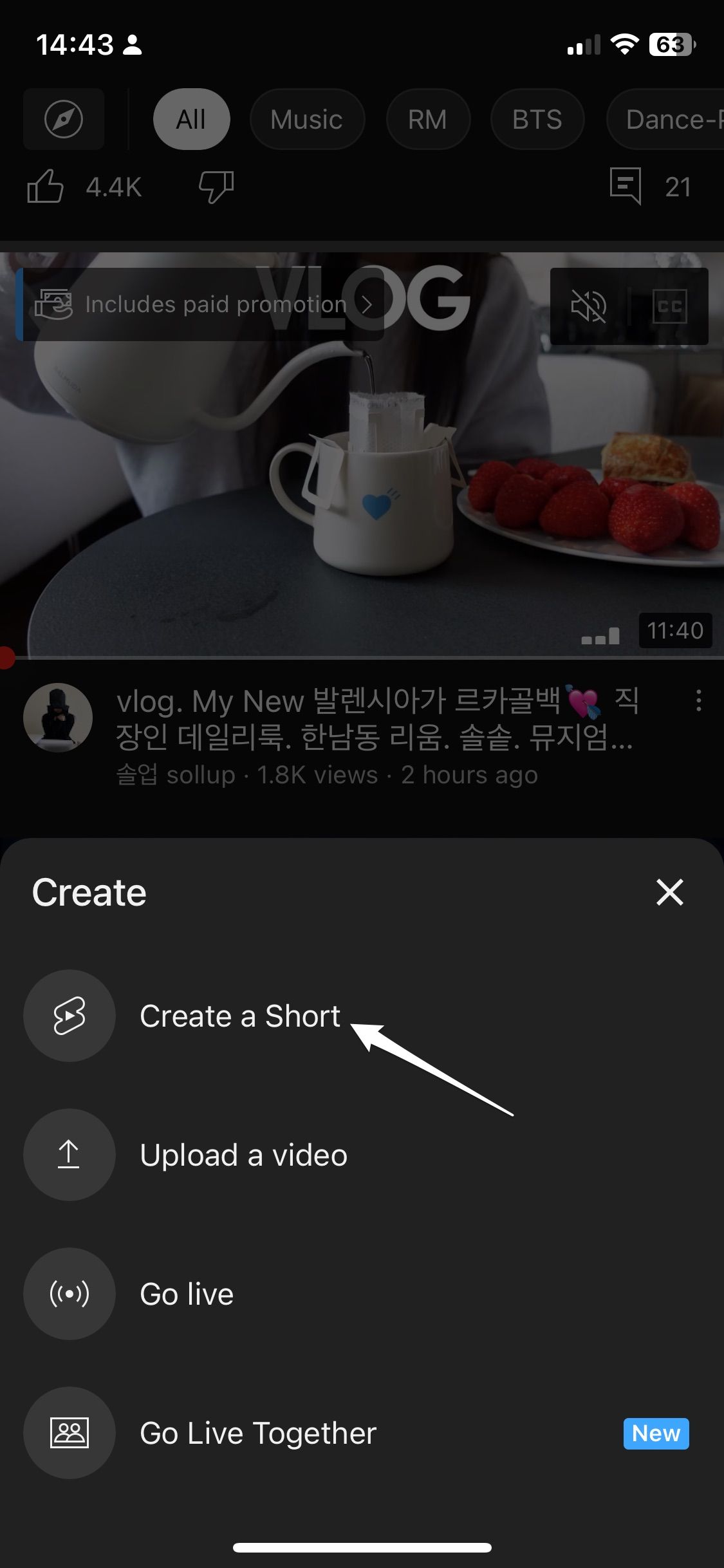
- Step 1: Open the YouTube mobile app, select the plus sign at the bottom of the screen and click ‘Create a Short’ from the list of options.
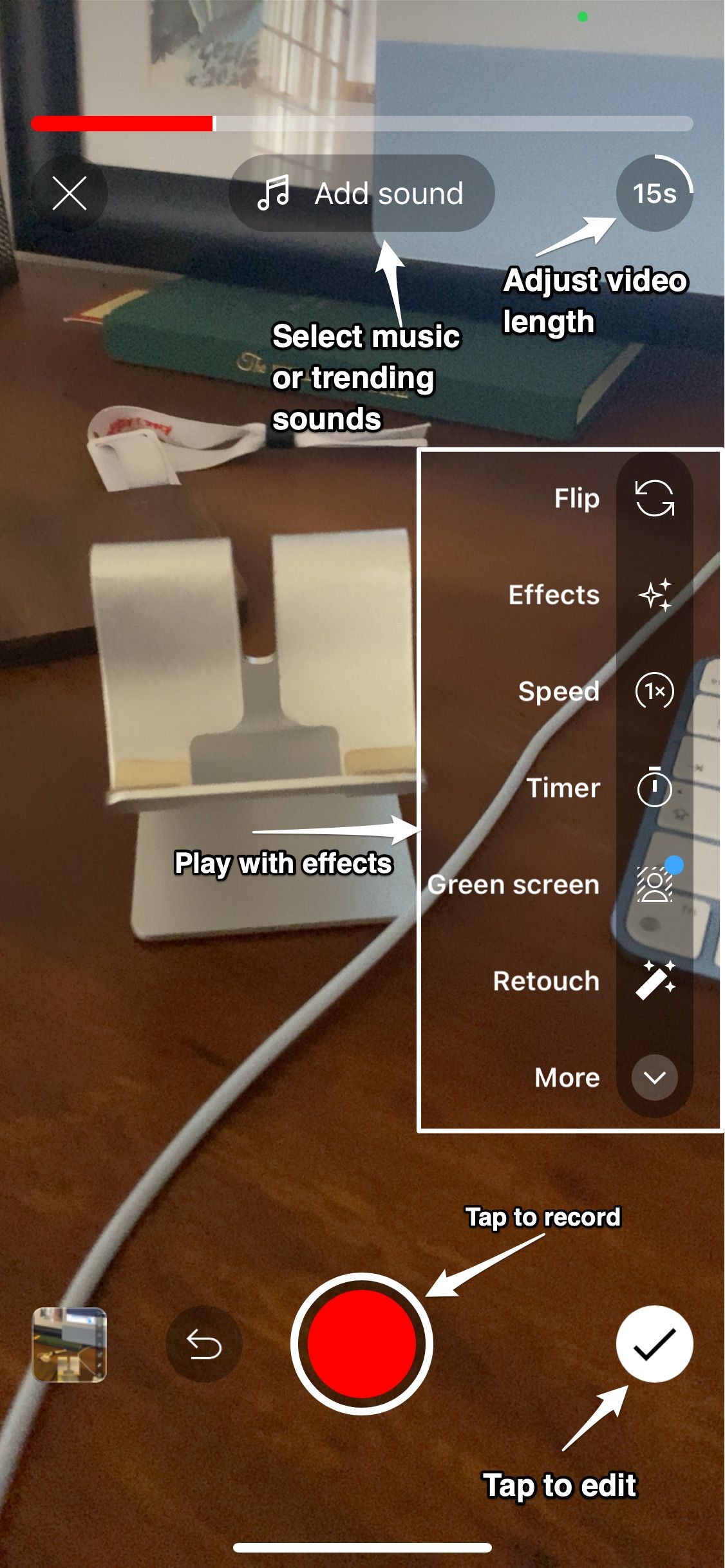
- Step 2: Start recording by tapping (not holding) the red button. You can choose the length of time you want to record for between 15 or 60 seconds at the top right side of your screen. To record different video sections, click the record button to pause recording, then again to resume recording for your next section.
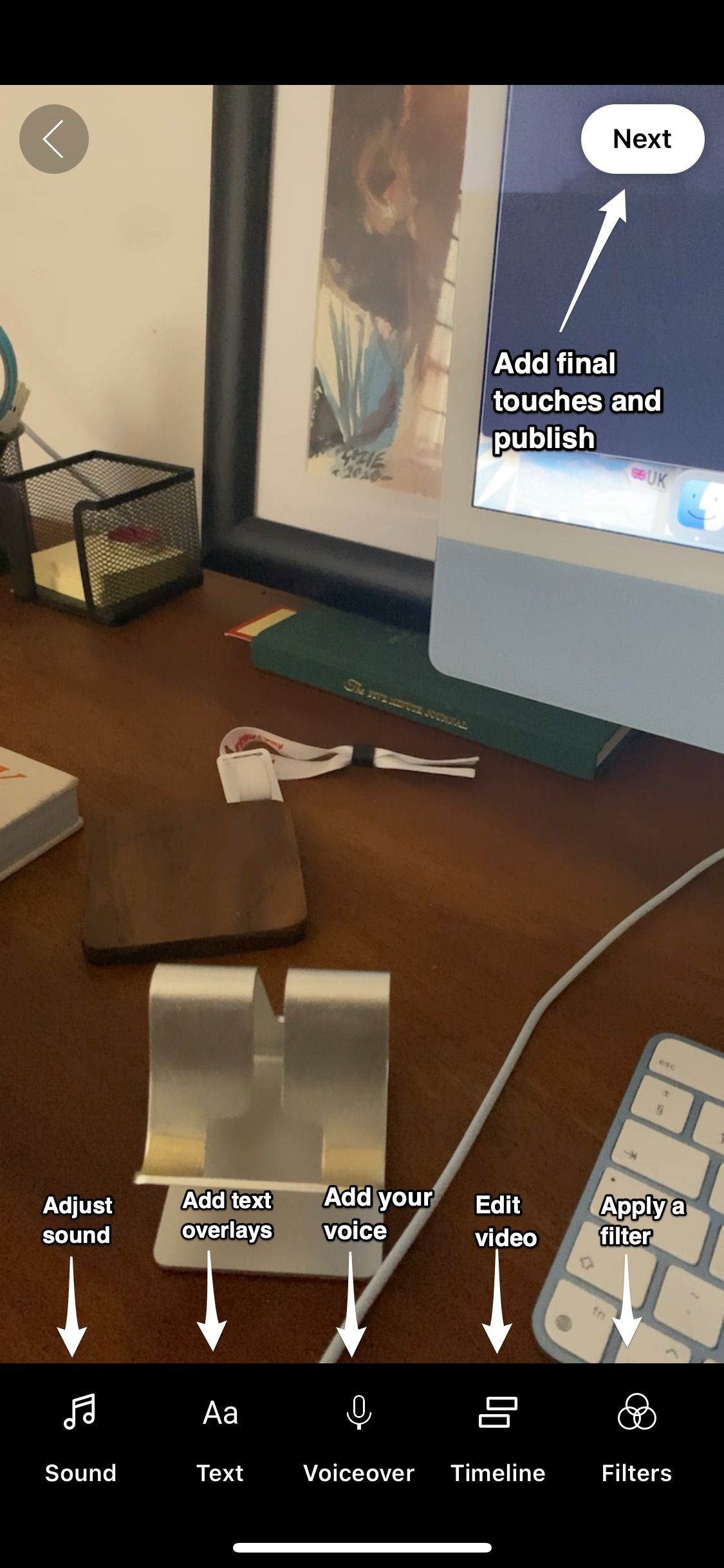
- Step 3: If you’re satisfied with your video, tap the checkmark in the bottom right of the screen. You can preview, edit, add music, voiceover, text, and filters to your video. Once you’re done, tap Next in the top right.
- Step 4: Add a caption, set visibility, schedule, select an audience, then tap Upload Short. Treat this step like you would a regular YouTube video by optimizing the caption so it's visible for the right search terms.
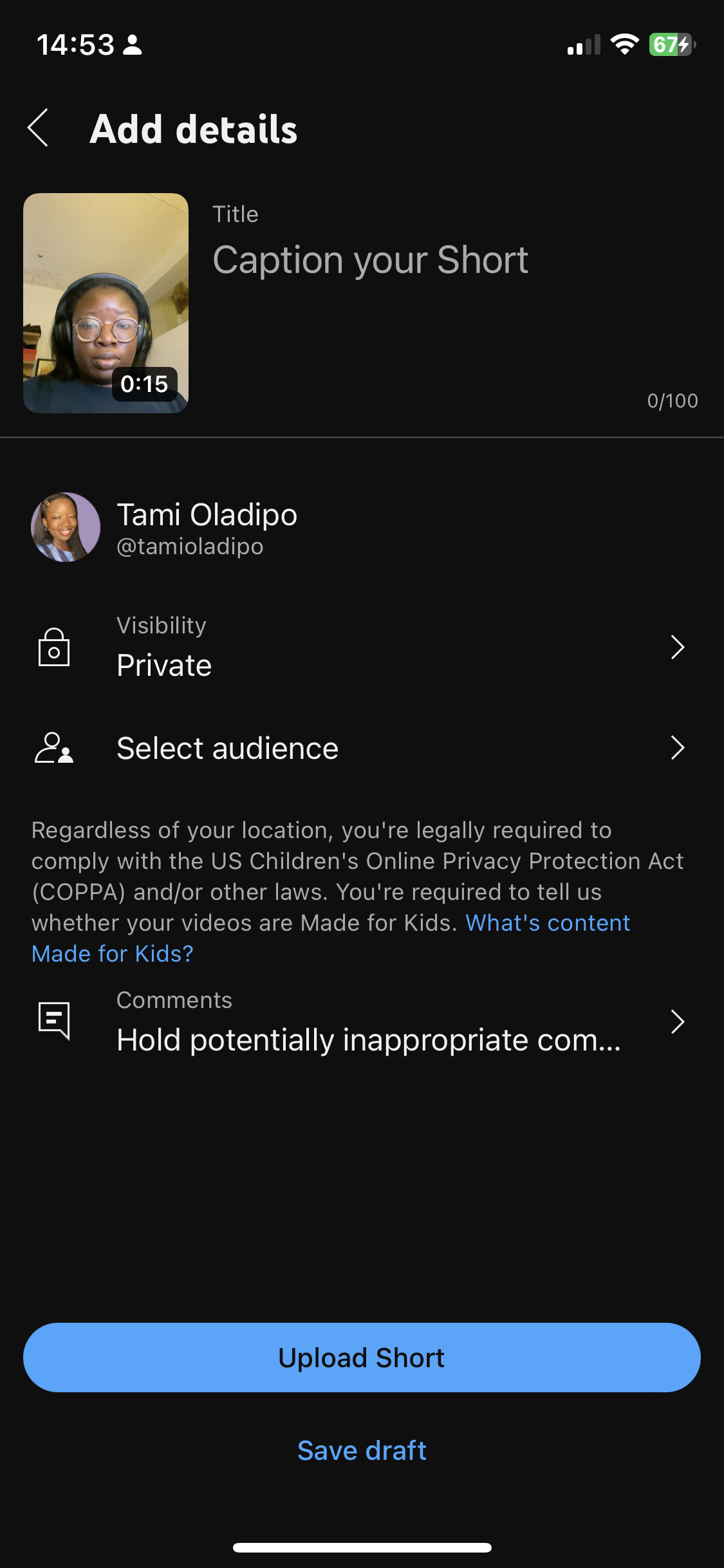
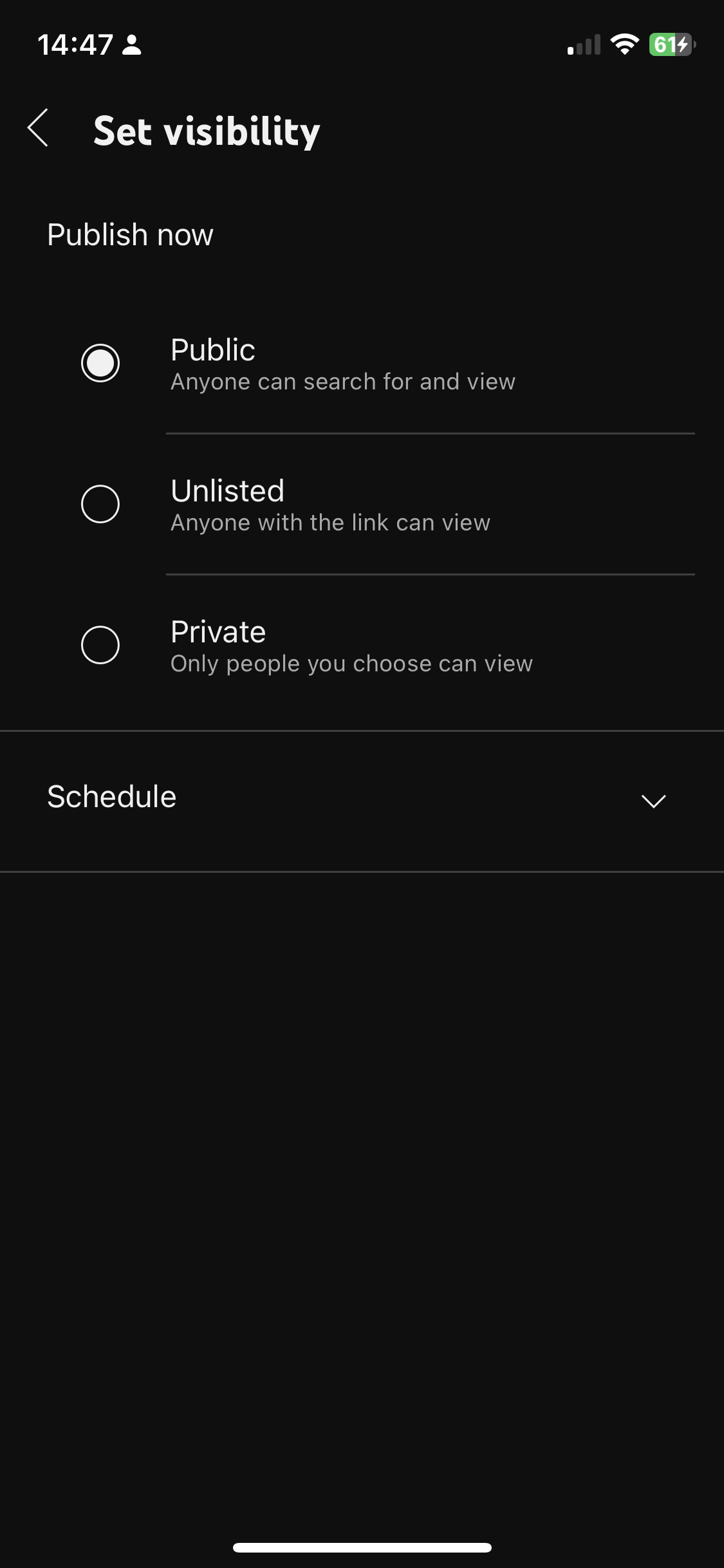
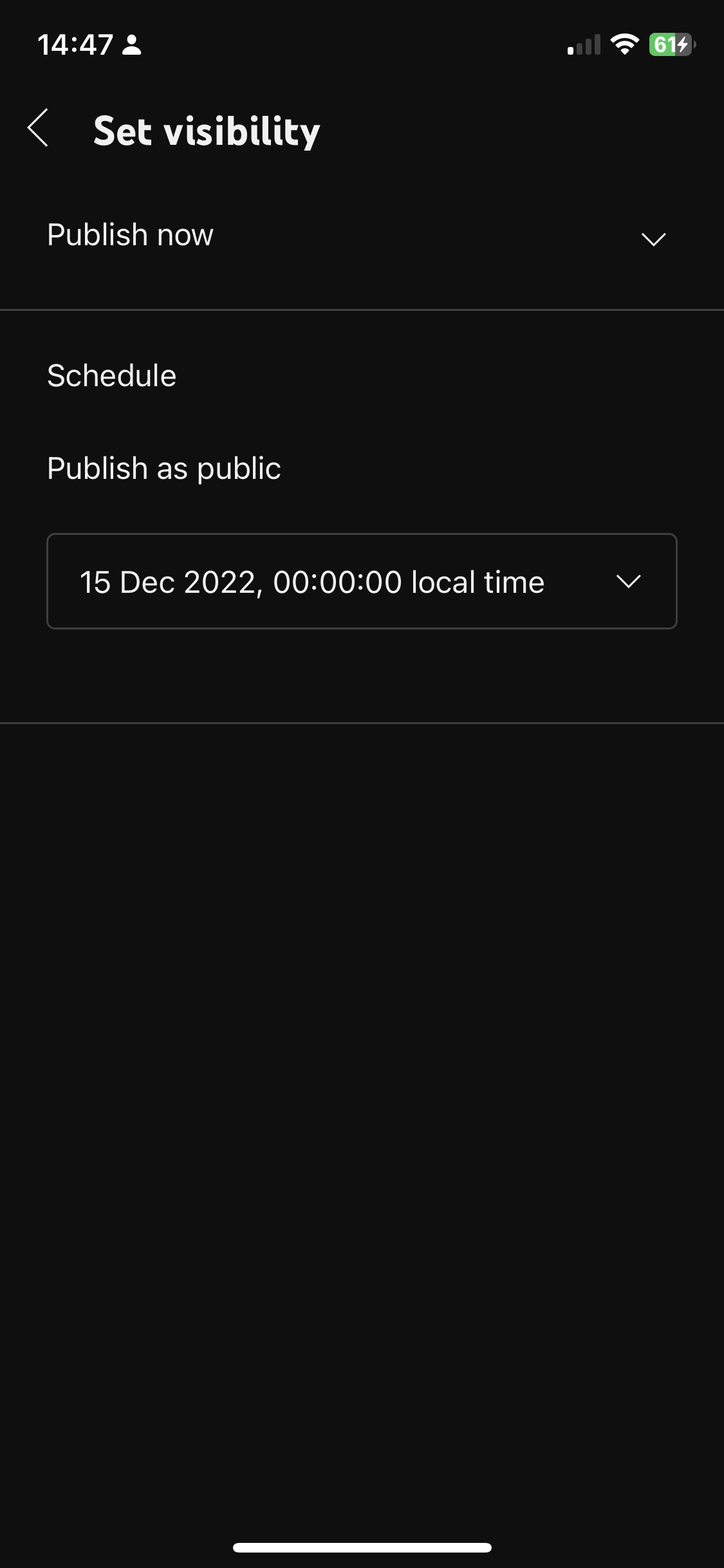
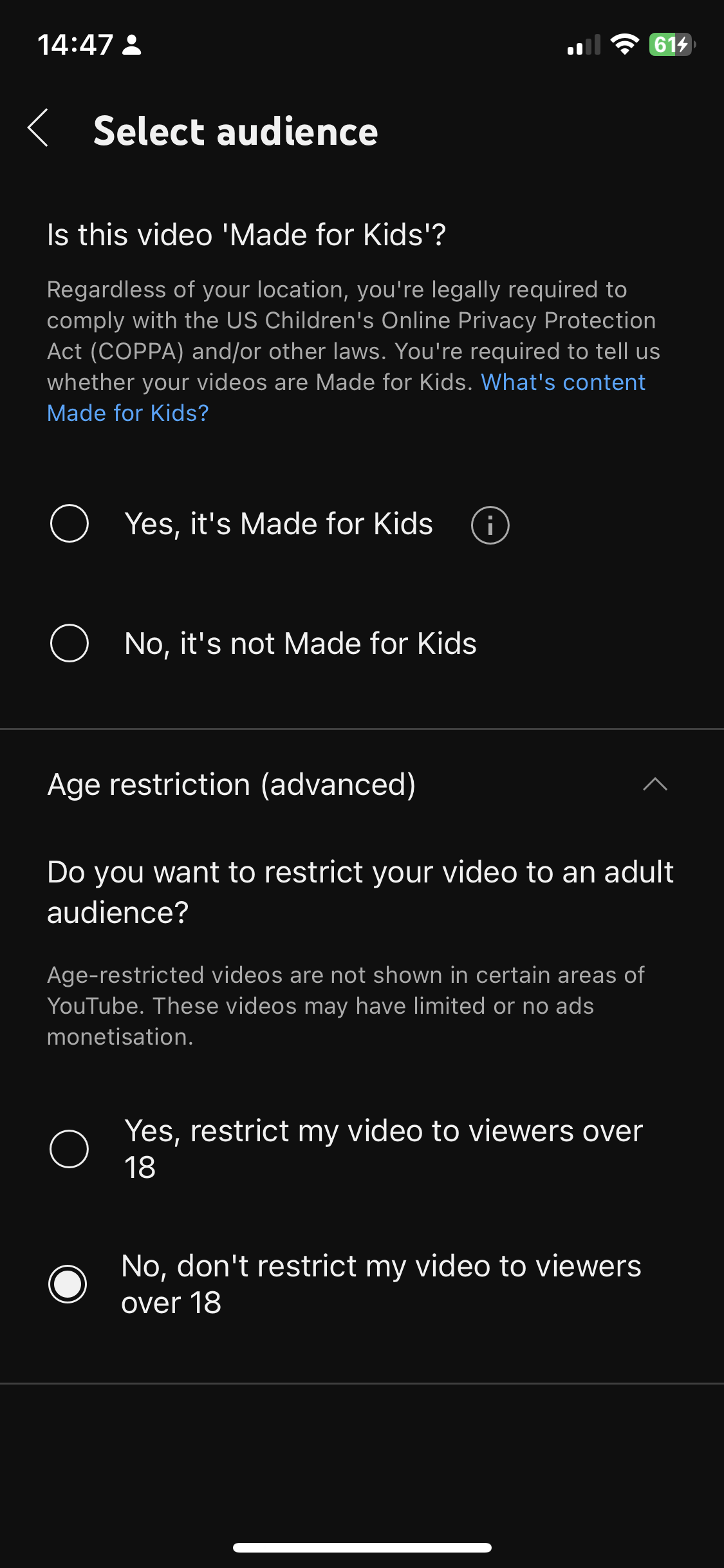
Alternatively, if you want to upload an existing video, you can follow these steps:
- Step 1: Click the plus sign.
- Step 2: Select Upload a video which will take you to your camera roll.
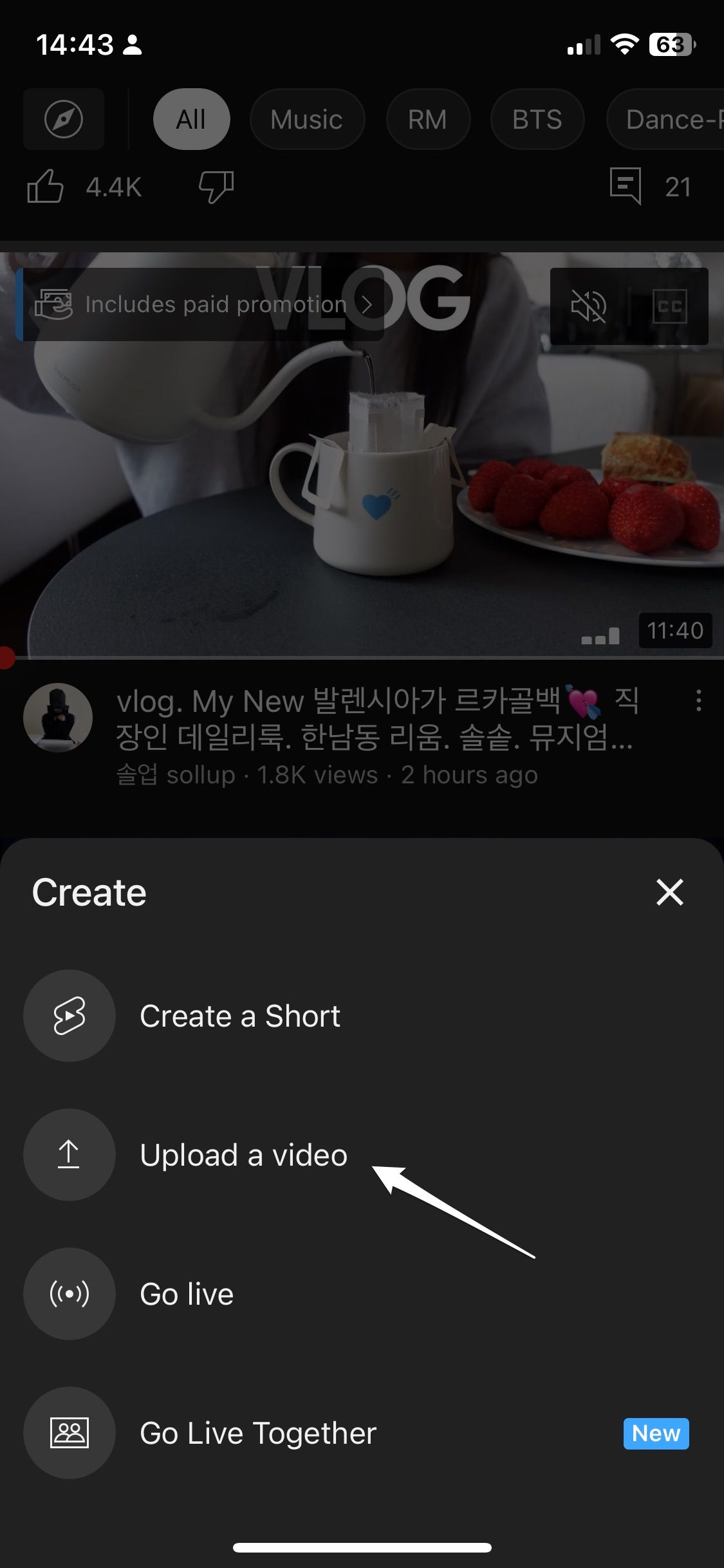
- Step 3: Select a video under 60 seconds.
- Step 4: Fill in the relevant details and hit publish.
Finally, you can also upload a Short from your desktop. YouTube can tell what type of video you’re uploading by its length and orientation, so if you’re uploading a square or vertical video that is less than 60 seconds, it is identified as a Short. To upload a Short from your desktop:
- Step 1: Head to the YouTube website or YouTube Studio.
- Step 2: Click Create in the top right side of the page.
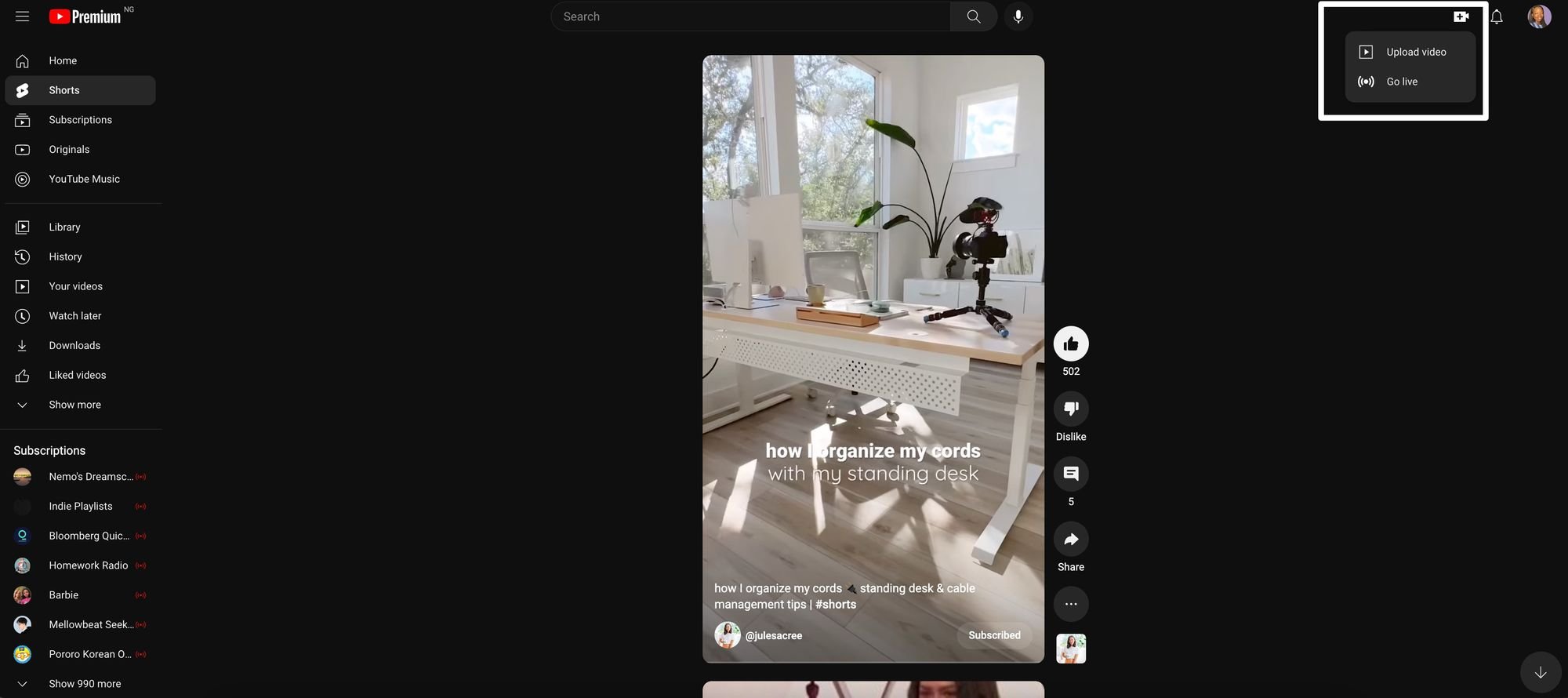
- Step 3: Upload your YouTube Short.
- Step 4: Fill in the relevant details and publish.
How to monetize YouTube Shorts
YouTube launched the Shorts Fund in August 2021, which is dedicated to paying out creators that generate large audiences for their Shorts. To qualify, creators must fit the following criteria:
- Uploaded an eligible video within the last 180 days
- Follow YouTube’s community guidelines
- Create completely original content
- Aged 13 or older (and creators between the ages of 13-18 have parental consent)
- Located in one of the participating countries
Creators don’t have to apply – YouTube will notify you if you’re qualified during the first week of each month via email and your account that you will be receiving money from the Fund.
7 tips for making the most of YouTube Shorts
Before you start publishing, here are some best practices that will help you achieve good results off the beat from this new channel.
- Don’t treat it like an afterthought: Develop a proper strategy to start uploading by creating relevant content, posting consistently and seeking audience feedback to make improvements.
- Repurpose existing content: If you’re having difficulty figuring out what to post, adopt a repurposing strategy where you take the content you create for other short video formats and upload it as a Short. You can then tweak and make improvements to your videos based on reception.
- Use a great hook: Much like other social video platforms, user attention is highly valuable. State the value proposition of your video upfront “Come along a day in my life as X” or “Let me teach you how to do Y” so people know why they should stick around.
- Keep an eye on top trends, sounds and hashtags: If you want to reach more people, you need to stay ahead of the trends. Monitor popular sounds, hashtags, and topics to see what’s hot right now. But remember that trends should only inform your strategy and not influence it.
- Engage with viewers: Use the comment section and YouTube’s Community feature to engage with viewers beyond uploads and build a loyal following. You can also use it to get their feedback on your content and improve.
- Analyze your performance: It’s essential to track what’s working and what isn’t so you can make better decisions for future content. Keep a watchful eye on these metrics and use them to inform your strategy moving forward.
YouTube Shorts is a great channel to adopt into your content creation process
With Shorts, you can dip your toes in the YouTube pool and start growing equity on the platform without having to create long-form content. Consider adopting it into your existing content creation to take advantage of the new audience on the growing channel.

Tamilore Oladipo
Sr. Content Creator @ Buffer
Tami is a Senior Content Creator at Buffer who grew 20K+ followers on LinkedIn and is now figuring out how to do it again on new platforms. She writes data-driven content about what's actually working on social.
Read more posts by Tamilore Oladipo
Try Buffer for free
190,000+ creators, small businesses, and marketers use Buffer to grow their audiences every month.