What are Instagram Story Highlights? (original) (raw)
What are Instagram Highlights?
Instagram Highlights are collections of Stories that you curate, located at the top of your Instagram personal or business profile in the form of tappable circles. They are a great way to group and categorize your Instagram Stories by theme. Instagram introduced them in 2017 as a way for users to keep their favorite or most relevant Stories around for more than 24 hours.
Story Highlights appear directly below your bio and right above the photo grid, so they are one of the first things your followers see when they go onto your profile. Brands have used their Instagram Highlights to present important information (e.g., upcoming events, restaurant menus, product lists, etc.) upfront.
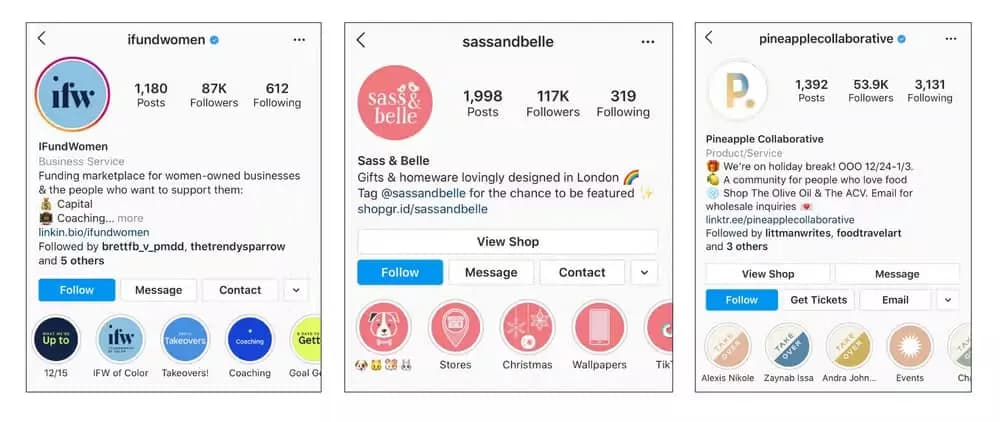
iFundWomen, Sass & Belle, and Pineapple Collaborative all use Instagram Highlights cover images to create a consistent look across their Highlights.
How do I create Instagram Highlights? How do I add a story to an Instagram Highlight?
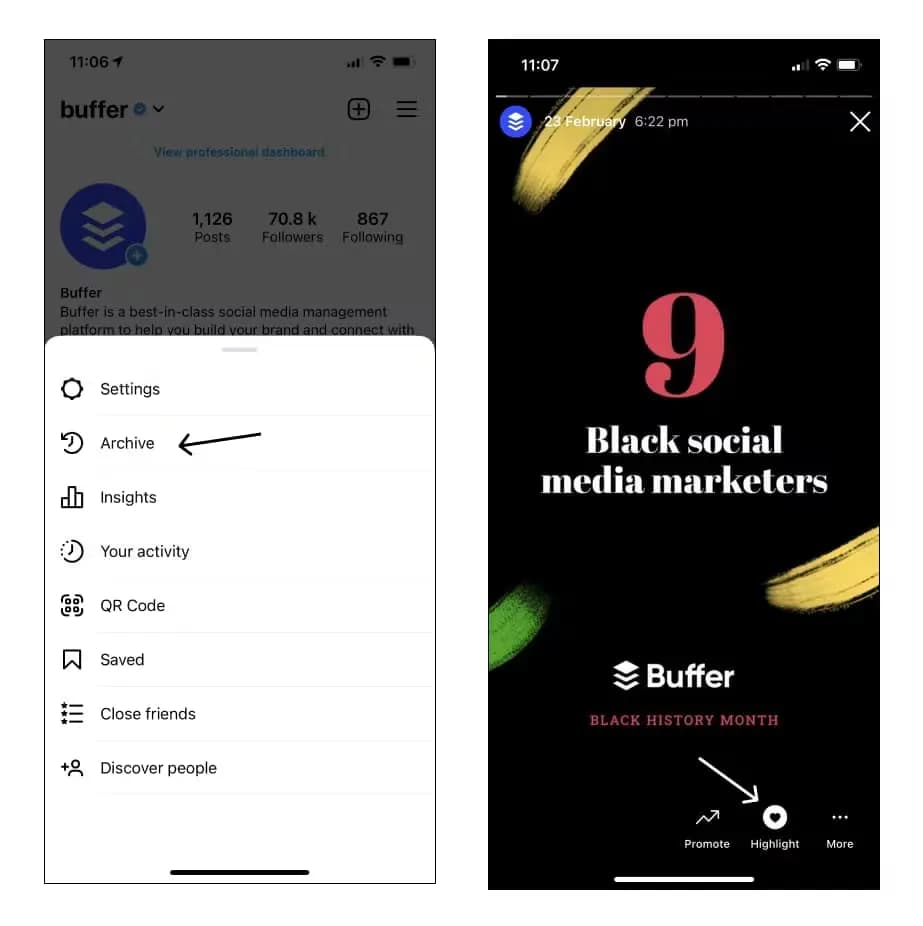
There are two ways to create Instagram Highlights; one way is to create them from your active Stories, and the other is from your Archived ones. Here’s how to add active Instagram Stories to your Highlights:
- Open the Story
- Tap Highlight at the bottom of the Story
- Choose a current Highlight or create a new one
Instagram Stories remain active on your profile for only 24 hours, but if you use the Archiving feature, you can store expired content for later use. Here’s how to add Archived Instagram Stories to Highlights:
- Go to your profile, and tap on the three horizontal lines in the top-right corner
- Select Archive.
- Open the Story you want to add to Highlights.
- Tap Highlight.
- Choose a current Highlight or create a new one.
What are the best ways to use Instagram Highlights for business?
People often find small businesses via social media, so Instagram business accounts should showcase many of the same resources they would on their website, including on their Instagram Highlights. Here are some of the best ways businesses can use Instagram Highlights:
- Highlight business information: Instagram Highlights are a great avenue to feature your small business’ return policy, opening hours, menu, mission statement, FAQs, and other important information. For instance, online boutique shop Ban.do answers questions about products, shipping, and customer service in its FAQ Highlight.
- Showcase products: You can also use Instagram Highlights to feature your essential products and services. For example, Buffer’s Instagram account includes Highlights for our Hashtag Manager, Shop Grid, Schedule Stories, and more.
- Highlight events and announcements: If you want to keep your latest news, events, and announcements at your audience’s fingertips, make space in your Instagram Highlights for weekly updates. For instance, The Kip, a boutique hotel, showcases their yoga, dinner party, and ceramic classes events in their Instagram Highlights.
- Share customer testimonials: Highlights are also a great way to keep testimonials on your account. Next time a customer shares how happy they are with your product in their Stories, save them to your Highlights instead of letting those testimonials disappear.
- Provide a behind-the-scenes look: Let your audience know what happens behind the scenes at your business. You can use Instagram Highlights to show off how you create your products and pack up orders, or you can introduce the employees who keep your business running.
- Feature influencers and customers: Featuring influencers and people from your community brings fresh voices to your profile and shows your fans that you want to amplify voices other than your own. Food-lover community Pineapple Collaborative uses its Instagram Highlights to keep Instagram takeovers at the top of their profile.
- Provide something extra: Use Instagram Highlights to share bonus content with your fans that they can’t find anywhere else. Gift and homeware design company Sass & Belle uses one of its Instagram Highlights to share cute phone wallpapers that fans can screenshot and use for free. Another way to offer your fans extra value is to keep tutorials in your Instagram Highlights. For instance, embroidery artist and seller Rosanna Diggs features stitch guides so followers can quickly locate her tutorials.
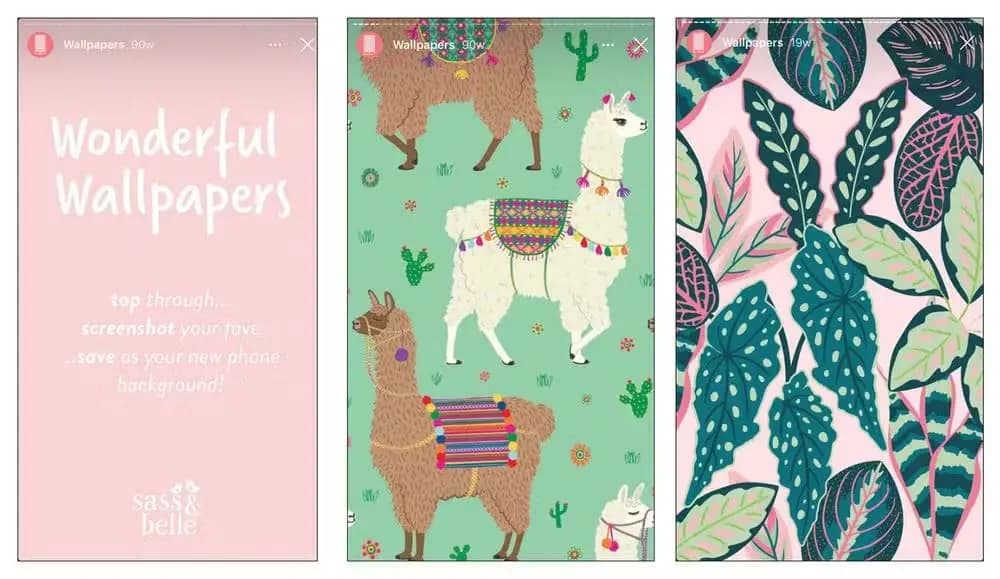
Sass & Belle frequently adds free phone wallpapers to their Wallpapers Instagram Highlights.
How do I add Instagram Highlight covers?
You can add Instagram Highlight covers by either uploading a premade cover from your device’s album or selecting an already published Story for your cover. Here’s how:
- Hold your finger pressed on an Instagram Highlight
- Tap on “Edit Highlight”
- Then tap on “Edit cover” at the top, close to the current cover
- Select the “image” icon at the beginning to upload a premade cover, or select an already published Story to use as a cover
How do I create Instagram Highlight covers?
If you’d like to elevate your Instagram Highlights further, you can create brand-specific covers for a consistent look across all your Instagram Highlights. Highlight covers give your profile a neat, professional look while also displaying your business’s branding and style.
You can create Instagram Highlights covers using Instagram’s built-in text on Instagram Stories or take it a step further with free image tools such as Canva. To make an image the cover photo, add the image to the new Highlight as your first image.
If you’re designing your own Instragm Highlights covers, the dimensions should be 1080 pixels x by 1920 pixels tall with a 9:16 aspect ratio. It would help if you also centered all the elements so that your cover looks great when cropped.
Why are Instagram Highlights important?
According to a Facebook survey, 62% of people have “become more interested in a brand or product after seeing it in Stories.” With Instagram Highlights, you can extend the life of your best Stories beyond 24 hours and give potential customers more chances to see the content you worked so hard to create.
Instagram Highlights also act as a “homepage,” thus shaping visitors’ first impressions and offering easy access to your business’s most important information.
Take your Instagram Stories to the next level with Buffer
Stories have become essential to brand awareness and should be included in your Instagram marketing strategy. Buffer’s Instagram Stories scheduling feature lets you plan and schedule your stories in advance—without the need to manually publish when the time comes.