Virtualmin PHP Options Made Simple - CharlesWorks (original) (raw)
A Look Into PHP Options in Virtualmin – Made Simple
Virtualmin PHP options matter quite a bit! When I work with websites, one of the most important parts that runs behind the scenes is PHP. People sometimes ask me, “What does PHP stand for?” Originally, PHP stood for “Personal Home Page“, but today it stands for “PHP: Hypertext Preprocessor” (yes, it’s a bit of a tongue-twister—it’s a recursive acronym!). PHP is a popular scripting language used to create dynamic web pages, like WordPress sites or contact forms.
Why Does PHP Matter?
Any time a website is doing something smart—like showing today’s weather, taking contact form submissions, or letting you log in—that’s likely powered by PHP. When you’re running a website, especially on your own server, PHP has lots of settings that control how it behaves. If something goes wrong, or if a site needs more speed or control, knowing these settings helps a lot.
I manage servers using Virtualmin, which gives me a friendly web interface to manage websites. In this post, I want to walk you through one specific screen that I use regularly—the PHP Options page in Virtualmin.
Below is a screenshot of the PHP Options page for a sample domain on a test server: 👉
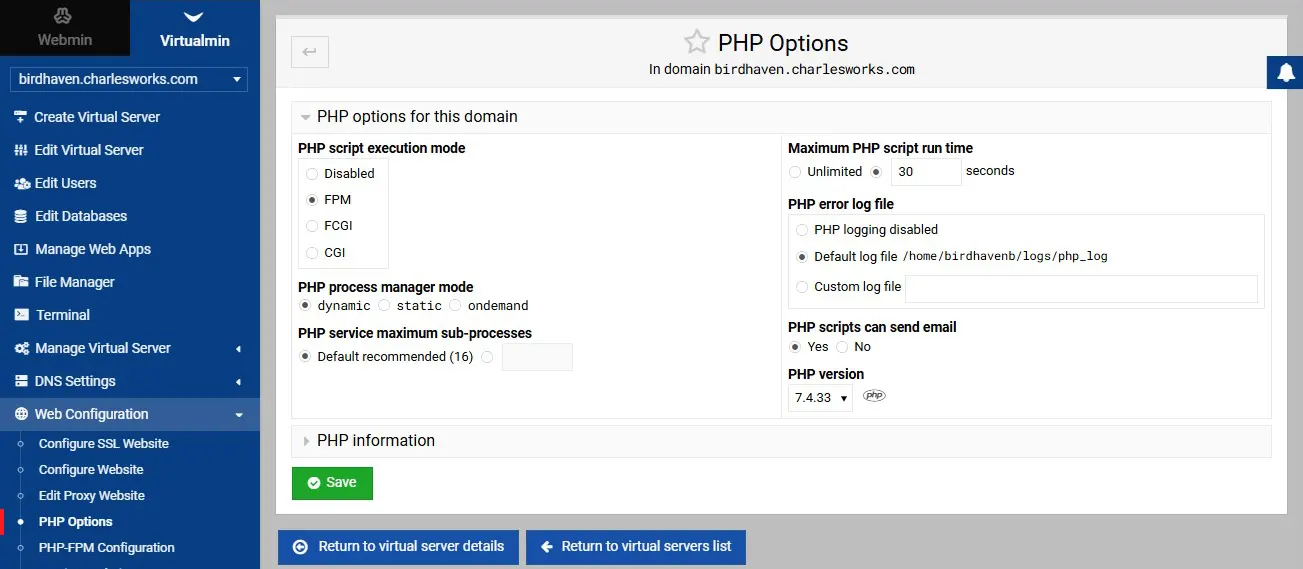
This image shows the PHP Options settings for the example domain birdhaven.charlesworks.com inside Virtualmin.
Let’s go through every part of this page so you understand what it all means.
🧠 PHP Script Execution Mode
This section controls how PHP code runs on the server. You have four choices:
- Disabled – This turns off PHP completely for the website. That means if your site uses PHP (like WordPress), it just won’t work. I only use this if a site doesn’t need PHP at all.
- FPM (FastCGI Process Manager) – This is the most efficient and modern way to run PHP. It keeps PHP running in the background, which speeds up your site and uses less memory overall. I usually go with this setting.
- FCGI (FastCGI) – This is similar to FPM but a bit older. It’s better than the oldest method (CGI), but not as efficient as FPM.
- CGI (Common Gateway Interface) – This is the traditional, slower method. It starts a new PHP process every time a page is loaded. It works, but it’s not great for busy websites.
⚙️ PHP Process Manager Mode
This only shows up when FPM is selected. It tells the server how to manage the PHP processes.
- Dynamic – PHP adjusts the number of processes depending on how busy the site is. This is usually the best balance.
- Static – It keeps the same number of PHP processes running all the time. Good for consistent performance but can waste resources.
- Ondemand – PHP processes only start when needed, then stop when idle. Great for saving memory on less-busy sites.
🔢 PHP Service Maximum Sub-Processes
Here you can control how many PHP processes (mini-programs) can run at once. The default is usually fine—Virtualmin recommends 16. If a site is very busy and needs more, I can increase it here.
⏱️ Maximum PHP Script Run Time
Sometimes a PHP script might take too long to finish (like importing a huge file). This setting limits how long a script can run.
- Unlimited – Lets PHP scripts run as long as they need. I don’t recommend this unless there’s a good reason.
- 30 seconds (or other) – This stops any PHP script that takes too long, which helps prevent a slow or stuck site.
📄 PHP Error Log File
When PHP has a problem, it writes a message to a log file. This helps me debug issues.
- PHP logging disabled – No errors will be logged. I only use this when I’m sure everything’s working.
- Default log file – This logs errors in a standard location. For example, in the screenshot, the errors go to:
/home/birdhavenb/logs/php_log - Custom log file – I can pick a different location if needed.
✉️ PHP Scripts Can Send Email
This is very important for contact forms or notifications.
- Yes – Allows PHP to send emails. I enable this for most sites that send out alerts or confirmation emails.
- No – Blocks PHP from sending email. Good for extra security on sites that don’t need email functions. But remember that setting this to “No” will also stop your site from notifying you of WordPress functions, like when updates happen and may disable you from recovering after a lost password.
🧮 PHP Version
Different websites need different versions of PHP. In the screenshot, PHP 7.4.33 is selected. That has been a stable version for a very long time. However, today I often recommend PHP 8.1 or higher for speed and security—if your site supports it. The WordPress core and its theme and every plugin must work under PHP 8.1 or you will have to either roll back to earlier versions or use different themes or plugins.
✅ Final Thoughts on Virtualmin PHP Options
This page might look intimidating at first, but once you understand what each option does, it’s really quite logical. Virtualmin makes managing all this way easier than editing configuration files by hand.
If you’re just starting out, my advice is:
- Use FPM with dynamic mode.
- Stick with the default error log and default sub-process limit.
- Set a reasonable timeout like 30 seconds unless needed.
- Let scripts send email if your site has contact forms.
- Use a current PHP version supported by your website software.
Managing websites on your own server teaches you so much—not just about PHP, but how the internet really works under the hood. Hopefully, this walk-through made it a bit clearer.
If you want to really get into the PHP weeds, check out the https://PHP.net website where all things PHP are available.