SMART Goals Template by ClickUp™ | Template by ClickUp™ (original) (raw)
Making and achieving goals is an important part of any business, but it can be hard to stay on track with so much to do. That's where the SMART Goals Template from ClickUp comes in!
This template helps you set and achieve goals by:
- Defining objectives that are Specific, Measurable, Achievable, Relevant and Time-bound (SMART)
- Visualizing your progress to keep everyone motivated
- Organizing tasks into manageable chunks so nothing gets left behind
Whether you're trying to get a project launched or launch an entire product line, this template will ensure that your team stays focused and on track!
Benefits of a SMART Goals Template
Using a SMART goals template can help you set better goals for yourself and your team. Benefits of using this method include:
- Helping to break down large, complex goals into smaller, more achievable steps
- Enabling you to track progress and measure success
- Making it easier to stay focused and motivated on long-term goals
- Making it easier to identify and address any potential roadblocks
Main Elements of a SMART Goals Template
ClickUp's SMART Goals Template is designed to help you create and track goals for yourself or your team. This List template includes:
- Custom Statuses: Create tasks with custom statuses such as Complete, Crushing, Off Track, On Hold, and On Track to keep track of the progress of each goal
- Custom Fields: Categorize and add 12 different custom attributes such as Do you have the skills required to achieve this, Why am I setting this goal right now, and Amount of Effort Required, to save vital information about goals and easily visualize goal progress
- Custom Views: Open 5 different views in different ClickUp configurations, such as the SMART Goals, Goal Effort, SMART Goal Worksheet, Company Goals, and Getting Started Guide so that you can hit the ground running
- Project Management: Improve goal tracking with time tracking capabilities, tagging, dependency warning, emails, and more
How to Use a SMART Goals Template
Creating SMART goals is an important part of any successful project or task. SMART stands for Specific, Measurable, Attainable, Relevant, and Time-bound. Here are five steps to help you create effective SMART goals:
1. Start with a specific goal
The first step in creating SMART goals is to make sure your goal is specific. This means that it should clearly state what you want to achieve and why. Consider the who, what, when, where, and why of your goal.
Create a Doc in ClickUp to document your specific goal.
2. Make it measurable
The next step is to make the goal measurable. This means setting specific criteria for measuring your progress and determining when you have achieved the goal.
Create custom fields in ClickUp to track progress and measure your goal.
3. Make sure it’s attainable
It’s important to make sure that the goal is attainable. Make sure that the goal is realistic and that the resources are available to make it happen.
Create tasks in ClickUp to break down the goal into smaller, more attainable steps.
4. Make it relevant
The goal should be relevant and important to you and your team. Ask yourself why the goal is important and how it can help you reach your overall objectives.
Create a Board view in ClickUp to map out how your goal fits into your overall objectives.
5. Set a timeline
Finally, set a timeline for when you want to achieve the goal. This will help you stay on track and ensure that you are making steady progress towards reaching your goal.
Set a Milestone in ClickUp for when you want to achieve the goal and use Automations to remind you when you’re getting close to the deadline.
Get Started with ClickUp's SMART Goals Template
Teams can use this SMART Goals Template to help everyone stay on the same page when it comes to setting and tracking measurable objectives.
First, hit “Add Template” to sign up for ClickUp and add the template to your Workspace. Make sure you designate which Space or location in your Workspace you’d like this template applied.
Next, invite relevant members or guests to your Workspace to start collaborating.
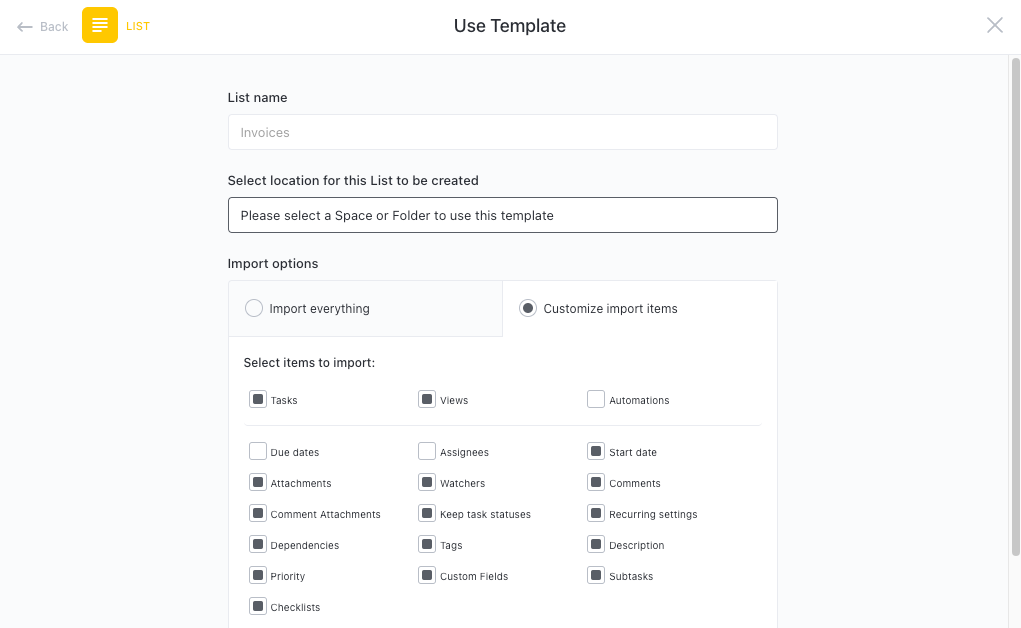
Now you can take advantage of the full potential of this template to create SMART goals:
- Use the SMART Goals View to create and organize goals
- The Goal Effort View will help you measure the effort required for each goal
- The SMART Goal Worksheet View will give you a space to brainstorm and store all of your ideas
- The Company Goals View will help you keep track of all goals that your team is working on
- The Getting Started Guide View will provide you with step-by-step instructions on how to set up SMART goals
- Organize tasks into six different statuses: Complete, Crushing, Off Track, On Hold, On Track, to keep track of progress
- Update statuses as you progress through tasks to keep stakeholders informed of progress
- Monitor and analyze tasks to ensure maximum productivity
Get Started with Our SMART Goals Template Today