About reservations (original) (raw)
This document gives you an overview of reservations. To learn more about the different types of reservations, seeChoose a reservation type.
When you create a reservation, Compute Engine verifies that the requested capacity is available in the specified zone. If so, then Compute Engine reserves resources, creates the reservation, and the following is enabled:
- You can consume the reserved resources to create virtual machine (VM) instances, and the reserved resources remain available until you delete the reservation.
- You're charged for the reserved resources at the same on-demand rate as running VMs, including any applicable discounts, as long as the reservation exists.
Reservations are useful for growth, migrations, or disaster recovery.
How reservations work
A reservation provides a high level of assurance of capacity for one or more VMs with the configuration the user specifies. You might also use a reservation withCompute Engine commitmentsor other products that use VMs.
When you create a reservation, you define the following properties:
- Auto-delete
The auto-delete option specifies to automatically delete the reservation, regardless if it's fully consumed or not. If you enable the auto-delete option, the reservation is deleted within two hours from your specified date and time by default, or at custom date and time. Automatically deleting reservations can be useful to avoid unnecessary charges for the reservations that aren't consumed for some time. - Consumption type (automatic or specific)
- An automatically consumed reservation (default) can be consumed by VMs with a reservation affinity property that allows them to automatically consume any of these reservations. This consumption type is useful if you create and delete lots of VMs, and you want to consume your reservations whenever possible.
- A specifically targeted reservation can only be consumed by VMs with a reservation affinity property that targets that specific reservation. This consumption type makes it easier to track and control which VMs consume which reservations.
- A single-project reservation (default) can only be consumed by VMs that are located in the same project as the reservation.
- A shared reservation can be consumed by VMs in the project where the reservation is located and any other project that the reservation is shared with. Using shared reservations can help improve the utilization of your reservations and reduce the number of reservations that you need to create and manage. For more information, seeHow shared reservations work in this document.
- Sharing policy
The sharing policy specifies if a reservation of GPU VMs can be consumed bycustom training jobs orprediction jobs in Vertex AI. By default, custom training jobs or prediction jobs aren't allowed to consume reservations of GPU VMs. To change this, see how tocreate or update reservations to be consumed in Vertex AI. - VM count
The VM count is the number of VMs with matching properties and zone that you want to reserve when creating a reservation. After you create the reservation, you can modify the VM count. - VM properties
The VM properties describe the hardware requirements (memory and CPUs) and optional resources (Local SSD disks and GPUs) for the VMs that you want to reserve. When creating a reservation, you can specify these properties directly, specify the properties based on an existing VM, or specify the properties by using aninstance template. A VM can consume a reservation only if both the VM's properties and reservation's VM properties exactly match. For more information, see Requirements in this document. - Optional: Resource placement policy (compact)
Acompact placement policy indicates that the reserved VMs should be located as close to each other as possible to reduce network latency between them.
When you stop, suspend, or delete a VM that consumes a reservation, the VM no longer counts toward the reservation. The reserved capacity becomes available again.
If you want to delete a reservation to release the reserved capacity, but keep any VMs that consume the reservation, then consider the following:
- You can delete an automatically consumed reservation without stopping or suspending VMs. After you delete the reservation, any VMs that were consuming it keep running. You keep incurring charges for them.
- You can only delete a specifically targeted reservation if no VMs consume it. If you stop or suspend VMs, then, after you delete the reservation, you can only restart or resume the VMs if you create a new specifically targeted reservation with a name, zone, and properties that match the deleted reservation.
How shared reservations work
Each VM in a shared reservation can be consumed by a VM in either the project that created the reservation (owner project) or any of the projects the reservation is shared with (consumer projects). When a VM stops consuming a shared reservation, the shared reservation can be consumed by a different VM in any of the projects that the reservation is shared with. If a shared reservation reserves multiple VMs, VMs from multiple projects can consume the same shared reservation simultaneously.
By default, projects can't create and modify shared reservations. To create and modify a shared reservation in a project, the project must be added to the allowlist of theShared Reservations Owner Projects (compute.sharedReservationsOwnerProjects) organizational policy constraint. If you share a reservation, then it is affected byadditional quota requirements and has different consumption behavior than single-project reservations.
Requirements
All reservations have the following requirements:
- A VM can consume a reservation only if all of the following properties for both the VM and the reservation exactly match:
- Project
* Project requirements vary based on the reservation'sshare type. - Zone
- Machine type
- Minimum CPU platform
- GPU type and count (if any)
- Local SSD disk type and count (if any)
- Reservation affinity
* Reservation affinity requirements vary based on the reservation'sconsumption type. - Compact placement policy (if any)
* A reservation can optionally include acompact placement policyto indicate that its reserved VMs should be located as close to each other as possible to reduce network latency among them. If a reservation specifies a compact placement policy, then it can only be consumed by VMs that specify the same compact placement policy. - Location hint (if any)
* A reservation can optionally include thelocationHintfield, which you can only specify when creating reservations or VMs using REST. Google doesn't recommend specifying thelocationHintfield when creating reservations.
- Project
- You must have unused quota available in your project for the resources that you're reserving. If the reservation is created successfully, then quota for those resources is consumed immediately.
Additional requirements for reservations attached to commitments
Additionally, reservations that are attached to commitments have the following requirements:
- The reservations must be for the same project and region as the commitment.
- The reservations must be for the same machine family series as the commitment. However, you can choose any machine type within that machine family series.
- The reservations must have the auto-delete option disabled.
- If the commitment specifies any GPUs, Local SSD disks, or both, then the attached reservation (or combination of attached reservations) must specify exactly the same numbers and types of those resources as the commitment.
To learn more, seeAttach reservations to resource-based commitments.
Additional requirements for reservations created from an instance template
Additionally, if you create a reservation by specifying aninstance template, make sure of the following:
- You must create your reservation in the same region, zone, and project as the resources within the template. Specifically:
- Anyregionalorzonal resourcesthat are specified in an instance template—such as a machine type or a disk—restrict the use of the template to the locations where those resources exist. For example, if your instance template specifies an existing disk in the
us-central1-azone, then you must create your reservation in the same zone. - An instance template contains project-specific settings, so you can only access and use an instance template within the same project. For the projects a shared reservation is shared with, you must create similar templates in those projects or create VMs by specifying properties directly.
- Anyregionalorzonal resourcesthat are specified in an instance template—such as a machine type or a disk—restrict the use of the template to the locations where those resources exist. For example, if your instance template specifies an existing disk in the
- If the instance template specifies a compact placement policy, you must create a specific reservation. Then, when you create the VMs to consume the reservation, you mustspecifically targetthe reservation by name. Otherwise, the VMs can't consume the reservation.
Additional quota requirements for shared reservations
Additionally, there are the following quota implications for the owner and consumer projects of a shared reservation:
- Owner project: The owner project consumes quota as follows:
- When creating the shared reservation, the owner project consumes quota for the total reserved resources.
- When consuming reserved resources, the owner project consumes quota for the resources that it consumes.
- Consumer projects: The consumer projects consume quota only when consuming the reserved resources and only for the resources that they consume.
For example, assume that project A (the owner project) creates a shared reservation for 10 resources and shares the reservation with project B and C (the consumer projects). Upon creating the shared reservation, project A consumes quota for 10 resources. Then, if project A and B consume 2 reserved resources each, project A and B each consume quota for 2 resources. In total, project A consumes quota for 12 resources, project B consumes quota for 2 resources, and project C consumes quota for 0 resources (as it didn't consume the reservation).
Additional requirements for reservations with compact placement policies
Additionally, to specify a compact placement policy for a reservation, make sure of the following requirements:
- The compact placement policy must support reservations:
- The compact placement policy can't specify a maximum distance value of
1. - The compact placement policy can't be specified by more than one reservation at a time.
- The compact placement policy can't specify a maximum distance value of
- The reservation must support compact placement policies:
- You can only specify a compact placement policy for an on-demand, single-project, specifically targeted reservation that is not attached to a commitment.
- The VMs reserved by the reservation must be supported by the compact placement policy:
* The reservation's zone must be within the region of the compact placement policy.
* The reservation's number of VMs can't exceed the maximum number of VMs that the compact placement policy supports.
* The reservation's machine type must besupported by compact placement policies.
Restrictions
All reservations have the following restrictions:
- You can only use reservations with the following Google Cloud products:
- Batch
- Compute Engine
- Dataflow
- Managed Service for Apache Spark
- Google Kubernetes Engine
- Vertex AI
- You can reserve up to 1,000 VMs per reservation.
- You can't reserve A4X Max bare metal instances, or A4X, A4, A3 Ultra, or A3 High (with less than 8 GPUs) VMs.
- You can only update the reservation affinity property of VMs to automatically consume any matching reservation (
ANY_RESERVATION) or no reservations (NO_RESERVATION).
Additional restrictions for reservations attached to commitments
Additionally, reservations that are attached to commitments have the following restrictions:
- You can attach reservations only to resource-based commitments.
- You can attach reservations only while you're purchasing your commitment.
- You can attach a specific reservation to only one single commitment.
- You can't delete or resize a reservation that is attached to a commitment. Instead, see how toreplace reservations that are attached to commitments.
To learn more, seeAttach reservations to resource-based commitments.
Additional restrictions for shared reservations
Additionally, shared reservations have the following restrictions:
- You can only share reservations with projects in the same organization as the project that creates the reservation.
- Each shared reservation can be shared with 1 to 100 consumer projects.
- For each organization, you can create up to 100 shared reservations for each unique combination of VM properties.
- You can onlylist the reservations created by a specific project. This means that each shared reservation is only listed in the project that created it—you can't list all of the shared reservations in an organization or all of the reservations that are shared with a specific project.
- If you create a shared reservation by specifying an instance template, only the users within your project can access the same instance template and use it to create VMs or other reservations.
- You can't specify a compact placement policy when creating a shared reservation.
- If you move a project that was using shared reservations to a new organization, its shared reservations don't migrate to the new organization. Any shared reservations that were created in this project are deleted, and any reservations from the previous organization that were shared with this project can't be consumed in the new organization. For more information, seeHow shared reservations work in this document.
You can mitigate the limitations of some of these requirements by following thebest practices for shared reservations.
Additional restrictions for reservations with compact placement policies
Additionally, reservations that specify a compact placement policy have the following restrictions:
- You can't share a compact placement policy across reservations. Instead, you must use a separate compact placement policy for each reservation that you want to apply a compact placement policy to.
- You can only specify compact placement policies. Any other type of resource policies, such as instance schedules or snapshot schedules, isn't supported.
Billing
Reservations are billed at the same rate as their reserved resources, including the same on-demand prices and1-minute minimum chargesas unreserved, running VMs.Sustained use discounts (SUDs),CUDs, and custom pricing also apply as they would for running VMs.
For example, suppose that you have the following scenario:
- You have a 3-vCPU commitment in
us-central1. - You're running 5 vCPUs in
us-central1-a. - You have a 10-vCPU reservation in
us-central1-a.
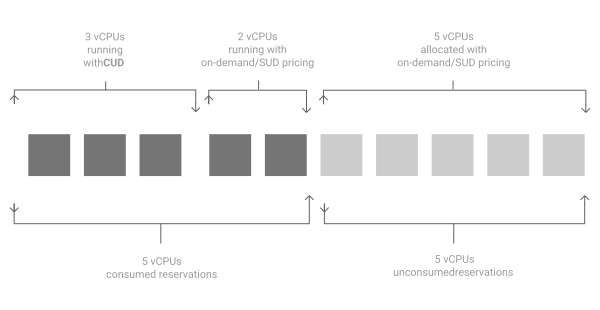
In this scenario, Google Cloud bills you as follows:
| Covered by | Number of vCPUs |
|---|---|
| Committed use discount price | 3 |
| On-demand price (2 vCPU used reservations + 5 vCPU unused reservations) | 7 |
A reservation incurs charges for its reserved resources for as long as the reservation exists, regardless of whether or not its resources are being used. While consuming a reservation, a VM does not incur duplicate resources charges since the reservation is already billed for the cost of the reserved resources. For details, see VMs pricing.
Additionally, you can monitor the consumption trends of your reservations to reduce unnecessary costs from wasted or unused resources. For more information, seeMonitor reservations consumption.
Additional billing information for shared reservations
There are no additional charges for using shared reservations—they are billed at the same price as single-project Compute Engine reservations. But, the project that is billed for shared reservations changes with consumption as different projects might qualify for different CUDs.
The billing project and price for shared reservations are managed as follows:
- Billing project: By default, the owner project is billed for the shared reservation. But, when a resource from a shared reservation is being consumed by a consumer project, the consumer project is billed for the reservation instead.
- Billing discounts: By default, billing uses the on-demand price. But, if you are eligible to receive CUDs for either the project that is being billed or the Cloud Billing account associated with that project, then the discounted price is used instead.
What's next
- Learn how to create reservations: