What is Infrastructure as Code (IaC)? (original) (raw)
- Topics
- What is Infrastructure as Code (IaC)?
Infrastructure as Code (IaC) is a methodology for managing and provisioning computing infrastructure. It relies on machine-readable definition files for configuration, rather than manual physical hardware adjustments or interactive configuration tools. By treating infrastructure setup the same way developers treat application code, teams can automate the deployment of networks, virtual machines, Kubernetes clusters, databases, and load balancers rapidly and reliably. It serves as a component of modern DevOps practices, helping enable organizations to scale with consistency and speed.
How Infrastructure as Code works
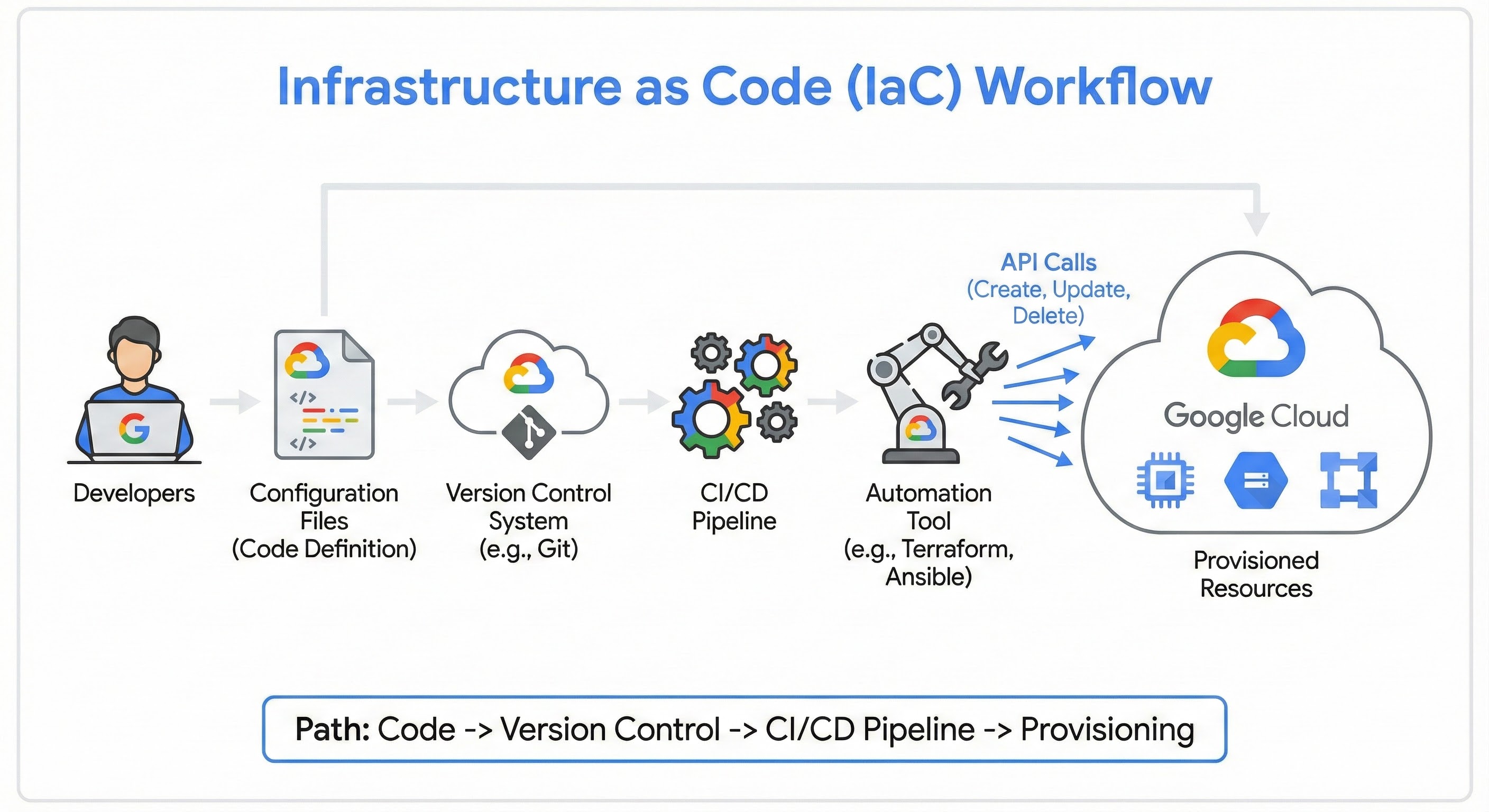
IaC works by automating the provisioning process through code, removing the need for manual settings in a cloud console. First, developers define the desired infrastructure specifications in configuration files, which are usually stored in a version control system. An automation tool, such as Terraform, then processes these files and makes the necessary API calls to the cloud provider to create, update, or delete the actual resources. This workflow typically follows a path from code (definition) to version control, through a CI/CD pipeline, and finally to provisioning.
Declarative versus imperative
When implementing IaC, teams generally choose between two approaches: declarative and imperative. The primary difference lies in whether you focus on the end result or the steps to get there.
| Approach | Description | Example |
|---|---|---|
| Declarative | You define what you want the final state to look like. The tool figures out the necessary steps to achieve that state. This is the modern standard for tools like Terraform and Kubernetes. | "I want 3 virtual machines with 8GB RAM each." |
| Imperative | You define how to change the infrastructure by listing specific commands or scripts to execute in order. | "Run script A to start server 1. Then run script B to configure the network. Then run script C..." |
You define what you want the final state to look like. The tool figures out the necessary steps to achieve that state. This is the modern standard for tools like Terraform and Kubernetes.
"I want 3 virtual machines with 8GB RAM each."
You define how to change the infrastructure by listing specific commands or scripts to execute in order.
"Run script A to start server 1. Then run script B to configure the network. Then run script C..."
IaC security and scanning
As infrastructure definitions move into code repositories, security practices must adapt to protect these files. "IaC security" and "IaC scanning" refer to the practice of analyzing configuration files for vulnerabilities before the infrastructure is ever deployed—a concept known as "Shift Left" security. Specialized tools scan the code pipeline to detect misconfigurations, such as Storage buckets left open to the public or unencrypted databases, preventing security risks from reaching the production environment.
Use cases of IaC
Multi-cloud deployments
Enterprises often need to run workloads across different environments. Using a tool like Terraform, a team can use a single configuration workflow to deploy and manage resources across Google Cloud, or other cloud environments, and on-premise data centers simultaneously. This reduces the complexity of learning different proprietary tools for each platform.
Disposable environments
Developers frequently need safe places to test new features. With IaC, a team can spin up a temporary "staging" environment that mirrors production exactly, run their tests, and then destroy the environment immediately afterward. This helps ensure testing accuracy while avoiding the cost of keeping a permanent staging server running 24/7.
Disaster recovery
In the event of a catastrophic regional outage, manual recovery can take days. IaC enables "Disaster Recovery as Code," allowing an organization to rapidly re-provision their entire infrastructure in a different region using their existing code definitions. This can dramatically reduce downtime and ensure business continuity.
Benefits of IaC
Adopting IaC can offer significant advantages for organizations looking to modernize their IT operations.
Speed
Automation allows you to deploy complex environments in minutes rather than days or weeks.
Consistency
Because the same code deploys the same environment every time, IaC eliminates "configuration drift"—where servers become inconsistent due to manual ad-hoc changes.
Cost savings
Teams can easily spin down unused resources when they aren't needed, such as turning off development environments on weekends, which helps manage cloud spend.
Version control
Since infrastructure is defined as code, the entire history of your infrastructure changes is stored in one place. This makes it easier to track who changed what and to roll back to a previous version if something breaks.
Implementing IaC on Google Cloud
Google Cloud provides a comprehensive set of tools to support your Infrastructure as Code journey, from initial design to deployment and ongoing management. A great starting point is the Application Design Center, which allows you to explore, customize, and build upon pre-built reference architectures. This helps you design your application stack based on Google Cloud best practices before you write a single line of code, ensuring your infrastructure is well-architected from the start.
Once you have a design, the Google Cloud open ecosystem makes it easy to implement it as code. The platform treats open-source standards like Terraform as a first-class citizen, not an afterthought. Services like Infrastructure Manager allow you to deploy and manage Google Cloud resources using Terraform directly, while Config Connector lets you manage Google Cloud resources through Kubernetes, helping to bridge the gap between cloud infrastructure and container orchestration.
Cloud Resource Manager
Cloud Resource Manager serves as the service for programmatically managing the Google Cloud resource hierarchy, including organizations, folders, and projects. While many teams use IaC to deploy resources like virtual machines, Cloud Resource Manager allows you to define the project structure itself as code. This helps teams automate the setup of new environments with consistent Identity and Access Management (IAM) policies and organizational constraints, ensuring that governance is baked into the infrastructure from the very beginning.
Automating temporary preview environments
One of the most valuable ways to use IaC is to solve the common developer problem: "It worked on my machine, so why did it break in production?" You can solve this by creating temporary environments.
In this workflow, when a developer opens a pull request (PR), IaC tools automatically spin up a temporary, isolated copy of the app. When the PR is merged, the environment self-destructs.
Step 1: Dynamic naming in Terraform
To make this work, your Terraform code cannot have hard-coded names. You must use variables to create unique resources for every PR.
main.tf (Snippet)
- Terraform
Step 2: The Cloud Build configuration
In your cloudbuild.yaml, you inject the PR number into Terraform using the _PR_NUMBER substitution variable provided by Cloud Build.
cloudbuild.yaml (Snippet)
- YAML
This workflow shifts IaC from a static maintenance task into a dynamic productivity tool that accelerates the review cycle.
Solve your business challenges with Google Cloud
New customers get $300 in free credits to spend on Google Cloud.
Related products and solutions
 Cloud BuildA serverless CI/CD platform that lets you build, test, and deploy software across all languages and environments, streamlining the integration of IaC into automated pipelines.
 Compute EngineSecure and customizable virtual machines that serve as the foundational infrastructure you can provision using Terraform.
 Cloud StorageA scalable object storage service used in IaC workflows to securely store remote Terraform state files.
 Google Kubernetes Engine (GKE)The most scalable and fully automated Kubernetes service, often configured using declarative IaC to manage cluster settings and node pools.
 Cloud RunA fully managed serverless platform that lets you deploy containerized applications via IaC without managing the underlying machines.
 Cloud SQLA fully managed relational database service for MySQL, PostgreSQL, and SQL Server that can be provisioned and connected to your apps via code.
Additional resources
- Infrastructure as code documentation: Explore the official hub for overviews, guides, and tools related to implementing Infrastructure as Code on Google Cloud.
- Running Infrastructure as Code with least privilege: Learn how to enhance security by applying the principle of least privilege to your IaC workflows in this technical blog post.
- Infrastructure as Code with Terraform lab: Gain practical, hands-on experience deploying cloud resources using Terraform through this guided Google Cloud Skills Boost quest.
- Adopting Infrastructure as Code on GCP for repeatable scale: Discover why adopting IaC is crucial for achieving repeatable, scalable operations in this introductory article.
- Managing Infrastructure as Code with Terraform: Dive deeper into specific strategies and best practices for effectively managing your infrastructure definitions when using Terraform on Google Cloud.
- Application Design Center: Explore, customize, and build upon pre-built reference architectures. It helps you design your application stack based on Google Cloud best practices before you write a single line of code.
- Infrastructure Manager: A fully managed service that automates the deployment and management of Google Cloud resources using Terraform, enabling teams to provision infrastructure reliably and consistently.