Instance Groups (original) (raw)

Create and manage virtual machines as a group
Google Cloud's managed instance group (MIG) is a set of virtual machines sharing the same configuration that you can manage as one entity.
Features
Autoscale with changing demand
When your apps require additional compute resources, autoscaled managed instance groups (MIGs) can automatically grow the number of VMs in the group to meet demand. If demand drops, autoscaled MIGs can automatically shrink to reduce your costs. You could also scale proactively using predictive or scheduled autoscaling.
Improve reliability by spreading across zones
Regional MIGs let you spread app load across multiple zones. This replication protects against zonal failures. If a zone fails, your app can continue serving traffic from VMs running in the remaining available zones in the same region.
Automatically attain and maintain capacity
MIGs will create desired VM capacity and maintain group size even in case of VM failure. If a VM in the group fails or gets preempted (Spot VMs), the MIG automatically recreates that VM.
Support for stateful workloads
You can use MIGs for building highly available deployments and automating operation of applications with stateful data or configuration, such as databases, DNS servers, legacy monolith applications, or long-running batch computations with checkpointing. Stateful MIGs preserve each VM's unique state (instance name, attached persistent disks, and metadata) on machine restart, recreation, auto-healing, and update events.
Application-based autohealing
You can also set up an application-based health check, which periodically verifies that your application responds as expected on each of the MIG's VMs. If an application is not responding on a VM, the MIG automatically recreates that VM for you. Checking that an application responds is more precise than simply verifying that a VM is up and running.
Automated updates
The MIG automatic updater lets you safely deploy new versions of software to instances in your MIG and supports a flexible range of rollout scenarios, such as rolling updates and canary updates. You can control the speed and scope of deployment as well as the level of disruption to your service.
How It Works
To use MIGs, you'll first create an instance template that defines the configuration for all VMs in the group. Then create a MIG by specifying the instance template, number of VMs needed, and optionally an autoscaling and autohealing configuration. Then the MIG will create and manage VMs for you.
Watch a demo of the how managed instance groups can help you build scalable and highly available deployments.
Common Uses
Availability
Tutorials, quickstarts, & labs
Tutorials, quickstarts, & labs
Obtainability
Tutorials, quickstarts, & labs
Batch or Machine Learning workloads
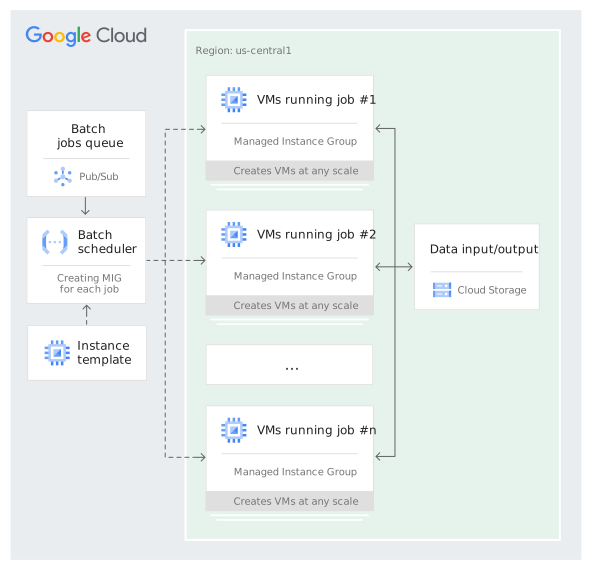
Large scale batch jobs require the ability to provision thousands of VMs. MIGs make it easy to create them across several zones with a single command. Use compact placement policies for tightly coupled batch jobs to reduce network latency. Using our GPU supported VMs you could run your analytics, machine learning and other batch computations on a scalable, high-performance cloud infrastructure.
Tutorials, quickstarts, & labs
Batch or Machine Learning workloads
Large scale batch jobs require the ability to provision thousands of VMs. MIGs make it easy to create them across several zones with a single command. Use compact placement policies for tightly coupled batch jobs to reduce network latency. Using our GPU supported VMs you could run your analytics, machine learning and other batch computations on a scalable, high-performance cloud infrastructure.
Persistence
Tutorials, quickstarts, & labs
Highly available database cluster
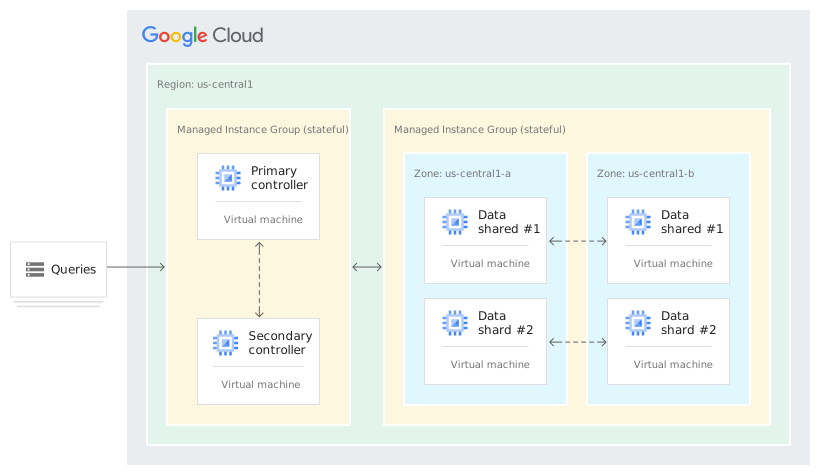
If you need to manage groups of VMs with persistent data or configurations (such as database shards or legacy applications) then stateful MIGs are your best bet. Autohealing, multi-zone deployments, and automatic rolling updates improve uptime and resilience of these stateful applications. Examples of stateful applications include Cassandra, MongoDB, MySQL, PostgreSQL and Kafka.
Tutorials, quickstarts, & labs
Highly available database cluster
If you need to manage groups of VMs with persistent data or configurations (such as database shards or legacy applications) then stateful MIGs are your best bet. Autohealing, multi-zone deployments, and automatic rolling updates improve uptime and resilience of these stateful applications. Examples of stateful applications include Cassandra, MongoDB, MySQL, PostgreSQL and Kafka.
Generate a solution
What problem are you trying to solve?
What you'll get:
Step-by-step guide
Reference architecture
Available pre-built solutions
Pricing
| How instance groups pricing works | There is no additional charge for using instance groups. You are charged only for the resources that your instance group creates. | |
|---|---|---|
| Product | Description | Pricing |
| Instance group | You are billed for each VM according to Compute Engine’s pricing. New customers get $300 in free credits to spend on Google Cloud during the first 90 days. | See Compute Engine pricing information. |
How instance groups pricing works
There is no additional charge for using instance groups. You are charged only for the resources that your instance group creates.
Description
You are billed for each VM according to Compute Engine’s pricing.
New customers get $300 in free credits to spend on Google Cloud during the first 90 days.
Pricing
See Compute Engine pricing information.
Pricing calculator
Estimate your monthly costs, including region specific pricing and fees.
Custom quote
Connect with our sales team to get a custom quote for your organization.
Learn more about instance groups
Ready to automate your deployments?
Stay up to date on Compute

See how customers are using Compute solutions

Related offerings

Product documentation