Access control with Identity and Access Management (original) (raw)
Discover
Get started
Secure and control access
Publish messages
Create a topic
Receive messages
Validate and transform messages
Schemas
Monitor and audit
Build Pub/Sub systems
Test and integrate
Troubleshoot
Troubleshoot topics
- Troubleshoot standard topics
- Troubleshoot import topics
* Use platform logs to troubleshoot import topics
* Troubleshoot Amazon Kinesis Data Streams import topics
* Troubleshoot Cloud Storage import topics
* Troubleshoot Azure Events Hub import topics
* Troubleshoot Amazon MSK import topics
* Troubleshoot Confluent Cloud import topics
Code samples
Access control with Identity and Access Management
This document describes the access control options available to you in Pub/Sub.
Overview
Pub/Sub uses Identity and Access Management (IAM) for access control.
IAM allows you to grant specific roles to users, groups, and service accounts, giving them the necessary permissions to perform their tasks. You can grant these IAM roles using the Google Cloud console or the IAM API.
In Pub/Sub, access control can be configured at the project level and at the individual resource level. Here are some examples for using Pub/Sub access control:
- Grant access on a per-resource basis, rather than for the whole Cloud project.
- Grant access with limited capabilities, such as to only publish messages to a topic, or to only consume messages from a subscription, but not to delete the topic or subscription.
- Grant access to all Pub/Sub resources within a project to a group of developers.
If you have view-only access to a single resource such as a topic or a subscription, you cannot view the resource using the Google Cloud console. Instead, you can use Google Cloud CLI to view the resource.
For a detailed description of IAM and its features, see theIAM documentation. In particular, seeGranting, changing, and revoking access to resources.
Types of roles in Pub/Sub
Similar to other Google Cloud products, Pub/Sub supports three types of roles:
- Basic roles: Basic roles are highly permissive roles that existed prior to the introduction of IAM. For more information about basic roles, see Basic roles.
- Predefined roles: Predefined roles give granular access to specific Google Cloud resources. For more information about predefined roles, see Predefined roles. The Pub/Sub predefined roles are included in a later part of this section.
- Custom roles: Custom roles help you enforce the principle of least privilege. For more information about custom roles, seeCustom roles.
Required Pub/Sub permissions
The following sections lists Pub/Sub permissions required for accessing different Pub/Sub resources.
Required permissions for topics
The following table outlines the required permissions for each Pub/Sub API method related to topics. It shows which IAM permission is needed to call each method, along with a description of what the method does.
| Method | Description | Required permission |
|---|---|---|
| projects.topics.create | Creates the given topic with the given name. | pubsub.topics.create on the containing Cloud project |
| projects.topics.delete | Deletes the topic with the given name. | pubsub.topics.delete on the requested topic |
| projects.topics.get | Gets the configuration of a topic. | pubsub.topics.get on the requested topic |
| projects.topics.getIamPolicy | Gets the IAM access control policy for a topic. | pubsub.topics.getIamPolicy on the requested topic |
| projects.topics.list | Lists all topics. | pubsub.topics.list on the requested Cloud project |
| projects.topics.patch | Updates an existing topic. | pubsub.topics.update on the requested topic |
| projects.topics.publish | Adds one or more messages to the topic. | pubsub.topics.publish on the requested topic |
| projects.topics.setIamPolicy | Sets the IAM access control policy for a topic. | pubsub.topics.setIamPolicy on the requested topic |
| projects.topics.testIamPermissions | Returns permissions that a caller has on the specified resource. | None |
Required permissions for subscriptions
The following table outlines the required permissions for each Pub/Sub API method related to subscriptions. It shows which IAM permission is needed to call each method, along with a description of what the method does.
| Method | Description | Required permission |
|---|---|---|
| projects.subscriptions.acknowledge | Acknowledges the messages associated with the ack_ids in the AcknowledgeRequest. | pubsub.subscriptions.consume on the requested subscription |
| projects.subscriptions.create | Creates a subscription to a given topic. | pubsub.subscriptions.create on the containing Cloud project andpubsub.topics.attachSubscription on the requested topic. For creating a Subscription S in Project A that is attached to a Topic T in Project B, the appropriate permissions must be granted on both Project A and on Topic T. In this case, user identity info can be captured in Project B's audit logs. |
| projects.subscriptions.delete | Deletes an existing subscription. | pubsub.subscriptions.delete on the requested subscription |
| projects.subscriptions.detach | Detaches a subscription from a topic. | pubsub.topics.detachSubscription on the topic that the subscription is attached to. |
| projects.subscriptions.get | Gets the configuration details of a subscription. | pubsub.subscriptions.get on the requested subscription |
| projects.subscriptions.getIamPolicy | Gets the IAM access control policy for a subscription. | pubsub.subscriptions.getIamPolicy on the requested subscription |
| projects.subscriptions.list | Lists matching subscriptions. | pubsub.subscriptions.list on the requested Cloud project |
| projects.subscriptions.modifyAckDeadline | Modifies the ack deadline for a specific message. | pubsub.subscriptions.consume on the requested subscription |
| projects.subscriptions.modifyPushConfig | Modifies the pushConfig for a specified subscription. | pubsub.subscriptions.update on the requested subscription |
| projects.subscriptions.patch | Updates an existing subscription. | pubsub.subscriptions.update on the requested subscription |
| projects.subscriptions.pull | Pulls messages from the server. | pubsub.subscriptions.consume on the requested subscription |
| projects.subscriptions.seek | Seeks an existing subscription to a point in time or a snapshot. | pubsub.subscriptions.consume on the requested subscription and pubsub.snapshots.seek on the requested snapshot, if any. |
| projects.subscriptions.setIamPolicy | Sets the IAM access control policy for a subscription. | pubsub.subscriptions.setIamPolicy on the requested subscription |
| projects.subscriptions.testIamPermissions | Returns permissions that a caller has on the specified resource. | None |
Required permissions for schemas
The following table outlines the required permissions for each Pub/Sub API method related to schemas. It shows which IAM permission is needed to call each method, along with a description of what the method does.
| Method | Description | Required permission |
|---|---|---|
| projects.schemas.commit | Commits a new schema revision. | pubsub.schemas.commit on the requested schema |
| projects.schemas.create | Creates a schema. | pubsub.schemas.create on the containing Cloud project |
| projects.schemas.delete | Deletes a schema. | pubsub.schemas.delete on the requested schema |
| projects.schemas.deleteRevision | Deletes a specific schema revision. | pubsub.schemas.delete on the requested schema |
| projects.schemas.get | Gets a schema. | pubsub.schemas.get on the requested schema |
| projects.schemas.getIamPolicy | Gets the IAM access control policy for a schema. | pubsub.schemas.getIamPolicy on the requested schema |
| projects.schemas.list | Lists schemas in a project. | pubsub.schemas.list on the requested Cloud project |
| projects.schemas.listRevisions | Lists all schema revisions for the named schema. | pubsub.schemas.listRevisions on the requested schema |
| projects.schemas.rollback | Creates a new schema revision from a previous revision. | pubsub.schemas.rollback on the requested schema |
| projects.schemas.validate | Validates a schema definition. | pubsub.schemas.validate on the containing Cloud project |
| projects.schemas.validateMessage | Validates a message against a schema. | pubsub.schemas.validate on the containing Cloud project |
Required permissions for snapshots
The following table outlines the required permissions for each Pub/Sub API method related to snapshots. It shows which IAM permission is needed to call each method, along with a description of what the method does.
| REST method | Description | Required permission |
|---|---|---|
| projects.snapshots.create | Creates a snapshot from the requested subscription. | pubsub.snapshots.create on the containing Cloud project and pubsub.subscriptions.consume permission on the source subscription. |
| projects.snapshots.delete | Removes an existing snapshot. | pubsub.snapshots.delete on the requested snapshot |
| projects.snapshots.getIamPolicy | Gets the IAM access control policy for a snapshot. | pubsub.snapshots.getIamPolicy on the requested snapshot |
| projects.snapshots.list | Lists the existing snapshots. | pubsub.snapshots.list on the requested Cloud project |
| projects.snapshots.patch | Updates an existing snapshot. | pubsub.snapshots.update on the requested snapshot |
| projects.snapshots.setIamPolicy | Sets the IAM access control policy for a snapshot. | pubsub.snapshots.setIamPolicy on the requested snapshot |
| projects.snapshots.testIamPermissions | Returns permissions that a caller has on the specified resource. | None |
Available Pub/Sub roles
The following table lists all Pub/Sub roles and the permissions associated with each role:
| Role | Permissions |
|---|---|
| Pub/Sub Admin (roles/pubsub.admin) Provides full access to topics and subscriptions. Lowest-level resources where you can grant this role: Schema Snapshot Subscription Topic | cloudkms.keyHandles.* cloudkms.keyHandles.create cloudkms.keyHandles.get cloudkms.keyHandles.list cloudkms.operations.get cloudkms.projects.showEffectiveAutokeyConfig pubsub.* pubsub.messageTransforms.validate pubsub.schemas.attach pubsub.schemas.commit pubsub.schemas.create pubsub.schemas.delete pubsub.schemas.get pubsub.schemas.getIamPolicy pubsub.schemas.list pubsub.schemas.listRevisions pubsub.schemas.rollback pubsub.schemas.setIamPolicy pubsub.schemas.validate pubsub.snapshots.create pubsub.snapshots.createTagBinding pubsub.snapshots.delete pubsub.snapshots.deleteTagBinding pubsub.snapshots.get pubsub.snapshots.getIamPolicy pubsub.snapshots.list pubsub.snapshots.listEffectiveTags pubsub.snapshots.listTagBindings pubsub.snapshots.seek pubsub.snapshots.setIamPolicy pubsub.snapshots.update pubsub.subscriptions.consume pubsub.subscriptions.create pubsub.subscriptions.createTagBinding pubsub.subscriptions.delete pubsub.subscriptions.deleteTagBinding pubsub.subscriptions.get pubsub.subscriptions.getIamPolicy pubsub.subscriptions.list pubsub.subscriptions.listEffectiveTags pubsub.subscriptions.listTagBindings pubsub.subscriptions.setIamPolicy pubsub.subscriptions.update pubsub.topics.attachSubscription pubsub.topics.create pubsub.topics.createTagBinding pubsub.topics.delete pubsub.topics.deleteTagBinding pubsub.topics.detachSubscription pubsub.topics.get pubsub.topics.getIamPolicy pubsub.topics.list pubsub.topics.listEffectiveTags pubsub.topics.listTagBindings pubsub.topics.publish pubsub.topics.setIamPolicy pubsub.topics.update pubsub.topics.updateTag resourcemanager.projects.get serviceusage.consumerpolicy.analyze serviceusage.consumerpolicy.get serviceusage.effectivepolicy.get serviceusage.groups.* serviceusage.groups.list serviceusage.groups.listExpandedMembers serviceusage.groups.listMembers serviceusage.quotas.get serviceusage.services.get serviceusage.services.list serviceusage.values.test |
| Pub/Sub Editor (roles/pubsub.editor) Provides access to modify topics and subscriptions, and access to publish and consume messages. Lowest-level resources where you can grant this role: Schema Snapshot Subscription Topic | cloudkms.keyHandles.* cloudkms.keyHandles.create cloudkms.keyHandles.get cloudkms.keyHandles.list cloudkms.operations.get cloudkms.projects.showEffectiveAutokeyConfig pubsub.messageTransforms.validate pubsub.schemas.attach pubsub.schemas.commit pubsub.schemas.create pubsub.schemas.delete pubsub.schemas.get pubsub.schemas.list pubsub.schemas.listRevisions pubsub.schemas.rollback pubsub.schemas.validate pubsub.snapshots.create pubsub.snapshots.createTagBinding pubsub.snapshots.delete pubsub.snapshots.deleteTagBinding pubsub.snapshots.get pubsub.snapshots.list pubsub.snapshots.listEffectiveTags pubsub.snapshots.listTagBindings pubsub.snapshots.seek pubsub.snapshots.update pubsub.subscriptions.consume pubsub.subscriptions.create pubsub.subscriptions.createTagBinding pubsub.subscriptions.delete pubsub.subscriptions.deleteTagBinding pubsub.subscriptions.get pubsub.subscriptions.list pubsub.subscriptions.listEffectiveTags pubsub.subscriptions.listTagBindings pubsub.subscriptions.update pubsub.topics.attachSubscription pubsub.topics.create pubsub.topics.createTagBinding pubsub.topics.delete pubsub.topics.deleteTagBinding pubsub.topics.detachSubscription pubsub.topics.get pubsub.topics.list pubsub.topics.listEffectiveTags pubsub.topics.listTagBindings pubsub.topics.publish pubsub.topics.update pubsub.topics.updateTag resourcemanager.projects.get serviceusage.consumerpolicy.analyze serviceusage.consumerpolicy.get serviceusage.effectivepolicy.get serviceusage.groups.* serviceusage.groups.list serviceusage.groups.listExpandedMembers serviceusage.groups.listMembers serviceusage.quotas.get serviceusage.services.get serviceusage.services.list serviceusage.values.test |
| Pub/Sub Publisher (roles/pubsub.publisher) Provides access to publish messages to a topic. Lowest-level resources where you can grant this role: Topic | pubsub.topics.publish |
| Cloud Pub/Sub Service Agent (roles/pubsub.serviceAgent) Grants Cloud Pub/Sub Service Account access to manage resources. | iam.serviceAccounts.get iam.serviceAccounts.getAccessToken iam.serviceAccounts.getOpenIdToken iam.serviceAccounts.implicitDelegation iam.serviceAccounts.list iam.serviceAccounts.signBlob iam.serviceAccounts.signJwt resourcemanager.projects.get resourcemanager.projects.list serviceusage.services.use |
| Pub/Sub Subscriber (roles/pubsub.subscriber) Provides access to consume messages from a subscription and to attach subscriptions to a topic. Lowest-level resources where you can grant this role: Snapshot Subscription Topic | pubsub.snapshots.seek pubsub.subscriptions.consume pubsub.topics.attachSubscription |
| Pub/Sub Viewer (roles/pubsub.viewer) Provides access to view topics and subscriptions. Lowest-level resources where you can grant this role: Schema Snapshot Subscription Topic | pubsub.messageTransforms.validate pubsub.schemas.get pubsub.schemas.list pubsub.schemas.listRevisions pubsub.schemas.validate pubsub.snapshots.get pubsub.snapshots.list pubsub.snapshots.listEffectiveTags pubsub.snapshots.listTagBindings pubsub.subscriptions.get pubsub.subscriptions.list pubsub.subscriptions.listEffectiveTags pubsub.subscriptions.listTagBindings pubsub.topics.get pubsub.topics.list pubsub.topics.listEffectiveTags pubsub.topics.listTagBindings resourcemanager.projects.get serviceusage.consumerpolicy.analyze serviceusage.consumerpolicy.get serviceusage.effectivepolicy.get serviceusage.groups.* serviceusage.groups.list serviceusage.groups.listExpandedMembers serviceusage.groups.listMembers serviceusage.quotas.get serviceusage.services.get serviceusage.services.list serviceusage.values.test |
Controlling access through the Google Cloud console
You can use the Google Cloud console to manage access control for your topics and projects.
To set access controls at the project level, follow these steps:
- In the Google Cloud console, go to the IAM page.
Go to IAM - Select your project.
- Click Add.
- Type in one or more principal names.
- In the Select a role list, select the role you want to grant.
- Click Save.
- Verify that the principal is listed with the role that you granted.
To set access controls for topics and subscriptions, follow these steps:
- In the Google Cloud console, go to the Pub/Sub Topics list.
Go to Topics - If needed, select your Pub/Sub-enabled project.
- Perform one of the following steps:
- To set roles for one or more topics, select the topics.
- To set roles for a subscription attached to a topic, click the topic ID. In the Topic details page, click the subscription ID. TheSubscription details page appears.
- If the info panel is hidden, click Show info panel.
- In the Permissions tab, clickAdd principal.
- Type in one or more principal names.
- In the Select a role list, select the role you want to grant.
- Click Save.
Controlling access through the IAM API
The Pub/Sub IAM API lets you set and get policies on individual topics and subscriptions in a project, and test a user's permissions for a given resource. As with the regular Pub/Sub methods, you can invoke the IAM API methods through the client libraries, or the API Explorer, or directly over HTTP.
Note that you cannot use the Pub/Sub IAM API to manage policies at the Google Cloud project level.
The following sections give examples for how to set and get a policy, and how to test what permissions a caller has for a given resource.
Get a policy
The getIamPolicy() method allows you to get an existing policy. This method returns a JSON object containing the policy associated with the resource.
Here is some sample code to get a policy for a subscription:
C#
Before trying this sample, follow the C# setup instructions inQuickstart: Using Client Libraries. For more information, see the Pub/Sub C# API reference documentation.
gcloud
Get the subscription policy:
gcloud pubsub subscriptions get-iam-policy
projects/${PROJECT}/subscriptions/${SUBSCRIPTION}
--format json
Output:
{ "etag": "BwUjMhCsNvY=", "bindings": [ { "role": "roles/pubsub.admin", "members": [ "user:user-1@gmail.com" ] }, { "role": "roles/pubsub.editor", "members": [ "serviceAccount:service-account-2@appspot.gserviceaccount.com", "user:user-3@gmail.com" ] } ] }
Go
The following sample uses the major version of the Go Pub/Sub client library (v2). If you are still using the v1 library, seethe migration guide to v2. To see a list of v1 code samples, see the deprecated code samples.
Before trying this sample, follow the Go setup instructions inQuickstart: Using Client Libraries. For more information, see the Pub/Sub Go API reference documentation.
Java
Before trying this sample, follow the Java setup instructions inQuickstart: Using Client Libraries. For more information, see the Pub/Sub Java API reference documentation.
Node.js
Before trying this sample, follow the Node.js setup instructions inQuickstart: Using Client Libraries. For more information, see the Pub/Sub Node.js API reference documentation.
Node.js
Before trying this sample, follow the Node.js setup instructions inQuickstart: Using Client Libraries. For more information, see the Pub/Sub Node.js API reference documentation.
PHP
Before trying this sample, follow the PHP setup instructions inQuickstart: Using Client Libraries. For more information, see the Pub/Sub PHP API reference documentation.
Python
Before trying this sample, follow the Python setup instructions inQuickstart: Using Client Libraries. For more information, see the Pub/Sub Python API reference documentation.
Ruby
The following sample uses Ruby Pub/Sub client library v3. If you are still using the v2 library, see the migration guide to v3. To see a list of Ruby v2 code samples, see the deprecated code samples.
Before trying this sample, follow the Ruby setup instructions inQuickstart: Using Client Libraries. For more information, see the Pub/Sub Ruby API reference documentation.
Here is some sample code to get a policy for a topic:
C#
Before trying this sample, follow the C# setup instructions inQuickstart: Using Client Libraries. For more information, see the Pub/Sub C# API reference documentation.
gcloud
Get the topic policy
gcloud pubsub topics get-iam-policy
projects/${PROJECT}/topics/${TOPIC}
--format json
Output:
{ "etag": "BwUjMhCsNvY=", "bindings": [ { "role":" roles/pubsub.viewer", "members": [ "user:user-1@gmail.com" ] } ] }
Go
The following sample uses the major version of the Go Pub/Sub client library (v2). If you are still using the v1 library, seethe migration guide to v2. To see a list of v1 code samples, see the deprecated code samples.
Before trying this sample, follow the Go setup instructions inQuickstart: Using Client Libraries. For more information, see the Pub/Sub Go API reference documentation.
Java
Before trying this sample, follow the Java setup instructions inQuickstart: Using Client Libraries. For more information, see the Pub/Sub Java API reference documentation.
Node.js
Before trying this sample, follow the Node.js setup instructions inQuickstart: Using Client Libraries. For more information, see the Pub/Sub Node.js API reference documentation.
PHP
Before trying this sample, follow the PHP setup instructions inQuickstart: Using Client Libraries. For more information, see the Pub/Sub PHP API reference documentation.
Python
Before trying this sample, follow the Python setup instructions inQuickstart: Using Client Libraries. For more information, see the Pub/Sub Python API reference documentation.
Ruby
The following sample uses Ruby Pub/Sub client library v3. If you are still using the v2 library, see the migration guide to v3. To see a list of Ruby v2 code samples, see the deprecated code samples.
Before trying this sample, follow the Ruby setup instructions inQuickstart: Using Client Libraries. For more information, see the Pub/Sub Ruby API reference documentation.
Set a policy
The setIamPolicy() method lets you attach a policyto a resource. The setIamPolicy() method takes a SetIamPolicyRequest, which contains the policy to be set and the resource to which the policy is attached. It returns the resulting policy.
Here is some sample code to set a policy for a subscription:
C#
Before trying this sample, follow the C# setup instructions inQuickstart: Using Client Libraries. For more information, see the Pub/Sub C# API reference documentation.
gcloud
1. Save the policy for the subscription.
gcloud pubsub subscriptions get-iam-policy
projects/${PROJECT}/subscriptions/${SUBSCRIPTION}
--format json > subscription_policy.json
2. Open subscription_policy.json and update bindings by giving appropriate roles to appropriate principals. For more information about working with subscription_policy.json files, see Policy in the IAM documentation.
{ "etag": "BwUjMhCsNvY=", "bindings": [ { "role": "roles/pubsub.admin", "members": [ "user:user-1@gmail.com" ] }, { "role": "roles/pubsub.editor", "members": [ "serviceAccount:service-account-2@appspot.gserviceaccount.com" ] } ] }
3. Apply the new subscription policy.
gcloud pubsub subscriptions set-iam-policy
projects/${PROJECT}/subscriptions/${SUBSCRIPTION}
subscription_policy.json
Go
The following sample uses the major version of the Go Pub/Sub client library (v2). If you are still using the v1 library, seethe migration guide to v2. To see a list of v1 code samples, see the deprecated code samples.
Before trying this sample, follow the Go setup instructions inQuickstart: Using Client Libraries. For more information, see the Pub/Sub Go API reference documentation.
Java
Before trying this sample, follow the Java setup instructions inQuickstart: Using Client Libraries. For more information, see the Pub/Sub Java API reference documentation.
Node.js
Before trying this sample, follow the Node.js setup instructions inQuickstart: Using Client Libraries. For more information, see the Pub/Sub Node.js API reference documentation.
PHP
Python
Before trying this sample, follow the Python setup instructions inQuickstart: Using Client Libraries. For more information, see the Pub/Sub Python API reference documentation.
Ruby
The following sample uses Ruby Pub/Sub client library v3. If you are still using the v2 library, see the migration guide to v3. To see a list of Ruby v2 code samples, see the deprecated code samples.
Before trying this sample, follow the Ruby setup instructions inQuickstart: Using Client Libraries. For more information, see the Pub/Sub Ruby API reference documentation.
Here is some sample code to set a policy for a topic:
C#
Before trying this sample, follow the C# setup instructions inQuickstart: Using Client Libraries. For more information, see the Pub/Sub C# API reference documentation.
gcloud
1. Save the policy for the topic.
gcloud pubsub topics get-iam-policy
projects/${PROJECT}/topics/${TOPIC}
--format json > topic_policy.json
2. Open topic_policy.json and update bindings by giving appropriate roles to appropriate principals. For more information about working with subscription_policy.json files, see Policy in the IAM documentation.
{ "etag": "BwUjMhCsNvY=", "bindings": [ { "role": "roles/pubsub.editor", "members": [ "user:user-1@gmail.com", "user:user-2@gmail.com" ] } ] }
3. Apply the new topic policy.
gcloud pubsub topics set-iam-policy
projects/${PROJECT}/topics/${TOPIC}
topic_policy.json
Go
The following sample uses the major version of the Go Pub/Sub client library (v2). If you are still using the v1 library, seethe migration guide to v2. To see a list of v1 code samples, see the deprecated code samples.
Before trying this sample, follow the Go setup instructions inQuickstart: Using Client Libraries. For more information, see the Pub/Sub Go API reference documentation.
Java
Before trying this sample, follow the Java setup instructions inQuickstart: Using Client Libraries. For more information, see the Pub/Sub Java API reference documentation.
Node.js
Before trying this sample, follow the Node.js setup instructions inQuickstart: Using Client Libraries. For more information, see the Pub/Sub Node.js API reference documentation.
PHP
Python
Before trying this sample, follow the Python setup instructions inQuickstart: Using Client Libraries. For more information, see the Pub/Sub Python API reference documentation.
Ruby
The following sample uses Ruby Pub/Sub client library v3. If you are still using the v2 library, see the migration guide to v3. To see a list of Ruby v2 code samples, see the deprecated code samples.
Before trying this sample, follow the Ruby setup instructions inQuickstart: Using Client Libraries. For more information, see the Pub/Sub Ruby API reference documentation.
Test permissions
You can use the testIamPermissions() method to check which of the given permissions can be added or removed for the given resource. It takes as parameters a resource name and a set of permissions, and returns the subset of permissions.
Here is some sample code to test permissions for a subscription:
C#
Before trying this sample, follow the C# setup instructions inQuickstart: Using Client Libraries. For more information, see the Pub/Sub C# API reference documentation.
gcloud
gcloud iam list-testable-permissions
https://pubsub.googleapis.com/v1/projects/${PROJECT}/subscriptions/${SUBSCRIPTION}
--format json
Output:
[ { "name": "pubsub.subscriptions.consume", "stage": "GA" }, { "name": "pubsub.subscriptions.delete", "stage": "GA" }, { "name": "pubsub.subscriptions.get", "stage": "GA" }, { "name": "pubsub.subscriptions.getIamPolicy", "stage": "GA" }, { "name": "pubsub.subscriptions.setIamPolicy", "stage": "GA" }, { "name": "pubsub.subscriptions.update", "stage": "GA" } ]
Go
The following sample uses the major version of the Go Pub/Sub client library (v2). If you are still using the v1 library, seethe migration guide to v2. To see a list of v1 code samples, see the deprecated code samples.
Before trying this sample, follow the Go setup instructions inQuickstart: Using Client Libraries. For more information, see the Pub/Sub Go API reference documentation.
Java
Before trying this sample, follow the Java setup instructions inQuickstart: Using Client Libraries. For more information, see the Pub/Sub Java API reference documentation.
Node.js
Before trying this sample, follow the Node.js setup instructions inQuickstart: Using Client Libraries. For more information, see the Pub/Sub Node.js API reference documentation.
PHP
Before trying this sample, follow the PHP setup instructions inQuickstart: Using Client Libraries. For more information, see the Pub/Sub PHP API reference documentation.
Python
Before trying this sample, follow the Python setup instructions inQuickstart: Using Client Libraries. For more information, see the Pub/Sub Python API reference documentation.
Ruby
The following sample uses Ruby Pub/Sub client library v3. If you are still using the v2 library, see the migration guide to v3. To see a list of Ruby v2 code samples, see the deprecated code samples.
Before trying this sample, follow the Ruby setup instructions inQuickstart: Using Client Libraries. For more information, see the Pub/Sub Ruby API reference documentation.
Here is some sample code to test permissions for a topic:
C#
Before trying this sample, follow the C# setup instructions inQuickstart: Using Client Libraries. For more information, see the Pub/Sub C# API reference documentation.
gcloud
gcloud iam list-testable-permissions
https://pubsub.googleapis.com/v1/projects/${PROJECT}/topics/${TOPIC}
--format json
Output
[ { "name": "pubsub.topics.attachSubscription", "stage": "GA" }, { "name": "pubsub.topics.delete", "stage": "GA" }, { "name": "pubsub.topics.detachSubscription", "stage": "GA" }, { "name": "pubsub.topics.get", "stage": "GA" }, { "name": "pubsub.topics.getIamPolicy", "stage": "GA" }, { "name": "pubsub.topics.publish", "stage": "GA" }, { "name": "pubsub.topics.setIamPolicy", "stage": "GA" }, { "name": "pubsub.topics.update", "stage": "GA" } ]
Go
The following sample uses the major version of the Go Pub/Sub client library (v2). If you are still using the v1 library, seethe migration guide to v2. To see a list of v1 code samples, see the deprecated code samples.
Before trying this sample, follow the Go setup instructions inQuickstart: Using Client Libraries. For more information, see the Pub/Sub Go API reference documentation.
Java
Before trying this sample, follow the Java setup instructions inQuickstart: Using Client Libraries. For more information, see the Pub/Sub Java API reference documentation.
Node.js
Before trying this sample, follow the Node.js setup instructions inQuickstart: Using Client Libraries. For more information, see the Pub/Sub Node.js API reference documentation.
PHP
Before trying this sample, follow the PHP setup instructions inQuickstart: Using Client Libraries. For more information, see the Pub/Sub PHP API reference documentation.
Python
Before trying this sample, follow the Python setup instructions inQuickstart: Using Client Libraries. For more information, see the Pub/Sub Python API reference documentation.
Ruby
The following sample uses Ruby Pub/Sub client library v3. If you are still using the v2 library, see the migration guide to v3. To see a list of Ruby v2 code samples, see the deprecated code samples.
Before trying this sample, follow the Ruby setup instructions inQuickstart: Using Client Libraries. For more information, see the Pub/Sub Ruby API reference documentation.
Cross-project communication
Pub/Sub IAM is useful for fine-tuning access in cross-project communication.
Suppose a service account in Cloud Project A wants to publish messages to a topic in Cloud Project B. First, enable the Pub/Sub API in Project A.
Second, grant the service account Edit permission in Cloud Project B. However, this approach is often too coarse. You can use the IAM API to achieve a more fine-grained level of access.
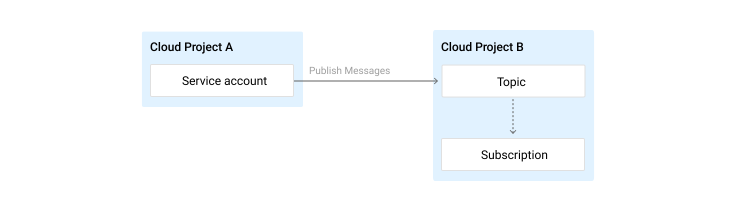
For example, this snippet uses the setIamPolicy() method in project-b and a preparedtopic_policy.json file to grant the service accountfoobar@project-a.iam.gserviceaccount.com of project-a the publisher role on the topicprojects/project-b/topics/topic-b:
gcloud pubsub topics set-iam-policy
projects/project-b/topics/topic-b
topic_policy.json
Output:
Updated IAM policy for topic topic-b. bindings:
- members:
- serviceAccount:foobar@project-a.iam.gserviceaccount.com role: roles/pubsub.publisher etag: BwWGrQYX6R4=
Partial availability behavior
Authorization checks depend on the IAM subsystem. In order to offer consistently low response latency for data operations (publishing and message consumption), the system may fall back on cached IAM policies. For information about when your changes will take effect, see theIAM documentation.
What's Next
- If you are having issues accessing or authenticating Pub/Sub resources, see General troubleshooting.
Except as otherwise noted, the content of this page is licensed under the Creative Commons Attribution 4.0 License, and code samples are licensed under the Apache 2.0 License. For details, see the Google Developers Site Policies. Java is a registered trademark of Oracle and/or its affiliates.
Last updated 2026-04-08 UTC.