Maximum concurrent requests for services (original) (raw)
For Cloud Run services, each revisionis automatically scaled to the number of instances needed to handle all incoming requests.
When more instances are processing requests, more CPU and memory will be used, resulting in higher costs.
To give you more control, Cloud Run provides a maximum concurrent requests per instance setting that specifies the maximum number of requests that can be processed simultaneously by a given instance.
Maximum concurrent requests per instance
You can configure the maximum concurrent requests per instance. You can increase this to a maximum of 1000. By default, Cloud Run instances deployed using Google Cloud CLI or Terraform have a maximum concurrency that is 80 times the number of vCPUs. This default only applies when a new service is created; it does not apply to subsequent deployments of a revision. Cloud Run instances deployed using Google Cloud console have a default concurrency of 80.
Although you should use the default value, if needed you canlower the maximum concurrency. For example, if your code cannot process parallel requests,set concurrency to 1.
The specified concurrency value is a maximum limit. If the CPU of the instance is already highly utilized, Cloud Run might not send as many requests to a given instance. In these cases, the Cloud Run instance might show that the maximum concurrency is not being utilized. For example, if the high CPU usage is sustained, the number of instances might scale up instead.
The following diagram shows how the maximum concurrent requests per instance setting affects the number of instances needed to handle incoming concurrent requests:
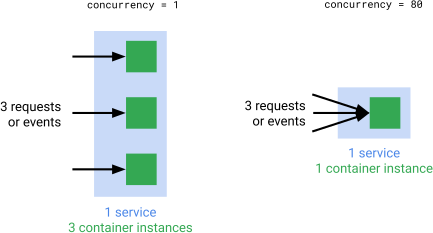
Cost considerations
When more instances process requests, Cloud Run allocates more CPU and memory at higher costs. A higher concurrency setting lets fewer instances handle the same request volume, which can reduce costs. However, the application code must be able to handle parallel requests efficiently. SeeTuning concurrency for autoscaling and resource utilizationfor more details.
Review Cloud Run pricing or estimate costs with the pricing calculatorfor more information.
Tuning concurrency for autoscaling and resource utilization
Adjusting the maximum concurrency per instance significantly influences how your service scales and utilizes resources.
- Lower concurrency: Forces Cloud Run to use more instances for the same request volume, because each instance handles fewer requests. This can improve responsiveness for applications that are not optimized for high internal parallelism or for applications you want to scale more quickly based on request load.
- Higher concurrency: Allows each instance to handle more requests, potentially leading to fewer active instances and reducing cost. This is suitable for applications efficient at parallel I/O-bound tasks or for applications that can truly utilize multiple vCPUs for concurrent request processing.
Start with the default concurrency, monitor the performance and utilization of your application closely, and adjust as needed.
Concurrency with multi-vCPU instances
Tuning concurrency is especially critical if your service uses multiple vCPUs but your application is single-threaded or effectively single-threaded (CPU-bound).
- vCPU hotspots: A single-threaded application on a multi-vCPU instance may max out one vCPU while others idle. The Cloud Run CPU autoscaler measures average CPU utilization across all vCPUs. The average CPU utilization can remain deceptively low in this scenario, preventing effective CPU-based scaling.
- Using concurrency to drive scaling: If CPU-based autoscaling is ineffective due to vCPU hotspots, lowering maximum concurrency becomes an important tool. vCPU hotspots often occur where multi-vCPU is chosen for a single-threaded application due to high memory needs. Using concurrency to drive scaling forces scaling based on request throughput. This ensures that more instances are started to handle the load, reducing per-instance queuing and latency.
When to limit maximum concurrency to one request at a time.
You can limit concurrency so that only one request at a time will be sent to each running instance. You should consider doing this in cases where:
- Each request uses most of the available CPU or memory.
- Your container image is not designed for handling multiple requests at the same time, for example, if your container relies on global state that two requests cannot share.
Note that a concurrency of 1 is likely to negatively affect scaling performance, because many instances will have to start up to handle a spike in incoming requests. SeeThroughput versus latency versus tradeoffsfor more considerations.
Case study
The following metrics show a use case where 400 clients are making 3 requests per second to a Cloud Run service that is set to a maximum concurrent requests per instance of 1. The green top line shows the requests over time, the bottom blue line shows the number of instances started to handle the requests.

The following metrics show 400 clients making 3 requests per second to a Cloud Run service that is set to a maximum concurrent requests per instance of 80. The green top line shows the requests over time, the bottom blue line shows the number of instances started to handle the requests. Notice that far fewer instances are needed to handle the same request volume.

Concurrency for source code deployments
When concurrency is enabled, Cloud Run does not provide isolation between concurrent requests processed by the same instance. In such cases, you must ensure that your code is safe to execute concurrently. You can change this bysetting a different concurrency value. We recommend starting with a lower concurrency like 8, and then moving it up. Starting with a concurrency that is too high could lead to unintended behavior due to resource constraints (such as memory or CPU).
Language runtimes can also impact concurrency. Some of these language-specific impacts are shown in the following list:
- Node.js is inherently single-threaded. To take advantage of concurrency, use JavaScript's asynchronous code style, which is idiomatic in Node.js. SeeAsynchronous flow controlin the official Node.js documentation for details.
- For Python 3.8 and later, supporting high concurrency per instance requires enough threads to handle the concurrency. We recommend that youset a runtime environment variableso that the threads value is equal to the concurrency value, for example:
THREADS=8.
What's next
To manage the maximum concurrent requests per instance of your Cloud Run services, seeSetting maximum concurrent requests per instance.
To optimize your maximum concurrent requests per instance setting, seedevelopment tips for tuning concurrency.