Roads (Daylight Map Distribution) (original) (raw)
Home / Data:Planet,Coastlines,Buildings,Admins,Roads /Attribution
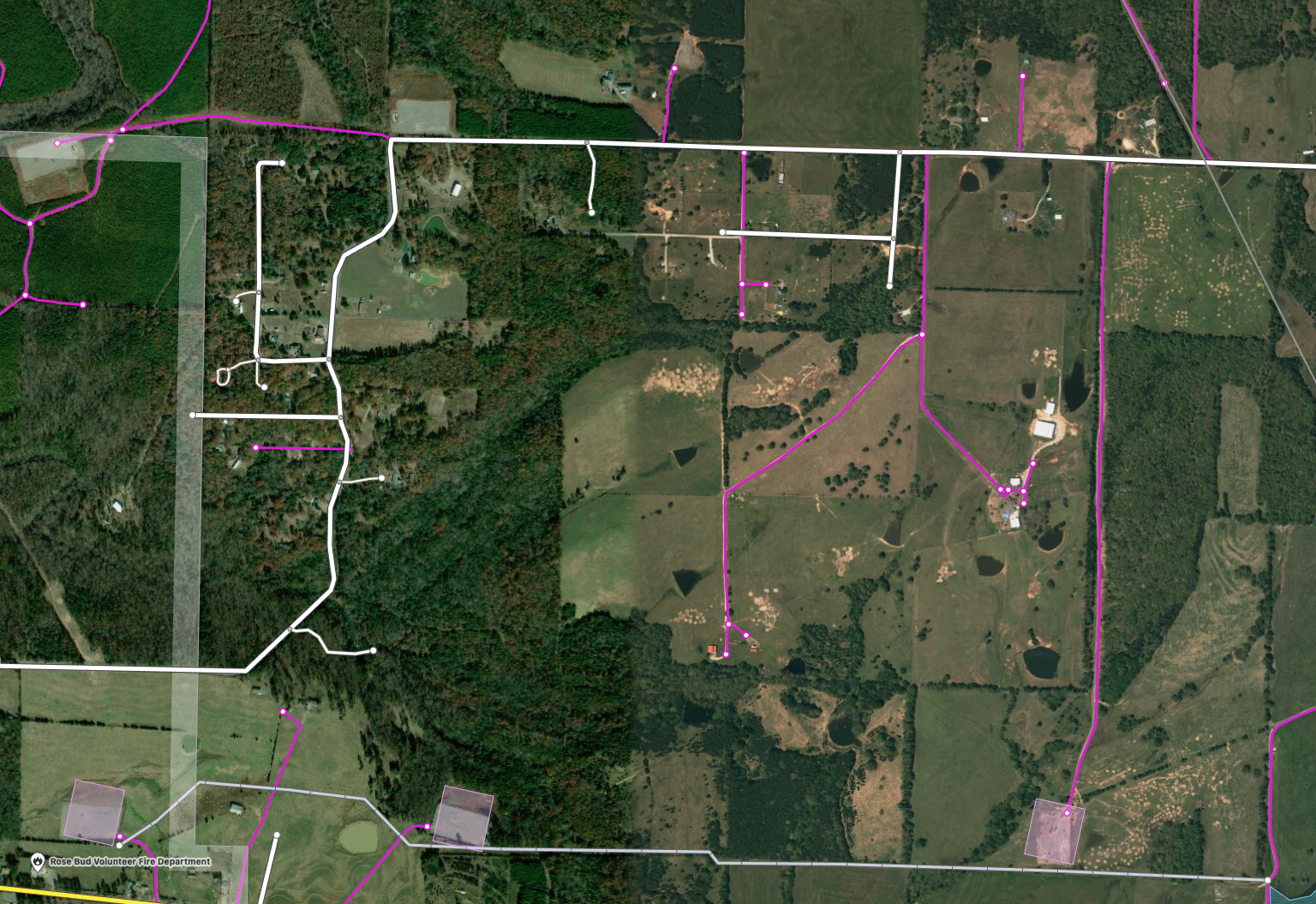
Daylight ML Roads is a facebook product that uses machine learning to detect unmapped roads. We scan satellite imagery for the entire planet to detect areas that look like roads or paths that have not yet been represented as ways in the OSM data set. For more information about the process please visit Mapping roads through deep learning and weakly supervised training. Each road that is detected is represented as a new way that references newly created nodes in the OSC file. Where these newly created ways connect to existing OSM ways the PBF file we will modify the existing way so that the road network is connected properly.
In the picture below the purple roads are roads generated by the Daylight Roads process.
There are few disclaimers associated with this data:
- These ML roads should be used for display purposes only
- Predicted roads could potentially predict things that are not roads
- It may incorporate road misalignments within certain areas due to imagery offset
- There could be discontinuity of roads
- This OSC file can not be renumbered using the osmium renumber command because it references existing nodes in the Daylight PBF.
How To Use
The process to apply Daylight Roads to the Daylight base map uses open source tools. You can use Osmium to apply the OSC file to the Daylight Planet PBF and create a combined PBF before importing them to PostgreSQL database with osm2pgsql. Or optionally you can use osm2pgsql to import the pbf and then append the osc file.
Option 1 - Create Combined PBF File
This option uses Osmium to process the changes in the OSC file and combine them with the Daylight PBF file to produce a new PBF file that is a combination of the two files. Example call to osmium to apply change in an osc file to a pbf file to produce the combined pbf:
`osmium apply-changes planet.osm.pbf fb-ml-roads.osc.gz -o everything.osm.pbf`
This will result in a single combined PBF file called everything.osm.pbf. Once you have the combined pbf file you can use osm2pgsql to import the everything.osm.pbf file from previous steps.
Option 2 - Append OSC file to PostgreSQL
Alternatively, you can import Daylight Planet PBF to PostgreSQL and then append the OSC file separately using osm2pgsql. This option doesn’t use osmium and will also skip the step of creating a combined pbf.
Use osm2pgsql to import the Planet PBF Use osm2pgsql –append to import the OSC file
Current Downloads
- 📦 planet-v1.58.osm.pbf – Complete Daylight v1.58 in OSM PBF format
- 📦 ml-buildings-v1.58.osm.pbf – Microsoft Building Footprints addition to Daylight v1.58
- 📦 fb-ml-roads-v1.58.osc.gz – Facebook Experimental ML Roads addition to Daylight v1.58
- 📦 admin-v1.58.osc.gz – Administrative boundaries for Daylight v1.58
- 📦 coastlines-v1.58.tgz – Coastline land polygons for Daylight v1.58
- 📦 preferred-localization-v1.58.tsv – Additional translations for Daylight v1.58
- 📦 important-features-v1.58.json – Library of curated major map features for Daylight v1.58