Doxygen and XML Doc Comment support - C++ Team Blog (original) (raw)
Whether you’re using Doxygen or XML Doc Comments, Visual Studio version 16.6 Preview 2 provides automatic comment stub generation as well as Quick Info, Parameter Help, and Member List tooltip support.
Stub Generation
By default, the stub generation is set to XML Doc Comments. The comment stub can be generated by typing a triple slash (///) or by using the documentation generation shortcut (Ctrl+/) above the function.
XML Doc Comment
Doxygen
To switch to Doxygen, type “Doxygen” in the Ctrl+Q search box, or go to Tools > Options > Text Editor > C/C++ > > General, and choose your preferred documentation style:
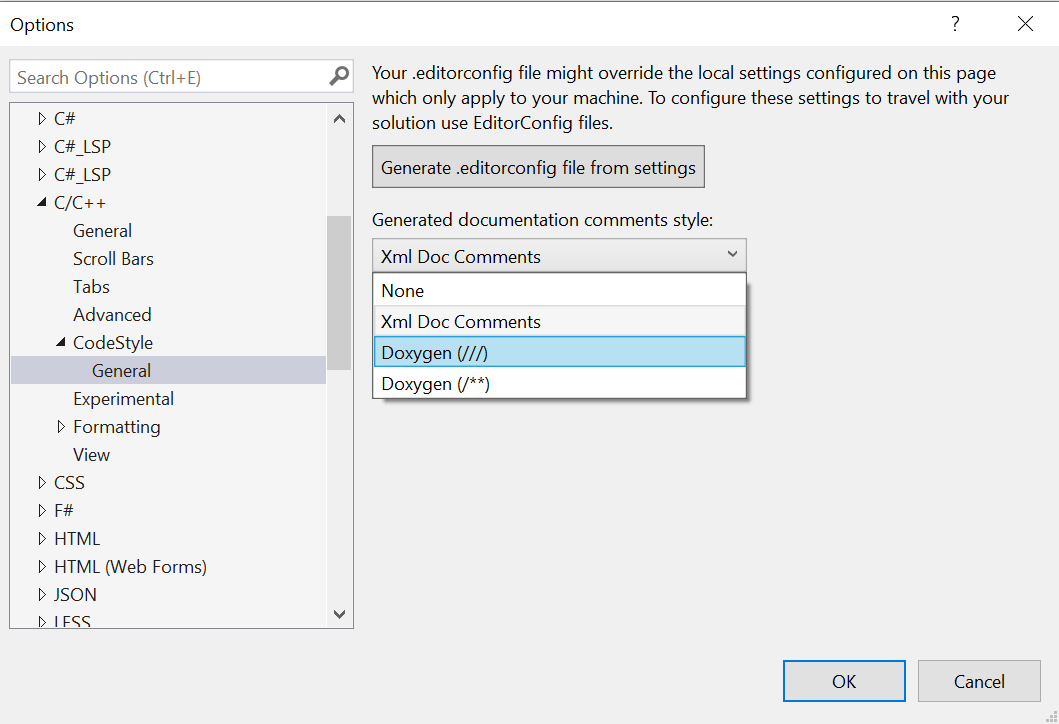
Once specified, you can generate the comment stub by typing the respective “///” or “/**” above a function, or by using the (Ctrl+/) shortcut.
You can also specify this documentation option on a per-folder or per-file basis via .editorconfig files with the corresponding setting:
vc_generate_documentation_comments = none
vc_generate_documentation_comments = xml
vc_generate_documentation_comments = doxygen_triple_slash
vc_generate_documentation_comments = doxygen_slash_star
To get started, you can have Visual Studio generate an .editorconfig file for you based on your existing setting for documentation by using the “Generate .editorconfig file from settings” button shown in the screenshot above.
Tooltip Display
Documentation artifacts will now appear in Quick Info, Member List, and Parameter Help tooltips:
Give us your feedback
Download Visual Studio 2019 version 16.6 Preview 2 today and give this new documentation support a try. We can be reached via the comments below, email (visualcpp@microsoft.com), and Twitter (@VisualC). The best way to file a bug or suggest a feature is via Developer Community.
Author

Nick Uhlenhuth is a Program Manager on the Visual Studio team responsible for C++ IntelliSense and Productivity features.