Request background location (original) (raw)
This page discusses the following:
- How to request background location access.
- How to handle the request based on your app's target SDK version.
- How user preferences for approximate location affect how your app gets background location.
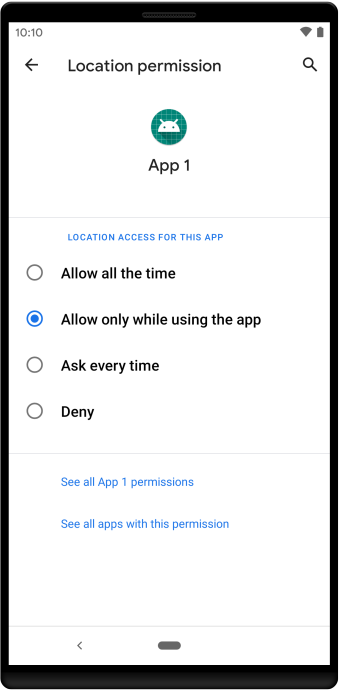
Figure 7. Settings page includes an option calledAllow all the time, which grants background location access.
Permission dialog contents depend on target SDK version
When a feature in your app requests background location on a device that runs Android 10 (API level 29), the system permissions dialog includes an option named Allow all the time. If the user selects this option, the feature in your app gains background location access.
On Android 11 (API level 30) and higher, however, the system dialog doesn't include the Allow all the time option. Instead, users must enable background location on a settings page, as shown in figure 7.
You can help users navigate to this settings page by following best practices when requesting the background location permission. The process for granting the permission depends on your app's target SDK version.
App targets Android 11 or higher
If your app hasn't been granted the ACCESS_BACKGROUND_LOCATION permission, andshouldShowRequestPermissionRationale() returns true, show an educational UI to users that includes the following:
- A clear explanation of why your app's feature needs access to background location.
- The user-visible label of the settings option that grants background location (for example, Allow all the time in figure 7). You can callgetBackgroundPermissionOptionLabel() to get this label. The return value of this method is localized to the user's device language preference.
- An option for users to decline the permission. If users decline background location access, they should be able to continue using your app.
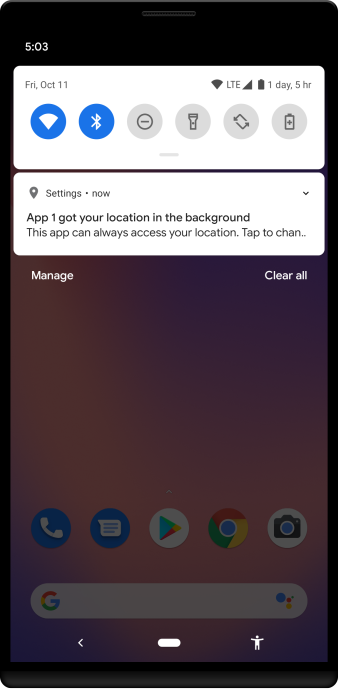
Figure 8. Notification reminding the user that they've granted background location access to an app.
App targets Android 10 or lower
When a feature in your app requests background location access, users see a system dialog. This dialog includes an option to navigate to your app's location permission options on a settings page.
As long as your app already follows best practices for requesting location permissions, you don't need to make any changes to support this behavior.
User can affect background location accuracy
If the user requests approximate location, the user's choices in the location permissions dialog also apply to background location. In other words, if the user grants your app the ACCESS_BACKGROUND_LOCATION permission but grants only approximate location access in the foreground, your app has only approximate location access in the background as well.
Additional resources
For more information about location permissions in Android, view the following materials:
Codelabs
Videos
Samples
- Sample appto demonstrate the use of location permissions.