One-time purchase lifecycle (original) (raw)
One-time purchase products have a simpler lifecycle than subscription products, but there are still several states and transition events that your backend needs to be able to handle properly.
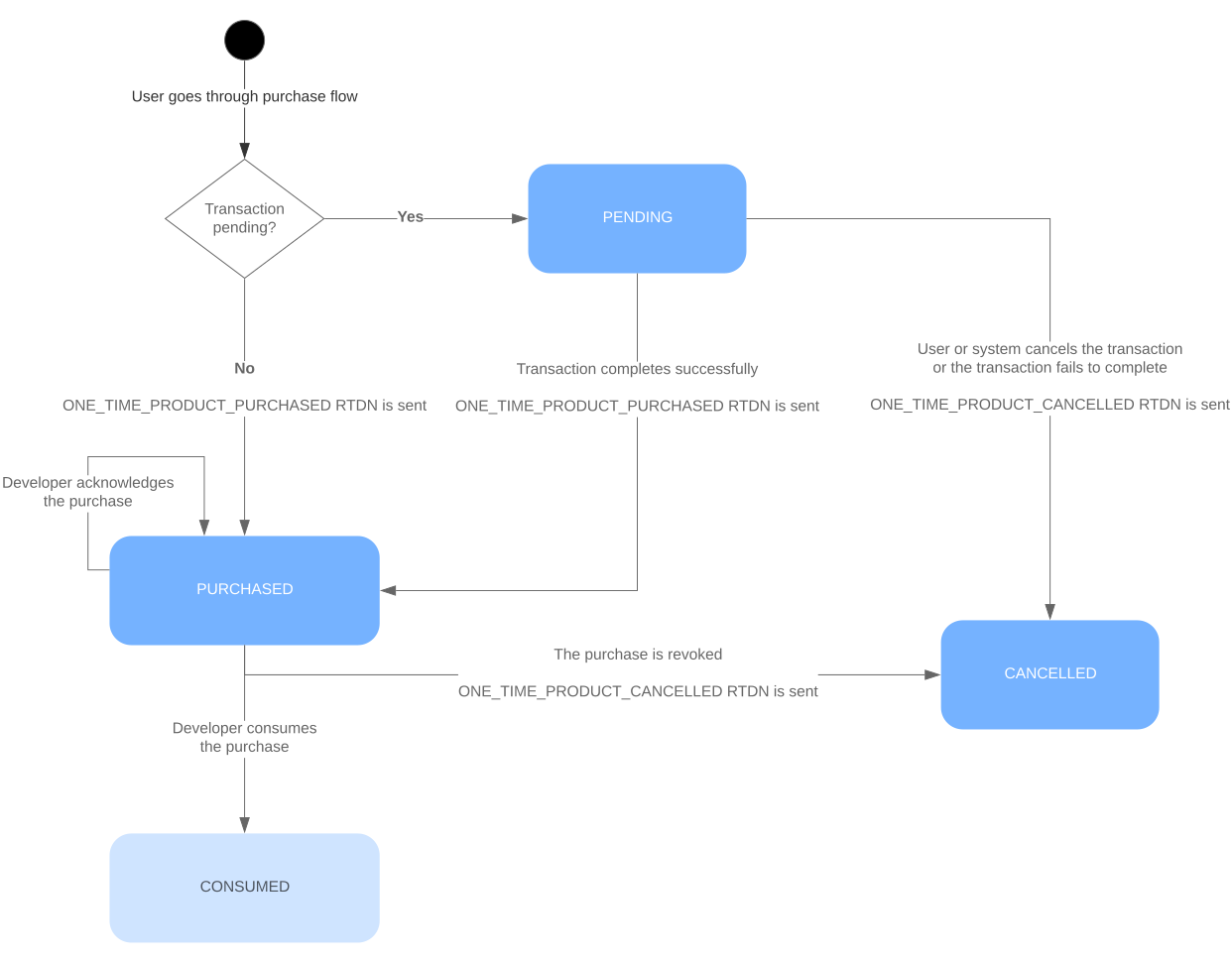
Figure 1 Lifecycle states and transition events for one-time purchases.
New one-time product purchases
After the user completes the billing flow, your app can see information about the new purchase in one of the following ways:
- Setup Real-time developer notifications and enable
Get all notifications for subscriptions and one-time productsto receive updates on the status of purchases. - Implement the PurchasesUpdatedListenerinterface from
BillingClientto automatically receive purchase updates. - Call the BillingClient.queryPurchasesAsync()method.
After receiving the new purchase, use thegetPurchaseState method orpurchases.productsv2.getproductpurchasev2 in Play Developer API
to determine the payment state of the new purchase.
Real-time developer notifications
When a user purchases or cancels the purchase of a one-time product, Google Play sends a OneTimeProductNotification message. To update your backend purchase state, use the purchase token provided in theOneTimeProductNotification object to call thepurchases.productsv2.getproductpurchasev2method. This method provides the latest purchase and consumption status given a purchase token.
When a pre-order is fulfilled and its purchase state changes to PURCHASED, an RTDN is sent to your client. After receiving the RTDN, process the pre-order purchase as described in Process one-time product purchases in your backend.
You should handle transaction-related RTDNs in your secure backend.
Handle completed transactions
When a user completes a one-time product purchase, Google Play sends aOneTimeProductNotification message with the type ONE_TIME_PRODUCT_PURCHASED. When you receive this RTDN, process the purchase as described in Process one-time product purchases in your backend.
Handle canceled transactions
When a one-time product purchase is canceled, Google Play sends aOneTimeProductNotification message with the type ONE_TIME_PRODUCT_CANCELEDif you have configured to receive real-time developer notifications. For example, this can occur if the user doesn't complete payment within the required timeframe, or if the purchase is revoked by the developer or by customer request. When your backend server receives this notification, call thepurchases.productsv2.getproductpurchasev2method to get the latest purchase state, then update your backend accordingly, including user entitlements.
If a one-time product purchase in Purchased state gets refunded, you will also be made aware using the Voided Purchases API.
Process one-time product purchases in your backend
Whether you have detected a new purchase using a ONE_TIME_PRODUCT_PURCHASEDRTDN or you have been made aware in-app throughPurchasesUpdatedListener or manually fetching purchases in your app's onResume() method, you must process the new purchase. We recommend that you handle purchase processing in your backend for better security.
Follow these steps to process a new one-time purchase:
- Query thepurchases.productsv2.getproductpurchasev2endpoint to obtain the latest one-time product purchase status. To call this method for a purchase, you need the corresponding
purchaseTokeneither from your app or from theONE_TIME_PRODUCT_PURCHASEDRTDN. - Call getPurchaseState() and make sure that the purchase state is
PURCHASED. - Verify the purchase.
- Give the user access to the content. The user account associated with the purchase can be identified with theobfuscatedExternalAccountId field from
purchases.productsv2.getproductpurchasev2, if one was set usingsetObfuscatedAccountId() when the purchase was made.- For non-consumable product purchases, acknowledge delivery of the content by calling thepurchases.products.acknowledge method. Make sure that the purchase hasn't been previously acknowledged by checking the acknowledgementStatefield.
- If the product is consumable, mark the item as consumed by calling thepurchases.products.consume method so that the user can buy the item again after they have consumed it. This method also acknowledges the purchase.
There are also purchase acknowledgement and consume methods available in the Play Billing Library that allow you to process purchases from you app, but we recommend that you handle processing in your backend if you have one for a more secure implementation.