Google Play's billing system (original) (raw)
Google Play's billing system is a service that enables you to sell digital products and content in your Android app, whether you want to monetize through one-time purchases or offer subscriptions to your services. Google Play offers a full set of APIs for integration with both your Android app and your server backend that unlock the familiarity and safety of Google Play purchases for your users.
Integration architecture
This section introduces the different functional modules that you can build and the APIs and libraries available to simplify the process.
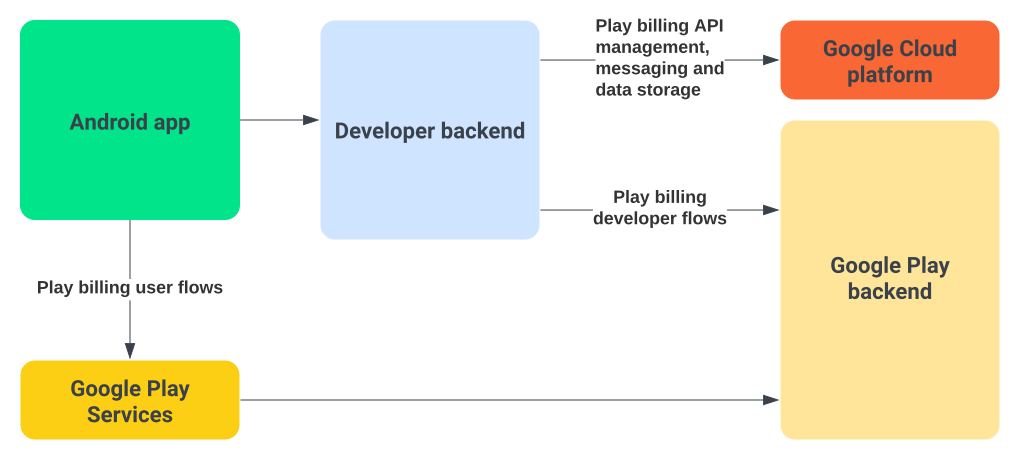
Figure 1. Diagram of a typical Google Play billing integration.
You can integrate Google Play's billing system with your Android app using the Play Billing Library. This library enables communication with the Google Play Services layer that provides the localized product offering available to each user in your app, as well as methods to handle other necessary user operations, like launching the purchase flow and handling its outcome.
You should also integrate Google Play's billing system with your server backend to create the necessary developer flows. This is essential to guarantee that your purchase management and cross-platform entitlements are efficient and secure. You can create this integration with the Subscriptions and in-app purchases API provided by the Google Play Developer API. The backend integration also leverages some Google Cloud platform tools.
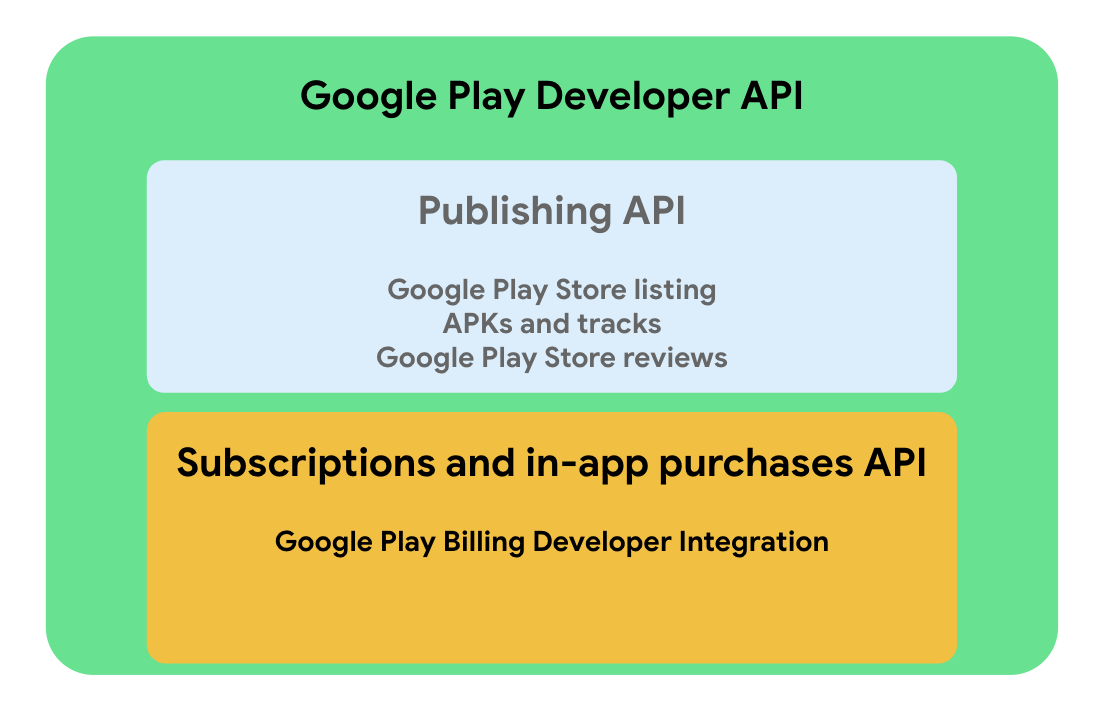
Figure 2. APIs and services provided by the Google Play Developer API.
Terminology
This section lists and describes the high-level technologies and concepts that you might encounter when integrating Google Play's billing system into your app. Reference this list as you proceed through the integration guidance.
Technologies
- Google Play. An online store where users can download apps and other digital products.
- Google Play Console. A platform that provides an interface where you can publish your app to Google Play. The Google Play Console also shows details about your app, including any products or content that you sell with Google Play.
- Google Cloud Console. A platform that manages backend APIs, such as the Google Play Developer API.
- Google Play Billing Library. An API that you can use to integrate Google Play's billing system into your app.
- Google Play Developer API. A REST API that you can use to programmatically handle publishing and app management tasks.
- Cloud Pub/Sub. A fully managed real-time messaging service that enables you to send and receive messages between independent applications. Google Play uses Cloud Pub/Sub to deliver Real-time developer notifications. To use Cloud Pub/Sub, you must have a project on theGoogle Cloud Platform (GCP) with the Cloud Pub/Sub API enabled. If you aren't familiar with GCP and Cloud Pub/Sub, see theQuickstart guide.
- Real-time developer notifications. A mechanism that lets you monitor state changes for Google Play-managed subscriptions in real time by leveraging Cloud Pub/Sub.
- Secure backend server. As part of integrating Google Play's billing system into your app, we strongly recommend that you use a secure backend server to implement billing-related tasks such as purchase verification, subscription-specific features, and handling Real-time developer notifications.
- Google Play Store app. An app that manages all operations related to Google Play. All requests made by your app are handled by the Google Play Store app.
Concepts
- Flow. A flow shows the typical steps involved in a billing-related task. For example, a purchase flow outlines the steps involved when a user purchases your product. A subscription flow might show how a subscription transitions between states.
- Entitlement. When a user purchases an in-app product, they are then_entitled_ to that product within your app. For one-time products, this means that the user should now have permanent access to the product. For subscriptions, this means that the user should have access while the subscription is active.
- Product ID. The ID of a specific product type.
- Purchase token. A string that represents a buyer's entitlement to a product on Google Play. It indicates that a Google user has paid for a specific product.
- Order ID. A string that represents a financial transaction on Google Play. An order ID is created every time a financial transaction occurs. This string is included in a receipt that is emailed to the buyer. You can use the order ID to manage refunds in the Order Management section of the Google Play Console. Order IDs are also used in sales and payout reports.
Next steps
To begin integrating Google Play's billing system with your app and server backend, see the setup guide.