Responding to media buttons (original) (raw)
Media buttons are hardware buttons found on Android devices and other peripheral devices, for example, the pause/play button on a Bluetooth headset. When a user presses a media button, Android generates a [KeyEvent](/reference/android/view/KeyEvent), which contains a key code that identifies the button. The key codes for media button KeyEvents are constants that begin with KEYCODE_MEDIA (for example, KEYCODE_MEDIA_PLAY).
Apps should be able to handle media button events in three cases, in this order of priority:
- When the app's UI activity is visible
- When the UI activity is hidden and the app's media session is active
- When the UI activity is hidden and app's media session is inactive and needs to be restarted
Handling media buttons in a foreground activity
The foreground activity receives the media button key event in its onKeyDown()method. Depending on the running version of Android, there are two ways the system routes the event to a media controller:
- If you are running Android 5.0 (API level 21) or later, call
[FLAG_HANDLES_MEDIA_BUTTONS](/reference/android/support/v4/media/session/MediaSessionCompat#FLAG%5FHANDLES%5FMEDIA%5FBUTTONS)MediaBrowserCompat.ConnectionCallback.onConnected. This will automatically call your media controller's[dispatchMediaButtonEvent()](/reference/android/support/v4/media/session/MediaControllerCompat#dispatchMediaButtonEvent%28android.view.KeyEvent%29), which translates the key code to a media session callback. - Prior to Android 5.0 (API level 21), you need to modify
onKeyDown()to handle the event yourself. (See Handling media buttons in an active media session for details.) The following code snippet shows how to intercept the key code and call dispatchMediaButtonEvent(). Be sure to returntrueto indicate that the event was handled:
Kotlin
fun onKeyDown(keyCode: Int, event: KeyEvent): Boolean {
    if (Build.VERSION.SDK_INT >= Build.VERSION_CODES.LOLLIPOP) {
        return super.onKeyDown(keyCode, event)
    }
    when (keyCode) {
        KeyEvent.KEYCODE_MEDIA_PLAY -> {
            yourMediaController.dispatchMediaButtonEvent(event)
            return true
        }
    }
    return super.onKeyDown(keyCode, event)
}
Java
@Override
boolean onKeyDown(int keyCode, KeyEvent event) {
        if (Build.VERSION.SDK_INT >= Build.VERSION_CODES.LOLLIPOP) {
          return super.onKeyDown(keyCode, event);
        }
        switch (keyCode) {
          case KeyEvent.KEYCODE_MEDIA_PLAY:
                  yourMediaController.dispatchMediaButtonEvent(event);
                  return true;
        }
        return super.onKeyDown(keyCode, event);
}
If the foreground activity does not handle the event, Android will try to find a media session that can handle it. Again, depending on the running version of Android, there are two ways to search for a media session:
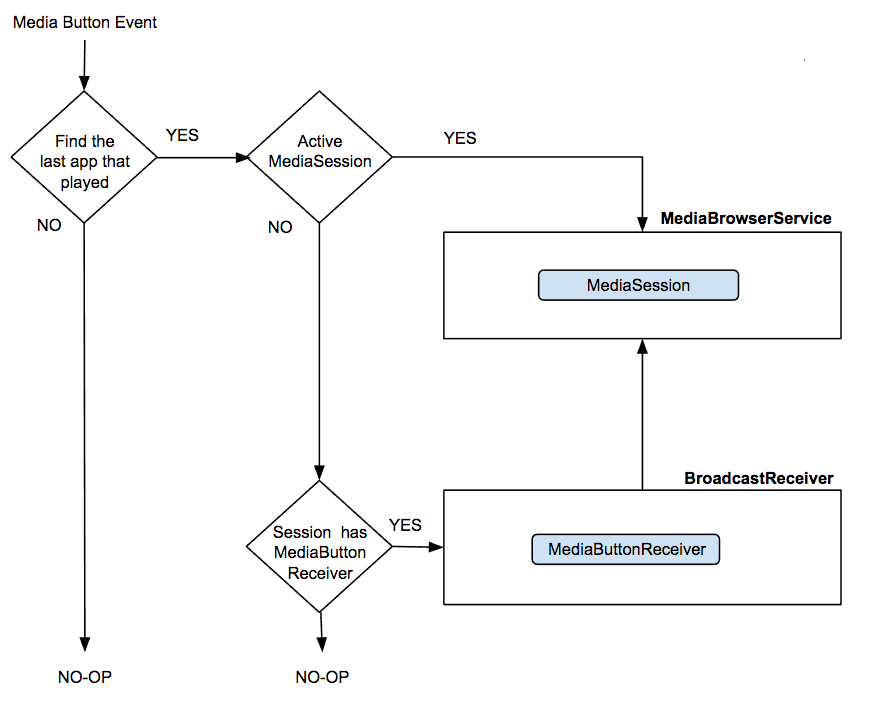
- If you are running Android 8.0 (API level 26) or later, the system tries to find the last app with a MediaSession that played audio locally. If the session is still active Android sends the event directly to it. Otherwise, if the session is not active and it has a mediabutton receiver, Android sends the event to the receiver, which will restart the session and so it can receive the event. (See Using media buttons to restart an inactive media session for details.) If the session does not have a media button receiver the system discards the media button event and nothing will happen. The logic is shown in the following diagram:
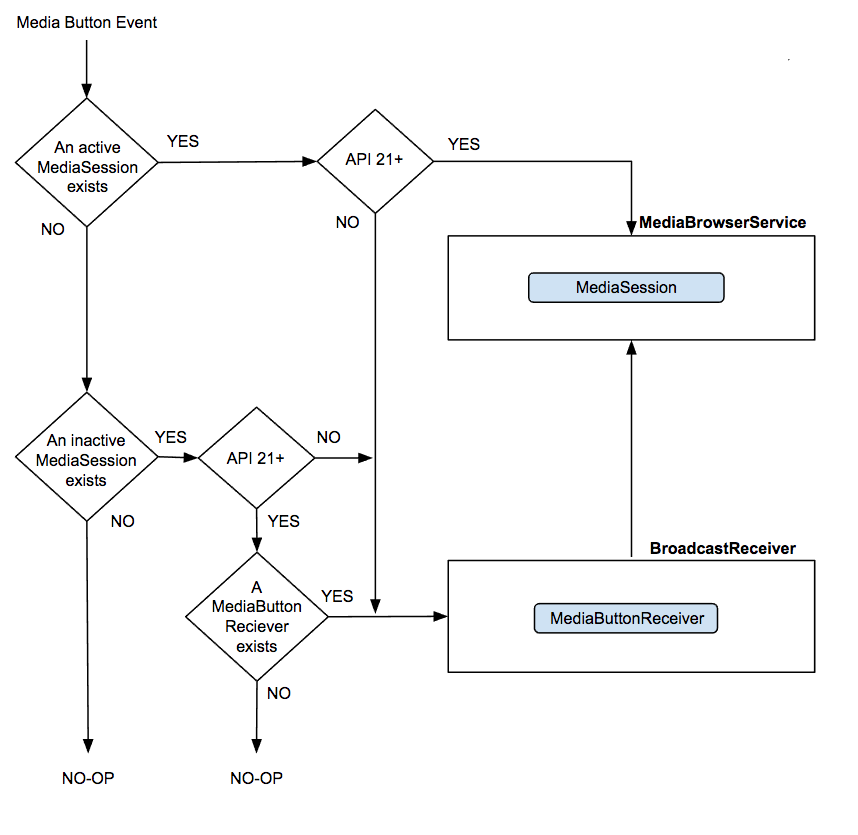
- Prior to Android 8.0 (API level 26), the system tries to send the event to an active media session. If there are multiple active media sessions, Android tries to choose a media session that is preparing to play (buffering/connecting), playing, or paused, rather than one that is stopped. (SeeHandling media buttons in an active media sessionfor more details.) If there is no active session, Android tries to send the event to the most recently active session. (See Using media buttons to restart an inactive media session for details.) The logic is shown in the following diagram:
On Android 5.0 (API level 21) and higher, Android automatically dispatches media button events to your active media session by calling[onMediaButtonEvent()](/reference/android/support/v4/media/session/MediaSessionCompat.Callback#onMediaButtonEvent%28android.content.Intent%29). By default this callback translates the KeyEvent into the appropriate media session Callback method that matches the key code.
Prior to Android 5.0 (API level 21), Android handles media button events by broadcasting an intent with the ACTION_MEDIA_BUTTON action. Your app must register a BroadcastReceiver to intercept these intents. The[MediaButtonReceiver](/reference/androidx/media/session/MediaButtonReceiver)class was designed specifically for this purpose. It is a convenience class in theAndroid media-compat library that handles ACTION_MEDIA_BUTTON and translates the incoming Intents into the appropriate MediaSessionCompat.Callback method calls.
A MediaButtonReceiver is a short-lived BroadcastReceiver. It forwards incoming intents to the service that is managing your media session. If you want to use media buttons in systems earlier than Android 5.0 you must include the MediaButtonReceiver in your manifest with a MEDIA_BUTTON intent filter.:
<receiver android:name="android.support.v4.media.session.MediaButtonReceiver" >
   <intent-filter>
     <action android:name="android.intent.action.MEDIA_BUTTON" />
   </intent-filter>
 </receiver>
The BroadcastReceiver forwards the intent to your service. To parse the intent and generate the callback to your media session, include the [MediaButtonReceiver.handleIntent()](/reference/androidx/media/session/MediaButtonReceiver#handleIntent%28android.support.v4.media.session.MediaSessionCompat, android.content.Intent%29) method in your service's onStartCommand(). This translates the key code into the appropriate session callback method.
Kotlin
private val mediaSessionCompat: MediaSessionCompat = ...
override fun onStartCommand(intent: Intent?, flags: Int, startId: Int): Int { MediaButtonReceiver.handleIntent(mediaSessionCompat, intent) return super.onStartCommand(intent, flags, startId) }
Java
private MediaSessionCompat mediaSessionCompat = ...;
public int onStartCommand(Intent intent, int flags, int startId) { MediaButtonReceiver.handleIntent(mediaSessionCompat, intent); return super.onStartCommand(intent, flags, startId); }
If Android can identify the last active media session, it tries to restart the session by sending an ACTION_MEDIA_BUTTON Intent to a manifest-registered component (such as a service or BroadcastReceiver).
This lets your app restart playback while its UI is not visible, which is the case for most audio apps.
This behavior is automatically enabled when you use MediaSessionCompat. If you use the Android framework's MediaSession or Support Library 24.0.0 through 25.1.1 you must call setMediaButtonReceiver to let a media button restart an inactive media session.
You can disable this behavior in Android 5.0 (API level 21) and higher by setting a null media button receiver:
Kotlin
// Create a MediaSessionCompat mediaSession = MediaSessionCompat(context, LOG_TAG) mediaSession.setMediaButtonReceiver(null)
Java
// Create a MediaSessionCompat mediaSession = new MediaSessionCompat(context, LOG_TAG); mediaSession.setMediaButtonReceiver(null);
The default behavior for onMediaButtonEvent() extracts the key code and uses the media session's current state and list of supported actions to determine which method to call. For instance, KEYCODE_MEDIA_PLAY invokes onPlay().
To provide a consistent media button experience across all apps, you should use the default behavior and only deviate for a specific purpose. If a media button needs custom handling, override your callback’s[onMediaButtonEvent()](/reference/android/support/v4/media/session/MediaSessionCompat.Callback#onMediaButtonEvent%28android.content.Intent%29)method, extract the KeyEvent using[intent.getParcelableExtra(Intent.EXTRA_KEY_EVENT)](/reference/android/content/Intent#getParcelableExtra%28java.lang.String%29), handle the event yourself, and return true.
Summary
To properly handle media button events in all versions of Android, you must specify [FLAG_HANDLES_MEDIA_BUTTONS](/reference/android/support/v4/media/session/MediaSessionCompat#FLAG%5FHANDLES%5FMEDIA%5FBUTTONS)when you create a media session.
In addition, depending on the Android versions you plan to support, you must also meet these requirements:
When running in Android 5.0 or later:
- Call
MediaControllerCompat.setMediaController()from the media controlleronConnected()callback - To allow a media button to restart an inactive session, dynamically create a
MediaButtonReceiverby callingsetMediaButtonReceiver()and passing it aPendingIntent
When running in systems earlier than Android 5.0:
- Override the activity's
[onKeyDown()](/reference/android/app/Activity#onKeyDown%28int,%20android.view.KeyEvent%29)to handle media buttons - Statically create a
MediaButtonReceiverby adding it to the app's manifest