Permissions used only in default handlers (original) (raw)
Several core device functions, such as reading call logs and sending SMS messages, depend on access to sensitive user information. To protect user privacy and provide users with more control over the information that they provide to apps on their device, Google Play restricts apps' access to call- and messaging-related permission groups.
If you distribute your app on the Google Play Store and want to access sensitive user information related to call logs and SMS messages, your app needs to be registered as the user's default handler for the core device function related to that permission, unless your app satisfies one of theexception casesthat appear in the Play Console Help Center. For example, to access call-related permissions, your app needs to be registered as the user's default Phone or Assistant handler, unless your app satisfies an exception case.
This guide provides a brief overview of how users access default handlers on Android-powered devices. The guide then reviews the requirements that an app must satisfy before becoming eligible to be a default handler. Finally, the guide walks you through the process of receiving user consent to become a default handler.
To learn more about default handlers, as well as how to handle permissions in an app that's available on the Play Store, see the Permissions policy guide.
View and change the set of default handlers
Android lets users set default handlers for several core use cases, such as placing phone calls, sending SMS messages, and providing assistive technology capabilities.
The Settings app on Android includes a screen that shows users which apps are currently default handlers for the device's core functions, as shown in figure 1. From this screen, users can change the default handler for a given function, as shown in figure 2.
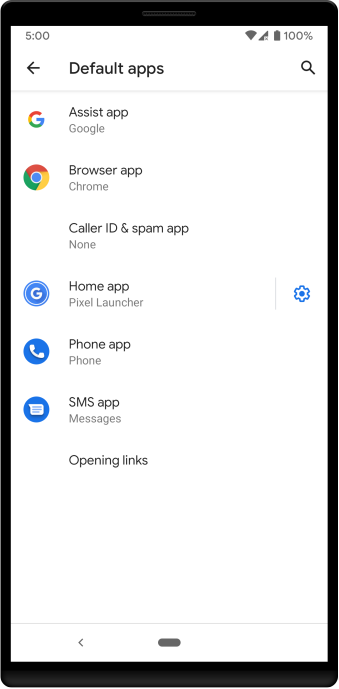
Figure 1. System settings screen showing list of default handlers on a device.
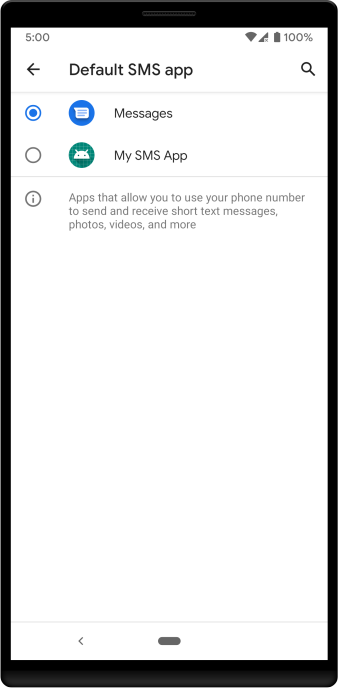
Figure 2. System settings screen showing how to change the default SMS handler.
Follow requirements for default handlers
Given the sensitive user information that an app accesses while serving as a default handler, your app cannot become a default handler unless it meets the following Play Store listing and core functionality requirements:
- Your app must be able to perform the functionality for which it's a default handler. For example, a default SMS handler must be able to send text messages.
- Your app must provide a privacy policy.
- Your app must make its core functionality clear in the Play Store description. For example, a default Phone handler should describe its phone-related capabilities in the description.
- Your app must declare permissions that are appropriate for its use case. For more details about which permissions you can declare as a given handler, see theguidance on using SMS or call log permission groupsin the Play Console Help Center.
- Your app must ask to become a default handler before it requests the permissions associated with being that handler. For example, an app must request to become the default SMS handler before it requests the
READ_SMSpermission.
Request user consent
After ensuring that your app follows each of the requirements necessary to become a default handler, you can add logic to display the dialog shown in figure 3. This dialog asks the user to make your app the default handler for a particular use case.
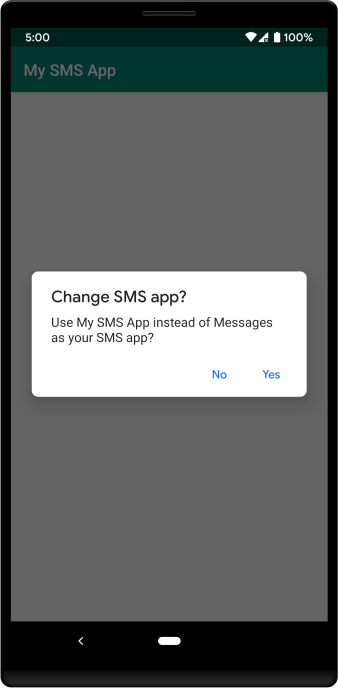
Figure 3. Prompt asking the user whether they want to change their device's default SMS handler.
The following example code shows the logic necessary to display a prompt that asks the user to change their device's default SMS handler:
Kotlin
val setSmsAppIntent = Intent(Telephony.Sms.Intents.ACTION_CHANGE_DEFAULT) setSmsAppIntent.putExtra(Telephony.Sms.Intents.EXTRA_PACKAGE_NAME, packageName) startActivityForResult(setSmsAppIntent, your-result-code)
Java
Intent setSmsAppIntent = new Intent(Telephony.Sms.Intents.ACTION_CHANGE_DEFAULT); setSmsAppIntent.putExtra(Telephony.Sms.Intents.EXTRA_PACKAGE_NAME, getPackageName()); startActivityForResult(setSmsAppIntent, your-result-code);