Open files using the Storage Access Framework (original) (raw)
Android 4.4 (API level 19) introduces the Storage Access Framework (SAF). The SAF lets users browse and open documents, images, and other files across all of their preferred document storage providers. A standard, easy-to-use UI lets users browse files and access recent files in a consistent way across apps and providers.
Cloud or local storage services can participate in this ecosystem by implementing a[DocumentsProvider](/reference/android/provider/DocumentsProvider) that encapsulates their services. Client apps that need access to a provider's documents can integrate with the SAF with a few lines of code.
The SAF includes the following:
- Document provider: a content provider that lets a storage service, such as Google Drive, reveal the files it manages. A document provider is implemented as a subclass of the
[DocumentsProvider](/reference/android/provider/DocumentsProvider)class. The document-provider schema is based on a traditional file hierarchy, though how your document provider physically stores data is up to you. The Android platform includes several built-in document providers, such as Downloads, Images, and Videos. - Client app: a custom app that invokes the
[ACTION_CREATE_DOCUMENT](/reference/android/content/Intent#ACTION%5FCREATE%5FDOCUMENT),[ACTION_OPEN_DOCUMENT](/reference/android/content/Intent#ACTION%5FOPEN%5FDOCUMENT), and[ACTION_OPEN_DOCUMENT_TREE](/reference/android/content/Intent#ACTION%5FOPEN%5FDOCUMENT%5FTREE)intent actions and receives the files returned by document providers. - Picker: a system UI that lets users access documents from all document providers that satisfy the client app's search criteria.
SAF offers the following features:
- Lets users browse content from all document providers, not just a single app.
- Makes it possible for your app to have long-term, persistent access to documents owned by a document provider. Through this access, users can add, edit, save, and delete files on the provider.
- Supports multiple user accounts and transient roots such as USB storage providers, which only appear if the drive is plugged in.
Overview
The SAF centers around a content provider that is a subclass of the [DocumentsProvider](/reference/android/provider/DocumentsProvider) class. Within a document provider, data is structured as a traditional file hierarchy:

Figure 1. Document provider data model. A root points to a single document, which then starts the fan-out of the tree.
Note the following:
- Each document provider reports one or more_roots_, which are starting points into exploring a tree of documents. Each root has a unique
[COLUMN_ROOT_ID](/reference/android/provider/DocumentsContract.Root#COLUMN%5FROOT%5FID), and it points to a document (a directory) representing the contents under that root. Roots are dynamic by design to support use cases like multiple accounts, transient USB storage devices, or user login and logout. - Under each root is a single document. That document points to 1 to N documents, each of which in turn can point to 1 to N documents.
- Each storage backend surfaces individual files and directories by referencing them with a unique
[COLUMN_DOCUMENT_ID](/reference/android/provider/DocumentsContract.Document#COLUMN%5FDOCUMENT%5FID). Document IDs are unique and don't change once issued, since they are used for persistent URI grants across device reboots. - Documents can be either an openable file, with a specific MIME type, or a directory containing additional documents, with the
[MIME_TYPE_DIR](/reference/android/provider/DocumentsContract.Document#MIME%5FTYPE%5FDIR)MIME type. - Each document can have different capabilities, as described by
[COLUMN_FLAGS](/reference/android/provider/DocumentsContract.Document#COLUMN%5FFLAGS). For example,[FLAG_SUPPORTS_WRITE](/reference/android/provider/DocumentsContract.Document#FLAG%5FSUPPORTS%5FWRITE),[FLAG_SUPPORTS_DELETE](/reference/android/provider/DocumentsContract.Document#FLAG%5FSUPPORTS%5FDELETE), and[FLAG_SUPPORTS_THUMBNAIL](/reference/android/provider/DocumentsContract.Document#FLAG%5FSUPPORTS%5FTHUMBNAIL). The sameCOLUMN_DOCUMENT_IDcan be included in multiple directories.
Control flow
The document provider data model is based on a traditional file hierarchy. However, you can physically store your data however you like, as long as you can access it using the [DocumentsProvider](/reference/android/provider/DocumentsProvider)API. For example, you can use tag-based cloud storage for your data.
Figure 2 shows how a photo app might use the SAF to access stored data:
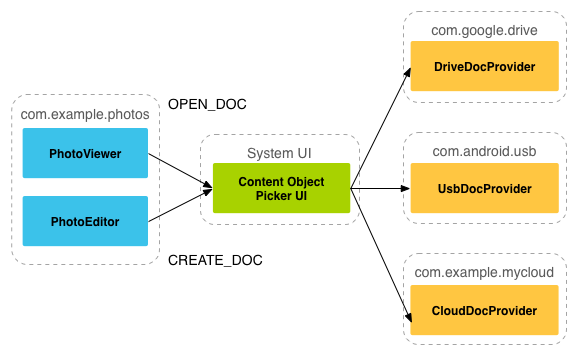
Figure 2. Storage Access Framework flow.
Note the following:
- In the SAF, providers and clients don't interact directly. A client requests permission to interact with files, meaning to read, edit, create, or delete files.
- The interaction starts when an application, in this example a photo app, fires the intent
[ACTION_OPEN_DOCUMENT](/reference/android/content/Intent#ACTION%5FOPEN%5FDOCUMENT)or[ACTION_CREATE_DOCUMENT](/reference/android/content/Intent#ACTION%5FCREATE%5FDOCUMENT). The intent can include filters to further refine the criteria, such as "give me all openable files that have the 'image' MIME type." - Once the intent fires, the system picker goes to each registered provider and shows the user the matching content roots.
- The picker gives users a standard interface for accessing documents, even when the underlying document providers are very different. For example, figure 2 shows a Google Drive provider, a USB provider, and a cloud provider.
In Figure 3, the user is selecting the Downloads folder from a picker opened in a search for images. The picker also shows all of the roots available to the client app.
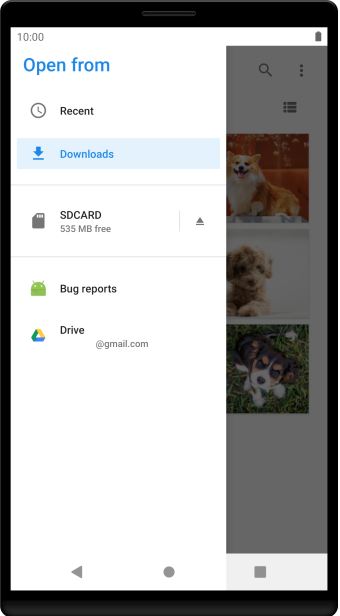
Figure 3. Picker showing Downloads folder selected as a search location.
After the user selects the Downloads folder, the images are displayed. Figure 4 shows the result of this process. The user can now interact with the images in the ways that the provider and client app support.
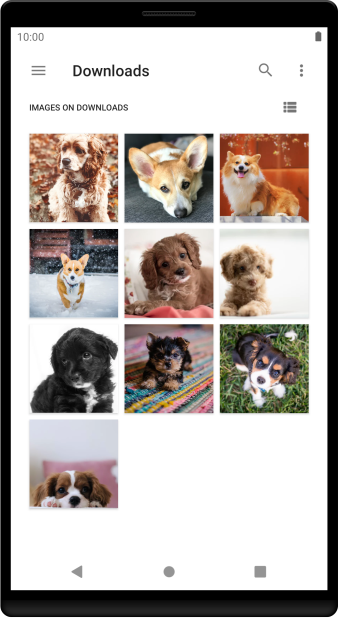
Figure 4. Images stored in the Downloads folder, as viewed in the system picker.
Write a client app
On Android 4.3 and lower, if you want your app to retrieve a file from another app, it must invoke an intent such as [ACTION_PICK](/reference/android/content/Intent#ACTION%5FPICK)or [ACTION_GET_CONTENT](/reference/android/content/Intent#ACTION%5FGET%5FCONTENT). The user then selects a single app from which to pick a file. The selected app must provide a user interface for the user to browse and pick from the available files.
On Android 4.4 (API level 19) and higher, you have the additional option of using the[ACTION_OPEN_DOCUMENT](/reference/android/content/Intent#ACTION%5FOPEN%5FDOCUMENT) intent, which displays a system-controlled picker UI that lets the user browse all files that other apps have made available. From this single UI, the user can pick a file from any of the supported apps.
On Android 5.0 (API level 21) and higher, you can also use the[ACTION_OPEN_DOCUMENT_TREE](/reference/android/content/Intent#ACTION%5FOPEN%5FDOCUMENT%5FTREE)intent, which lets the user choose a directory for a client app to access.
Note: ACTION_OPEN_DOCUMENT isn't a replacement for ACTION_GET_CONTENT. The one you use depends on the needs of your app:
- Use
ACTION_GET_CONTENTif you want your app to read or import data. With this approach, the app imports a copy of the data, such as an image file. - Use
ACTION_OPEN_DOCUMENTif you want your app to have long-term, persistent access to documents owned by a document provider. An example is a photo-editing app that lets users edit images stored in a document provider.
For more information about how to support browsing for files and directories using the system picker UI, see the guide aboutaccessing documents and other files.
Additional resources
For more information about document providers, take advantage of the following resources: