About Restore Credentials (original) (raw)
Credential Manager's Restore Credentials feature lets users automatically restore their app accounts and be signed in upon first opening an app after setting up a new device. A restore credential, also known as a restore key, is a type of credential that can be saved locally or backed up to a cloud provider, and then used to provision access on the user's new device.
This guide assumes you're familiar with the following concepts:
Benefits
The benefits of the Restore Credentials feature include:
- Seamless user experience: Users can begin using the app immediately on their new device without needing to manually sign in.
- Immediate engagement: You can engage users with notifications or other prompts as soon as they start using their new device.
- Support for multiple authentication mechanisms: It works with all the authentication mechanisms supported by Credential Manager, including:
- Passkeys
- Passwords
- Sign in with Google
Process overview
The following sections describe the process required on each device:
On the previous device
Generate the restore key after the user authenticates to your app—immediately after they sign in, or during a subsequent app launch if they are already signed in. The Android backup service automatically stores the generated restore key on the device, and based on the user's backup settings, also saves it in the cloud.
For a user to be able to back up to the cloud, they must meet the following requirements:
- Be signed in to their Google Account.
- Have Android data backup enabled. For more information, seeData backup.
- Have a screen unlock mechanism set up, such as pattern, PIN, password, or biometrics.
If these conditions aren't met, an E2eeUnavailableException is thrown.
On the new device
When the user sets up their new device, Restore Credentials works silently in the background during the device setup process. Users can choose to restore data either from the following options:
- From a cloud backup: If a cloud backup is used, the restore key is downloaded with the app data to the new device.
- Using a device-to-device transfer: When users connect their old and new devices with a USB cable, the restore key moves from the old to the new device through the USB cable.
After the restore key is available on the new device, you can use it to sign in the user.
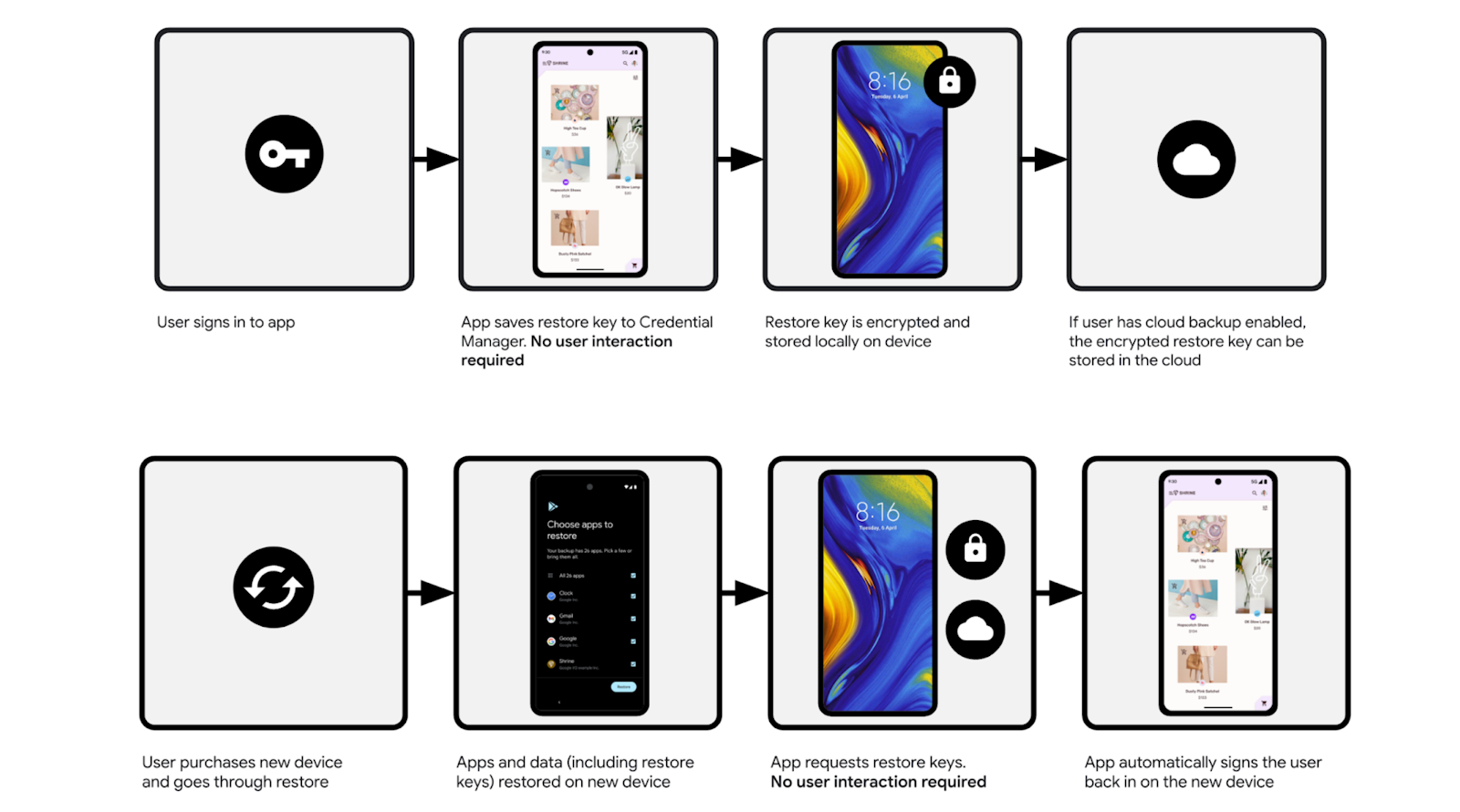
Figure 1: Process overview to restore credentials
Handle multiple system profiles and app accounts
When implementing the Restore Credentials feature, consider the following constraints regarding multi-account apps and system-level profiles.
Apps with multiple signed-in accounts
Some apps allow users to switch between multiple active accounts (for example, a personal and a work email account within the same app). Restore Credentials supports only one account per app. If a user is signed in to multiple accounts, you must select only one account for which to create the restore key. Typically, this should be the primary or most recently used account.
Devices with multiple system profiles
On devices configured with separate system profiles (such as a corporate device with a work profile and a personal profile), the restore key is only available to the profile that was set up first on the device.
Limitations
Restore Credentials works on mobile devices and does not work across form factors.