Kotlin flows on Android (original) (raw)
In coroutines, a flow is a type that can emit multiple values sequentially, as opposed to suspend functions that return only a single value. For example, you can use a flow to receive live updates from a database.
Flows are built on top of coroutines and can provide multiple values. A flow is conceptually a stream of data that can be computed asynchronously. The emitted values must be of the same type. For example, a Flow<Int> is a flow that emits integer values.
A flow is very similar to an Iterator that produces a sequence of values, but it uses suspend functions to produce and consume values asynchronously. This means, for example, that the flow can safely make a network request to produce the next value without blocking the main thread.
There are three entities involved in streams of data:
- A producer produces data that is added to the stream. Thanks to coroutines, flows can also produce data asynchronously.
- (Optional) Intermediaries can modify each value emitted into the stream or the stream itself.
- A consumer consumes the values from the stream.
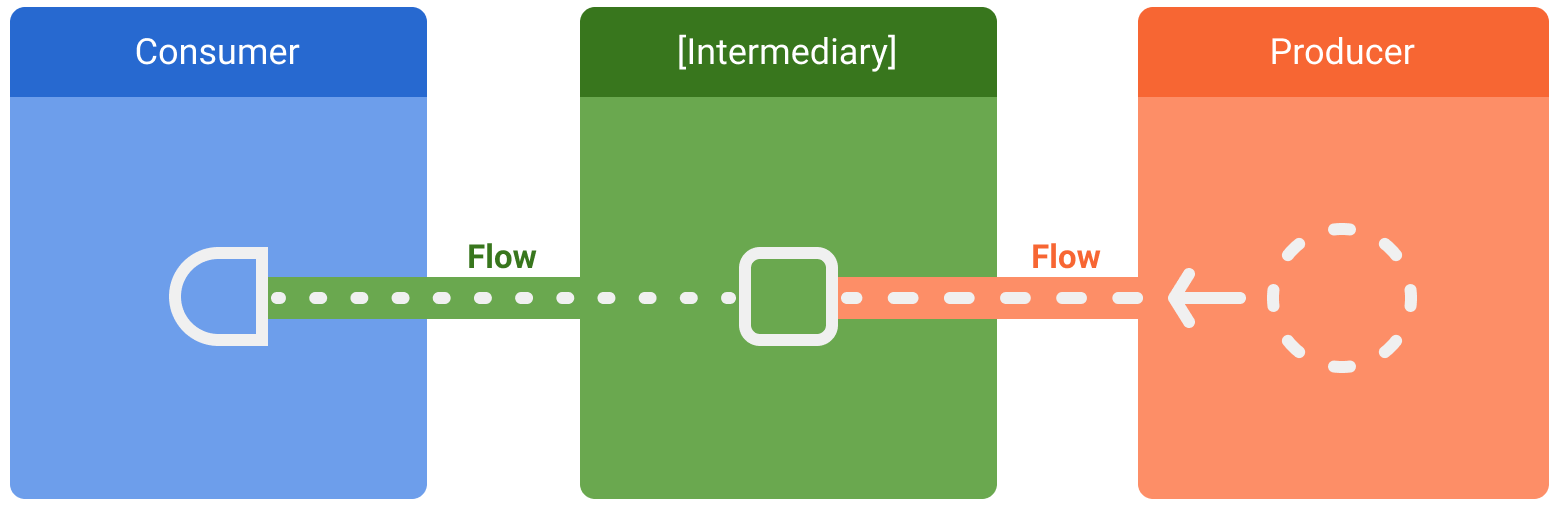
Figure 1. Entities involved in streams of data: consumer, optional intermediaries, and producer.
In Android, a repository is typically a producer of UI data that has the user interface (UI) as the consumer that ultimately displays the data. Other times, the UI layer is a producer of user input events and other layers of the hierarchy consume them. Layers in between the producer and consumer usually act as intermediaries that modify the stream of data to adjust it to the requirements of the following layer.
Creating a flow
To create flows, use theflow builderAPIs. The flow builder function creates a new flow where you can manually emit new values into the stream of data using theemitfunction.
In the following example, a data source fetches the latest news automatically at a fixed interval. As a suspend function cannot return multiple consecutive values, the data source creates and returns a flow to fulfill this requirement. In this case, the data source acts as the producer.
class NewsRemoteDataSource(
    private val newsApi: NewsApi,
    private val refreshIntervalMs: Long = 5000
) {
    val latestNews: Flow<List<ArticleHeadline>> = flow {
        while(true) {
            val latestNews = newsApi.fetchLatestNews()
            emit(latestNews) // Emits the result of the request to the flow
            delay(refreshIntervalMs) // Suspends the coroutine for some time
        }
    }
}

// Interface that provides a way to make network requests with suspend functions
interface NewsApi {
    suspend fun fetchLatestNews(): List<ArticleHeadline>
}
The flow builder is executed within a coroutine. Thus, it benefits from the same asynchronous APIs, but some restrictions apply:
- Flows are sequential. As the producer is in a coroutine, when calling a suspend function, the producer suspends until the suspend function returns. In the example, the producer suspends until the
fetchLatestNewsnetwork request completes. Only then is the result emitted to the stream. - With the
flowbuilder, the producer cannotemitvalues from a differentCoroutineContext. Therefore, don't callemitin a differentCoroutineContextby creating new coroutines or by usingwithContextblocks of code. You can use other flow builders such ascallbackFlowin these cases.
Modifying the stream
Intermediaries can use intermediate operators to modify the stream of data without consuming the values. These operators are functions that, when applied to a stream of data, set up a chain of operations that aren't executed until the values are consumed in the future. Learn more about intermediate operators in theFlow reference documentation.
In the example below, the repository layer uses the intermediate operatormapto transform the data to be displayed on the View:
class NewsRepository(
    private val newsRemoteDataSource: NewsRemoteDataSource,
    private val userData: UserData
) {
    /**
     * Returns the favorite latest news applying transformations on the flow.
     * These operations are lazy and don't trigger the flow. They just transform
     * the current value emitted by the flow at that point in time.
     */
    val favoriteLatestNews: Flow<List<ArticleHeadline>> =
        newsRemoteDataSource.latestNews
            // Intermediate operation to filter the list of favorite topics
            .map { news -> news.filter { userData.isFavoriteTopic(it) } }
            // Intermediate operation to save the latest news in the cache
            .onEach { news -> saveInCache(news) }
}
Intermediate operators can be applied one after the other, forming a chain of operations that are executed lazily when an item is emitted into the flow. Note that simply applying an intermediate operator to a stream does not start the flow collection.
Collecting from a flow
Use a terminal operator to trigger the flow to start listening for values. To get all the values in the stream as they're emitted, usecollect. You can learn more about terminal operators in theofficial flow documentation.
As collect is a suspend function, it needs to be executed within a coroutine. It takes a lambda as a parameter that is called on every new value. Since it's a suspend function, the coroutine that calls collect may suspend until the flow is closed.
Continuing the previous example, here's a simple implementation of a ViewModel consuming the data from the repository layer:
class LatestNewsViewModel(
    private val newsRepository: NewsRepository
) : ViewModel() {

    init {
        viewModelScope.launch {
            // Trigger the flow and consume its elements using collect
            newsRepository.favoriteLatestNews.collect { favoriteNews ->
                // Update View with the latest favorite news
            }
        }
    }
}
Collecting the flow triggers the producer that refreshes the latest news and emits the result of the network request on a fixed interval. As the producer remains always active with the while(true) loop, the stream of data will be closed when the ViewModel is cleared andviewModelScope is cancelled.
Flow collection can stop for the following reasons:
- The coroutine that collects is cancelled, as shown in the previous example. This also stops the underlying producer.
- The producer finishes emitting items. In this case, the stream of data is closed and the coroutine that called
collectresumes execution.
Flows are cold and lazy unless specified with other intermediate operators. This means that the producer code is executed each time a terminal operator is called on the flow. In the previous example, having multiple flow collectors causes the data source to fetch the latest news multiple times on different fixed intervals. To optimize and share a flow when multiple consumers collect at the same time, use theshareIn operator.
Catching unexpected exceptions
The implementation of the producer can come from a third party library. This means that it can throw unexpected exceptions. To handle these exceptions, use thecatchintermediate operator.
class LatestNewsViewModel(
    private val newsRepository: NewsRepository
) : ViewModel() {

    init {
        viewModelScope.launch {
            newsRepository.favoriteLatestNews
                // Intermediate catch operator. If an exception is thrown,
                // catch and update the UI
                .catch { exception -> notifyError(exception) }
                .collect { favoriteNews ->
                    // Update View with the latest favorite news
                }
        }
    }
}
In the previous example, when an exception occurs, the collectlambda isn't called, as a new item hasn't been received.
catch can also emit items to the flow. The example repository layer could emit the cached values instead:
class NewsRepository(...) {
    val favoriteLatestNews: Flow<List<ArticleHeadline>> =
        newsRemoteDataSource.latestNews
            .map { news -> news.filter { userData.isFavoriteTopic(it) } }
            .onEach { news -> saveInCache(news) }
            // If an error happens, emit the last cached values
            .catch { exception -> emit(lastCachedNews()) }
}
In this example, when an exception occurs, the collect lambda is called, as a new item has been emitted to the stream because of the exception.
Executing in a different CoroutineContext
By default, the producer of a flow builder executes in theCoroutineContext of the coroutine that collects from it, and as previously mentioned, it cannot emit values from a differentCoroutineContext. This behavior might be undesirable in some cases. For instance, in the examples used throughout this topic, the repository layer shouldn't be performing operations on Dispatchers.Main that is used by viewModelScope.
To change the CoroutineContext of a flow, use the intermediate operatorflowOn.flowOn changes the CoroutineContext of the upstream flow, meaning the producer and any intermediate operators applied before (or above) flowOn. The downstream flow (the intermediate operators after flowOnalong with the consumer) is not affected and executes on theCoroutineContext used to collect from the flow. If there are multiple flowOn operators, each one changes the upstream from its current location.
class NewsRepository(
    private val newsRemoteDataSource: NewsRemoteDataSource,
    private val userData: UserData,
    private val defaultDispatcher: CoroutineDispatcher
) {
    val favoriteLatestNews: Flow<List<ArticleHeadline>> =
        newsRemoteDataSource.latestNews
            .map { news -> // Executes on the default dispatcher
                news.filter { userData.isFavoriteTopic(it) }
            }
            .onEach { news -> // Executes on the default dispatcher
                saveInCache(news)
            }
            // flowOn affects the upstream flow ↑
            .flowOn(defaultDispatcher)
            // the downstream flow ↓ is not affected
            .catch { exception -> // Executes in the consumer's context
                emit(lastCachedNews())
            }
}
With this code, the onEach and map operators use the defaultDispatcher, whereas the catch operator and the consumer are executed onDispatchers.Main used by viewModelScope.
As the data source layer is doing I/O work, you should use a dispatcher that is optimized for I/O operations:
class NewsRemoteDataSource(
    ...,
    private val ioDispatcher: CoroutineDispatcher
) {
    val latestNews: Flow<List<ArticleHeadline>> = flow {
        // Executes on the IO dispatcher
        ...
    }
        .flowOn(ioDispatcher)
}
Flows in Jetpack libraries
Flow is integrated into many Jetpack libraries, and it's popular among Android third party libraries. Flow is a great fit for live data updates and endless streams of data.
You can useFlow with Roomto be notified of changes in a database. When usingdata access objects (DAO), return a Flow type to get live updates.
@Dao
abstract class ExampleDao {
    @Query("SELECT * FROM Example")
    abstract fun getExamples(): Flow<List<Example>>
}
Every time there's a change in the Example table, a new list is emitted with the new items in the database.
Convert callback-based APIs to flows
callbackFlowis a flow builder that lets you convert callback-based APIs into flows. As an example, the Firebase FirestoreAndroid APIs use callbacks.
To convert these APIs to flows and listen for Firestore database updates, you can use the following code:
class FirestoreUserEventsDataSource(
    private val firestore: FirebaseFirestore
) {
    // Method to get user events from the Firestore database
    fun getUserEvents(): Flow<UserEvents> = callbackFlow {

        // Reference to use in Firestore
        var eventsCollection: CollectionReference? = null
        try {
            eventsCollection = FirebaseFirestore.getInstance()
                .collection("collection")
                .document("app")
        } catch (e: Throwable) {
            // If Firebase cannot be initialized, close the stream of data
            // flow consumers will stop collecting and the coroutine will resume
            close(e)
        }

        // Registers callback to firestore, which will be called on new events
        val subscription = eventsCollection?.addSnapshotListener { snapshot, _ ->
            if (snapshot == null) { return@addSnapshotListener }
            // Sends events to the flow! Consumers will get the new events
            try {
                trySend(snapshot.getEvents())
            } catch (e: Throwable) {
                // Event couldn't be sent to the flow
            }
        }

        // The callback inside awaitClose will be executed when the flow is
        // either closed or cancelled.
        // In this case, remove the callback from Firestore
        awaitClose { subscription?.remove() }
    }
}
Unlike the flow builder, callbackFlowallows values to be emitted from a different CoroutineContext with thesendfunction or outside a coroutine with thetrySendfunction.
Internally, callbackFlow uses achannel, which is conceptually very similar to a blockingqueue. A channel is configured with a capacity, the maximum number of elements that can be buffered. The channel created in callbackFlow has a default capacity of 64 elements. When you try to add a new element to a full channel, send suspends the producer until there's space for the new element, whereas trySend does not add the element to the channel and returnsfalse immediately.
trySend immediately adds the specified element to the channel, only if this doesn't violate its capacity restrictions, and then returns the successful result.