State holders and UI state (original) (raw)
The UI layer guide discusses unidirectional data flow (UDF) as a means of producing and managing the UI State for the UI layer.
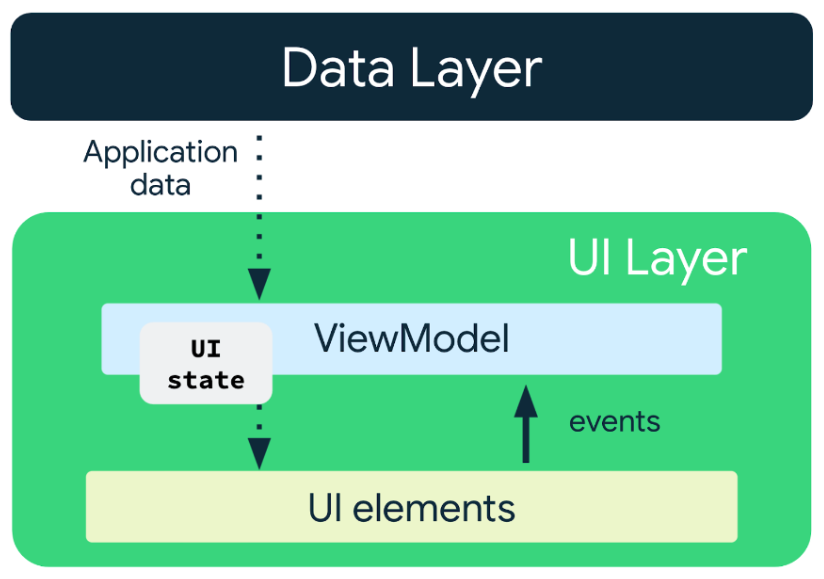
Figure 1. Unidirectional data flow.
It also highlights the benefits of delegating UDF management to a special class called a state holder. You can implement a state holder either through aViewModel or a plain class. This document takes a closer look at state holders and the role they play in the UI layer.
At the end of this document, you should have an understanding of how to manage application state in the UI layer; that is the UI state production pipeline. You should be able to understand and know the following:
- Understand the types of UI state that exist in the UI layer.
- Understand the types of logic that operate on those UI states in the UI layer.
- Know how to choose the appropriate implementation of a state holder, such as a
ViewModelor a class.
Elements of the UI state production pipeline
The UI state and the logic that produces it defines the UI layer.
UI state
UI state is the property that describes the UI. There are two types of UI state:
- Screen UI state is what you need to display on the screen. For example, a
NewsUiStateclass can contain the news articles and other information needed to render the UI. This state is usually connected with other layers of the hierarchy because it contains app data. - UI element state refers to properties intrinsic to UI elements that influence how they are rendered. A UI element may be shown or hidden and may have a certain font, font size, or font color. In Android Views, the View manages this state itself as it is inherently stateful, exposing methods to modify or query its state. An example of this are the get andset methods of the TextView class for its text. In Jetpack Compose, the state is external to the composable, and you can even hoist it out of the immediate vicinity of the composable into the calling composable function or a state holder. An example of this is ScaffoldState for theScaffold composable.
Logic
UI state is not a static property, as application data and user events cause UI state to change over time. Logic determines the specifics of the change, including what parts of the UI state have changed, why it's changed, and when it should change.

Figure 2. Logic as the producer of UI state.
Logic in an application can be either business logic or UI logic:
- Business logic is the implementation of product requirements for app data. For example, bookmarking an article in a news reader app when the user taps the button. This logic to save a bookmark to a file or database is usually placed in the domain or data layers. The state holder usually delegates this logic to those layers by calling the methods they expose.
- UI logic is related to how to display UI state on the screen. For example, obtaining the right search bar hint when the user has selected a category, scrolling to a particular item in a list, or the navigation logic to a particular screen when the user clicks a button.
Android lifecycle and the types of UI state and logic
The UI layer has two parts: one dependent and the other independent of the UI lifecycle. This separation determines the data sources available to each part, and therefore requires different types of UI state and logic.
- UI lifecycle independent: This part of the UI layer deals with the data producing layers of the app (data or domain layers) and is defined by business logic. Lifecycle, configuration changes, and
Activityrecreation in the UI may affect if the UI state production pipeline is active, but do not affect the validity of the data produced. - UI lifecycle dependent: This part of the UI layer deals with UI logic, and is directly influenced by lifecycle or configuration changes. These changes directly affect the validity of the sources of data read within it, and as a result its state can only change when its lifecycle is active. Examples of this include runtime permissions and getting configuration dependent resources like localized strings.
The above can be summarized with the table below:
| UI Lifecycle independent | UI Lifecycle dependent |
|---|---|
| Business logic | UI Logic |
| Screen UI state |
The UI state production pipeline
The UI state production pipeline refers to the steps undertaken to produce UI state. These steps comprise the application of the types of logic defined earlier, and are completely dependent on the needs of your UI. Some UIs may benefit from both UI Lifecycle independent and UI Lifecycle dependent parts of the pipeline, either, or neither.
That is, the following permutations of the UI layer pipeline are valid:
- UI state produced and managed by the UI itself. For example, a simple, reusable basic counter:
@Composable
fun Counter() {
    // The UI state is managed by the UI itself
    var count by remember { mutableStateOf(0) }
    Row {
        Button(onClick = { ++count }) {
            Text(text = "Increment")
        }
        Button(onClick = { --count }) {
            Text(text = "Decrement")
        }
    }
} - UI logic → UI. For example, showing or hiding a button that allows a user to jump to the top of a list.
@Composable
fun ContactsList(contacts: List<Contact>) {
    val listState = rememberLazyListState()
    val isAtTopOfList by remember {
        derivedStateOf {
            listState.firstVisibleItemIndex < 3
        }
    }
    // Create the LazyColumn with the lazyListState
    ...
    // Show or hide the button (UI logic) based on the list scroll position
    AnimatedVisibility(visible = !isAtTopOfList) {
        ScrollToTopButton()
    }
} - Business logic → UI. A UI element displaying the current user's photo on the screen.
@Composable
fun UserProfileScreen(viewModel: UserProfileViewModel = hiltViewModel()) {
    // Read screen UI state from the business logic state holder
    val uiState by viewModel.uiState.collectAsStateWithLifecycle()
    // Call on the UserAvatar Composable to display the photo
    UserAvatar(picture = uiState.profilePicture)
} - Business logic → UI logic → UI. A UI element that scrolls to display the right information on the screen for a given UI state.
@Composable
fun ContactsList(viewModel: ContactsViewModel = hiltViewModel()) {
    // Read screen UI state from the business logic state holder
    val uiState by viewModel.uiState.collectAsStateWithLifecycle()
    val contacts = uiState.contacts
    val deepLinkedContact = uiState.deepLinkedContact
    val listState = rememberLazyListState()
    // Create the LazyColumn with the lazyListState
    ...
    // Perform UI logic that depends on information from business logic
    if (deepLinkedContact != null && contacts.isNotEmpty()) {
        LaunchedEffect(listState, deepLinkedContact, contacts) {
            val deepLinkedContactIndex = contacts.indexOf(deepLinkedContact)
            if (deepLinkedContactIndex >= 0) {
              // Scroll to deep linked item
              listState.animateScrollToItem(deepLinkedContactIndex)
            }
        }
    }
}
In the case where both kinds of logic are applied to the UI state production pipeline, business logic must always be applied before UI logic. Trying to apply business logic after UI logic would imply that the business logic depends on UI logic. The following sections cover why this is a problem through an in depth look at different logic types and their state holders.
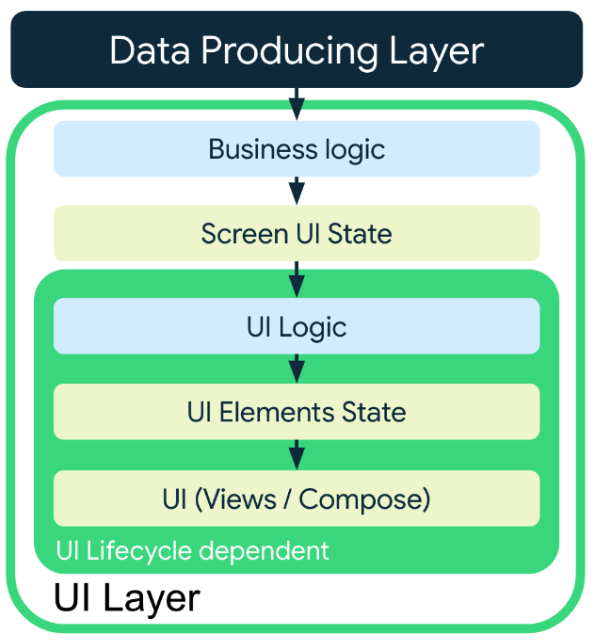
Figure 3. Application of logic in the UI layer.
State holders and their responsibilities
The responsibility of a state holder is to store state so the app can read it. In cases where logic is needed, it acts as an intermediary and provides access to the data sources that host the required logic. In this way, the state holder delegates logic to the appropriate data source.
This produces the following benefits:
- Simple UIs: The UI just binds its state.
- Maintainability: The logic defined in the state holder can be iterated upon without changing the UI itself.
- Testability: The UI and its state production logic can be tested independently.
- Readability: Readers of the code can clearly see differences between UI presentation code and UI state production code.
Regardless of its size or scope, every UI element has a 1:1 relationship with its corresponding state holder. Furthermore, a state holder must be able to accept and process any user action that might result in a UI state change and must produce the ensuing state change.
Types of state holders
Similar to the kinds of UI state and logic, there are two types of state holders in the UI layer defined by their relationship to the UI lifecycle:
- The business logic state holder.
- The UI logic state holder.
The following sections take a closer look at the types of state holders, starting with the business logic state holder.
Business logic and its state holder
Business logic state holders process user events and transform data from the data or domain layers to screen UI state. In order to provide an optimal user experience when considering the Android lifecycle and app configuration changes, state holders that utilize business logic should have the following properties:
| Property | Detail |
|---|---|
| Produces UI State | Business logic state holders are responsible for producing the UI state for their UIs. This UI state is often the result of processing user events and reading data from the domain and data layers. |
| Retained through activity recreation | Business logic state holders retain their state and state processing pipelines across Activity recreation, helping provide a seamless user experience. In the cases where the state holder is unable to be retained and is recreated (usually after process death), the state holder must be able to easily recreate its last state to ensure a consistent user experience. |
| Possess long lived state | Business logic state holders are often used to manage state for navigation destinations. As a result, they often preserve their state across navigation changes until they are removed from the navigation graph. |
| Is unique to its UI and is not reusable | Business logic state holders typically produce state for a certain app function, for example a TaskEditViewModel or a TaskListViewModel, and therefore only ever applicable to that app function. The same state holder can support these app functions across different form factors. For example, mobile, TV, and tablet versions of the app may reuse the same business logic state holder. |
For example consider the author navigation destination in the "Now in Android" app:

Figure 4. The Now in Android app.
Acting as the business logic state holder, the AuthorViewModel produces the UI state in this case:
@HiltViewModel
class AuthorViewModel @Inject constructor(
    savedStateHandle: SavedStateHandle,
    private val authorsRepository: AuthorsRepository,
    newsRepository: NewsRepository
) : ViewModel() {

    val uiState: StateFlow<AuthorScreenUiState> = …

    // Business logic
    fun followAuthor(followed: Boolean) {
      …
    }
}
Notice that the AuthorViewModel has the attributes outlined previously:
| Property | Detail |
|---|---|
| Produces AuthorScreenUiState | The AuthorViewModel reads data from the AuthorsRepository and NewsRepository and uses that data to produce AuthorScreenUiState. It also applies business logic when the user wants to follow or unfollow an Author by delegating to the AuthorsRepository. |
| Has access to the data layer | An instance of AuthorsRepository and NewsRepository are passed to it in its constructor, allowing it to implement the business logic of following an Author. |
| Survives Activity recreation | Because it is implemented with a ViewModel, it will be retained across quick Activity recreation. In the case of process death, the SavedStateHandle object can be read from to provide the minimum amount of information required to restore the UI state from the data layer. |
| Possesses long lived state | The ViewModel is scoped to the navigation graph, therefore unless the author destination is removed from the nav graph, the UI state in the uiState StateFlow remains in memory. The use of the StateFlow also adds the benefit of making the application of the business logic that produces the state lazy because state is only produced if there is a collector of the UI state. |
| Is unique to its UI | The AuthorViewModel is only applicable to the author navigation destination and cannot be reused anywhere else. If there is any business logic that is reused across navigation destinations, that business logic must be encapsulated in a data- or domain-layer-scoped component. |
The ViewModel as a business logic state holder
The benefits of ViewModels in Android development make them suitable for providing access to the business logic and preparing the application data for presentation on the screen. These benefits include the following:
- Operations triggered by ViewModels survive configuration changes.
- Integration with Navigation:
- Navigation caches ViewModels while the screen is on the back stack. This is important to have your previously loaded data instantly available when you return to your destination. This is something more difficult to do with a state holder that follows the lifecycle of the composable screen.
- The ViewModel is also cleared when the destination is popped off the back stack, ensuring that your state is automatically cleaned up. This is different from listening for the composable disposal that can happen for multiple reasons such as going to a new screen, due to a configuration change, or other reasons.
- Integration with other Jetpack libraries such as Hilt.
UI logic and its state holder
UI logic is logic that operates on data that the UI itself provides. This may be on UI elements' state, or on UI data sources like the permissions API orResources. State holders that utilize UI logic typically have the following properties:
- Produces UI state and manages UI elements state.
- Does not survive
Activityrecreation: State holders that are hosted in UI logic are often dependent on data sources from the UI itself, and attempting to retain this information across configuration changes more often than not causes a memory leak. If state holders need data to persist across configuration changes, they need to delegate to another component better suited to survivingActivityrecreation. In Jetpack Compose for example, Composable UI element states created withrememberedfunctions often delegate torememberSaveableto preserve state acrossActivityrecreation. Examples of such functions includerememberScaffoldState()andrememberLazyListState(). - Has references to UI scoped sources of data: Sources of data like lifecycle APIs and Resources can safely be referenced and read as the UI logic state holder has the same lifecycle as the UI.
- Is reusable across multiple UIs: Different instances of the same UI logic state holder may be reused in different parts of the app. For example, a state holder for managing user input events for a chip group may be used on a search page for filter chips, and also for the "to" field for receivers of an email.
The UI logic state holder is typically implemented with a plain class. This is because the UI itself is responsible for the creation of the UI logic state holder and the UI logic state holder has the same lifecycle as the UI itself. In Jetpack Compose for example, the state holder is part of the Composition and follows the Composition's lifecycle.
The preceding can be illustrated in the following example in theNow in Android sample:
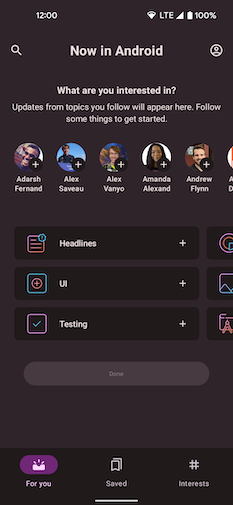
Figure 5. The Now in Android sample app.
The Now in Android sample shows either a bottom app bar or a navigation rail for its navigation depending on the device's screen size. Smaller screens use the bottom app bar, and larger screens the navigation rail.
Since the logic for deciding the appropriate navigation UI element used in theNiaApp composable function doesn't depend on business logic, it can be managed by a plain class state holder called NiaAppState:
@Stable
class NiaAppState(
    val navController: NavHostController,
    val windowSizeClass: WindowSizeClass
) {

    // UI logic
    val shouldShowBottomBar: Boolean
        get() = windowSizeClass.widthSizeClass == WindowWidthSizeClass.Compact ||
            windowSizeClass.heightSizeClass == WindowHeightSizeClass.Compact

    // UI logic
    val shouldShowNavRail: Boolean
        get() = !shouldShowBottomBar

   // UI State
    val currentDestination: NavDestination?
        @Composable get() = navController
            .currentBackStackEntryAsState().value?.destination

    // UI logic
    fun navigate(destination: NiaNavigationDestination, route: String? = null) { /* ... */ }

     /* ... */
}
In the preceding example, the following details regarding NiaAppState are notable:
- Does not survive
Activityrecreation:NiaAppStateisrememberedin the Composition by creating it with a Composable functionrememberNiaAppStatefollowing Compose naming conventions. After theActivityis recreated, the prior instance is lost and a new instance is created with all its dependencies passed in, appropriate for the new configuration of the recreatedActivity. These dependencies may be new or restored from the previous configuration. For example,rememberNavController()is used in theNiaAppStateconstructor and it delegates torememberSaveableto preserve state acrossActivityrecreation. - Has references to UI scoped sources of data: References to the
navigationController,Resourcesand other similar lifecycle scoped types can be safely held inNiaAppStateas they share the same lifecycle scope.
Choose between a ViewModel and plain class for a state holder
From the preceding sections, choosing between a ViewModel and a plain class state holder comes down to the logic applied to the UI state and the sources of data the logic operates on.
In summary, the following diagram shows the position of state holders in the UI State production pipeline:
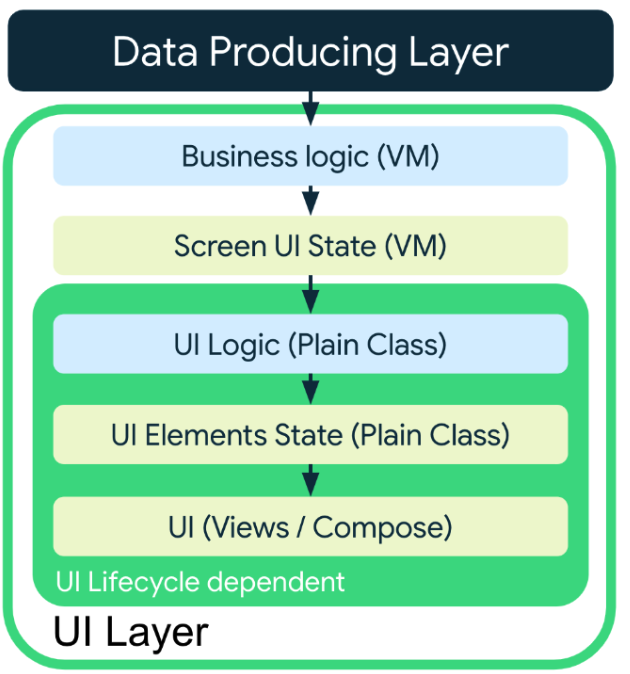
Figure 6. State holders in the UI State production pipeline. Arrows mean data flow.
Ultimately, you should produce UI state using state holders closest to where it is consumed. Less formally, you should hold state as low as possible while maintaining proper ownership. If you need access to business logic and need the UI state to persist as long as a screen may be navigated to, even across Activity recreation, a ViewModel is a great choice for your business logic state holder implementation. For shorter-lived UI state and UI logic, a plain class whose lifecycle is dependent solely on the UI should suffice.
State holders are compoundable
State holders can depend on other state holders as long as the dependencies have an equal or shorter lifetime. Examples of this are:
- a UI logic state holder can depend on another UI logic state holder.
- a screen level state holder can depend on a UI logic state holder.
The following code snippet shows how Compose's DrawerState depends on another internal state holder, SwipeableState, and how an app's UI logic state holder could depend on DrawerState:
@Stable
class DrawerState(/* ... */) {
  internal val swipeableState = SwipeableState(/* ... */)
  // ...
}

@Stable
class MyAppState(
  private val drawerState: DrawerState,
  private val navController: NavHostController
) { /* ... */ }

@Composable
fun rememberMyAppState(
  drawerState: DrawerState = rememberDrawerState(DrawerValue.Closed),
  navController: NavHostController = rememberNavController()
): MyAppState = remember(drawerState, navController) {
  MyAppState(drawerState, navController)
}
An example of a dependency that outlives a state holder would be a UI logic state holder depending on a screen level state holder. That would decrease the reusability of the shorter-lived state holder and gives it access to more logic and state than it actually needs.
If the shorter-lived state holder needs certain information from a higher-scoped state holder, pass only the information it needs as a parameter instead of passing the state holder instance. For example, in the following code snippet, the UI logic state holder class receives just what it needs as parameters from the ViewModel, instead of passing the whole ViewModel instance as a dependency.
class MyScreenViewModel(/* ... */) {
  val uiState: StateFlow<MyScreenUiState> = /* ... */
  fun doSomething() { /* ... */ }
  fun doAnotherThing() { /* ... */ }
  // ...
}

@Stable
class MyScreenState(
  // DO NOT pass a ViewModel instance to a plain state holder class
  // private val viewModel: MyScreenViewModel,

  // Instead, pass only what it needs as a dependency
  private val someState: StateFlow<SomeState>,
  private val doSomething: () -> Unit,

  // Other UI-scoped types
  private val scaffoldState: ScaffoldState
) {
  /* ... */
}

@Composable
fun rememberMyScreenState(
  someState: StateFlow<SomeState>,
  doSomething: () -> Unit,
  scaffoldState: ScaffoldState = rememberScaffoldState()
): MyScreenState = remember(someState, doSomething, scaffoldState) {
  MyScreenState(someState, doSomething, scaffoldState)
}

@Composable
fun MyScreen(
  modifier: Modifier = Modifier,
  viewModel: MyScreenViewModel = viewModel(),
  state: MyScreenState = rememberMyScreenState(
    someState = viewModel.uiState.map { it.toSomeState() },
    doSomething = viewModel::doSomething
  ),
  // ...
) {
  /* ... */
}
The following diagram represents the dependencies between the UI and different state holders of the previous code snippet:
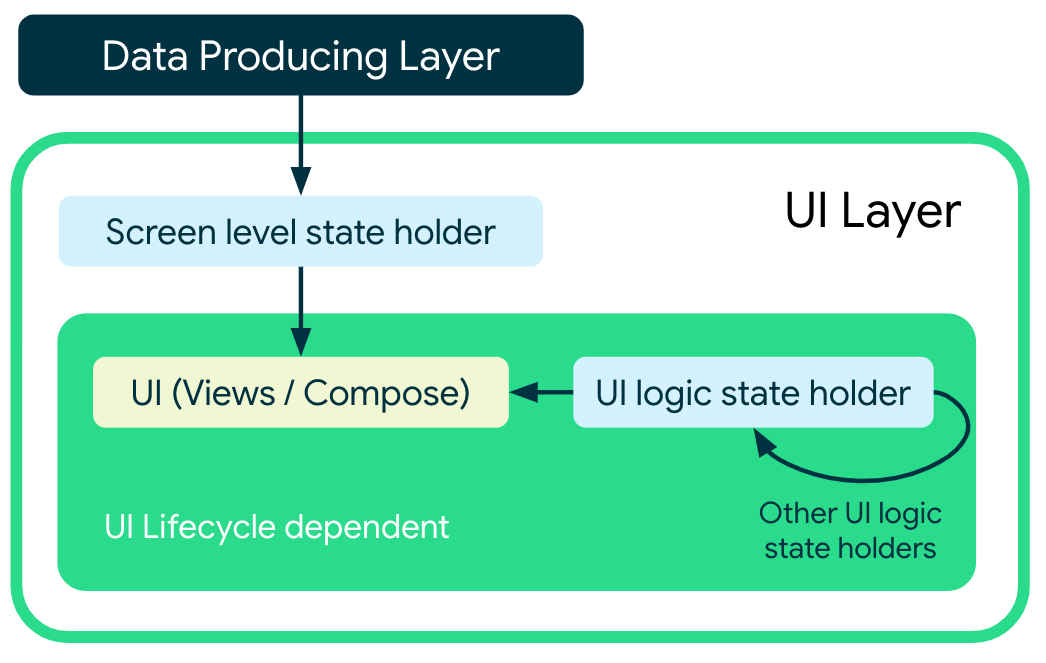
Figure 7. UI depending on different state holders. Arrows mean dependencies.
Samples
The following Google samples demonstrate the use of state holders in the UI layer. Go explore them to see this guidance in practice:
Recommended for you
- Note: link text is displayed when JavaScript is off
- UI layer
- UI State production
- Guide to app architecture