Structured output support for the Prompt API (original) (raw)

Published: May 13, 2025
Large language models (LLMs) are notorious for their occasional lengthy responses. Even if you tell the model to answer with just "true" or "false," the model may respond with a friendly output and more than you asked for, such as: "Certainly, the answer is: true."
To address this challenge, the Prompt APIlets you specify a JSON output format of the model's response by passing aJSON Schema to the LanguageModel.prompt() andLanguageModel.promptStreaming() methods. Structured output support is available as of Chrome version 137.
What is JSON Schema
JSON Schema is a vocabulary that enables JSON data consistency, validity, and interoperability at scale. When it comes to data exchange, JSON Schema stands out as a powerful standard for defining the structure and rules of JSON data. It uses a set of keywords to define the properties of your data.
JSON Schema is the industry standard for ensuring structured output, used, among others, by theOpenAI APIandGemini API.
For example, you prompt the model to assign at most three hashtags for a post on an online social network, such as Mastodon. The ideal output could look similar to the following JSON:
{
  "hashtags": [
    "#pottery",
    "#dyi"
  ]
}
The corresponding JSON Schema for this requested output object shape would then look as follows:
{
  "type": "object",
  "properties": {
    "hashtags": {
      "type": "array",
      "maxItems": 3,
      "items": {
        "type": "string",
        "pattern": "^#[^\\s#]+$"
      }
    }
  },
  "required": ["hashtags"],
  "additionalProperties": false
}
This JSON Schema defines a structure for an object that must contain ahashtags field with the following constraints:
"type": "object": The root value must be a JSON object."properties": { "hashtags": ... }: The object can (and in this case, must) have a property calledhashtags."hashtags":"type": "array": The value must be an array."maxItems": 3: The array can contain at most 3 items."items": { "type": "string", "pattern": "^#[^\\s#]+$" }: Each item in the array must be a string that matches the given regular expression pattern:^#[^\\s#]+$:
*^#→ must start with a#.
*[^\\s#]+→ followed by one or more characters that are not a space (\s) or another#.
*$→ must end there.
"required": ["hashtags"]: The object must contain thehashtagsproperty."additionalProperties": false: No other properties than hashtags are allowed.
Read the JSON Schema Basics documentation for a complete description of the format's capabilities.
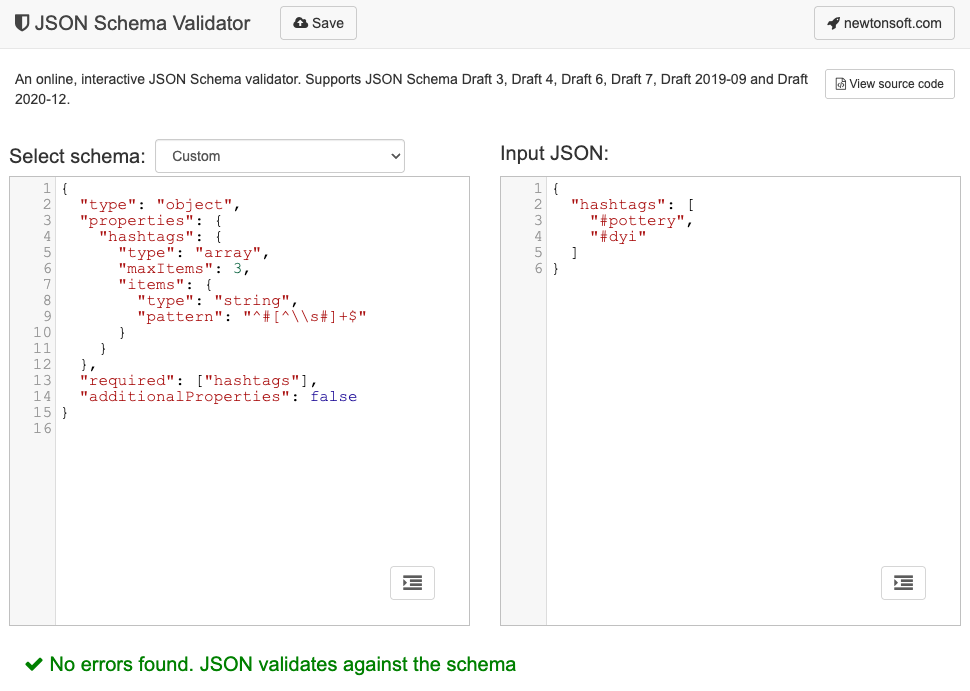
In fact, LLMs are really good at creating JSON Schema. Describe the constraints in natural language in your prompt and provide a valid example JSON object, and you're halfway there. You can then validate JSON objects against the generated JSON Schema with one of theJSON Schema validators, for example, the online Newtonsoft JSON Schema Validator.
Pass a JSON Schema to the Prompt API
To make sure the model respects a requested JSON Schema, you need to pass the JSON Schema as an argument to the prompt() or the promptStreaming() methods' options object as the value of a responseConstraint field.
Here's a very basic JSON Schema example that makes sure the model responds with either true or false in classifying whether a given message like thisMastodon post is about pottery.
const session = await LanguageModel.create();

const schema = {
  "type": "boolean"
};

const post = "Mugs and ramen bowls, both a bit smaller than intended- but that's
how it goes with reclaim. Glaze crawled the first time around, but pretty happy
with it after refiring.";

const result = await session.prompt(
  `Is this post about pottery?\n\n${post}`,
  {
    responseConstraint: schema,
  }
);
console.log(JSON.parse(result));
// true
Support predictable outputs
Structured output support for the Prompt API makes the responses of the LLM a lot more predictable. Rather than extracting an object from a Markdown response or other post-processing, developers can now assume the model's response is valid JSON.
This brings built-in AI one step closer to cloud-based APIs, with all the benefits of running local, client-side AI.