Work with tabs (original) (raw)
The Google Docs API lets you access content from any tab in the document.
What are tabs?
Google Docs features an organizational layer called tabs. Docs allows users to create one or more tabs within a single document, similar to how there are tabs in Sheets today. Each tab has its own title and ID (appended in the URL). A tab can also have child tabs, which are tabs that are nested beneath another tab.
Structural changes to how document content is represented in the Document Resource
In the past, documents did not have a concept of tabs, so theDocument Resource directly contained all of the text contents through the following fields:
- document.body
- document.headers
- document.footers
- document.footnotes
- document.documentStyle
- document.suggestedDocumentStyleChanges
- document.namedStyles
- document.suggestedNamedStylesChanges
- document.lists
- document.namedRanges
- document.inlineObjects
- document.positionedObjects
With the additional structural hierarchy of tabs, these fields no longer semantically represent the text content from all tabs in the document. The text-based content is now represented in a different layer. Tab properties and content in Google Docs are accessible withdocument.tabs, which is a list of Tab objects, each of which contains all of the aforementioned text content fields. The later sections give a brief overview; the Tab JSON representation also provides more detailed information.
Access Tab properties
Access tab properties usingtab.tabProperties, which includes information such as the ID, title, and positioning of the tab.
Access text content within a Tab
The actual document content within the tab is exposed astab.documentTab. All of the aforementioned text content fields are accessible usingtab.documentTab. For example, instead of using document.body, you should usedocument.tabs[indexOfTab].documentTab.body.
Tab hierarchy
Child tabs are represented in the API as atab.childTabs field onTab. Accessing all tabs in a document requires traversing the "tree" of child tabs. For example, consider a document that contains a tab hierarchy as follows:
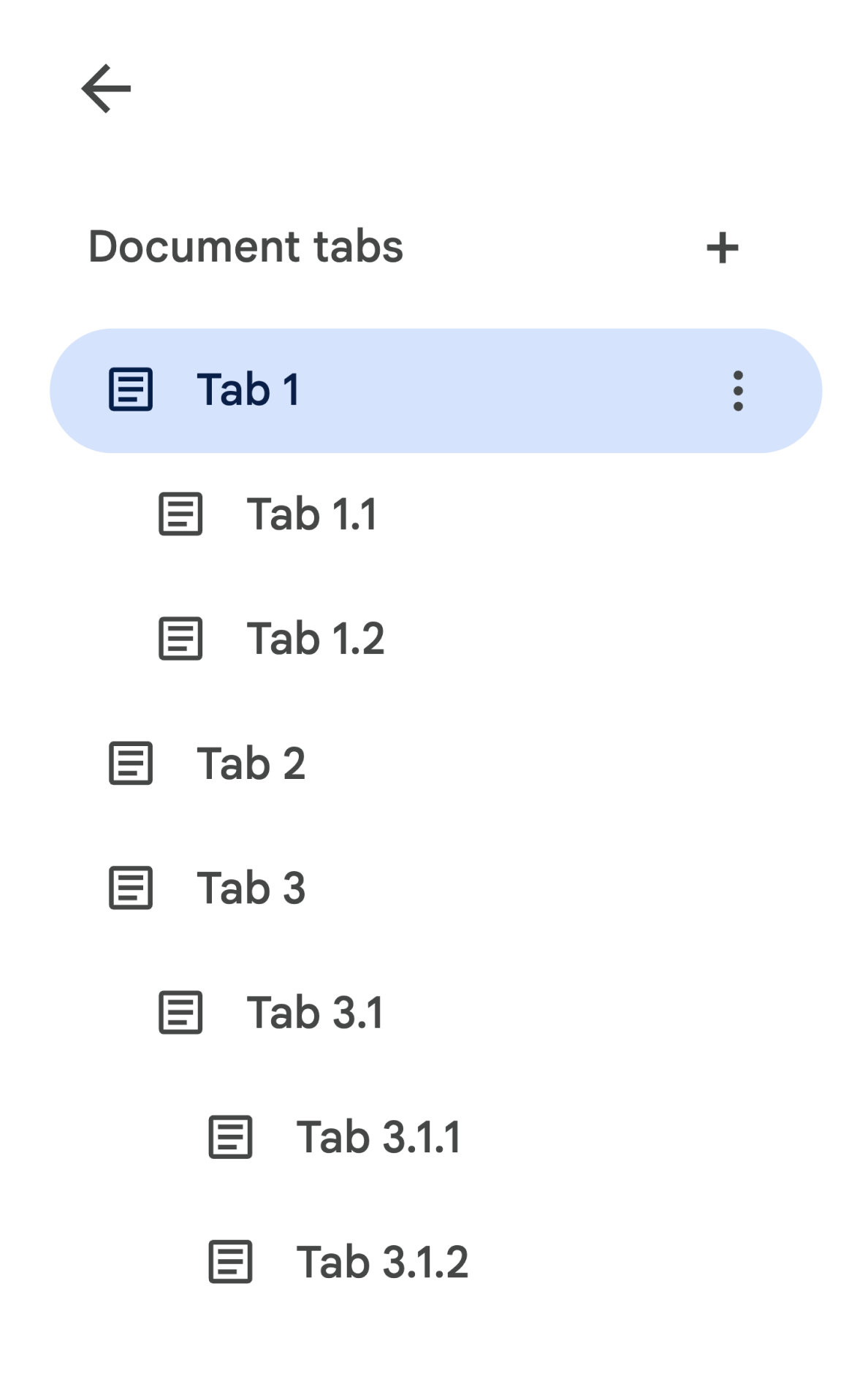
In order to retrieve the Bodyfrom Tab 3.1.2, you would accessdocument.tabs[2].childTabs[0].childTabs[1].documentTab.body. See the sample code blocks in the later section, which provides sample code for iterating across all tabs in a document.
Changes to methods
With the introduction of tabs, each of the document methods have a few changes that may require you to update your code.
documents.get
By default, not all tab contents are returned. Developers should update their code to access all tabs. Thedocuments.get method exposes an includeTabsContent parameter which enables configuring whether contents from all tabs are provided in the response.
- If
includeTabsContentis set totrue, thedocuments.getmethod will return aDocument Resource with thedocument.tabsfield populated. All of the text fields directly ondocument(e.g.document.body) will be left as empty. - If
includeTabsContentis not provided, then the text fields in theDocument Resource (e.g.document.body) will be populated with content from the first tab only. Thedocument.tabsfield will be empty and content from other tabs won't be returned.
documents.create
The documents.createmethod returns a DocumentResource representing the empty document which was created. The returnedDocument Resource will populate the empty document contents in both the document's text content fields as well as document.tabs.
document.batchUpdate
EachRequestincludes a way to specify the tabs to apply the update to. By default, if a tab is not specified, theRequestwill in most cases be applied to the first tab in the document.ReplaceAllTextRequest,DeleteNamedRangeRequest, andReplaceNamedRangeContentRequestare three special requests that will instead default to applying to all tabs.
Refer to theRequests documentation for specifics.
Changes to internal links
Users can create internal links to tabs, bookmarks, and headings in a document. With the introduction of the tabs feature, the link.bookmarkId andlink.headingId fields in theLink resource can no longer represent a bookmark or heading in a particular tab in the document.
Developers should update their code to use link.bookmark and link.heading in read and write operations. They expose internal links usingBookmarkLinkand HeadingLinkobjects, each containing the ID of the bookmark or heading and the ID of the tab it is located in. Additionally, link.tabId exposes internal links to tabs.
Link contents of adocuments.get response can also vary depending on the includeTabsContent parameter:
- If
includeTabsContentis set totrue, all internal links will be exposed aslink.bookmarkandlink.heading. The legacy fields will no longer be used. - If
includeTabsContentis not provided, then in documents containing a single tab, any internal links to bookmarks or headings within that singular tab continue to be exposed aslink.bookmarkIdandlink.headingId. In documents containing multiple tabs, internal links will be exposed aslink.bookmarkandlink.heading.
Indocument.batchUpdate, if an internal link is created using one of the legacy fields, the bookmark or heading will be considered to be from the tab ID specified in theRequest. If no tab is specified, it will be considered to be from the first tab in the document.
The Link JSON representation provides more detailed information.
Common usage patterns for tabs
The following code samples describe various ways of interacting with tabs.
Read tab content from all tabs in the document
Existing code that did this before the tabs feature can be migrated to support tabs by setting the includeTabsContent parameter to true, traversing the tabs tree hierarchy, and calling getter methods off ofTab andDocumentTabinstead of Document. The following partial code sample is based off of the snippet at Extract the text from a document. It shows how to print all of the text contents from every tab in a document. This tab traversal code can be adapted for many other use cases which don't care about the actual structure of the tabs.
Java
/** Prints all text contents from all tabs in the document. */ static void printAllText(Docs service, String documentId) throws IOException { // Fetch the document with all of the tabs populated, including any nested // child tabs. Document doc = service.documents().get(documentId).setIncludeTabsContent(true).execute(); List allTabs = getAllTabs(doc);
// Print the content from each tab in the document. for (Tab tab: allTabs) { // Get the DocumentTab from the generic Tab. DocumentTab documentTab = tab.getDocumentTab(); System.out.println( readStructuralElements(documentTab.getBody().getContent())); } }
/**
- Returns a flat list of all tabs in the document in the order they would
- appear in the UI (top-down ordering). Includes all child tabs. */ private List getAllTabs(Document doc) { List allTabs = new ArrayList<>(); // Iterate over all tabs and recursively add any child tabs to generate a // flat list of Tabs. for (Tab tab: doc.getTabs()) { addCurrentAndChildTabs(tab, allTabs); } return allTabs; }
/**
- Adds the provided tab to the list of all tabs, and recurses through and
- adds all child tabs. */ private void addCurrentAndChildTabs(Tab tab, List allTabs) { allTabs.add(tab); for (Tab tab: tab.getChildTabs()) { addCurrentAndChildTabs(tab, allTabs); } }
/**
- Recurses through a list of Structural Elements to read a document's text
- where text may be in nested elements.
For a code sample, see
- Extract
- the text from a document. */ private static String readStructuralElements(List elements) { ... }
Read tab content from the first tab in the document
This is similar to reading all tabs.
Java
/** Prints all text contents from the first tab in the document. */ static void printAllText(Docs service, String documentId) throws IOException { // Fetch the document with all of the tabs populated, including any nested // child tabs. Document doc = service.documents().get(documentId).setIncludeTabsContent(true).execute(); List allTabs = getAllTabs(doc);
// Print the content from the first tab in the document. Tab firstTab = allTabs.get(0); // Get the DocumentTab from the generic Tab. DocumentTab documentTab = firstTab.getDocumentTab(); System.out.println( readStructuralElements(documentTab.getBody().getContent())); }
Make a Request to update the first tab
The following partial code sample shows how to target a specific tab in aRequest. This code is based off of the sample in theInsert, delete, and move textguide.
Java
/** Inserts text into the first tab of the document. */ static void insertTextInFirstTab(Docs service, String documentId) throws IOException { // Get the first tab's ID. Document doc = service.documents().get(documentId).setIncludeTabsContent(true).execute(); Tab firstTab = doc.getTabs().get(0); String tabId = firstTab.getTabProperties().getTabId();
Listrequests = new ArrayList<>(); requests.add(new Request().setInsertText( new InsertTextRequest().setText(text).setLocation(new Location() // Set the tab ID. .setTabId(tabId) .setIndex(25))));
BatchUpdateDocumentRequest body = new BatchUpdateDocumentRequest().setRequests(requests); BatchUpdateDocumentResponse response = docsService.documents().batchUpdate(DOCUMENT_ID, body).execute(); }