Google Chat messages overview (original) (raw)
- Google Chat apps use text messages for basic information and cards for interactive elements or richer content.
- Text messages appear inline within the chat, similar to regular user messages.
- Cards provide a structured format to include images, buttons, and other interactive widgets within a message.
- Card messages are represented as JSON objects using the
cardsV2field in the Google Chat API. - The Card Builder tool can be used to design and preview cards for Chat apps.
This page explains the differences between text and card messages.
When Chat apps send text messages to convey basic information, the messages appear inline, just like how people in Google Chat write messages. To create messages that contain more than text, or to create messages that users can interact with, Chat apps can usecards. Chat apps can also append a text message with a card. To prompt users to finish multi-step processes such as completing a form, Chat apps can also create cards that open in a new window asdialogs.
Anatomy of a text message
In the Google Chat API, messages are represented as JSON objects. Within a message, a text message is represented as atextobject.
In the following example, a Chat app creates a text message in a space for a team of software developers that a code freeze is approaching:
{
  "text": "Attention <users/all>: Code freeze starts at `11:59 am` Pacific Standard Time! If you need a little more time, type `/moreTime` and I'll push the code freeze back one hour."
}
The JSON returns the following message:

Anatomy of a card message
In the Google Chat API, messages are represented as JSON objects. Within a message a card is represented as acardsV2array and consists of the following:
- One or moreCardWithId objects.
- A
cardId, used to identify the card and scoped within a given message. (Cards in different messages can have the same ID.) - A
cardobject, which consists of the following:- A header objectthat specifies things like a title, subtitle, and avatar-style image.
- One or moresection objectsthat each contain at least one widget.
- One or morewidget objects. Each widget is a composite object that can represent text, images, buttons, and other object types.
As an example, the following card message containsheader,section, andwidget objects:
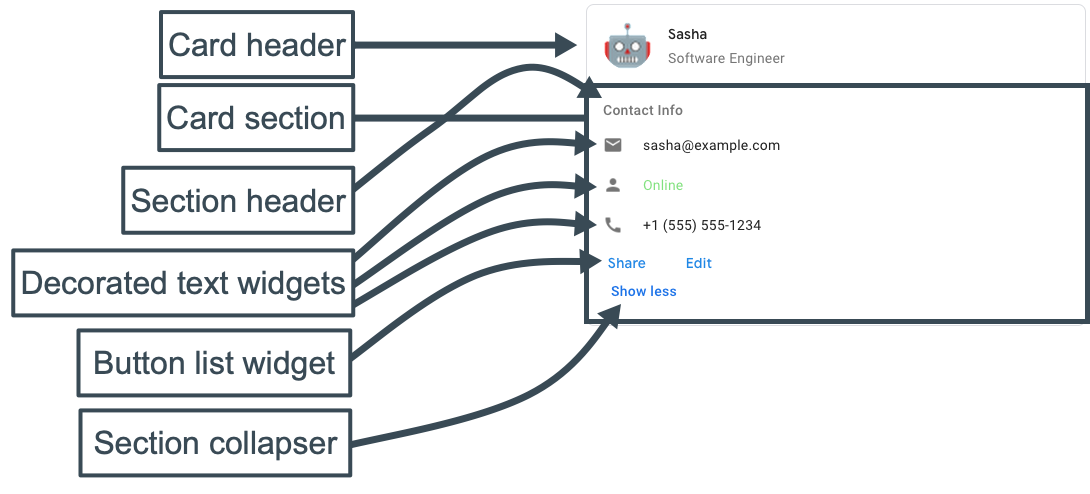
The following code represents the JSON of the card message:
JSON
{
  "cardsV2": [
    {
      "cardId": "unique-card-id",
      "card": {
        "header": {
          "title": "Sasha",
          "subtitle": "Software Engineer",
          "imageUrl": "https://developers.google.com/chat/images/quickstart-app-avatar.png",
          "imageType": "CIRCLE",
          "imageAltText": "Avatar for Sasha"
        },
        "sections": [
          {
            "header": "Contact Info",
            "collapsible": true,
            "uncollapsibleWidgetsCount": 1,
            "widgets": [
              {
                "decoratedText": {
                  "startIcon": {
                    "knownIcon": "EMAIL"
                  },
                  "text": "sasha@example.com"
                }
              },
              {
                "decoratedText": {
                  "startIcon": {
                    "knownIcon": "PERSON"
                  },
                  "text": "<font color=\"#80e27e\">Online</font>"
                }
              },
              {
                "decoratedText": {
                  "startIcon": {
                    "knownIcon": "PHONE"
                  },
                  "text": "+1 (555) 555-1234"
                }
              },
              {
                "buttonList": {
                  "buttons": [
                    {
                      "text": "Share",
                      "onClick": {
                        "openLink": {
                          "url": "https://example.com/share"
                        }
                      }
                    },
                    {
                      "text": "Edit",
                      "onClick": {
                        "action": {
                          "function": "goToView",
                          "parameters": [
                            {
                              "key": "viewType",
                              "value": "EDIT"
                            }
                          ]
                        }
                      }
                    }
                  ]
                }
              }
            ]
          }
        ]
      }
    }
  ]
}
Use the Card Builder to design and preview messaging and user interfaces for Chat apps: