Qt for VxWorks | Qt 6.9 (original) (raw)
Contact The Qt Company for more information: https://www.qt.io/contact-us/
Qt for VxWorks Licensing
Qt for VxWorks is available under the Qt for Device Creation Professional (DCP) license. For more information, see Qt Pricing.
Supported Architectures and VxWorks Releases
Qt 6.9 is verified on VxWorks 24.03.
Supported architectures:
- ARM-v7—Tested on BD-SL-i.MX6. BSP used: fsl_imx6
- x86_64—Tested on Intel NUC6i3SYH. BSP used: itl_generic
If you are interested in later Qt releases, please contact Qt professional services.
Requirements for VxWorks
Qt Widgets Applications
- POSIX support
- C++17 support
Qt Quick 2 Applications
All features which are required for Qt Widgets applications, and in addition the following:
- GPU device (GPUDEV) for OpenGL ES 2.0
Supported Modules
Most essential Qt modules and some add-on modules are supported.
Supported Essential modules
Supported Add-Ons
Note: You can explicitly exclude unsupported or unused modules from the build via the -skip option when running the configure tool.
Platform Notes
Qt is prepared to be used by RTP applications, there is no support for DKM.
With the release of Qt 5.0, Qt no longer contains its own window system implementation: QWS is no longer a supported platform. For single-process use cases, the Qt Platform Abstraction is a superior solution.
There is one plugin that is usable on VxWorks: EGLFS. The availability of this plugins depends on the configuration of Qt.
Configuring for a Specific Device
Prepare your environment by installing VxWorks SDK and obtaining WindRiver license which is needed by installer and for building VxWorks images. Search for appropriate installer in {https://gallery.windriver.com/portal/products}.
Building Qt for a given device requires a Qt 6 installation for compilation host, a toolchain and a sysroot. See Cross-compiling Qt for details. Additionally, some devices require vendor specific adaptation code for EGL and OpenGL 2.0 support.
VxWorks Image Requirements
Qt for VxWorks requires certain VxWorks image bundles and components to be embedded in base software to make Qt compile and work properly. The list is by no means complete as it depends on hardware, software and system requirements of your project. However, the following table contains those that are mandatory for certain functionalities to work (including touchscreen support). Note also that these might change with VxWorks versions.
Example VSB configuration for the fsl_imx6 and itl_generic BSPs
You need to add the following features to VSB for Qt to work properly. For more details please check WindRiver VxWorks Documentation.
| Feature | Notes |
|---|---|
| DSI_DSI_KERNEL | Not applicable |
| IPNET_COREIP | Not applicable |
| IPNET_DHCPC | Not applicable |
| SDMMC_DEVICE | Not applicable |
| SDMMC_HOST | Not applicable |
| SDMMC_SDHC | Not applicable |
| SDMMC_STORAGE | Not applicable |
| SERVICE_UN | Not applicable |
| SOCKET | Not applicable |
| USB_EHCI | Not applicable |
| USB_KEYBOARD | Not applicable |
| USB_MOUSE | Not applicable |
| USB_STORAGE | Not applicable |
| USB_TOUCHSCREEN | Not applicable |
| EVDEV | Not applicable |
| EVDEV_LIB | Not applicable |
| EVDEV_TI_TSC2004_TS | Not applicable |
| EVDEV_EETI_EXC7200_TS | Not applicable |
| AUDIO | Not applicable |
| GPUDEV_FSLVIVGPU | fsl_imx6 specific |
| HASH | Not applicable |
| OPENSSL | Not applicable |
| RANDOM_ENTROPY_INJECT | Not applicable |
| IPNET_SSH | Not applicable |
| USER_MANAGEMENT | Not applicable |
| ICU | Not applicable |
| DRM | itl_generic specific |
| ITLI915 | itl_generic specific |
| LIBDRM | itl_generic specific |
| MESA | itl_generic specific |
The following config variables are added implicitly and you need to remove them:
| Variable | Notes |
|---|---|
| _WRS_CONFIG_EVDEV_OPTIMIZED_MODE | Not applicable |
| _WRS_CONFIG_EVDEV_DISPLAY_POINT_TRANSLATE | Not applicable |
| _WRS_CONFIG_MESA_MANGLE | itl_generic specific |
You need to add the following variables to the config:
| Variable | Value | Notes |
|---|---|---|
| _WRS_CONFIG_RTP_SSP | y | Not applicable |
| _WRS_CONFIG_RTP_STACK_PROTECTOR | y | Not applicable |
| _WRS_CONFIG_MESA_GPUDEV_INTEL_GEN90 | y | itl_generic specific |
| _WRS_CONFIG_EVDEV_COMPATIBLE_MODE | y | Needed in order for Qt to work properly with a touchscreen. |
Example VIP configuration for fsl_imx6 and itl_generic BSPs
For more details please check WindRiver VxWorks Documentation.
| Bundle | Notes |
|---|---|
| BUNDLE_POSIX | This bundle is necessary for compatibility with POSIX-related functionalities which Qt requires. |
| BUNDLE_RTP_DEPLOY | Not applicable |
| BUNDLE_RTP_DEVELOP | Not applicable |
| BUNDLE_STANDALONE_SHELL | Not applicable |
| Component | Notes |
|---|---|
| INCLUDE_TMP_DIR INCLUDE_RAM_DISK_FORMAT_HRFS | Including these two components is necessary if you want to use QTemporaryFile. Note that you should also consider setting TMP_DIR_SIZE to appropriate value |
| DRV_AUDIO_FSL_SSI | Not applicable |
| DRV_AUDIO_FSL_SGTL5000 | Not applicable |
| DRV_FSL_SDHC_CTRL | Not applicable |
| DRV_IMX_SDHC_CTRL | Not applicable |
| INCLUDE_EHCI_INIT | Not applicable |
| INCLUDE_FSL_IMX6Q_SABRELITE | Not applicable |
| DRV_MMCSTORAGE_CARD | Not applicable |
| DRV_SDSTORAGE_CARD | Not applicable |
| INCLUDE_AUDIO_LIB_CORE | Not applicable |
| INCLUDE_AUDIO_LIB_WAV | Not applicable |
| INCLUDE_CUSTOM_ENTROPY_ADD | Not applicable |
| INCLUDE_DEBUG_AGENT_START | Not applicable |
| INCLUDE_DEFAULT_TIMEZONE | Not applicable |
| INCLUDE_DISK_UTIL | Not applicable |
| INCLUDE_DOSFS | Not applicable |
| INCLUDE_DSAPARAM_CMD | Not applicable |
| INCLUDE_END | Not applicable |
| INCLUDE_EVDEV_LIB_CORE | Not applicable |
| INCLUDE_EVDEV_LIB_KBD | Not applicable |
| INCLUDE_EVDEV_LIB_KBD_MAP_US | Not applicable |
| INCLUDE_EVDEV_LIB_PTR | Not applicable |
| INCLUDE_EVDEV_LIB_TS | Not applicable |
| INCLUDE_GENDSA_CMD | Not applicable |
| INCLUDE_GENRSA_CMD | Not applicable |
| INCLUDE_GETADDRINFO | Not applicable |
| INCLUDE_GETNAMEINFO | Not applicable |
| INCLUDE_HRFS | Not applicable |
| INCLUDE_HRFS_ACCESS_TIMESTAMP | Not applicable |
| INCLUDE_HRFS_FORMAT | Not applicable |
| INCLUDE_HRFS_HISPEED_WRITE_MODE | Not applicable |
| INCLUDE_IFCONFIG | Not applicable |
| INCLUDE_IO_REALPATH | This component is needed to enable the use of the realpath function needed for QFileInfo |
| INCLUDE_IPATTACH | Not applicable |
| INCLUDE_IPCOM_SYSLOGD_CMD | Not applicable |
| INCLUDE_IPCOM_SYSVAR_CMD | Not applicable |
| INCLUDE_IPCOM_USE_RAM_DISK | Not applicable |
| INCLUDE_IPCOM_USE_TIME_CMD | Not applicable |
| INCLUDE_IPDHCPC | Not applicable |
| INCLUDE_IPDNSC | Not applicable |
| INCLUDE_IPD_CMD | Not applicable |
| INCLUDE_IPFTPC | Not applicable |
| INCLUDE_IPFTP_CMD | Not applicable |
| INCLUDE_IPIFCONFIG_CMD | Not applicable |
| INCLUDE_IPNETSTAT_CMD | Not applicable |
| INCLUDE_IPNSLOOKUP_CMD | Not applicable |
| INCLUDE_IPPING_CMD | Not applicable |
| INCLUDE_IPROUTE_CMD | Not applicable |
| INCLUDE_IPTRACE_ROUTE_CMD | Not applicable |
| INCLUDE_IPWRAP_GETHOSTBYADDR | Not applicable |
| INCLUDE_IPWRAP_GETHOSTBYNAME | Not applicable |
| INCLUDE_IPWRAP_GETNAMEINFO | Not applicable |
| INCLUDE_IPWRAP_IFNAME | Not applicable |
| INCLUDE_IPWRAP_ROUTECMD | Not applicable |
| INCLUDE_MMAP | Not applicable |
| INCLUDE_PING | Not applicable |
| INCLUDE_PIPES | Not applicable |
| INCLUDE_POSIX_MAPPED_FILES | Not applicable |
| INCLUDE_POSIX_PIPES | Not applicable |
| INCLUDE_POSIX_PTHREAD_SCHEDULER | Not applicable |
| INCLUDE_POSIX_SHM | Not applicable |
| INCLUDE_RAM_DISK | Not applicable |
| INCLUDE_RAM_DISK_FORMAT_HRFS | Not applicable |
| INCLUDE_RANDOM_NUM_GEN | Not applicable |
| INCLUDE_ROMFS | Not applicable |
| INCLUDE_ROUTECMD | Not applicable |
| INCLUDE_SC_PIPE | Not applicable |
| INCLUDE_SC_POSIX_PIPE | Not applicable |
| INCLUDE_SD_BUS | Not applicable |
| INCLUDE_SECURITY | Not applicable |
| INCLUDE_SEC_KEY_STORE_CMD | Not applicable |
| INCLUDE_SHELL | Not applicable |
| INCLUDE_SSH | Not applicable |
| INCLUDE_STANDALONE_SYM_TBL | Not applicable |
| INCLUDE_STARTUP_SCRIPT | Not applicable |
| INCLUDE_TMP_DIR | Not applicable |
| INCLUDE_UN_COMP | Not applicable |
| INCLUDE_USB_GEN2_KEYBOARD | Not applicable |
| INCLUDE_USB_GEN2_MOUSE | Not applicable |
| INCLUDE_USB_GEN2_STORAGE_INIT | Not applicable |
| INCLUDE_USB_TOUCH_SCREEN | Not applicable |
| INCLUDE_USB_TOUCH_SCREEN_INIT | Not applicable |
| INCLUDE_USER_DATABASE | Not applicable |
| INCLUDE_USER_IDENTIFICATION | Not applicable |
| INCLUDE_VRFS | Not applicable |
| INCLUDE_VXBUS_SHOW | Not applicable |
| DRV_TOUCH_SCREEN_TI_TSC2004 | Not applicable |
| DRV_TOUCH_SCREEN_EETI_EXC7200 | Not applicable |
| INCLUDE_FBDEV_FSLIPU_0 | fsl_imx6 specific |
| INCLUDE_FBDEV_SPLASH | Not applicable |
| INCLUDE_GPUDEV_FSLVIV_API | fsl_imx6 specific |
| INCLUDE_GPUDEV_FSLVIV_API_INIT | fsl_imx6 specific |
| INCLUDE_GPUDEV_ITLGMC_2 | itl_generic specific |
| INCLUDE_I915 | itl_generic specific |
| INCLUDE_MESA_FBDEV | itl_generic specific |
| INCLUDE_MESA_GPUDEV_DRI | itl_generic specific |
| INCLUDE_MESA_GPUDEV_DRI_I965 | itl_generic specific |
The following components are added implicitly and you need to remove them:
| Layer | Notes |
|---|---|
| INCLUDE_FTP | Not applicable |
| INCLUDE_SHELL_SECURITY | Not applicable |
VIP Parameters
You need to add the following parameters for Qt to run properly on VxWorks:
| Parameter | Example value | Notes |
|---|---|---|
| SEC_VAULT_KEY_ENCRYPTING_PW | '"vxTarget"' | Not applicable |
| UDB_STORAGE_PATH | '"/ram/vxUserDB.txt"' | Not applicable |
| UDB_HASH_KEY | '"123456789"' | Not applicable |
| UDB_HASH_KEY_LEN | 9 | Example value, see previous |
| FSLVIV_RTP_COMMAND_BUFFER_QUEUE | 32 | For 'arm' architecture |
| SYS_CLK_RATE | 100 | Not applicable |
| RTP_PTHREAD_STACK_SIZE_DEFAULT | 262144 | Required to make qtquick3d examples work. Can be overridden with the PTHREAD_STACK_SIZE_DEFAULT env variable. |
| TMP_DIR_SIZE | 614400 | Minimum value for passing Qt internal tests |
| NUM_FILES | 300 | Not applicable |
| RTP_FD_NUM_MAX | 300 | Not applicable |
| HRFS_DEFAULT_MAX_FILES | 300 | Not applicable |
| ITLGMC_FBDEV_RESOLUTION_2 | '"1024x768-32"' | Example value for the Xenarc 706TSA touchscreen connected over HDMI. |
| RTP_MEM_FILL | True | By default the value is True and it needs to remain True for Qt to work properly. |
Building Qt 6 for VxWorks
Host build
A host build of Qt needs to be available to cross-compile Qt. This is because, during the build, certain tools (such as moc, rcc, qmlcachegen, and qsb) are invoked from the host build. You have the following options:
- Building Qt Sources for the host,
- Installing host build using Qt Online Installer.
However, it is advisable to ensure that you can build Qt for the desktop target on the host as well since the same tools are also needed when compiling for VxWorks.
Running the Configure Script
The commands to configure, build, and install Qt 6 for host are the following:
./configure
-cmake-generator "Ninja"
-extprefix <path/to/Qt6/host/installation/dir>
-submodules qtbase,qtdeclarative,qtquick3d,qtshadertools
-nomake tests
-nomake examples
--
-B <host/build/directory>
cd <host/build/directory>
cmake --build . --parallel
cmake --install .
These commands install Qt 6 for the host in <path_to_Qt 6_host_installation_dir>.
Building Qt 6 for the Target
Setting Up the Build Environment
Before you run configure and build Qt 6, you must open VxWorks Development Shell in command prompt.
- Linux:
cd
./wrenv.sh -p vxworks
export WIND_CC_SYSROOT= - Windows:
cd
wrenv -p vxworks
export WIND_CC_SYSROOT=
Preparing the Custom CMake Toolchain File
To include graphics libraries from the BSP, you need to first create a CMake toolchain file. An example CMake toolchain file for BD-SL-i.MX6 device:
Copyright (C) 2024 The Qt Company Ltd.
SPDX-License-Identifier: BSD-3-Clause
if(QT_VXWORKS_TOOLCHAIN_FILE) set(_original_toolchain_file "${QT_VXWORKS_TOOLCHAIN_FILE}") elseif(DEFINED ENV{QT_VXWORKS_TOOLCHAIN_FILE}) set(_original_toolchain_file "$ENV{QT_VXWORKS_TOOLCHAIN_FILE}") else() message(FATAL_ERROR "QT_VXWORKS_TOOLCHAIN_FILE is not set.") endif()
if(NOT EXISTS "${_original_toolchain_file}") message(FATAL_ERORR "${_original_toolchain_file} doesn't exists.") endif()
include("${_original_toolchain_file}") unset(_original_toolchain_file)
list(APPEND CMAKE_TRY_COMPILE_PLATFORM_VARIABLES QT_VXWORKS_TOOLCHAIN_FILE)
set(_common_lib_path "${CMAKE_SYSROOT}/usr/lib/common") set(EGL_INCLUDE_DIR ${CMAKE_SYSROOT}/usr/h/public CACHE PATH "Path to EGL include directory" FORCE) set(EGL_LIBRARY ${_common_lib_path}/libgfxFslVivEGL.so CACHE PATH "Path to EGL lib" FORCE) set(GLESv2_INCLUDE_DIR ${CMAKE_SYSROOT}/usr/h/public CACHE PATH "Path to GLES include directory" FORCE) set(GLESv2_LIBRARY ${_common_lib_path}/libgfxFslVivGLESv2.so CACHE PATH "Path to GLES lib" FORCE)
set(VxWorksPlatformGraphics_DEFINES "-D_FSLVIV") set(VxWorksPlatformGraphics_LIBRARIES_PACK "${_common_lib_path}/libgfxFslVivEGL.so" "${_common_lib_path}/libgfxFslVivGLESv2.so" "${_common_lib_path}/libgfxFslVivGAL.so" "${_common_lib_path}/libgfxFslVivGLSLC.so" "${_common_lib_path}/libgfxFslVivVDK.so" "${_common_lib_path}/libxml.so" )
set(VxWorksPlatformGraphics_REQUIRED_LIBRARIES ${VxWorksPlatformGraphics_LIBRARIES_PACK} ${EGL_LIBRARY} ${GLESv2_LIBRARY} ) unset(_common_lib_path)
An example for Intel NUC6i3SYH:
Copyright (C) 2024 The Qt Company Ltd.
SPDX-License-Identifier: BSD-3-Clause
if(QT_VXWORKS_TOOLCHAIN_FILE) set(_original_toolchain_file "${QT_VXWORKS_TOOLCHAIN_FILE}") elseif(DEFINED ENV{QT_VXWORKS_TOOLCHAIN_FILE}) set(_original_toolchain_file "$ENV{QT_VXWORKS_TOOLCHAIN_FILE}") else() message(FATAL_ERROR "QT_VXWORKS_TOOLCHAIN_FILE is not set.") endif()
if(NOT EXISTS "${_original_toolchain_file}") message(FATAL_ERORR "${_original_toolchain_file} doesn't exists.") endif()
include("${_original_toolchain_file}") unset(_original_toolchain_file)
list(APPEND CMAKE_TRY_COMPILE_PLATFORM_VARIABLES QT_VXWORKS_TOOLCHAIN_FILE)
set(_common_lib_path "${CMAKE_SYSROOT}/usr/lib/common") set(EGL_INCLUDE_DIR ${CMAKE_SYSROOT}/usr/h/public CACHE PATH "Path to EGL include directory" FORCE) set(EGL_LIBRARY ${_common_lib_path}/libgfxMesaEGL.so CACHE PATH "Path to EGL lib" FORCE) set(GLESv2_INCLUDE_DIR ${CMAKE_SYSROOT}/usr/h/public CACHE PATH "Path to GLES include directory" FORCE) set(GLESv2_LIBRARY ${_common_lib_path}/libgfxMesaGL.so CACHE PATH "Path to GLES lib" FORCE)
set(VxWorksPlatformGraphics_DEFINES "-D__vxworks -D__VXWORKS") set(VxWorksPlatformGraphics_LIBRARIES_PACK "${_common_lib_path}/libgfxMesaEGL.so" "${_common_lib_path}/libgfxMesaGL.so" "${_common_lib_path}/libgfxMesaSw.so" "${_common_lib_path}/libgfxMesa.so" "${_common_lib_path}/libgfxMesaDriI965.so" "${_common_lib_path}/libgfxLibDRM.so" "${_common_lib_path}/libxml.so" )
set(VxWorksPlatformGraphics_REQUIRED_LIBRARIES ${VxWorksPlatformGraphics_LIBRARIES_PACK} ${EGL_LIBRARY} ${GLESv2_LIBRARY} ) unset(_common_lib_path)
An example for I.MX8:
Copyright (C) 2024 The Qt Company Ltd.
SPDX-License-Identifier: BSD-3-Clause
if(QT_VXWORKS_TOOLCHAIN_FILE) set(_original_toolchain_file "${QT_VXWORKS_TOOLCHAIN_FILE}") elseif(DEFINED ENV{QT_VXWORKS_TOOLCHAIN_FILE}) set(_original_toolchain_file "$ENV{QT_VXWORKS_TOOLCHAIN_FILE}") else() message(FATAL_ERROR "QT_VXWORKS_TOOLCHAIN_FILE is not set.") endif()
if(NOT EXISTS "${_original_toolchain_file}") message(FATAL_ERORR "${_original_toolchain_file} doesn't exists.") endif()
include("${_original_toolchain_file}") unset(_original_toolchain_file)
list(APPEND CMAKE_TRY_COMPILE_PLATFORM_VARIABLES QT_VXWORKS_TOOLCHAIN_FILE)
set(_common_lib_path "${CMAKE_SYSROOT}/usr/lib/common") set(EGL_INCLUDE_DIR ${CMAKE_SYSROOT}/usr/h/public CACHE PATH "Path to EGL include directory" FORCE) set(EGL_LIBRARY ${_common_lib_path}/libgfxNxpVivEGL.so CACHE PATH "Path to EGL lib" FORCE) set(GLESv2_INCLUDE_DIR ${CMAKE_SYSROOT}/usr/h/public CACHE PATH "Path to GLES include directory" FORCE) set(GLESv2_LIBRARY ${_common_lib_path}/libgfxNxpVivGLESv2.so CACHE PATH "Path to GLES lib" FORCE)
set(VxWorksPlatformGraphics_DEFINES "-D_NXPVIV -D__vxworks -D__VXWORKS__") set(VxWorksPlatformGraphics_LIBRARIES_PACK "${_common_lib_path}/libgfxNxpVivGAL.so" "${_common_lib_path}/libgfxNxpVivEGL.so" "${_common_lib_path}/libgfxNxpVivGLSLC.so" "${_common_lib_path}/libgfxNxpVivGLESv2.so" "${_common_lib_path}/libgfxNxpVivGLESv1_CM.so" "${_common_lib_path}/libgfxNxpVivVSC.so" "${_common_lib_path}/libxml.so" )
set(VxWorksPlatformGraphics_REQUIRED_LIBRARIES ${VxWorksPlatformGraphics_LIBRARIES_PACK} ${EGL_LIBRARY} ${GLESv2_LIBRARY} ) unset(_common_lib_path)
Running Qt 6 Configure for the Target
Below is an example build configuration for the BD-SL-i.MX6. For most VxWorks boards the configure command looks very similar. By default, Qt 6 is configured to use shared libraries. To build Qt 6 statically, add -static option to configure.
Make sure that {WIND_CC_SYSROOT} environment variable is set to VxWorks VSB root directory.
./configure
-cmake-generator "Ninja"
-icu
-eglfs
-qpa eglfs
-submodules "qtbase,qtdeclarative,qtmultimedia,qtquick3d,qtgraphs,qtimageformats,qtsvg,qtshadertools,qtvirtualkeyboard"
--
-B <target/build/directory>
-DQT_VXWORKS_TOOLCHAIN_FILE=<path/to/VSB/mk/toolchain.cmake>
-DFEATURE_vulkan=OFF
-DQT_QMAKE_TARGET_MKSPEC=vxworks-clang
-DQT_HOST_PATH=<path/to/Qt6/host/installation/dir>
-DCMAKE_STAGING_PREFIX:PATH=<path/to/Qt6/target/installation/dir>
-DCMAKE_TOOLCHAIN_FILE=<path/to/cmake/for/graphics/file/created/above> \
It is recommended to build Qt 6 using a shadow build. See Qt Configure Options for more information.
Warning: If VxWorks is configured with RTP_MEM_FILL as false, then Qt configure needs an extra -DCMAKE_CXX_FLAGS="-DQT_RTP_MEM_FILL=1" argument.
After configuration, build and install Qt 6 for VxWorks with these commands:
cd cmake --build . --parallel cmake --install .
Platform Plugins for VxWorks Devices
Qt for VxWorks supports EGLFS platform plugin for a native window substitution. Read more about its configuration in EGLFS.
Building Qt Applications
To build a Qt application, you must set the QT_VXWORKS_TOOLCHAIN_FILE as an environment variable or as a define.
An example to build the clocks Qt demo:
export WIND_CC_SYSROOT=<path/to/VxWorks/VSB/directory> export QT_VXWORKS_TOOLCHAIN_FILE=<path/to/the/BSP/toolchain.cmake> <path/to/Qt6/target/installation/dir>/bin/qt-cmake -G Ninja -S ~/Qt/Examples/Qt-6.9.2/demos/clocks -B <path/to/build/directory> cd <path/to/build/directory> cmake --build . --parallel
Running Qt Applications
The following example shows how to start an application when Qt 6 is built using shared libraries. With a statically built Qt 6, you don't need to use the LD_LIBRARY_PATH environment variable for the Qt libraries, but it needs to point to the location of VxWorks shared libraries (for example libc and OpenGL ES 2.0). It is not needed for Qt 6 static libraries.
putenv "LD_LIBRARY_PATH=/sd0:1/lib" cd "/sd0:1" rtpSp("<Qt 6 VxWorks application>", 200, 0x100000, 0, 0x01000000)
Debugging Qt Applications
To debug Qt Applications, you must add the following to your VxWorks VSB:
vxprj vsb config -s -add "_WRS_CONFIG_TCF_GDB_RSP=y"
To your VxWorks VIP configuration add:
"INCLUDE_DEBUG_AGENT" "INCLUDE_DEBUG_AGENT_START" "INCLUDE_STANDALONE_SYM_TBL"
From the Command Line
- Start the application to debug on the device through SSH or the USB serial connection:
rtpSp("<Qt 6 VxWorks application>", 200, 0x100000, 0, 0x01000000) - Start the VxWorks debugger on the PC:
- List the running processes in the debugger:
- Attach the debugger to the already running application:
"attach " - Use GDB commands for debugging.
From Workbench
- Create a CMake Real Time Process project.
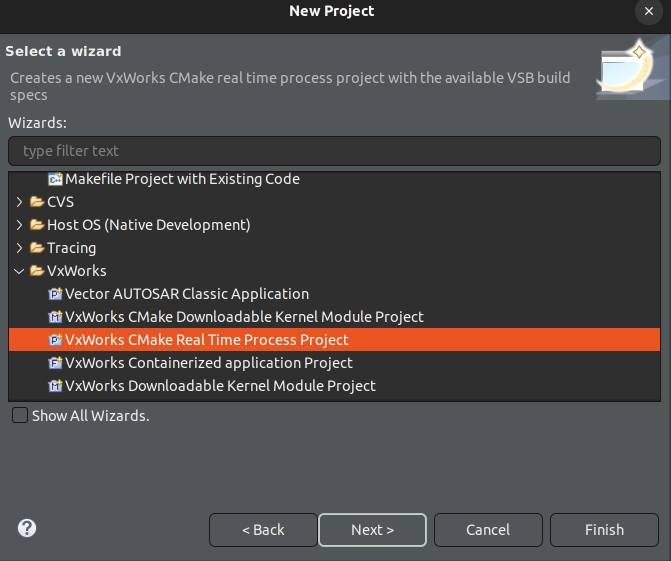
- Set the VSB which has debugging configured.
- Remove set(CMAKE_EXE_LINKER_FLAGS "${CMAKE_EXE_LINKER_FLAGS} -static") from CMakeLists.txt.
- Add Qt CMake related code to the CMakeLists.txt following Getting started with CMake.
- Before
project()addunset(CMAKE_TOOLCHAIN_FILE CACHE)and addCMAKE_TOOLCHAIN_FILEpointing to the Qt6 toolchain file andQT_CHAINLOAD_TOOLCHAIN_FILEto the VSB toolchain file. For example:
unset(CMAKE_TOOLCHAIN_FILE CACHE)
set(CMAKE_TOOLCHAIN_FILE "/home/qtuser/VxWorks/qt/target_gdb/lib/cmake/Qt6/qt.toolchain.cmake")
set(QT_CHAINLOAD_TOOLCHAIN_FILE "/home/qtuser/VxWorks/fsl_imx6_2_0_6_2_VSB_gdb/mk/toolchain.cmake") - Build the application Project.
- Create a New Connection.
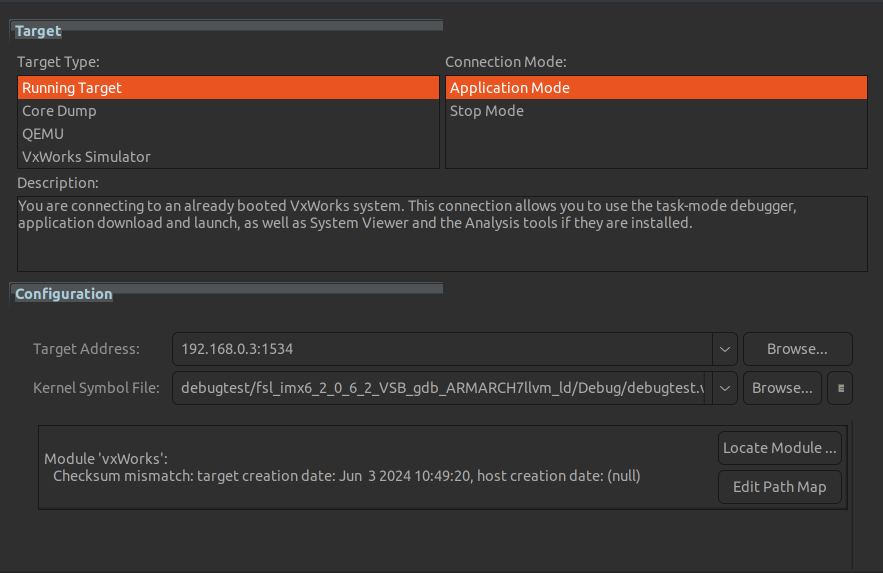
- Start RTP process to debug.
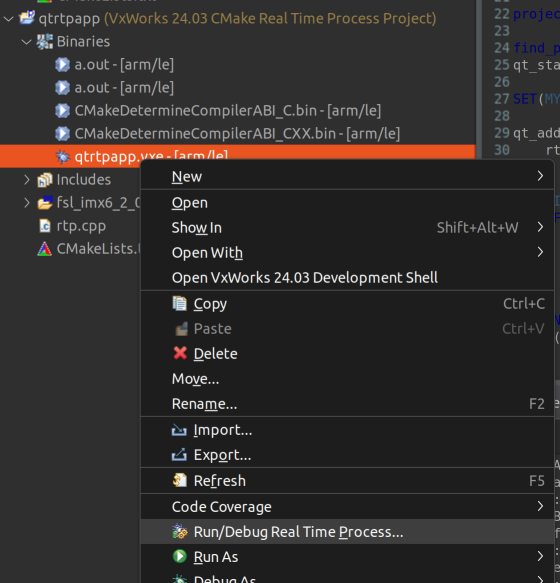
- Click on Advanced options.
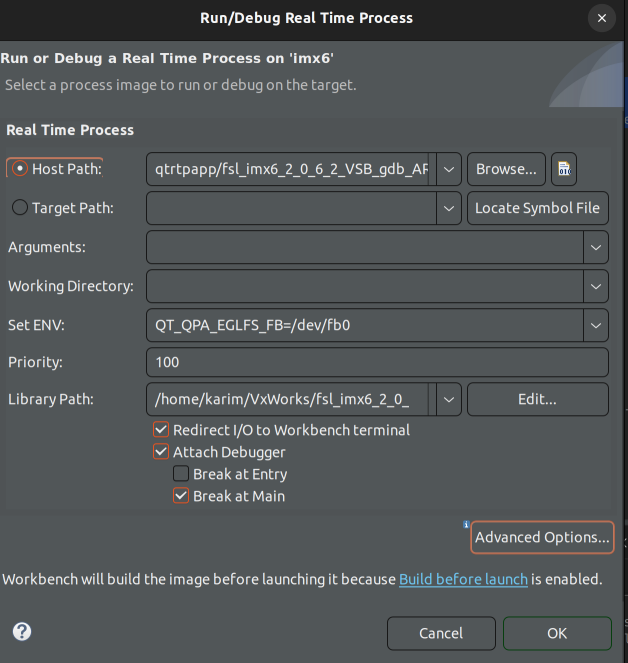
- Set the stack size to 0x100000.
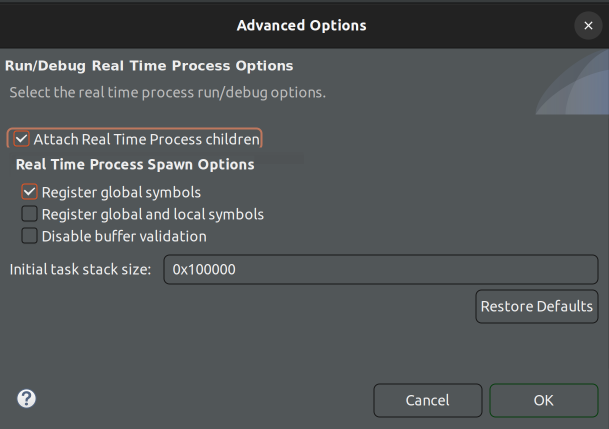
Qt for VxWorks input plugins
VxWorks uses its own implementation of libevdev, which has an API that is very similar to that of Linux, but differs in capabilities. Because of this Qt implements separate input plugins for VxWorks to handle mouse, keyboard and touchscreen, which are based on {inputs-linux-device.html}{Linux evdev}, with differences that are explained below.
VxMouse
VxMouse uses the same configuration scheme as EvdevMouse, except for different environment variable: QT_QPA_VXEVDEV_MOUSE_PARAMETERS. Additionally, VxMouse ignores nocompress, dejitter and grab parameters.
VxKeyboard
VxKeyboard uses the same configuration scheme as EvdevKeyboard, except for different environment variable: QT_QPA_VXEVDEV_KEYBOARD_PARAMETERS.
VxTouch
VxTouch uses the same configuration scheme as EvdevTouch, except for different environment variables:
QT_QPA_EVDEV_TOUCHSCREEN_PARAMETERSQT_QPA_VXEVDEV_DEBUG
Additionally, VxTouch adds two new parameters:
| Parameter | Description |
|---|---|
| rangex=MIN_X,MAX_X | Overrides touch point min and max for X axis |
| rangey=MIN_Y,MAX_Y | Overrides touch point min and max for Y axis |
Limitations
Video Memory
Systems with a fixed amount of dedicated video memory may need extra care before running Qt application based on Qt Quick or classes like QOpenGLWidget. The default setting might be insufficient for such applications, especially when they are displayed on a high resolution (for example, full HD) screen. In this case they might start failing in unexpected ways. It is therefore recommended to ensure that there is at least 128 MB of GPU memory available. For systems that do not have a fixed amount of memory reserved for the GPU this is not an issue.