Overview | Citrix DaaS™ (original) (raw)
Introduction
Citrix DaaS™ is a service that provides app and desktop virtualization, giving IT control of on-prem or cloud-hosted virtual machines, applications, and security while providing anywhere access for any device. End users can use applications and desktops independently of the device’s operating system and interface.
Using Citrix DaaS, you can deliver secure virtual apps and desktops to any device, leaving most of the installation, setup, and upgrades to Citrix. You maintain complete control over applications, policies, and users while delivering the best user experience on any device.
Citrix DaaS allows you to manage on-premises data center and public cloud workloads together in a hybrid deployment. You can connect to public clouds Microsoft Azure, Amazon Web Services (AWS), and Google Cloud, plus on-premises hypervisors such as XenServer®, Microsoft Hyper-V, Nutanix AHV, and VMware vSphere. The hybrid, multi-cloud approach gives you the flexibility to deploy different applications in different resource locations worldwide.
Citrix DaaS offers several ways to deliver apps and desktops.
- Delivery methods describes the primary ways, with use-cases and pros/cons.
- Delivery models lists more choices, and also offers VDI model comparisons.
Citrix Managed Azure further simplifies the deployment of virtual apps and desktops. With Citrix Managed Azure, Citrix also manages the hosting of Azure workloads.
Learn more about the advantages of using this service.
Site overview
The following graphic shows the services and components that Citrix administrators work with in a Citrix DaaS production deployment (also known as a site).
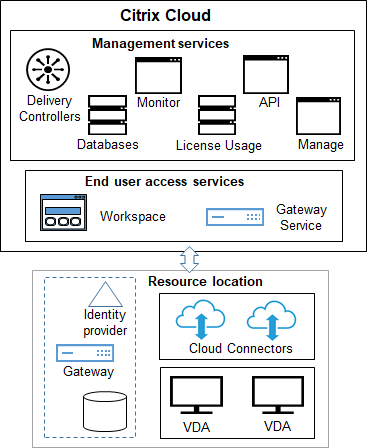
As shown in the graphic, Citrix manages the user access and management services and components in Citrix Cloud. The applications and desktops that you deliver to users reside on machines in one or more resource locations. In a Citrix DaaS deployment, a resource location contains components from the access layer and resource layers. Each resource location is considered a zone.
If you recently migrated from Citrix Virtual Apps and Desktops™, you’ll see that Citrix DaaS eliminates most of the component setup work required in an on-premises deployment.
Components and services managed by Citrix
- Delivery Controllers: Citrix DaaS provides the functionality to load balance applications and desktops, authenticate users, and broker or prioritize connections directly from the cloud, without the need to manage Delivery Controllers, as with Citrix Virtual Apps and Desktops.
- Databases: Site configuration, monitoring, and configuration logging data is stored by the cloud service, eliminating the SQL database requirement of the on-premises Citrix Virtual Apps and Desktops product.
- Licensing: Manages licenses and provides usage statistics.
- Studio: A web-based, central console that lets you configure, manage, and monitor your DaaS deployments for delivering virtual apps and desktops. For more information, see Plan and build a deployment and Manage your deployments.
You can also use service APIs and PowerShell commands to configure and manage your DaaS deployments. - Monitor: The Monitor console enables IT support and help desk teams to monitor an environment, troubleshoot issues before they become critical, and perform support tasks for end users. Displays include:
- Real-time session data from the Broker Service in the Controller, which includes data from the broker agent in the Virtual Deliver Agent (VDA).
- Historical data from the Monitor Service in the Controller.
- Data about HDX™ traffic (also known as ICA traffic).
- Cloud Connectors: A Cloud Connector is the communications channel between the components in the Citrix Cloud and components in the resource location. In the resource location, the Cloud Connector acts as a proxy for the Delivery Controller™ in Citrix Cloud.
Every resource location contains at least one Cloud Connector. Two or more Cloud Connectors are recommended for redundancy.- When using Studio to provision machines, you first install Cloud Connectors from the Citrix Cloud™ console. For details, see Cloud Connectors.
- When using Quick Deploy to provision Azure machines, Citrix creates the resource location and Cloud Connectors for you when you create a catalog.
After Cloud Connectors are installed, Citrix manages and updates them. The only tasks handled by the customer are Cloud Connector Windows updates and patching.
Studio
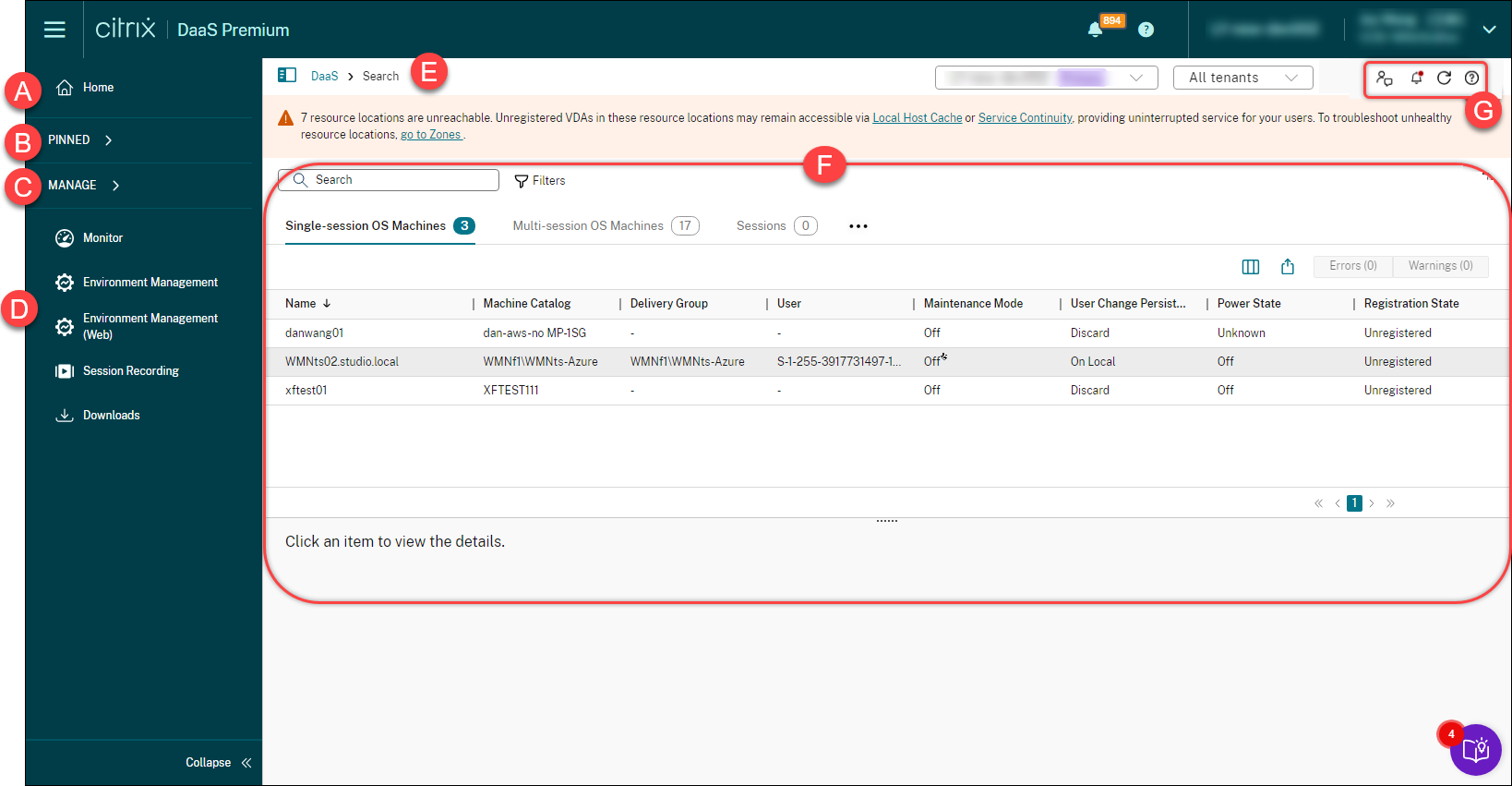
Studio is a web-based, central portal that lets you configure, manage, and monitor your DaaS deployments for delivering virtual apps and desktops.
| Callout | Area | Description |
|---|---|---|
| A | Home | Provides an overview of your Citrix DaaS deployment and workloads along with information that helps you get the most from your subscription. For more information, see the Home page. |
| B | PINNED | Visible only after you pin a node in the left pane. Lists nodes that you’ve pinned. |
| C | MANAGE | Full Configuration-related nodes: Let you configure and manage your DaaS deployments for delivering virtual apps and desktops. Examples include: Search, Machine Catalogs, Delivery Groups, and more. For more information, see Plan and build a deployment and Manage deployments. Quick Deploy node: Lets you quickly configure and manage your DaaS deployments hosted by other cloud service providers using a guided workflow. Choose from four hosting providers: Microsoft Azure, Microsoft Windows 365, Amazon WorkSpace Core, and Google Cloud. |
| D | Others | Monitor node: Directs you to the Monitor interface. For more information, see Monitor. Service nodes: Directs you to the interfaces of value-added services, such as Workspace Environment Management (web) service and Session Recording service. Downloads node: Directs you to the Downloads page, where you can download software to set up and manage your DaaS resources. |
| E | Breadcrumb trail | Provides context and enables quick navigation back to higher-level pages. |
| F | Working pane | Displays actions and details of a selected node. |
| G | Common actions | Displays common actions such as Submit feedback, customize the Home page, access the Notification Center, and more. Notification Center provides real-time updates and a 48-hour history of long-running operations. While an operation is running, a status notification appears below the common actions area to indicate its progress. |
| Task Center displays a comprehensive list of all tasks, organized by category. The UI provides Filter, Search, and other controls consistent with the main view. You can perform actions on any listed task, including common actions like Delete and View details, and task-specific actions such as Rerun task and Export sub-task status. |
Components and technologies managed by the customer
- Citrix Gateway: When users connect from outside the corporate firewall, Citrix DaaS can use Citrix Gateway technology to secure these connections with TLS. The Citrix Gateway or VPX virtual appliance is an SSL VPN appliance deployed in the DMZ. It provides a single secure point of access through the corporate firewall.
Citrix installs and manages the Citrix Gateway service in Citrix Cloud. You can also optionally install Citrix Gateway in resource locations. - Active Directory: Active Directory is used for authentication and authorization. It authenticates users and ensures that they are getting access to appropriate resources. A subscriber’s identity defines the services to which they have access in Citrix Cloud. This identity comes from Active Directory domain accounts provided from the domains within the resource location.
- Identity Provider (IdP): The IdP is the final authority for the user’s identity. Supported IdPs include: on-premises Active Directory, Active Directory plus token, Microsoft Entra ID, Citrix Gateway, and Okta. For more information, see:
- Virtual Delivery Agents (VDAs): Each physical or virtual machine that delivers resources (applications and desktops) must have a Citrix VDA installed on it. VDAs establish and manage the connection between the machine on which it’s installed and the user device, and apply policies that are configured for the session.
The VDA registers with a Delivery Controller, using a Cloud Connector in the resource location as a proxy.
Several VDA types are available:- VDAs for Windows multi-session operating systems allow multiple users to connect to the machine at one time. This VDA type is usually installed on Windows servers.
- VDAs for Windows single-session operating systems allow one user to connect to a machine at a time. This VDA type is usually used for VDI.
A core version of this VDA type is available for use with the Remote PC Access feature. It contains a subset of the features in the full single-session VDA. - Linux VDAs support virtual apps and desktops based on an RHEL, CentOS, SUSE, or Ubuntu distribution.
Throughout this service’s documentation, “VDA” often refers to the agent and the machine on which it is installed.
- Hypervisors and cloud services: In most production sites, the app and desktop instances (workloads) that you make available (publish) to your users are “hosted” by a supported hypervisor or cloud service. (The Remote PC Access feature is usually used with physical machines. Therefore, it does not use hypervisors or cloud services for machine provisioning.)
- When using Studio, you first create a connection to a supported host hypervisor or cloud service. Next, you use an image (created through that host) to create a catalog of machines that contain the app and desktop instances. Finally, you create a delivery group. Citrix provides various tools to simplify and facilitate how these session hosts are built and maintained.
- When using Quick Deploy to deliver Azure workloads, you only need to create the catalog. Although you can use your own Azure subscription when creating the catalog, using a Citrix Managed Azure subscription eliminates your need to manage the host, too.
The app and desktop instances that you publish can be on-premises, hosted in public clouds, or in a hybrid mixture of both.
- Citrix StoreFront: Citrix StoreFront is the predecessor to the cloud-hosted Citrix Workspace. It is used as the web interface for access to applications and desktops.
You can optionally install StoreFront servers in resource locations. Having local stores can help deliver apps and desktops during network outages. The Local Host Cache feature requires a customer-managed StoreFront in each resource location.
See User access for considerations for using StoreFront in a service environment.
Objects you configure to deliver desktops and applications
You configure the following items to deliver apps and desktops in a production environment.
- Host connection: A host connection (mentioned earlier) helps enable communication between components in the control plane (Citrix Cloud) and VDAs in a resource location. Connection specifications include:
- The address and credentials to access the host
- The storage method to use, and the machines to use for storage
- Which network the VMs can use
Remember: When using Quick Deploy, you don’t have to create a connection. And if you use Citrix Managed Azure, Citrix manages the hosting, as well.
- Catalog: In the Studio and Monitor interfaces, catalogs are called “machine catalogs.” A catalog is a collection of virtual or physical machines that have the same operating system type (for example, Windows multi-session, Ubuntu single-session).
When creating a catalog, you usually use an image, which is also known as a template. (Remote PC Access catalogs usually contain physical machines, so no image is needed.)- When using Quick Deploy, Citrix provides several Citrix prepared images you can use to create your own customized images. Or, you can import images from your own Azure subscription.
- When using Studio to create VMs using a supported host type, the image usually must be created and reside on a host machine. When creating the catalog, you provide the path to that image.
Regardless of where the image resides, you can install applications on the image, if you want those apps on all machines created from that image (and don’t want to virtualize those apps).
After the image is ready, you create the catalog. - For VMs, MCS creates the machines and the catalog.
- For Remote PC Access, MCS simply creates the catalog, because the physical machines already exist.
For more information about MCS, see Image management.
- Delivery group: A delivery group specifies:
- One or more machines from a catalog.
- Users who are allowed to access those machines.
- The applications and desktops that users can access through Workspace.
When using Quick Deploy, a delivery group is created automatically. (It appears only in the Studio interface.)
- Application group: Application groups let you manage collections of applications. You can create application groups for applications shared across different delivery groups or used by a subset of users within delivery groups. Application groups are optional.
Citrix Managed Azure
Citrix Managed Azure is an option available in several Citrix DaaS editions. Using Citrix Managed Azure simplifies the deployment of virtual apps and desktops from Azure. Citrix manages the infrastructure for hosting Azure workloads.
With Citrix Managed Azure, you get a dedicated Citrix-managed Azure subscription and resource location. In that Azure subscription, you create a catalog of VMs. You can:
- Deploy single-session and multi-session Windows OS machines or Linux OS machines, from various supported versions.
- Choose from a curated list of compute types and storage options in select regions.
- Provision persistent or non-persistent workloads on those machines.
- Choose from several Citrix provided images that have the latest VDA installed. Then, from the Citrix interface, you build your own image from that template, and customize it. You can also import and use images from your own Azure subscriptions.
Even though Citrix manages Azure capacity, if you want to communicate with existing resources on your own Azure subscription, you can use Azure VNet peering to connect resources. You can also use Azure VPN gateway to connect to your on-premises resources directly.
For information about security and responsibilities when using Citrix Managed Azure, see Technical security overview for Citrix Managed Azure.
Ordering Citrix Managed Azure
To get a Citrix Managed Azure subscription, you must subscribe to a supported Citrix service offering, and then order Citrix Managed Azure Consumption Funds. You can order Citrix DaaS and consumption funds through Citrix or from Azure Marketplace. Citrix Managed Azure is supported on the following service offerings:
- Citrix Workspace™ Premium Plus
- Citrix DaaS, Advanced, Advanced Plus, and Premium editions
- Citrix DaaS Standard for Azure edition
For details, see Sign up for Citrix DaaS.
Citrix Managed Azure benefits summary
Using Citrix Managed Azure offers several benefits:
- Fastest path to hybrid-cloud benefits.
- Offloads IT management of infrastructure. Provides an administration experience that puts IT in control without the management and maintenance challenges.
- Enables you to rapidly scale work solutions.
- Provides a separate Azure subscription that is managed and maintained by Citrix. This Isolates activity from your other Azure subscriptions.
- You retain the flexibility to create and manage workloads using your own Azure subscriptions. Your deployment can include workloads that use the Citrix Managed Azure subscription, and workloads that use your own (customer-managed) Azure subscriptions.
- Uses a true consumption-based Infrastructure as a Service (IaaS) model.
- Several technologies are available to create connections to your own on-premises networks (such as Azure VNet peering and Azure VPN gateway). This allows your users to access your network’s resources, such as file servers.
Deploying and managing Citrix Managed Azure from this service uses the Quick Deploymanagement interface.
For more information, contact your Citrix representative.
Delivering applications and desktops to users
Citrix Workspace
Subscribers (users) access their desktops and apps through Citrix Workspace.
After installing and configuring Citrix DaaS, you’re provided with a workspace URL link. The workspace URL is posted in two places:
- From the Citrix Cloud console, select Workspace Configuration from the menu in the upper left corner. The Access tab contains the Workspace URL.
- From the Citrix DaaS Welcome page, the workspace URL appears at the bottom of the page.
Test and then share the workspace URL link with your subscribers (users) to give them access to their apps and desktops. Your subscribers can access the workspace URL without any additional configuration.
You configure workspaces from Citrix Cloud.
- Specify which services are integrated with Citrix Workspace.
- Customize the URL that your subscribers use to access their workspace.
- Customize the appearance of subscribers’ workspaces, such as logos, color, and preferences.
- Specify how subscribers authenticate to their workspace, such as using Active Directory or Microsoft Entra ID.
- Specify external connectivity for resource locations used by your subscribers.
For more information, see Citrix Workspace.
Citrix Workspace app
From the user side, Citrix Workspace app is installed on user devices and other endpoints, such as virtual desktops. Citrix Workspace app provides users with secure, self-service access to documents, applications, and desktops from any device, including smartphones, tablets, and PCs. Citrix Workspace app provides on-demand access to Windows, web, and Software as a Service (SaaS) applications.
For devices that cannot install Citrix Workspace app software, Citrix Workspace app for HTML5 provides a connection through a HTML5-compatible web browser.
Citrix Workspace app is available for various operating systems. For details, see Citrix Workspace app.
Service Level Agreement
Citrix DaaS is designed using industry best practices to achieve cloud scale and a high degree of service availability.
For complete details about Citrix’s commitment for availability of Citrix Cloud services, see the Service Level Agreement.
Performance against this goal can be monitored on an ongoing basis at https://status.cloud.com.
Limitations
The calculation of this Service Level Goal will not include loss of availability from the following causes:
- Customer failure to follow configuration requirements for Citrix DaaS documented in the product documentation on https://docs.citrix.com.
- Caused by any component not managed by Citrix including, but not limited to, customer controlled physical and virtual machines, customer installed and maintained operating systems, customer installed and controlled networking equipment or other hardware; customer defined and controlled security settings, group policies and other configuration policies; public cloud provider failures, Internet Service Provider failures or other external to Citrix control.
- Service disruption due to reasons beyond Citrix control, including natural disaster, war or acts of terrorism, government action.
More information
- Citrix DaaS diagrams
- Citrix DaaS Reference Architecture and Deployment Methods
- Technical security overview
- Network ports
- Third-party notices
- System requirements
- Features
- An introduction to HDX technologies, plus details about Devices, Graphics, and Multimedia.
- Remote PC Access: Allow users to log on remotely from anywhere to a physical PC in the office. You can configure Remote PC Access using Studio.
- Publish content: Publish an application that is simply a URL or UNC path to a resource.
- Server VDI: Deliver a desktop from a server operating system for a single user.
- For Citrix DaaS Standard for Azure, see its dedicated product documentation.
- To learn about feature availability in the Citrix DaaS products and editions, see the Citrix DaaS feature matrix.
- The Citrix Cloud Learning Series offers education course to get you up and running with Citrix Cloud and its services. You can sequentially view all of the modules, from introductions through planning and building services. You can also choose individual modules or task-specific segments within a module. See Cloud Learning Series.
Get started
To learn how to set up your deployment, start with Plan and build a deployment. That summary guides you through the major steps in the process, and provides links to more information and detailed procedures.