Data lineage with Knowledge Catalog (original) (raw)
Managed Airflow (Gen 3) | Managed Airflow (Gen 2) | Managed Airflow (Legacy Gen 1)
This page explains how to enable data lineage integration in Managed Airflow.
About data lineage integration
Data lineage is aKnowledge Catalog feature that tracks how data moves through your systems: where it comes from, where it is passed to, and what transformations are applied to it.
Managed Airflow uses the apache-airflow-providers-openlineagepackage to generate the lineage events that are sent to the Data Lineage API.
This package already installed in Managed Airflow environments. If you install another version of this package, the list of supported operators might change. We recommend to do so only if necessary and keep the preinstalled version of the package otherwise.
- Data lineage is available for environments in the same regions as Knowledge Catalog regionsthat support data lineage.
- If data lineage is enabled in your Managed Service for Apache Airflow environment, Managed Service for Apache Airflow reports lineage information to the Data Lineage API for DAGs that utilize any of thesupported operators. You can alsosend custom lineage events if you want to report lineage for an operator that isn't supported.
- You can access lineage information with:
- Data Lineage API
- Lineage graphs for supported entries in Knowledge Catalog. For more information, seeLineage graphsin the Knowledge Catalog documentation.
When you create an environment, data lineage integration isautomatically enabled if the following conditions are met:
- Data Lineage API is enabled in your project. For more information, seeEnabling Data Lineage API in Knowledge Catalog documentation.
- A custom Lineage Backend isn't configured in Airflow.
You can disable data lineage integration when you create an environment.
For an existing environment, you can enable ordisable data lineage integration at any time.
Feature considerations in Managed Service for Apache Airflow
Managed Airflow makes an RPC call to create lineage events in the following cases:
- When an Airflow task starts or finishes
- When a DAG run starts or finishes
For details on these entities, seelineage information modeland Lineage API reference in the Knowledge Catalog documentation.
Emitted lineage traffic is subject toquotas in Data Lineage API. Managed Airflow consumes Write quota.
Pricing associated with handling lineage data is subject to lineage pricing. See data lineage considerations.
Performance considerations in Managed Service for Apache Airflow
Data lineage is reported at the end of Airflow task execution. On average, the data lineage reporting takes about 1-2 seconds.
This does not affect the performance of the task itself: Airflow tasks do not fail if lineage is not successfully reported to the Lineage API. There is no impact on the main operator logic, but the whole task instance does execute a bit longer to account for reporting lineage data.
An environment that reports data lineage will have a minor increase in associated costs, because of extra time needed to report data lineage.
Compliance
Data lineage offers different support levels for features such as VPC Service Controls. Reviewdata lineage considerationsto make sure that support levels match your environment requirements.
Before you begin
- This feature provides varying compliance support. Make sure to first review bothfeature considerations specific to Managed Service for Apache Airflow, anddata lineage feature considerations.
- Data lineage integration is supported in Managed Airflow version 2.1.2 and later with Airflow versions 2.2.5 and later.
- All required IAM permissions for data lineage are already included in the Composer Worker (
roles/composer.worker) role. This role is the requiredrole for environment's service accounts.
For more information about data lineage permissions, seelineage roles and permissions in the Knowledge Catalog documentation.
Check if an operator is supported
Data lineage support is provided by the provider package where the operator is located:
- Check the changelogs of the provider package where the operator is located for entries that add OpenLineage support.
For example, BigQueryToBigQueryOperator supports OpenLineage starting fromapache-airflow-providers-googleversion 11.0.0. - Check the version of the provider package used by your environment. To do so, see the list of preinstalled packages for the version of Managed Airflow used in your environment. You can alsoinstall a different version of the package in your environment.
In addition, the Supported classespage in the apache-airflow-providers-openlineage documentation lists latest supported operators.
Configure data lineage integration
Data lineage integration for Managed Service for Apache Airflow is managed on a per-environment basis. This means that enabling the feature requires two steps:
- Enable the Data Lineage API in your project.
- Enable data lineage integration in a specific Managed Service for Apache Airflow environment.
Enable data lineage in Managed Service for Apache Airflow
Console
- In Google Cloud console, go to the Environments page.
Go to Environments - In the list of environments, click the name of your environment. The Environment details page opens.
- Select the Environment configuration tab.
- In the Knowledge Catalog Lineage integration section, click Edit.
- In the Knowledge Catalog Lineage integration panel, selectEnable integration with Knowledge Catalog Lineage.
- Click Save.
gcloud
Use the --enable-cloud-data-lineage-integration argument.
gcloud composer environments update ENVIRONMENT_NAME \
    --location LOCATION \
    --enable-cloud-data-lineage-integration
Replace the following:
ENVIRONMENT_NAME: the name of your environment.LOCATION: the region where the environment is located.
Example:
gcloud composer environments update example-environment \
    --location us-central1 \
    --enable-cloud-data-lineage-integration
Disable data lineage in Managed Service for Apache Airflow
Disabling lineage integration in a Managed Service for Apache Airflow environment doesn't disable the Data Lineage API. If you want to completely disable lineage reporting for your project, also disable the Data Lineage API. SeeDisabling services.
Console
- In Google Cloud console, go to the Environments page.
Go to Environments - In the list of environments, click the name of your environment. The Environment details page opens.
- Select the Environment configuration tab.
- In the Knowledge Catalog Lineage integration section, click Edit.
- In the Knowledge Catalog Lineage integration panel, selectDisable integration with Knowledge Catalog Lineage.
- Click Save.
gcloud
Use the --disable-cloud-data-lineage-integration argument.
gcloud composer environments update ENVIRONMENT_NAME \
    --location LOCATION \
    --disable-cloud-data-lineage-integration
Replace the following:
ENVIRONMENT_NAME: the name of your environment.LOCATION: the region where the environment is located.
Example:
gcloud composer environments update example-environment \
    --location us-central1 \
    --disable-cloud-data-lineage-integration
Send lineage events in supported operators
If data lineage is enabled, supported operators send lineage events automatically. You don't need to change your DAG code.
For example, running the following task:
task = BigQueryInsertJobOperator(
    task_id='snapshot_task',
    dag=dag,
    location='<dataset-location>',
    configuration={
        'query': {
            'query': 'SELECT * FROM dataset.tableA',
            'useLegacySql': False,
            'destinationTable': {
                'project_id': 'example-project',
                'dataset_id': 'dataset',
                'table_id': 'tableB',
            },
        }
    },
)
Results in creating the following lineage graph in the Knowledge Catalog UI:
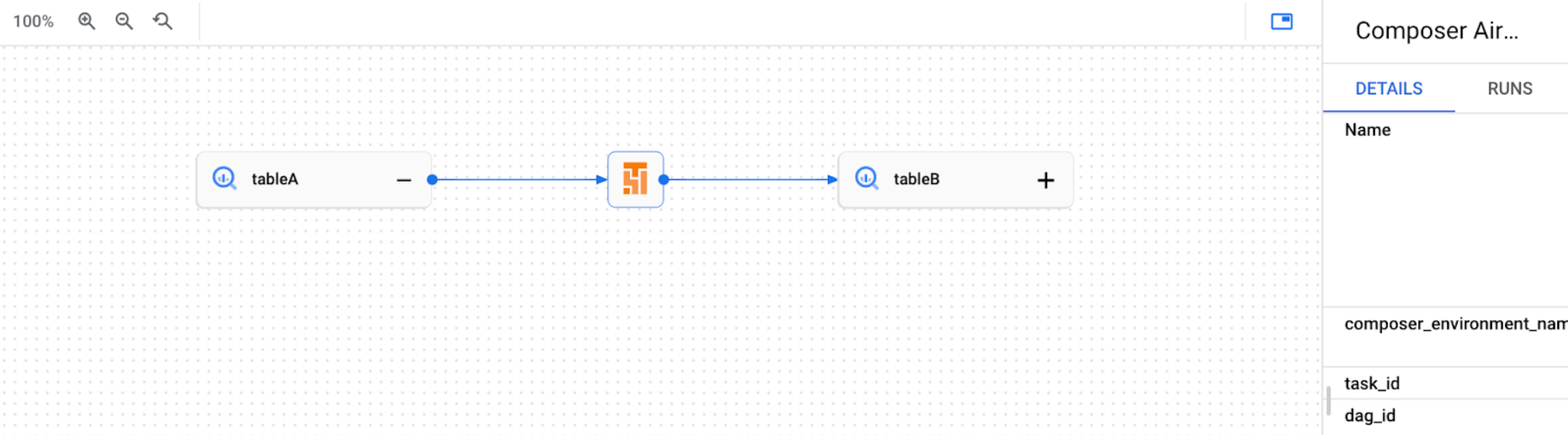
Figure 1. Example lineage graph for a BigQuery table in Knowledge Catalog UI.
Send custom lineage events
You can send custom lineage events if you want to report lineage for an operator that isn'tsupported for automated lineage reporting.
For example, to send custom events with:
- BashOperator: modify the
inletsoroutletsparameter in the task definition. - PythonOperator: modify the
task.inletsortask.outletsparameter in the task definition. - You can use
AUTOfor theinletsparameter. This sets its value equal to theoutletsof its upstream task.
The following example demonstrates the usage of inlets and outlets:
from airflow.composer.data_lineage.entities import BigQueryTable
from airflow.lineage import AUTO

...

bash_task = BashOperator(
    task_id="bash_task",
    dag=dag,
    bash_command="sleep 0",
    inlets=[
        BigQueryTable(
            project_id="example-project",
            dataset_id="dataset",
            table_id="table1",
        )
    ],
    outlets=[
        BigQueryTable(
            project_id="example-project",
            dataset_id="dataset",
            table_id="table2",
        )
    ],
)


def _python_task(task):
    print("Python task")


python_task = PythonOperator(
    task_id="python_task",
    dag=dag,
    python_callable=_python_task,
    inlets=[
        AUTO,
        BigQueryTable(
            project_id="example-project",
            dataset_id="dataset",
            table_id="table3",
        ),
    ],
    outlets=[
        BigQueryTable(
            project_id="example-project",
            dataset_id="dataset",
            table_id="table4",
        )
    ],
)

bash_task >> python_task
As a result, the following lineage graph is created in Knowledge Catalog UI:

Figure 2. Example lineage graph for multiple BigQuery tables in Knowledge Catalog UI.
View lineage logs in Managed Service for Apache Airflow
You can inspect logs related to data lineage using the link on theEnvironment configuration page in theKnowledge Catalog Lineage integration section.
Troubleshooting
If lineage data is not reported to the Lineage API, or you can't see it in Knowledge Catalog, try the following troubleshooting steps:
- Make sure Data Lineage API is enabled in the project of your Managed Service for Apache Airflow environment.
- Check if data lineage integration is enabled in the Managed Service for Apache Airflow environment.
- Check if the operator that you use is included in the automated lineage reporting support. For more information, see Supported Airflow operators.
- Check lineage logs in Managed Service for Apache Airflow for possible issues.