Context-aware access with ingress rules (original) (raw)
Context-aware access ingress rule setups allow access to resources based on client attributes such as network origin (IP address or VPC network), identity type (service account or user), identity, and device data. Access is defined by ingress rules.
For an overview of ingress and egress rules, see Ingress and egress rules.
For instructions on how to apply ingress and egress rule policies, see Configuring ingress and egress policies.
Configuration examples of context-aware access use cases
This section contains the following examples of context-aware access:
- Allow human users to access BigQuery from the internet and only specific service accounts access from a specified IP range
- Allow employees to query BigQuery from trusted devices over the internet and a specific service account to privately load data to a Cloud Storage bucket (source data)
Allow human users to access BigQuery from the internet and only specific service accounts access from a specified IP range

Assume that you have defined the following perimeter, found by listing the perimeterwith gcloud:
name: accessPolicies/222/servicePerimeters/Example status: resources:
- projects/111 restrictedServices:
- bigquery.googleapis.com
- storage.googleapis.com
vpcAccessibleServices:
enableRestriction: true
allowedServices:
- RESTRICTED_SERVICES title: Example
We also assume that an access level called CorpDatacenters has been defined. CorpDatacenters, in this example, is a whitelisted range of IPs of corporate data centers that access from which service accounts are allowed.
Here is the directional policy to allow all humans and a specific set of service accounts, limited to a particular set of IPs (defined by an access level):
echo """
- ingressFrom:
identities:
- serviceAccount:my-sa@my-project.iam.gserviceaccount.com sources:
- accessLevel: accessPolicies/222/accessLevels/CorpDatacenters ingressTo: operations:
- serviceName: bigquery.googleapis.com
methodSelectors:
- method: "*" resources:
- "*"
- ingressFrom:
identityType: ANY_USER_ACCOUNT
sources:
- accessLevel: "*" ingressTo: operations:
- serviceName: bigquery.googleapis.com
methodSelectors:
- method: "*" resources:
- "*" """ > ingress.yaml
Apply the ingress rules by running the following command:
gcloud access-context-manager perimeters update Example --set-ingress-policies=ingress.yaml
Allow employees to query BigQuery and privately load data to a Cloud Storage bucket
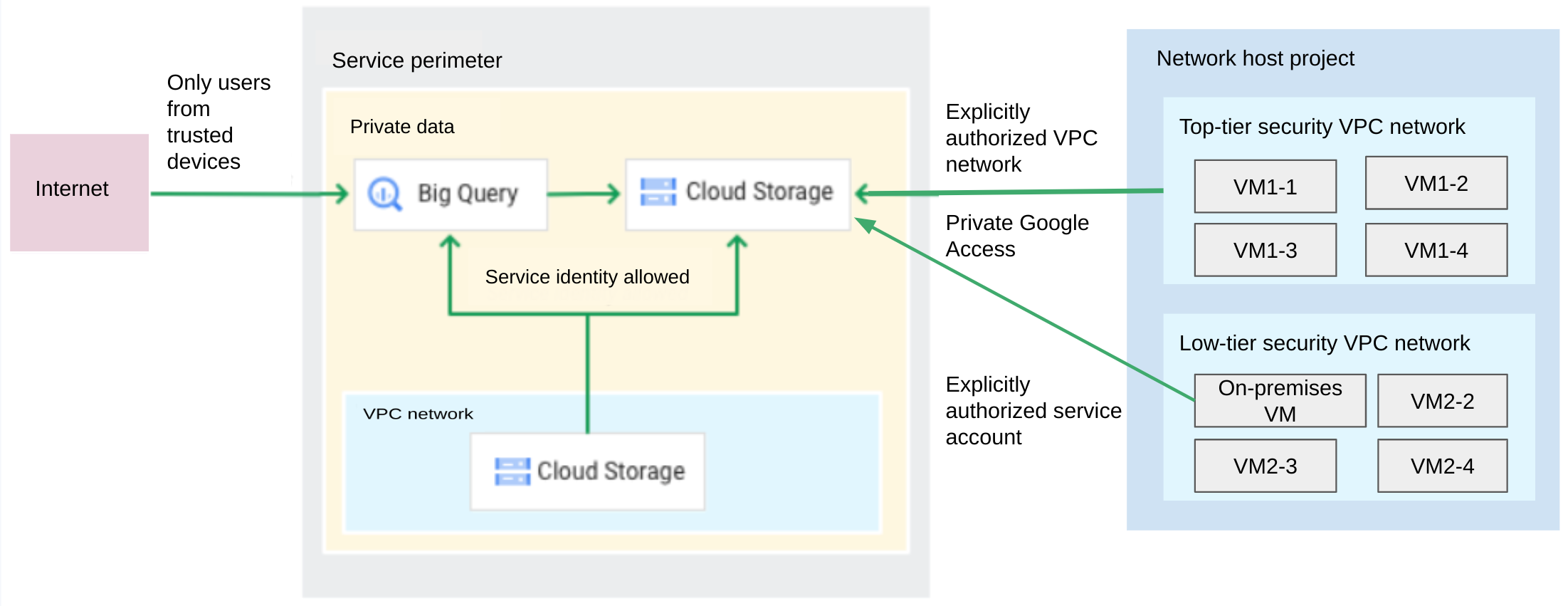
Assume that you have defined the following perimeter, found by listing the perimeterwith gcloud:
name: accessPolicies/222/servicePerimeters/Example status: resources:
- projects/111 restrictedServices:
- bigquery.googleapis.com
- storage.googleapis.com
vpcAccessibleServices:
enableRestriction: true
allowedServices:
- RESTRICTED_SERVICES title: Example
Here is the directional policy to allow humans to access BigQuery views from trusted devices (using a Access Level) and a specific service account private to access Cloud Storage from an authorized VPC network:
echo """
ingressFrom: identities:
- serviceAccount:my-sa@my-project.iam.gserviceaccount.com sources:
- resource: projects/111 ingressTo: operations:
- serviceName: storage.googleapis.com
methodSelectors:
- method: google.storage.Write
- method: google.storage.objects.create resources:
- "*"
ingressFrom: identityType: ANY_SERVICE_ACCOUNT sources: - resource: //compute.googleapis.com/projects/my-network-project/global/networks/top-tier-vpc-network ingressTo: operations:
- serviceName: storage.googleapis.com
methodSelectors:
- method: google.storage.Write
- method: google.storage.objects.create resources:
- "*"
- serviceName: storage.googleapis.com
methodSelectors:
ingressFrom: identityType: ANY_USER_ACCOUNT sources:
- accessLevel: accessPolicies/222/accessLevels/TrustedDevices ingressTo: operations:
- serviceName: bigquery.googleapis.com
methodSelectors:
- permission: bigquery.tables.getData resources:
- "*" """ > ingress.yaml
Apply the ingress rules by running the following command:
gcloud access-context-manager perimeters update Example --set-ingress-policies=ingress.yaml
For information about VPC networks limitations when you use VPC networks in service perimeters, see VPC network limitations.