About accessing published services through endpoints (original) (raw)
This document provides an overview of connecting to services in another VPC network by using Private Service Connect endpoints. You can connect to your own services, or those provided by other service producers, including by Google.
Clients connect to the endpoint by using internal IP addresses. Private Service Connect performs network address translation (NAT) to route the request to the service.
For more information about published services, seeAbout published services.

A Private Service Connect endpoint lets service consumers send traffic from the consumer's VPC network to services in the service producer's VPC network. The consumer, endpoint, and service must all be in the same region. (click to enlarge).
Features and compatibility
In the following tables, a checkmark indicates that a feature is supported, and a no symbol indicates that a feature isn't supported.
Consumer configuration
This table summarizes the supported configuration options and capabilities of endpoints that access published services.
Producer configuration
This table summarizes the supported configuration options and capabilities of published services that are accessed by endpoints.
| Producer type | Producer configuration (published service) | |
|---|---|---|
| Supported producer backends | PROXY protocol (TCP traffic only) | IP version |
| Cross-region internal Application Load Balancer | GCE_VM_IP_PORT zonal NEGs Hybrid NEGs Serverless NEGs Private Service Connect NEGs Instance groups | IPv4 |
| Internal passthrough Network Load Balancer | GCE_VM_IP zonal NEGs Instance groups | IPv4 IPv6 |
| Internal protocol forwarding (target instance) | Not applicable | IPv4 IPv6 |
| Port mapping services | Port mapping NEG | IPv4 IPv6 |
| Regional internal Application Load Balancer | GCE_VM_IP_PORT zonal NEGs Hybrid NEGs Serverless NEGs Private Service Connect NEGs Instance groups Regional internet NEGs | IPv4 |
| Regional internal proxy Network Load Balancer | GCE_VM_IP_PORT zonal NEGs Hybrid NEGs Private Service Connect NEGs Instance groups | IPv4 |
| Secure Web Proxy | Not applicable | IPv4 |
Different load balancers support different port configurations; some load balancers support a single port, some support a range of ports, and some support all ports. For more information, see Port specifications.
Limitations
Endpoints that access a published service have the following limitations:
- You can't create an endpoint in the same VPC network as thepublished service that you are accessing.
- Packet Mirroring can't mirror packets for Private Service Connect published services traffic.
- Not all static routes with load balancer next hops are supported with Private Service Connect. For more information, see Static routes with load balancer next hops.
- Connectivity Tests can't test connectivity between an IPv6 endpoint and a published service.
On-premises access
Endpoints that you use to access Google APIs can be accessed from supported connected on-premises hosts. For more information, seeAccess endpoints from hybrid networks.
Specifications
- Private Service Connect endpoints must be created in the same region as the published service that is the target of the endpoint.
- The endpoint must be created in a different VPC network than the VPC network that contains the target service.
- If you're using Shared VPC, you can create endpoints in the host project or a service project. For more information, see [Shared VPC](#shared-vpc).
- By default, the endpoint can be accessed only by clients that are in the same region and the same VPC network (or Shared VPC network) as the endpoint. For information about making endpoints available in other regions, see Global access.
- The IP address that you assign to the endpoint must be from aregular subnet.
- You can use an IPv4 address from an IPv4-only subnet or a dual-stack subnet.
- You can use an IPv6 address from an IPv6-only or dual-stack subnet if the subnet has an internal IPv6 address range.
- The IP version of the IP address affects which published services the endpoint can connect to. For more information, see IP version translation.
- The IP address counts toward the project's quota forstatic internal IPv4 addresses or static internal IPv6 addresses.
- When you create an endpoint to connect to a service, if the service has a DNS domain name configured, private DNS entries are automatically created in your VPC network for the endpoint.
- Each endpoint has its own unique IP address and optionally its own unique DNS name.
- Published service backends (Preview) let you configure supported regional load balancers or Cloud Service Mesh to route traffic to published services through Private Service Connect endpoints.
Connection statuses
Private Service Connect endpoints, backends, and service attachments have connection statuses that describe the state of their connections. The consumer and producer resources that form the two sides of a connection always have the same status.
You can view connection statuses when youview endpoint details,describe a backend, orview details for a published service.
The following table describes the possible statuses.
| Connection status | Description |
|---|---|
| Accepted | The Private Service Connect connection is accepted by the producer, and the connection is permitted by configuration. However, this status doesn't guarantee that traffic can flow through the connection. |
| Pending | The Private Service Connect connection is not established, and network traffic can't travel between the two networks. A connection might have this status for the following reasons: The service attachment requires explicit approval, and the consumer is not in the consumer accept list. The number of connections exceeds the service attachment's connection limit. Connections that are blocked for these reasons remain in the pending state indefinitely until the underlying issue is resolved. |
| Rejected | The Private Service Connect connection is not established. Network traffic can't travel between the two networks. A connection might have this status for the following reasons: A producerorganization policy rejected the connection. Aconsumer reject list rejected the connection. |
| Needs attention | There is an issue on the producer side of the connection. Some traffic might be able to flow between the two networks, but some connections might not be functional. For example, the producer's NAT subnet might be exhausted and unable to allocate IP addresses for new connections. |
| Closed | The service attachment was deleted, and the Private Service Connect connection is closed. Network traffic can't travel between the two networks. A closed connection is a terminal state. To restore the connection, you must recreate both the service attachment and the endpoint or backend. |
IP version translation
For Private Service Connect endpoints that connect to published services (service attachments), the IP version of the consumer forwarding rule's IP address determines the IP version of the endpoint and traffic that egresses the endpoint. The IP address can come from an IPv4-only, IPv6-only, or dual-stack subnet. The IP version of the endpoint can be either IPv4 or IPv6, but not both.
For published services, the IP version of the service attachment is determined by the IP address of the associated forwarding rule or Secure Web Proxy instance. This IP address must be compatible with the stack type of the service attachment'sNAT subnet. The NAT subnet can be an IPv4-only, IPv6-only, or dual-stack subnet. If the NAT subnet is a dual-stack subnet, either the IPv4 or IPv6 address range is used, but not both.
Private Service Connect doesn't support connecting an IPv4 endpoint with an IPv6 service attachment. In this case, the endpoint creation fails with the following error message:
Private Service Connect forwarding rule with an IPv4 address cannot target an IPv6 service attachment.
The following combinations are possible forsupported configurations:
- IPv4 endpoint to IPv4 service attachment
- IPv6 endpoint to IPv6 service attachment
- IPv6 endpoint to IPv4 service attachment
In this configuration, Private Service Connect automatically translates between the two IP versions.
Connection propagation
With propagated connections, services that are accessible in one consumer VPC spoke through Private Service Connect endpoints can be privately accessed by other consumer VPC spokes that are connected to the same Network Connectivity Center hub.
For more information, see About propagated connections.
Global access
Private Service Connect endpoints that are used to access services are regional resources. However, you can make an endpoint available in other regions by configuring global access.
Global access lets resources in any region send traffic to Private Service Connect endpoints. You can use global access to provide high availability across services that are hosted in multiple regions, or to allow clients to access a service that is not in the same region as the client.
The following diagram illustrates clients in different regions accessing the same endpoint:
- The endpoint is in
us-west1and has global access configured. - The VM in
us-west1can send traffic to the endpoint, and the traffic stays within the same region. - The VM in
us-east1and the VM from the on-premises network can also connect the endpoint inus-west1, even though they are in different regions. The dotted lines represent the inter-regional traffic path.
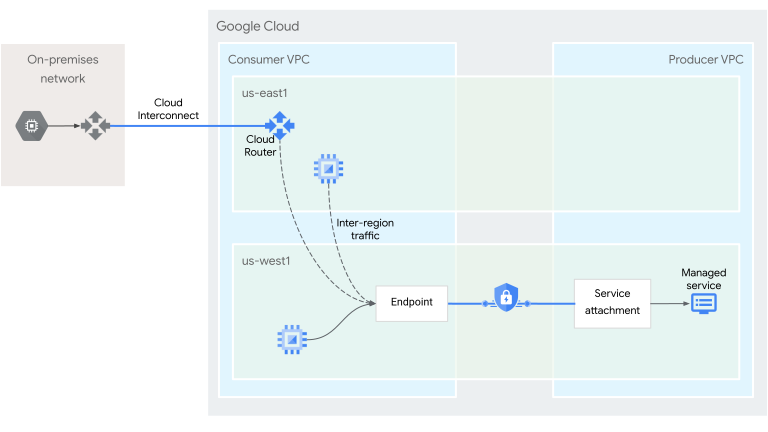
A Private Service Connect endpoint with global access lets service consumers send traffic from the consumer's VPC network to services in the service producer's VPC network. The client can be in the same region or a different region as the endpoint (click to enlarge).

Global access specifications
- You can turn global access on or off at any time for an endpoint.
- Turning on global access does not cause traffic disruption for existing connections.
- Turning off global access terminates any connections from regions other than the region where the endpoint is located.
- Not all Private Service Connect services support endpoints with global access. If you connect a global access endpoint to a service that isn't configured for global access, traffic might be sent to unhealthy backends and dropped (known issue).
Check with your service producer to verify if their service supports global access. For more information, see Supported configurations. - Global access does not provide a single global IP address or DNS name for multiple global access endpoints.
Published service backends
If both the producer and consumer VPC networks belong to the sameorganization, you can access a published service by using published service backends.
Published service backends let you configuresupported load balancers or regional Cloud Service Meshto route traffic to published services through Private Service Connect endpoints.
This approach provides the following benefits:
- Unified connectivity: Supported load balancers and regional Cloud Service Mesh can access published services through the same Private Service Connect endpoint. This lets you extend access to Cloud Service Mesh applications by using the same endpoint that you use for load balancers.
- Separation of network and service management: Service owners can connect load balancers or Cloud Service Mesh to published services by providing a reference to the producer's service attachment. They don't need to manage or refer to specific Private Service Connect endpoints, which can be managed independently by network administrators.
- Advanced traffic management and security: When you access a published service through a consumer load balancer, the load balancer can act as a centralized policy enforcement point where security policies (such as Google Cloud Armor policiesand SSL policies) or routing policies (such asGoogle Cloud URL maps) are enforced.
- Observability: A load balancer can provide centralized metrics and logging that a published service might not provide.
To use published service backends, you need a pre-existing Private Service Connect endpoint that connects to the service you want to access; configuring a published service backend doesn't automatically create one for you.
To use a published service backend with a load balancer, youassociate the load balancer's backend service with a service attachment.
You don't explicitly associate the load balancer with an endpoint. Instead, when a client sends a request to the load balancer, the load balancer routes traffic through a Private Service Connect endpoint that matches the following criteria:
- The endpoint connects to the service attachment that is specified in the consumer load balancer's backend.
- The endpoint has a connection status of
ACCEPTED. - The endpoint is in the same VPC network and region as the consumer forwarding rule.
For information about configuring published service backends to access published services with regional Cloud Service Mesh, seeConfigure published service backends for Cloud Service Mesh.
Supported configurations
The following table lists the supported configurations for using published service backends with Private Service Connect endpoints. Consumer support indicates that the configuration can access a published service by using published service backends. Producer support indicates that the load balancer can be used to publish a service that is accessible through published service backends.
Service Project Admins can create endpoints in Shared VPC service projects that use IP addresses fromShared VPC networks.
In general, we recommend that you create forwarding rules and their corresponding address resources in the same Google Cloud project. Using the same project helps to avoid issues when a project is deleted.
If you're creating an endpoint in a service project, use an address resource that is also in the service project. The address resource can reference an IP address from a subnet in the host project, or from the service project, if it contains subnets.
We don't recommend using an address resource from a host project to create an endpoint in a service project.
For more information, seeCreate an endpoint with an IP address from a Shared VPC network.
VPC Service Controls
VPC Service Controls and Private Service Connect are compatible with each other. If the VPC network where the Private Service Connect endpoint is deployed is in a VPC Service Controls perimeter, the endpoint is part of the same perimeter. AnyVPC Service Controls-supported servicesthat are accessed through the endpoint are subject to the policies of that VPC Service Controls perimeter.
When you create an endpoint, control-plane API calls are made between the consumer and producer projects to establish a Private Service Connect connection. Establishing a Private Service Connect connection between consumer and producer projects that are not in the same VPC Service Controls perimeter does not require explicit authorization with egress policies. Communication to VPC Service Controls-supported services through the endpoint is protected by the VPC Service Controls perimeter.
Static routes with load balancer next hops
Static routes can be configured to use the forwarding rule of an internal passthrough Network Load Balancer as the next hop(--next-hop-ilb). Not all routes of this type are supported with Private Service Connect.
Static routes that use --next-hop-ilb to specify the name of an internal passthrough Network Load Balancer forwarding rule can be used to send and receive traffic to a Private Service Connect endpoint when the route and the endpoint are in the same VPC network and region.
The following routing configurations are not supported with Private Service Connect:
- Static routes that use
--next-hop-ilbto specify the IP address of an internal passthrough Network Load Balancer forwarding rule. - Static routes that use
--next-hop-ilbto specify the name or_IP address_ of a Private Service Connect endpoint forwarding rule.
Logging
- You can enable VPC Flow Logs on subnets containing VMs that are accessing services in another VPC network using endpoints. The logs show flows between the VMs and the endpoint.
- You can view changes in connection statusfor endpoints using audit logs. Changes in connection status for the endpoint are captured in system event metadata for the resource type GCE forwarding rule. You can filter for
pscConnectionStatusto view these entries.
For example, when a service producer allows connections from your project, the connection status of the endpoint changes fromPENDINGtoACCEPTED, and this change is reflected in the audit logs.- To view audit logs, see View logs.
- To set alerts based on audit logs, see Managing log-based alerts.
Pricing
Pricing for Private Service Connect is described in theVPC pricing page.
Quotas
The number of endpoints that you can create for accessing published services is controlled by the PSC Internal LB Forwarding Rules quota. For more information, see quotas.
Organization policy constraints
An Organization Policy Administrator can use theconstraints/compute.disablePrivateServiceConnectCreationForConsumers constraintto define the set of endpoint types for which users cannot create forwarding rules.
For information about creating an organization policy that uses this constraint, see Block consumers from deploying endpoints by connection type.