Parallel steps (original) (raw)
Use a parallel step to define a part of your workflow where two or more steps can execute concurrently. A parallel step waits until all the steps defined within it have completed or are interrupted by an unhandled exception; execution then continues. To learn more about the intended use and benefits of parallel steps, seeExecute workflow steps in parallel.
YAML
- PARALLEL_STEP_NAME: parallel: exception_policy: POLICY shared: [VARIABLE_A, VARIABLE_B, ...] concurrency_limit: CONCURRENCY_LIMIT BRANCHES_OR_FOR: ...
JSON
[ { "PARALLEL_STEP_NAME": { "parallel": { "exception_policy": "POLICY", "shared": [ "VARIABLE_A", "VARIABLE_B", ... ], "concurrency_limit": "CONCURRENCY_LIMIT", "BRANCHES_OR_FOR": ... } } } ]
Replace the following:
PARALLEL_STEP_NAME: the name of the parallel step.POLICY(optional): determines the action other branches will take when an unhandled exception occurs. The default policy,continueAll, results in no further action, and all other branches will attempt to run. Note thatcontinueAllis the only policy currently supported.VARIABLE_A,VARIABLE_B, and so on: a list of writable variables with parent scope that allow assignments within the parallel step. In this document, see Shared variables.CONCURRENCY_LIMIT(optional): the maximum number of branches and iterations that can concurrently execute within a single workflow execution before further branches and iterations are queued to wait. This applies to a singleparallelstep only and does not cascade. Must be a positive integer and can be either a literal value or an expression. In this document, see Concurrency limits.BRANCHES_OR_FOR: use eitherbranchesorforto indicate one of the following:- Branches that can run concurrently. In this document, seeParallel branches.
- A loop where iterations can run concurrently. In this document, seeParallel iteration.
Note the following:
- Parallel branches and iterations can run in any order, and might run in a different order with each execution.
- Parallel steps can include other, nested parallel steps up to the depth limit. See Quotas and limits.
Parallel branches
A branch is a named set of steps that execute sequentially. Parallel branchescan execute concurrently (with the steps in each branch executing sequentially).
YAML
- PARALLEL_STEP_NAME: parallel: ... branches: - BRANCH_NAME_A: steps: ... - BRANCH_NAME_B: steps: ...
JSON
[ { "PARALLEL_STEP_NAME": { "parallel": { ... "branches": [ { "BRANCH_NAME_A": { "steps": ... } }, { "BRANCH_NAME_B": { "steps": ... } } ] } } } ]
Example of parallel branches
This workflow retrieves customer and notification information from two different microservices. These operations are performed in parallel to reduce the end-to-end execution time. The user and notification variables are shared so that they can be updated in branches and accessed later in the workflow.
YAML
JSON
Parallel iteration
Ordinary for loops can be executed in parallel by nesting the for block within a parallel step. Parallel steps execute iterations nondeterministically and can arrive at an outcome using various paths, with multiple iterations (up to the concurrency limit) executing concurrently. See Quotas and limits.
YAML
- PARALLEL_ITERATION_STEP_NAME: parallel: ... for: value: LOOP_VARIABLE_NAME ... steps: - STEP_NAME_A: ...
JSON
[ { "PARALLEL_ITERATION_STEP_NAME": { "parallel": { ... "for": { "value": "LOOP_VARIABLE_NAME", ... "steps": [ { "STEP_NAME_A": ... } ] } } } } ]
The LOOP_VARIABLE_NAME refers to the value of the currently iterated element. The variable name must not be used in assignments or expressions outside of the loop. The same name can be used in multiple loops, as long as they are not nested.
Example of parallel iteration
This workflow calculates the total number of comments for a set of posts provided as a runtime argument. Since the comment count for each post must be retrieved using a separate call, the workflow executes the loop iterations in parallel to reduce the end-to-end execution time. The shared variable, total, is updated in each iteration so that it contains the sum after thecountComments parallel step completes.
YAML
JSON
Shared variables
Branches and iterations support local variable scopeswith a special property: variables from the parent scope are read-only unless explicitly marked as shared for write-access. Assignments in a parallel step to a non-shared variable from a parent scope will result in a deployment error.
Atomic assignments
All assignments in parallel steps are atomic. The assigned value is determined (evaluating any specified expression), and written without any intervening writes by other branches. Shared variables writes are immediately seen by other branches.
Note that assignments can happen in any order, and expressions should not depend on the order of evaluation and assignment. For example, changing the order of addends in a + b = b + a does not change the sum.
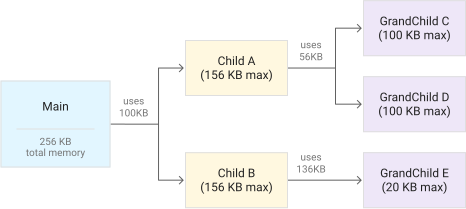
Local variables and memory limits
Variables assigned only in a parallel branch or loop are local to that branch or iteration unless marked shared. In for loops, a local variable is unique to each iteration and cannot be used to pass or accumulate values between iterations. The variable memory limitis applied independently to each branch, and must not exceed the limit when considering variables from both the parent and local scopes. Local variables in a branch do not affect the memory available to other branches.
For example, the following diagram illustrates how if a parent step uses 40% of the available memory, a child step can only use the remaining 60%, and so on:
Variables that are not assigned
To optimize performance, variables should not be marked shared if they are intended to be read-only and not assigned within a parallel step.
Variables and nested parallel steps
Marking a variable as shared only affects the branches or for loop in the given parallel step. To write to a shared variable in a nested parallel step, mark it as shared in both the parent and child parallel steps.
Example of variable scopes
This workflow demonstrates the scope of a shared variable, my_result, as well as variables that are local to their respective branch scopes. Assigning to a variable from a parent scope (input) in a parallel step will result in a deployment error unless the variable is shared in the parallel step.
YAML
JSON
Concurrency limits
You can concurrently execute branches or iterations using parallel steps up to the maximum concurrency quota before further branches and iterations are queued to wait. You can't change this global limit; however, you can specify a lower parallel step concurrency limit by setting aconcurrency_limit value.
The concurrency restrictions for any child are independent from those of its parent and, unlike the global limit, the parallel step concurrency limit isnot cascading: any descendants do not have to adhere as a group to the concurrency limit set for an ancestor. Note that if a parent is waiting for its children to complete executing, it is not considered active, and it is not counted towards the concurrency limit.
Examples of concurrency limits
Example 1
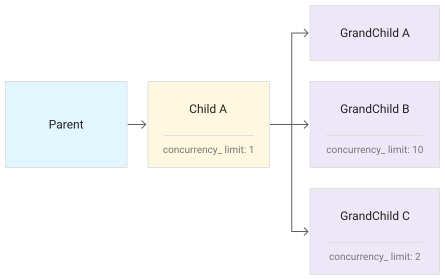
The following diagram illustrates how the concurrency_limit applies only to the current parallel step and is not inherited by any nested parallel steps.
Note the following:
- Child A has a
concurrency_limitof 1; therefore, only one of GrandChild A, GrandChild B, or GrandChild C can execute at any given time. When one completes, another can execute. - The concurrency restrictions for any child are independent from those of its parent. For example, the concurrency limit set for Child A (1) does not impact the concurrency limits set for GrandChild B (10) or GrandChild C (2). Unlike the global limit, the
parallelstep concurrency limit is not cascading: any descendants do not have to adhere as a group to the concurrency limit set for an ancestor. Note that if a parent is waiting for its children to complete executing, it is not considered active, and it is not counted towards the concurrency limit. - GrandChild A does not have a defined
concurrency_limitset; however, it still adheres to the global limit.
Example 2
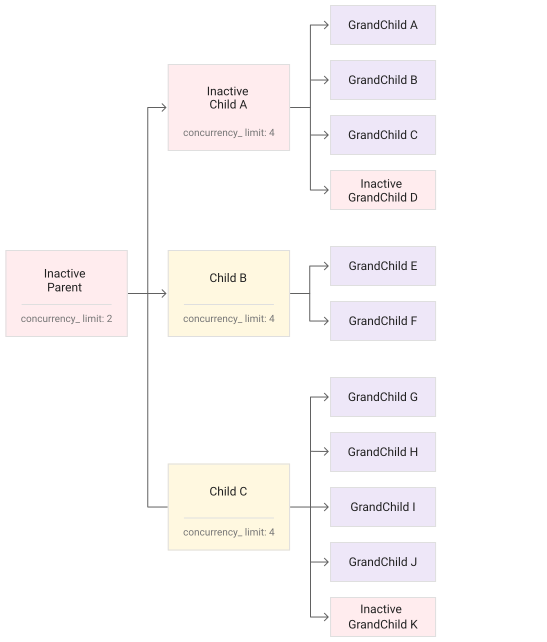
In the following workflow, there are three iterations of the -parent step. Since only two can be active at a time, two concurrent www.foo.com calls can occur. However, three iterations can exist at the same time (two active, one inactive), and the inactive branch can complete its call towww.foo.com while waiting for its five -nestedChild iterations to complete.
YAML
- parent: parallel: concurrency_limit: 2 for: range: [1, 3] value: i steps: - parentHttpCall: call: http.get args: url: "www.foo.com" - nestedChild: parallel: concurrency_limit: 4 for: range: [1, 5] value: j steps: - childHttpCall: call: http.get args: url: "www.bar.com"
JSON
[
  {
    "parent": {
      "parallel": {
        "concurrency_limit": 2,
        "for": {
          "range": [
            1,
            3
          ],
          "value": "i",
          "steps": [
            {
              "parentHttpCall": {
                "call": "http.get",
                "args": {
                  "url": "www.foo.com"
                }
              }
            },
            {
              "nestedChild": {
                "parallel": {
                  "concurrency_limit": 4,
                  "for": {
                    "range": [
                      1,
                      5
                    ],
                    "value": "j",
                    "steps": [
                      {
                        "childHttpCall": {
                          "call": "http.get",
                          "args": {
                            "url": "www.bar.com"
                          }
                        }
                      }
                    ]
                  }
                }
              }
            }
          ]
        }
      }
    }
  }
]
Example 3
The following image illustrates nine concurrent (active) -nestedChild (GrandChild) iterations. It applies a maximum child concurrency limit multiplied by the maximum number of parent iterations (4 * 3 = 12). Each of the 12 can make a concurrent www.bar.com request. In total, 15-nestedChild iterations are executed (3 parent * 5 child).
Jumps
You can jump to steps only within the same branch or loop. To exit a single iteration or branch early, use next: continue. For details, seeUse break/continue in a loop.
Returns
Although you can use return in the main workflowto stop a workflow's execution, return steps are not allowed inside a branch or loop step. To return one or more values from a branch, use a shared variable instead.
Exceptions
Exceptions in branches and iterations can be handled inline byretrying steps andcatching errors within the branch or for loop step. An unhandled exception in a branch terminates that branch. An unhandled exception in a parallel for loop terminates the single iteration where it is raised. See the maximum number of unhandled exceptions than can be raised during the execution of a workflow.
The exception_policy determines what action other branches will take when an unhandled exception occurs. The default policy, continueAll, results in no further action, and all other branches will attempt to run. (Note thatcontinueAll is the only policy currently supported.)
As shared variables are atomic, any shared variables that are set prior to a branch exception are seen by other branches with access to the variables.
Unhandled exceptions
An UnhandledBranchError is raised in a parallel step if there are unhandled exceptions from branches or iterations. This is a runtime exception that can be caught. Branches or iterations that throw an exception are listed as string entries in the branches field in an exception map. The exception map indicates which branch or iteration raised the error, and the error itself. For example:
{ "branches": [ { "id": "1", "error": { "context": "RuntimeError: "branch error"\nin step "step1", routine "main", line: 9", "payload": { "message": "ZeroDivisionError: division by zero", "tags": [ "ZeroDivisionError", "ArithmeticError" ] } } } ], "message": "UnhandledBranchError: One or more branches or iterations encountered an unhandled runtime error", "tags": [ "UnhandledBranchError", "RuntimeError" ], "truncated": false }
Note the following:
- Exceptions are included in the
branchesfield in chronological order, with the earliest error appearing first. - Branch execution order is not guaranteed.
- If including the error payload for a child branch would result in the parent scope exceeding 90% of the remaining memory capacity, the exception is truncated. Specifically, all branch IDs that return an error (up to themaximum number of unhandled exceptions) are included in the
brancheslist; however, each branch error might or might not be truncated:- If an error is truncated, it is not included, and
error:nullandtruncated:trueare set. - If an error is not truncated, the size of the error payload is subtracted from the parent scope's remaining memory.
- If an error is truncated, it is not included, and
- Nested parallel steps follow the same pattern, recursively. The following workflow is an example of nested parallel steps that results in unhandled exceptions:
YAML
- parallelStep:
parallel:
for:
value: num
range: [0,1]
steps:
- parentLoop:
parallel:
for:
value: num2
range: [0,0]
steps:
- checkEven:
switch:
- condition: '${num % 2 != 0}'
raise: "how odd!"
JSON
[
{
"parallelStep": {
"parallel": {
"for": {
"value": "num",
"range": [
0,
1
],
"steps": [
{
"parentLoop": {
"parallel": {
"for": {
"value": "num2",
"range": [
0,
0
],
"steps": [
{
"checkEven": {
"switch": [
{
"condition": "${num % 2 != 0}",
"raise": "how odd!"
}
]
}
}
]
}
}
}
}
]
}
}
}
}
]
The exceptions that are the result of the preceding example:
{
"branches":[
{
"id":"1",
"error":{
"context":"RuntimeError: "branch error"\nin step "parentLoop", routine "main", line: 8",
"payload":{
"branches":[
{
"id":"0",
"error":{
"context":"RuntimeError: "branch error"\nin step "checkEven", routine "main", line: 15",
"payload":"how odd!"
}
}
],
"message":"UnhandledBranchError: One or more branches or iterations encountered an unhandled runtime error",
"tags":[
"UnhandledBranchError",
"RuntimeError"
],
"truncated":false
}
}
}
],
"message":"UnhandledBranchError: One or more branches or iterations encountered an unhandled runtime error",
"tags":[
"UnhandledBranchError",
"RuntimeError"
],
"truncated":false
}
Example of error handling
The following example uses a try/except structure for error handling:
YAML
JSON
An error message similar to the following is logged:
{ "branches":[ { "id":"3", "error":{ "context":"RuntimeError: "branch error"\nin step "checkEven", routine "main", line: 12", "payload":"how odd!" } }, { "id":"5", "error":{ "context":"RuntimeError: "branch error"\nin step "checkEven", routine "main", line: 12", "payload":"how odd!" } }, { "id":"1", "error":{ "context":"RuntimeError: "branch error"\nin step "checkEven", routine "main", line: 12", "payload":"how odd!" } } ], "message":"UnhandledBranchError: One or more branches or iterations encountered an unhandled runtime error", "tags":[ "UnhandledBranchError", "RuntimeError" ], "truncated":false }