Overview - Bundle Analysis (original) (raw)
Bundle Analysis helps improve your application's performance, bandwidth usage, and load times by letting you know if what you’re about to merge will cause any performance regressions. It will allow you to explore all of the modules in your bundle and determine where you might be able to streamline your bundle size as well as find areas of concern.
- Asset and Module exploration
On the Bundles Tab in the Codecov UI you’ll see a summary of the size of your bundle: total size, gzip size, and download time to help you understand just how much bundle size may be impacting user experience.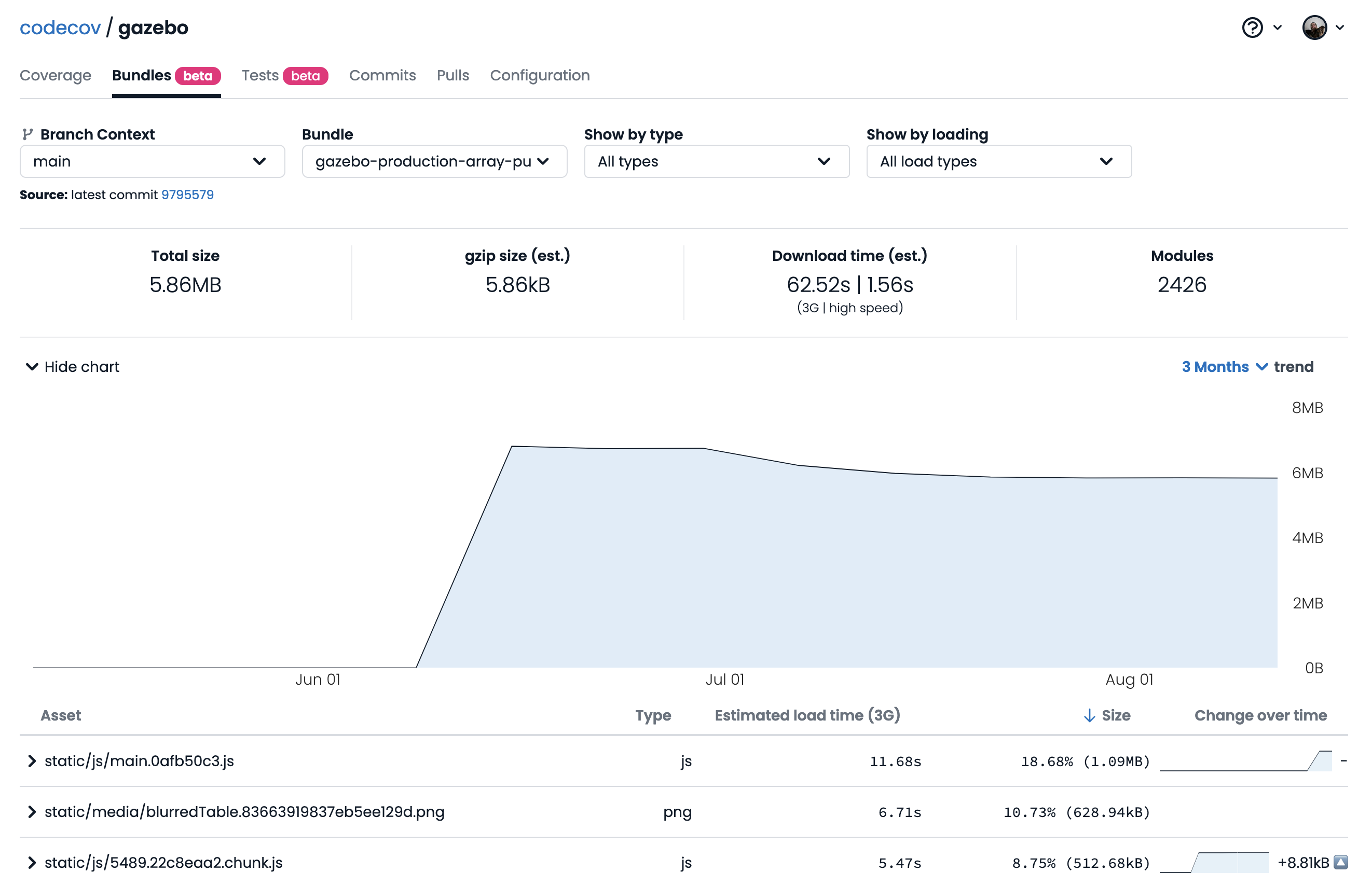
- Commit and Pull Request bundle breakdown
To help you dig deeper, we incorporated Bundle Analysis into our Commit and Pull Request pages. This means you can now pinpoint the exact commit and Pull Request responsible for any bundle size changes, allowing for a better understanding of your code changes.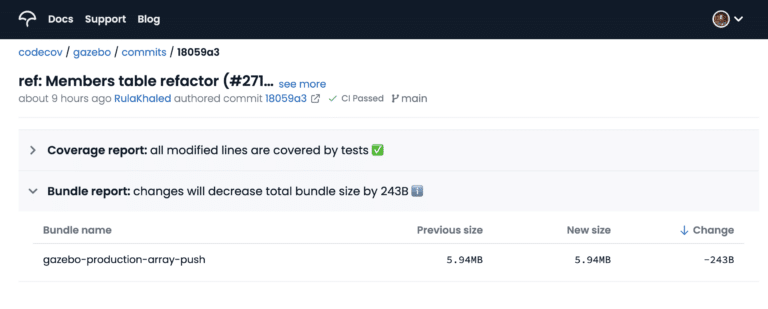
- Bundle information via PR comment
See if your bundle size increases or – better yet – decreases in the Codecov PR comment. There’s no need to leave the Pull Request to understand how a code change impacts your bundle size – unless you want to dig deeper, which you definitely should.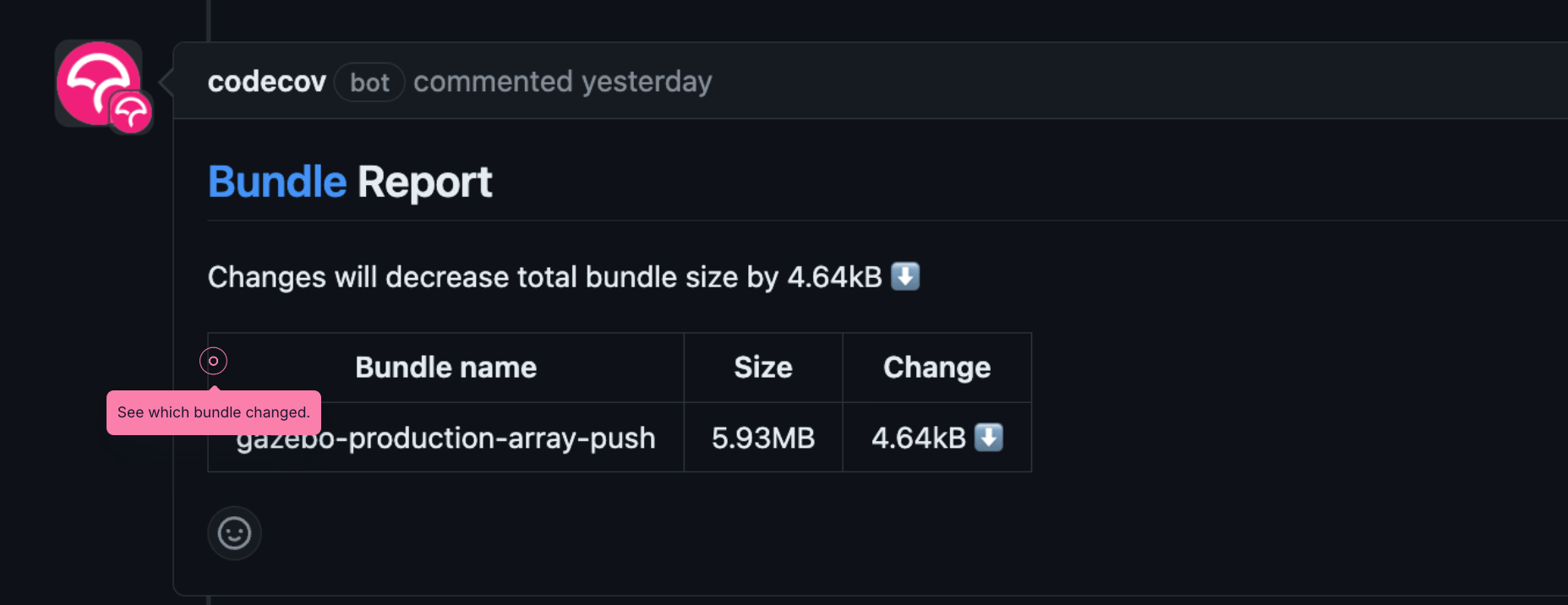
By default, Codecov will always post a comment with the bundle analysis information, even if it doesn't change. You can require that certain conditions be met for the comment to be posted.require_bundle_changescontrols conditions for posting. Options include:True- Only post if the bundle size changesbundle_increase- Only post if bundle size increases
Furthermore you can also define a threshold (in absolute size) for the "changes", in bytes, using thebundle_change_thresholdconfiguration. Valid options includebytes,b,Kb,MbandGb. It only accepts integer numbers (so"500Kb"✅, but"0.5Mb"❌)
Examples
# Post comment if there are changes in bundle size of any size
comment:
     require_bundle_changes: True

# Post comment if there are changes in bundle size exceeding 1Kb
comment:
     require_bundle_changes: True
     bundle_change_threshold: "1Kb"

# Post comment if there are changes in bundle size increases more than 1Mb
comment:
     require_bundle_changes: "bundle_increase"
     bundle_change_threshold: "1Mb"
📘
Requiring changes are for posting the comment the 1st time. If it was already posted Codecov will always update the comment. Editing a comment doesn't send a new email to subscribers of the pull request.
- Bundle information via commit statuses
See a summary of the bundle changes in the commit statuses.
By default Codecov will emit an informative status for commits, indicating the total change.
If the status is above the configured threshold it is emitted with a warning, so you know it might require further investigation.
It is also possible to configure the status to fail (potentially blocking a PR from being merged). Configuration happens via the codecov.yaml, as described below
# Post informational status (never fails) with threshold of 5%
# This is the default configuration
bundle_analysis:
    warning_threshold: "5%"
  status: "informational"

# Disable commit status
bundle_analysis:
  status: False

# Post commit status that will fail if change is larger than threshold of 10MB
bundle_analysis:
  warning_threshold: "10MB"
  status: True
To use Bundle Analysis, users can opt for a bundler plugin setup with current support for Rollup, Vite, and Webpack. To get started all you need to do is:
- Install one of the plugins as a dev dependency
- Configure it in your bundler config
- Make a commit
- Build
Framework specific guides for those frameworks can be found below:
- Astro Quick Start
- NextJS (Webpack) Quick Start
- Nuxt Module Quick Start
- Remix (Vite) Quick Start
- Rollup Quick Start
- SolidStart Quick Start
- SvelteKit Quick Start
- Vite Quick Start (React, Vue, Svelte, SolidJS, etc.)
- Webpack Quick Start (Angular, CRACO)
If you're looking to further configure your plugin, you can check out more specific bundle configuration options in our plugin config docs.
Check out our Environment Specific Requirements for some potential fixes.