Azure DDoS Rapid Response (original) (raw)
During an active attack, Azure DDoS Network Protection customers have access to the DDoS Rapid Response (DRR) team, who can help with attack investigation during an attack and post-attack analysis.
Prerequisites
- If you don't have an Azure subscription, create a free account before you begin.
- Before you can complete the steps in this guide, you must first create a Azure DDoS Protection plan.
When to engage DRR
You should only engage DRR if:
- During a DDoS attack if you find that the performance of the protected resource is severely degraded, or the resource isn't available.
- You think your resource is under DDoS attack, but DDoS Protection service isn't mitigating the attack effectively.
- You're planning a viral event that will significantly increase your network traffic.
- For attacks that have a critical business impact.
Engage DRR during an active attack
- From Azure portal while creating a new support request, choose Issue Type as Technical.
- Choose Service as DDOS Protection.
- Choose a resource in the resource drop-down menu. You must select a DDoS Plan that’s linked to the virtual network being protected by DDoS Protection to engage DRR.
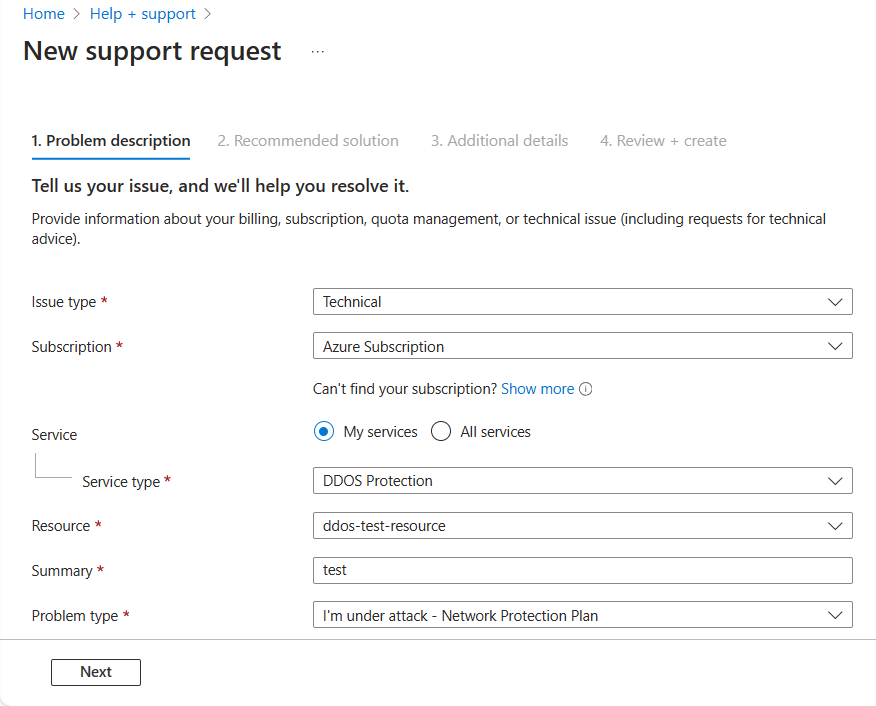
- On the next Problem page, select the severity as A -Critical Impact and Problem Type as ‘Under attack.’
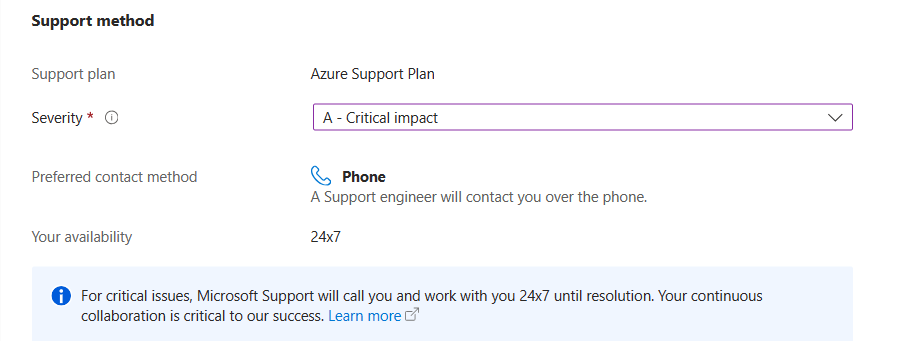
- Complete additional details and submit the support request.
DRR follows the Azure Rapid Response support model. Refer to Support scope and responsiveness for more information on Rapid Response.
To learn more, read the DDoS Protection documentation.
Next steps
- Learn how to test through simulations.
- Learn how to view and configure DDoS protection telemetry.
- Learn how to view and configure DDoS diagnostic logging.