Maven plugin configuration | OpenRewrite Docs (original) (raw)
The OpenRewrite Maven Plugin is the fastest way to apply OpenRewrite recipes to your code as part of your Maven build. The OpenRewrite Maven Plugin is compatible with all versions of Maven since 3.6.
tip
The OpenRewrite Maven plugin automatically supplies any recipes you configure to run with all source files in the project that are transformable. It will supply Java visitors with Java files, XML visitors with XML files, etc.
The OpenRewrite Maven plugin offers these goals:
mvn rewrite:run- Run the configured recipes and apply the changes locally.mvn rewrite:runNoFork- Run the configured recipes and apply the changes locally. This variant does not fork the Maven life cycle and can be a more efficient choice when using Rewrite within a CI workflow when combined with other Maven goals.mvn rewrite:dryRun- Generate warnings to the console for any recipe that would make changes and generates a diff file in each Maven module'stargetfolder.mvn rewrite:dryRunNoFork- Generate warnings to the console for any recipe that would make changes and generates a diff file in each Maven module'stargetfolder. This variant does not fork the Maven life cycle and can be a more efficient choice when using Rewrite within a CI workflow when combined with other Maven goals.mvn rewrite:discover- Generate a report of available recipes found on the classpath.mvn rewrite:typetable- Generate a type table to support multiple versions of a single library.mvn rewrite:recipeCsvGenerate- Generate arecipes.csvmarketplace file from the recipes found in this project.
info
rewrite name-spaced properties can be used for substituting plugin properties:
-Drewrite.activeRecipes=org.example.R1, org.example.R2-Drewrite.activeStyles=org.example.Style-Drewrite.recipeArtifactCoordinates=org.example:your-recipe:1.0
info
The goals rewrite:run and rewrite:dryRun are configured to fork Maven's life cycle and are a better choice when running recipes via a stand-alone goal (mvn rewrite:run) because this will trigger all the necessary life-cycle goals prior to running rewrite's plugin. However, when using rewrite within the context of an integration build (mvn deploy rewrite:run) it may be more efficient to use the non-forking variants, as these will not cause duplicate life cycle phases to be called.
info
In some circumstances, depending on how your project pom.xml is configured, you may get a NoPluginFoundForPrefixException. The root cause for this varies from pom.xml to pom.xml. In any case, as a quick fix to get unstuck, try referencing the fully-qualified rewrite-maven-plugin coordinates instead of the shorthand prefix. That is, try using mvn org.openrewrite.maven:rewrite-maven-plugin:GOAL (such as mvn org.openrewrite.maven:rewrite-maven-plugin:run, etc.) rather than mvn rewrite:GOAL.
Plugin configuration
It generally makes sense to apply the plugin to the root pom.xml in a repository so that the configuration applies to each project in a multi-module project. The configuration block below contains an example of every configuration option. You may also find it beneficial to check out the auto-generated rewrite-maven-plugin documentation which contains type information among other things.
activeRecipes- Explicitly turns on recipes by name (the name given in thespecs.openrewrite.org/v1beta/reciperesource). No recipe is run unless explicitly turned on with this setting. You can setactiveRecipesad-hoc directly on the command line using-Drewrite.activeRecipes=an.example.Recipe0,an.example.Recipe1. For example,mvn rewrite:run -Drewrite.activeRecipes=an.example.Recipe0.activeStyles- Explicitly turns on a style by name (the name given in thespecs.openrewrite.org/v1beta/styleresource). No style is applied unless explicitly turned on with this setting. This can be invoked ad-hoc directly on the command line using-Drewrite.activeStyles=an.example.Style0,an.example.Style1. For example,mvn rewrite:run -Drewrite.activeStyles=an.example.Style0.checkstyleConfigFile- Path to a custom Checkstyle configuration file. When specified, this will be used instead of auto-detecting the configuration. For example,-Drewrite.checkstyleConfigFile=/path/to/checkstyle.xml.checkstyleDetectionEnabled- Rewrite will, by default, detect the presence of the Checkstyle plugin and attempt to derive the coding style from the Checkstyle configuration file. If this flag is set tofalse, the plugin will not attempt to parse the Checkstyle configuration.configLocation- Where to look for an OpenRewrite YML configuration file somewhere in the project directory (or really anywhere on disk). If you want to customize this, prefixing the file name with the Maven property${maven.multiModuleProjectDirectory}is a handy way of ensuring that each module resolves the same configuration file relative to the root directory of the repository. ThisconfigLocationis (unless an absolute path is given) evaluated for each module relative to that module's project directory.dependencies- To make pre-packaged OpenRewrite recipes available to the Maven plugin, add them as plugin dependencies.exportDatatables- When enabled, export data tables generated by recipes during execution. Default isfalse. This is typically used for reporting and analysis purposes. For example,-Drewrite.exportDatatables=true.failOnDryRunResults- Boolean flag toggling whetherrewrite:dryRunshould throw an exception and non-zero exit code if changes are detected. Default isfalse.failOnInvalidActiveRecipes- Whether to throw an exception if an active recipe fails configuration validation. This may happen if the recipe is improperly configured, or any downstream recipes are improperly configured. Default isfalse. In the future, this default may be changed totrue. For example,-Drewrite.failOnInvalidActiveRecipes=true.exclusions- Skips parsing for any paths matching these exclusions. Evaluated as a PathMatcher glob pattern, where "**" matches any number of directories and "*" matches a single directory or filename. For example,-Drewrite.exclusions=*/some/irrelevant/or/expensive/directory/**,docs/**.additionalPlainTextMasks- Allows adding additional plain text masks without overriding the defaults. Evaluated as a PathMatcher glob pattern, where "**" matches any number of directories and "*" matches a single directory or filename. These masks are added to the default set of plain text masks. If you need to override the default masks entirely, useplainTextMasksinstead. For example,-Drewrite.additionalPlainTextMasks=**/*.ext,**/.in-root.plainTextMasks- A set of file masks to denote which files should be parsed as plain text. Evaluated as a PathMatcher glob pattern, where "**" matches any number of directories and "*" matches a single directory or filename. Exclusions take precedence over any plain text masks. If this configuration is specified, it completely overrides the default masks, andadditionalPlainTextMaskswill have no effect. If not explicitly defined, the default masks are
Default masks
**/META-INF/services/**
**/META-INF/spring.factories
**/META-INF/spring/**
**/*.bash
**/*.bat
**/CODEOWNERS
**/*.config
**/Dockerfile
**/.gitattributes
**/.gitignore
**/.java-version
**/*.jsp
**/*.ksh
**/*.md
**/*.qute.java
**/.sdkmanrc
**/*.sh
**/*.sql
**/*.txt options- Pass configuration options to recipes in the formatkey=value. Multiple options can be provided as a comma-separated list. For example,-Drewrite.options=methodPattern=java.util.List add(..),key2=value2.pomCacheDirectory- The directory where OpenRewrite will cachepom.xmland meta-data. The default value is~/.rewrite-cachepomCacheEnabled- This flag determines if OpenRewrite will cachepom.xmland meta-data using an on-disk cache. The default istruerecipeArtifactCoordinates- Alternative way to specify recipe dependencies as Maven coordinates. Can be used instead of or in addition to plugin dependencies. For example,-Drewrite.recipeArtifactCoordinates=org.openrewrite.recipe:rewrite-java-dependencies:1.0.0.recipeChangeLogLevel- The log level used to log changes performed by recipes. Available values areERROR,WARN,INFO,DEBUG. Default isWARN. For example,-Drewrite.recipeChangeLogLevel=INFO.reportOutputDirectory- Custom output directory for dryRun reports. If not specified, defaults totarget/rewrite. For example,-DreportOutputDirectory=/custom/path.resolvePropertiesInYaml- Whether to resolve Maven properties in YAML configuration files. Default istrue. Set tofalseto disable property resolution. For example,-Drewrite.resolvePropertiesInYaml=false.rewriteSkip- Skip the execution of the plugin. Default isfalse. Useful for temporarily disabling rewrite without removing the configuration. For example,-Drewrite.skip=true.runPerSubmodule- Run recipes per submodule rather than in an aggregated fashion across all modules. Default isfalse. For example,-Drewrite.runPerSubmodule=true.sizeThresholdMb- Threshold over which non-Java sources are ignored during parsing. The default threshold is 10Mb.skipMavenParsing- When enabled, skip parsing Mavenpom.xmls, and any transitive poms, as source files. This can be an efficiency improvement in certain situations. Defaults tofalse. For example,-DskipMavenParsing=true.
info
Note. the plugin scans the compile, provided, and test scopes for visitors, recipes, and styles and will automatically discover recipes on the project classpath.
pom.xml
<project>
  <build>
    <plugins>
      <plugin>
        <groupId>org.openrewrite.maven</groupId>
        <artifactId>rewrite-maven-plugin</artifactId>
        <version>6.41.0</version>
        <configuration>
          <activeRecipes>
            <recipe>org.openrewrite.java.Spring</recipe>
          </activeRecipes>
          <activeStyles>
            <!-- This style is made up for sake of example. It isn't packaged with OpenRewrite -->
            <style>com.yourorg.SpringStyle</style>
          </activeStyles>
          <!-- These are default values, shown for example. It isn't necessary to supply these values manually: -->
          <configLocation>${maven.multiModuleProjectDirectory}/rewrite.yml</configLocation>
          <failOnDryRunResults>false</failOnDryRunResults>
          <exclusions>
            <exclusion>*/some/irrelevant/or/expensive/directory/**</exclusion>
          </exclusions>
          <additionalPlainTextMasks>
            <additionalPlainTextMask>**/.custom-ext</additionalPlainTextMask>
            <additionalPlainTextMask>**/.config-file</additionalPlainTextMask>
          </additionalPlainTextMasks>
          <plainTextMasks>
            <plainTextMask>**/.txt</plainTextMask>
          </plainTextMasks>
        </configuration>
        <dependencies>
          <!-- This module is made up for sake of example. It isn't packaged with OpenRewrite -->
          <dependency>
            <groupId>com.yourorg.recipes</groupId>
            <artifactId>your-recipes</artifactId>
            <version>1.1.0</version>
          </dependency>
        </dependencies>
      </plugin>
    </plugins>
  </build>
</project>
info
To find out what recipes a rewrite module provides, see its documentation and the output of the rewrite:discover goal.
The "TypeTable" goal[](#the-typetable-goal "Direct link to The "TypeTable" goal")
Execute mvn rewrite:typetable to generate a type table to support multiple versions of a single library.
The "recipeCsvGenerate" goal[](#the-recipecsvgenerate-goal "Direct link to The "recipeCsvGenerate" goal")
Execute mvn rewrite:recipeCsvGenerate to generate a recipes.csv marketplace file from the recipes found in this project. This is the Maven equivalent of the Gradle recipeCsvGenerate task provided by the OpenRewrite Gradle build plugin.
The goal scans compiled classes and resources in target/classes/ for recipe definitions (both Java class-based and YAML declarative recipes) and writes the result to src/main/resources/META-INF/rewrite/recipes.csv. If an existing recipes.csv is present, generated data is merged into it, preserving any manually added entries such as custom category assignments.
The goal automatically forks the Maven lifecycle to process-classes, so classes and resources will be compiled before scanning.
The "Run" goal[](#the-run-goal "Direct link to The "Run" goal")
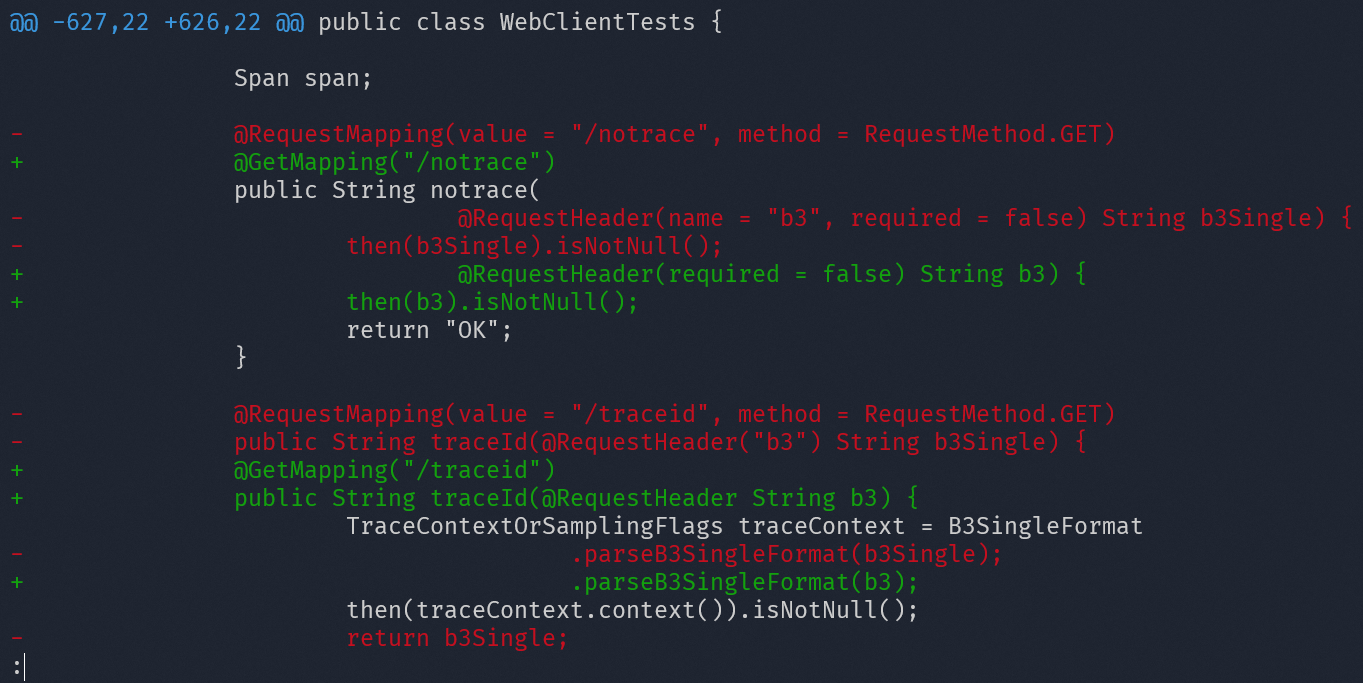
Execute mvn rewrite:run to run the active recipes and apply the changes. This will write changes locally to your source files on disk. Afterward, review the changes, and when you are comfortable with the changes, commit them. The run goal generates warnings in the build log wherever it makes changes to source files.

After the goal finishes executing, run git diff to see what changes were made, review, and commit them.
The "dryRun" goal[](#the-dryrun-goal "Direct link to The "dryRun" goal")
Execute mvn rewrite:dryRun to dry-run the active recipes and print which visitors would make changes to which files to the build log. This does not alter your source files at all. This goal can be used to preview the changes that would be made by a recipe.
rewrite:dryRun outputs a report in the form of a patch file, by default under target/site/rewrite/rewrite.patch, containing changes that would be made if you were to run rewrite:run. This file can be used with git or diff to view or apply the potential changes. For example, git diff . target/site/rewrite/rewrite.patch.
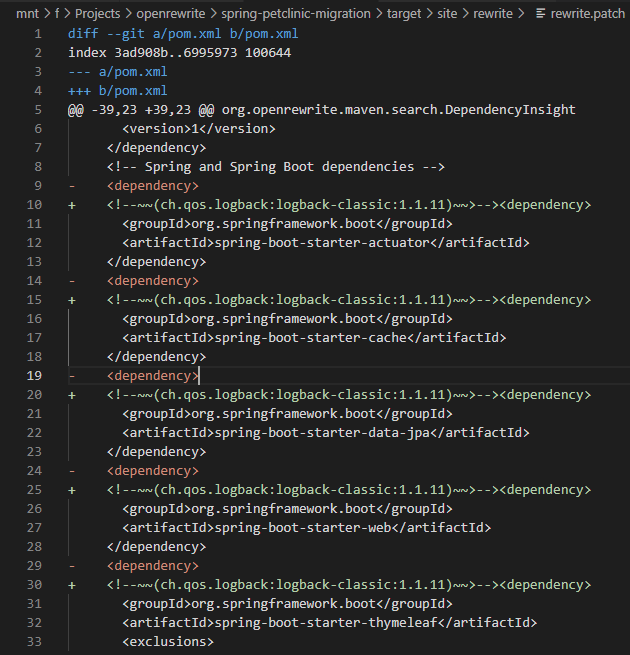
dryRun can be used as a "gate" in a continuous integration environment by failing the build if dryRun detects changes to be made and failOnDryRunResults is set to true:
<configuration>
  <failOnDryRunResults>true</failOnDryRunResults>
</configuration>
If desired, dryRun can be configured to bind dryRun to desired maven phases. For example, the following configuration is sufficient to have mvn verify also run rewrite:dryRun:
pom.xml
<!-- truncating the pom.xml for brevity -->
<project>
  <build>
    <plugins>
      <plugin>
        <artifactId>rewrite-maven-plugin</artifactId>
        <configuration>...</configuration>
        <!-- this 'executions' block is the important part of binding the dryRun goal to the verify phase -->
        <executions>
          <execution>
            <goals>
              <goal>dryRun</goal>
            </goals>
            <phase>verify</phase>
          </execution>
        </executions>
      </plugin>
    </plugins>
  </build>
</project>
The "Discover" goal[](#the-discover-goal "Direct link to The "Discover" goal")
Execute mvn rewrite:discover to list the recipes that the OpenRewrite Maven plugin has found on your classpath and the recipes that you have activated in your plugin configuration.
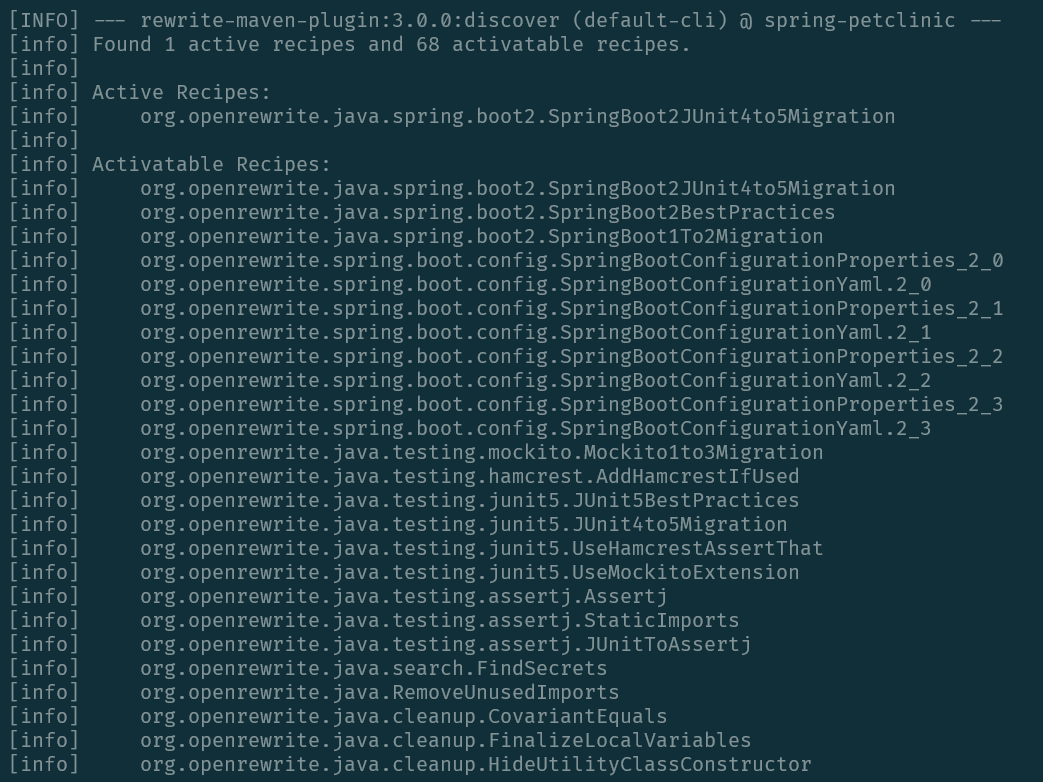
The discover goal supports several parameters:
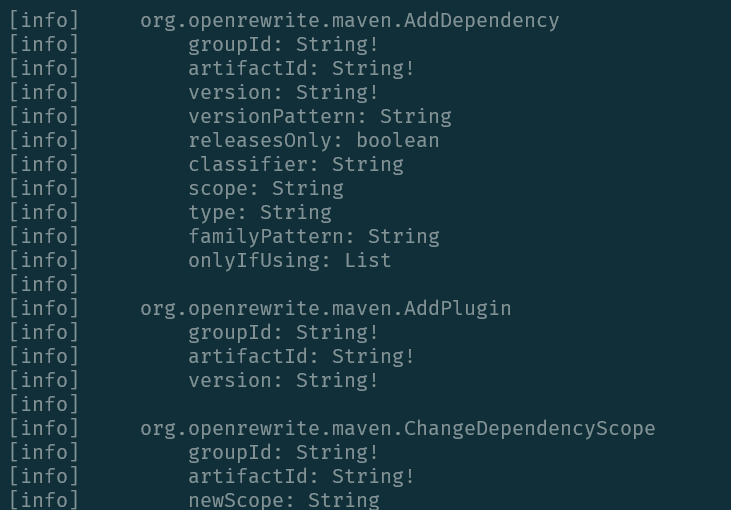
detail- When set totrue, produces additional details including recipe configuration options. For example:mvn rewrite:discover -Ddetail=truerecipe- Filter the discovery output to show information about a specific recipe. For example:mvn rewrite:discover -Drecipe=org.openrewrite.java.format.AutoFormatrecursion- Control the maximum level of recursion when displaying nested recipe descriptors. Default is0. For example:mvn rewrite:discover -Drecursion=2
Rewrite's pom cache
Rewrite's maven parser has its own resolution logic for pom files. (It will download metadata and poms from maven repositories). To speed up this process, there is a caching abstraction with two implementations (one that uses RocksDB and one that uses an in-memory cache to reduce the number of times a pom/metadata is downloaded from a repository.
The Maven plugin uses the RocksDB cache by default and will store this cache in ~/.rewrite-cache . RocksDB is a high-performance, embedded database that is maintained by Facebook. The database engine is written in C++ and is used by the plugin via a JNI wrapper that has no transitive dependencies.
Cache troubleshooting
In the very rare cases where the Maven plugin is unable to write to its on-disk folder or you encounter a serialization issue when reading/writing to the cache, there are several options available:
- Check if the folder is writable by the Maven process. The default folder location is under the user's home folder (
~/.rewrite-cache) and you can choose an alternate location by using the plugin'spomCacheDirectoryconfiguration property. - It is safe to simply delete all of the contents within the cache folder. The first time the plugin is executed after deleting the cache, it will download and re-populate this cache folder.
- The
pomCacheEnabledcan be set tofalsein which case the plugin will use an in-memory cache instead. This will make running recipes slower when a project has deep dependency trees.