Tutorials | Collecting Custom Data | Distributed bpftrace Deployment (original) (raw)
Pixie can deploy bpftrace programs to your cluster, collect the resulting data, and display it in the Live UI. This tutorial will demonstrate how to run a bpftrace program using a PxL script and discuss the guidelines for running arbitrary bpftrace code using Pixie.
Background
Most of the data in Pixie's no-instrumentation monitoring platform is collected by the Pixie Edge Modules (PEMs), which are deployed as a daemonset onto every node in your cluster. These PEMs use eBPF based tracing to collect network transactions without any code changes.
One increasingly popular way to write eBPF programs is to use bpftrace, an open source high-level tracing language for Linux. bpftrace provides a simplified front-end language that makes it easier to write BPF programs when compared to frameworks such as BCC. Many bpftrace programs are written as one-liners or stand-alone scripts.
Now, using Pixie, developers can dynamically run their own bpftrace programs on their cluster. Pixie will handle:
- deploying the bpftrace program to all of the nodes in your cluster.
- capturing the output of the bpftrace program's
printfstatements into a table. - making the data available to be queried and visualized in the Pixie UI.
- removing the probe(s) after a set expiration time.
Output
bpftrace programs output data through a variety of built-in functions. Examples include printf for general purpose printing, print for printing map contents, and time for printing the current time. bpftrace also automatically prints all maps on termination, which many bpftrace programs rely on.
Pixie's distributed bpftrace deployment feature captures outputs made through bpftrace printf statements, and pushes the arguments into an automatically created table, as shown below.
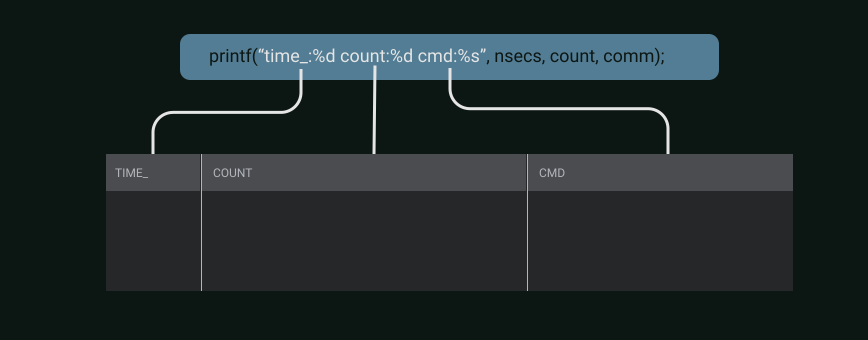
Bpftrace printf-based output, and its mapping to auto-generated tables
There are some requirements for bpftrace programs you wish to deploy with Pixie, all of which concern the output mechanism:
- The program must have at least 1
printfstatement. - If the program has more than 1
printfstatement, the format string of allprintfsmust be exactly the same, as it defines the table output columns. - There should be no
printfstatements in theBEGINorENDblocks. - If wishing to specify column names, they must be done by prepending the column name to the format specifier with a colon (example:
name:%d). The column names cannot contain any whitespaces. - To output time in a manner that is recognizable by Pixie, label the column
time_and pass the argumentnsecs.
Note that not all programs in the bpftrace repository meet these requirements, but most can be easily adapted to be compatible. For example, in programs with multiple printfs, the extraneous printfs can be removed. Also, programs that output data on termination instead of through printf statements can be converted to instead print the data on a regular interval using an interval block. pidpersec.bt is a good example of this design pattern.
Limitations
This beta feature has limitations:
- Support for bpftrace kprobes only. Other types of probes will be supported in the future.
Tutorial
In this demo, we'll deploy Dale Hamel's bpftrace TCP retransmit tool using Pixie. TCP retransmits are usually a sign of poor network health and this open-source tool will help us discover if any connections in our cluster are experiencing a high number of retransmits.
Running the PxL Script in the Live UI
We've incorporated this trace into a PxL script called bpftrace/tcp_retransmits. To run this script:
- Open up Pixie's Live View and select your cluster.
- Select the
bpftrace/tcp_retransmitsscript using the drop downscriptmenu or with Pixie Command. Pixie Command can be opened with thectrl/cmd+kkeyboard shortcut. - Run the script using the Run button in the top right, or with the
ctrl/cmd+enterkeyboard shortcut.
Once the probe is deployed to all the nodes in the cluster, the probes will begin to push out data into tables. The PxL script queries this data and the Vis Spec defines how this data will be displayed.
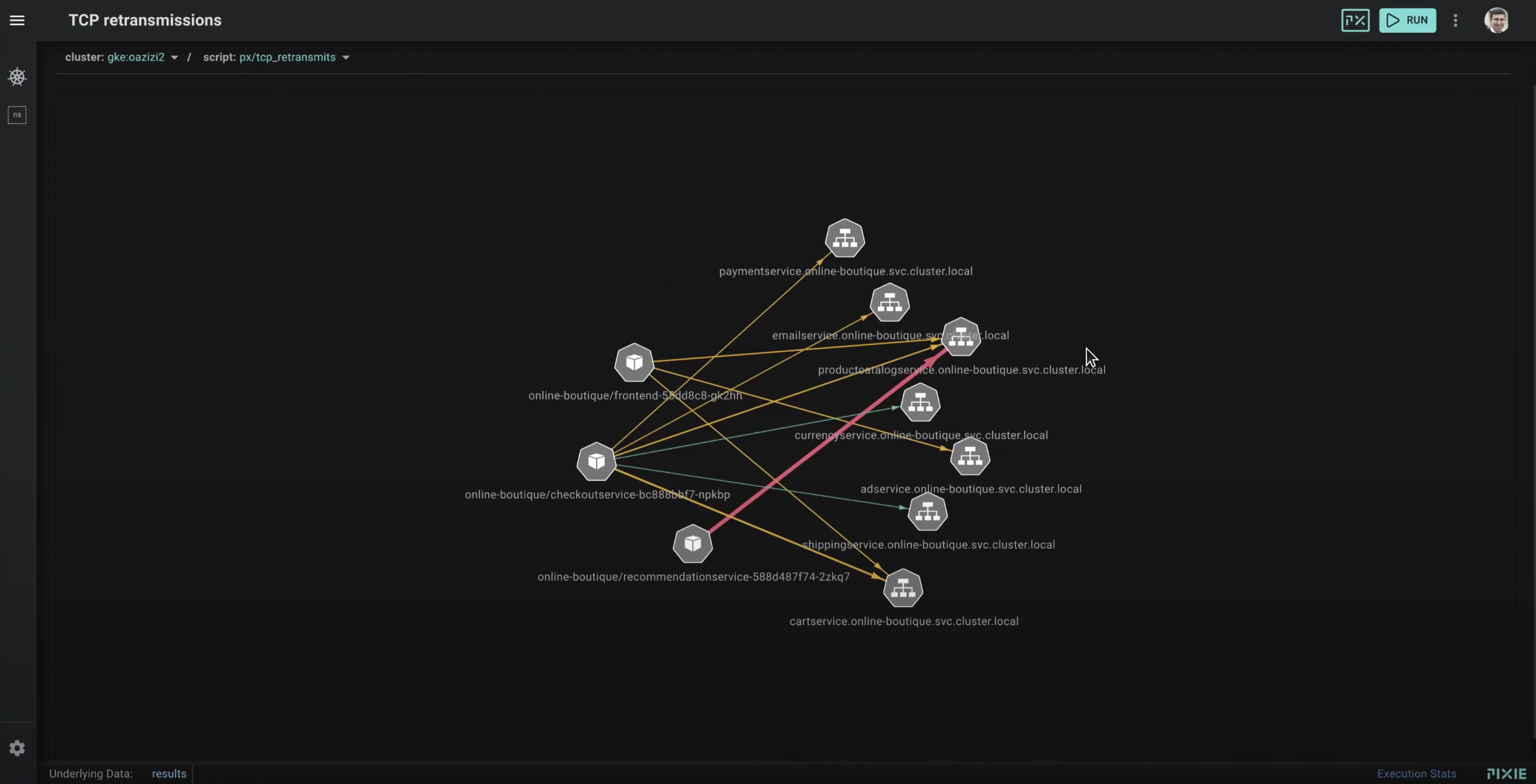
Pixie Live UI view of TCP Retransmissions
In the Live View, we'll see a graph of the pods (hexagonal grey box icons) and the services (hexagonal grey tree icons) who are are experiencing TCP retransmits.
The color and weight of the arrows between these entities indicates the number of retransmits. Hovering over an arrow will display the number of retransmits for a particular connection. The data displayed in this graph can also be seen in the Data Drawer (use the ctrl/cmd+d keyboard shortcut to open and close this table).
In this particular example, the 3 pods experiencing high levels of retransmits are located on the same node, perhaps indicating an issue with that particular node.
How does the PxL script work?
Pixie's scripts are written using the Pixie Language (PxL), a domain-specific language that is heavily influenced by the popular Python data processing library Pandas.
On line 8, we've included Dale Hamel's tcpretrans.bt bpftrace tool from the iovisor/bpftrace repo as a string. We've tweaked the original trace in order to work with Pixie's bpftrace rules (seen in the "Output" section above):
- removed the informational print statements on lines 25-26 of
tcpretrans.btso that the program contains a singleprintfstatement. - modified the
printfstatement on line 72 oftcpretrans.btto name the output columns (no whitespaces) - modified the
printfstatement on line 72 oftcpretrans.btto output time using the reserved column nametime_and passing it thensecsargument.
Some further modifications were made to simplify the program for the purposes of this tutorial (for example, removing the TCP state), but those are not required changes.
On line 50, we call UpsertTracepoint with the following arguments:
- the name of the tracepoint
- the name of the table to push data into
- the type of the trace probe
- the expiration time for the tracepoint
Lines 55-69 query the collected data, convert known IPs to domain names, and group the retransmits by source and destination IPs tallying the number of retransmits.
If you'd like to filter the results to a particular service, modify line 67 to include the namespace:
Deploying different BPFtrace programs depending on properties of the host
Pixie has introduced a TraceProgram object in the pxtrace module, which allows you to specify deployment restrictions for your BPFtrace programs. You can use the TraceProgram object to define a BPFtrace program and specify the kernel versions on which it should be deployed (more selectors may be added in the future).
The TraceProgram object currently accepts the following parameters:
program: The BPFtrace program as a string.max_kernel: The maximum kernel version on which the program should be deployed.min_kernel: The minimum kernel version on which the program should be deployed.
You can use the TraceProgram object to deploy different BPFtrace programs based on the kernel version of the nodes in your cluster. For example, you might have one version of a BPFtrace program that works on kernel versions up to 5.18, and another version that works on kernel versions 5.19 and above. 0and0 and 0and1 are placeholders for BPFtrace programs. You can define two TraceProgram objects and use them both in the UpsertTracepoint function.
Here's an example:
In this example, the before_518_trace_program will be deployed on nodes with kernel versions up to 5.18, and the after_519_trace_program will be deployed on nodes with kernel versions 5.19 and above.
Tracepoint status
Run px/tracepoint_status to see the information about all of the tracepoints running on your cluster. The STATUS column can be used to debug why a tracepoint fails to deploy.
Running other bpftrace programs
The following bpftrace programs are available today for use in Pixie:
capable.bt: use thebpftrace/capablescriptdcsnoop.bt: use thebpftrace/dc_snoopscript.mdflush.bt: use thebpftrace/md_flushscript.naptime.bt: use thebpftrace/nap_timescript.oomkill.bt: use thebpftrace/oom_killscript.syncsnoop.bt: use thebpftrace/sync_snoopscript.tcpdrop.bt: use thebpftrace/tcp_dropsscript.tcpretrans.bt: use thebpftrace/tcp_retransmitsscript.
Many other bpftrace programs can work with Pixie. Some may require a few modifications to obey the rules listed above.
If you have any questions about this feature or how to incorporate your own bpftrace code, we'd be happy to help out over on our Slack.