Developer Guide (original) (raw)
This document explains how to develop applications, including basic terminology, tips on using the Vespa Cloud Console, and how to benchmark and size your application. See deploy a sample application to deploy a basic sample application, andautomated deployments on making production deployments safe routine occurences.
Manual deployments
Developers will typically deploy their application to the dev zone during development. Each deployment is owned by a tenant, and each specified instance is a separate copy of the application; this lets developers work on independent copies of the same application, or collaborate on a shared one, as they prefer—more details here. These values can be set in the Vespa Cloud UI when deploying, or with each of the build and deploy tools, as shown in the respective getting-started guides.
Additionally, a deployment may specify a different zone to deploy to, instead of the default dev zone.
Auto downsizing
Deployments to dev are downscaled to one small node by default, so that applications can be deployed there without changing services.xml. See performance testing for how to disable auto downsizing using deploy:environment="dev".
Availability
The dev zone is a sandbox and not for production serving; It has no uptime guarantees.
An automated Vespa software upgrade can be triggered at any time, and this may lead to some downtime if you have only one node per cluster (as with the default auto downsizing).
Performance testing
For performance testing, to avoid auto downsizing, lock the resources using deploy:environment="dev":
<nodes deploy:environment="dev" count="1">
    <resources vcpu="8.0"
               memory="64Gb"
               disk="474Gb"
               architecture="arm64"
               storage-type="local"/>
</nodes>
Read more in benchmarking andvariants in services.xml.
Component overview
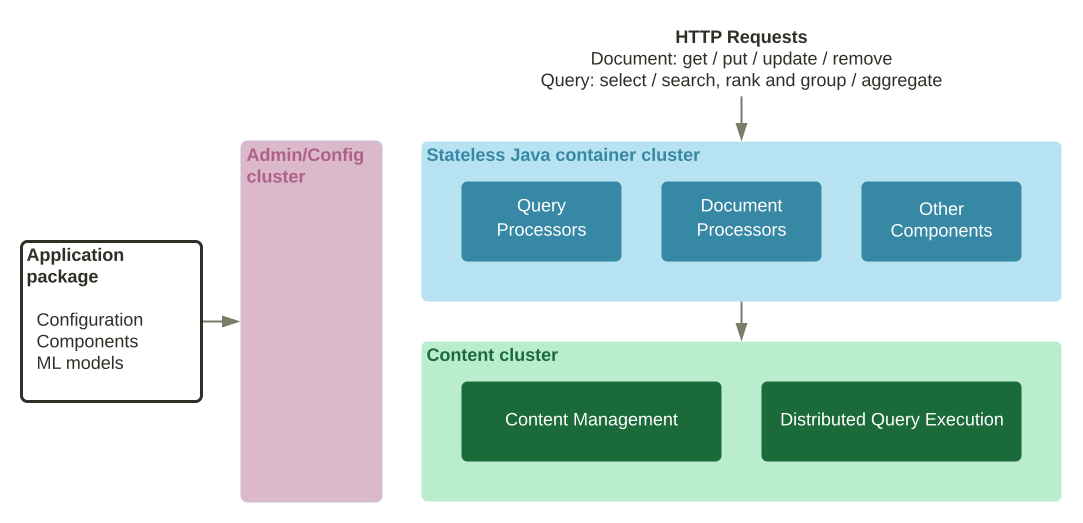
Application packages can contain Java components to be run in container clusters. The most common component types are:
- Searchers, which can modify or build the query, modify the result, implement workflows issuing multiple queries etc.
- Document processors that can modify incoming write operations.
- Handlers that can implement custom web service APIs.
- Renderers that are used to define custom result formats.
Components are constructed by dependency injection and are reloaded safely on deployment without restarts. See the container documentation for more details.
See deploy an application having Java components, and troubleshooting.
Developing Components
The development cycle consists of creating the component, deploying the application package to Vespa, writing tests, and iterating. These steps refer to files in album-recommendation-java:
| Build | All the Vespa sample applications use the bundle plugin to build the components. | | | --------- | ------------------------------------------------------------------------------------------------------------------------------------------------------------------------------------------------------------------------------------------------------------------------------------------------------------------------------------------------------------------------------------------------------------------------------------------------------------------------------------------------------------------------------------------------------------------------------------------------------------------------------------------------------------------------------------------------------------------------------------------------------------------------------------------------------------------------------------------------------------------------------------------------------------------------ | | | Configure | A key Vespa feature is code and configuration consistency, deployed using an application package. This ensures that code and configuration is in sync, and loaded atomically when deployed. This is done by generating config classes from config definition files. In Vespa and application code, configuration is therefore accessed through generated config classes. The Maven target generate-sources (invoked by mvn install) uses metal-names.def to generate target/generated-sources/vespa-configgen-plugin/com/mydomain/example/MetalNamesConfig.java. After generating config classes, they will resolve in tools likeIntelliJ IDEA. | | | Tests | Examples unit tests are found in MetalSearcherTest.java.testAddedOrTerm1 and testAddedOrTerm2 illustrates two ways of doing the same test: The first setting up the minimal search chain for YQL programmatically The second uses com.yahoo.application.Application, which sets up the application package and simplifies testing Read more in unit testing. | |
Debugging Components
Vespa Cloud does not allow debugging over the Java Debug Wire Protocol (JDWP) due to the protocol's inherent lack of security measures. If you need interactive debugging, deploy your application to a self-hosted Vespa installation (below) and manually add the JDWP agent to JVM options.
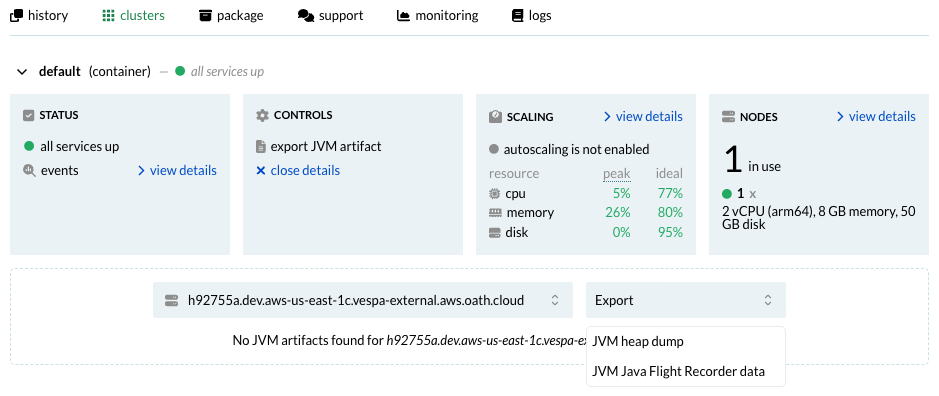
You may debug your Java code by requesting either a JVM heap dump or a Java Flight Recorder recording through theVespa Cloud Console. Go to your application's cluster overview and select_export JVM artifact_ on any container node. The process will take up to a few minutes. You'll find the steps to download the dump on the Console once it's completed. Extract the files from the downloaded Zstandard-compressed archive, and use the freeJDK Mission Control utility to inspect the dump/recording.
To debug a Searcher /Document Processor /Component running in a self-hosted container, set up a remote debugging configuration in the IDEA - IntelliJ example:
- Run -> Edit Configurations...
- Click
+to add a new configuration. - Select the "Remote JVM Debug" option in the left-most pane.
- Set hostname to the host running the container, change the port if needed.
- Set the container's jvm options to the value in "Command line arguments for remote JVM":
- Re-deploy the application, then restart Vespa on the node that runs the container. Make sure the port is published if using a Docker/Podman container, e.g.:
$ docker run --detach --name vespa --hostname vespa-container \
--publish 127.0.0.1:8080:8080 --publish 127.0.0.1:19071:19071 --publish 127.0.0.1:5005:5005 \
vespaengine/vespa - Start debugging! Check vespa.log for errors.
Developing system and staging tests
When using Vespa Cloud, system and tests are most easily developed using a test deployment in adev zone to run the tests against. Refer to general testing guide for a discussion of the different test types, and the basic HTTP tests orJava JUnit tests reference for how to write the relevant tests.
If using the Vespa CLI to deploy and runbasic HTTP tests, the same commands as in the test reference will just work, provided the CLI is configured to use the cloud target.
Running Java tests
With Maven, and Java Junit tests, some additional configuration is required, to infuse the test runtime on the local machine with API and data plane credentials:
$ mvn test
-D test.categories=system
-D dataPlaneKeyFile=data-plane-private-key.pem -D dataPlaneCertificateFile=data-plane-public-cert.pem
-D apiKey="$API_KEY"
The apiKey is used to fetch the dev instance's endpoints. The data plane key and certificate pair is used byai.vespa.hosted.cd.Endpoint to access the application endpoint. Note that the -D vespa.test.config argument is gone; this configuration is automatically fetched from the Vespa Cloud API—hence the need for the API key.
When running Vespa self-hosted like in thesample application, no authentication is required by default, to either API or container, and specifying a data plane key and certificate will instead cause the test to fail, since the correct SSL context is the Java default in this case.
Make sure the TestRuntime is able to start. As it will init an SSL context, make sure to remove config when running locally, in order to use a default context. Remove properties from pom.xml and IDE debug configuration.
Developers can also set these parameters in the IDE run configuration to debug system tests:
-D test.categories=system -D tenant=my_tenant -D application=my_app -D instance=my_instance -D apiKeyFile=/path/to/myname.mytenant.pem -D dataPlaneCertificateFile=data-plane-public-cert.pem -D dataPlaneKeyFile=data-plane-private-key.pem
Tips and troubleshooting
- Vespa Cloud upgrades daily, and applications in
devalso have their Vespa platform upgraded. This usually happens at the opposite time of day of when deployments are made to each instance, and takes some minutes. Deployments without redundancy will be unavailable during the upgrade. - Failure to deploy, due to authentication (HTTP code 401) or authorization (HTTP code 403), is most often due to wrong configuration of
tenantand/orapplication, when using command line tools to deploy. Ensure the values set with Vespa CLI or inpom.xmlmatch what is configured in the UI. - In case of data plane failure, remember to copy the public certificate to
src/main/application/security/clients.pembefore building and deploying. This is handled by the Vespa CLIvespa auth certcommand. - To run Java system and staging tests in an IDE, ensure all API and data plane keys and certificates are configured in the IDE as well; not all IDEs pick up all settings from
pom.xmlcorrectly:
-Dtest.categories=system
-DapiKeyFile=/path-to/tname.pem
-DdataPlaneCertificateFile=/path-to/data-plane-public-cert.pem
-DdataPlaneKeyFile=/path-to/data-plane-private-key.pem