GLM-4.6 - Overview - Z.AI DEVELOPER DOCUMENT (original) (raw)
GLM-4.6 achieves comprehensive enhancements across multiple domains, including real-world coding, long-context processing, reasoning, searching, writing, and agentic applications. Details are as follows:
- Longer context window: The context window has been expanded from 128K to 200K tokens, enabling the model to handle more complex agentic tasks.
- Superior coding performance: The model achieves higher scores on code benchmarks and demonstrates better real-world performance in applications such as Claude Code、Cline、Roo Code and Kilo Code, including improvements in generating visually polished front-end pages.
- Advanced reasoning: GLM-4.6 shows a clear improvement in reasoning performance and supports tool use during inference, leading to stronger overall capability.
- More capable agents: GLM-4.6 exhibits stronger performance in tool use and search-based agents, and integrates more effectively within agent frameworks.
- Refined writing: Better aligns with human preferences in style and readability, and performs more naturally in role-playing scenarios.
Introducing GLM-4.6
1. Comprehensive Evaluation
In evaluations across 8 authoritative benchmarks for general model capabilities—including AIME 25, GPQA, LCB v6, HLE, and SWE-Bench Verified—GLM-4.6 achieves performance on par with Claude Sonnet 4/Claude Sonnet 4.6 on several leaderboards, solidifying its position as the top model developed in China. 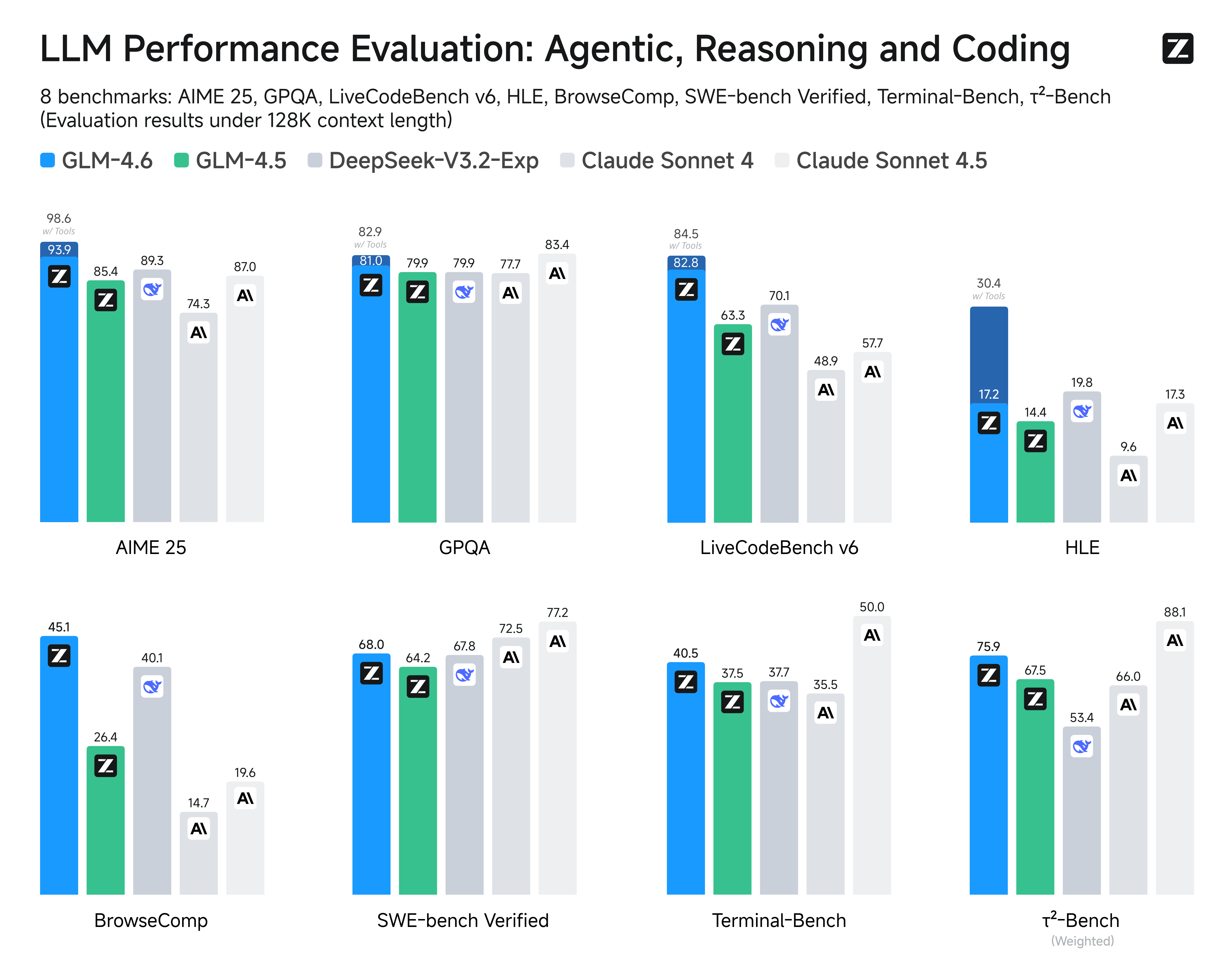
2. Real-World Coding Evaluation
To better test the model’s capabilities in practical coding tasks, we conducted 74 real-world coding tests within the Claude Code environment. The results show that GLM-4.6 surpasses Claude Sonnet 4 and other domestic models in these real-world tests. 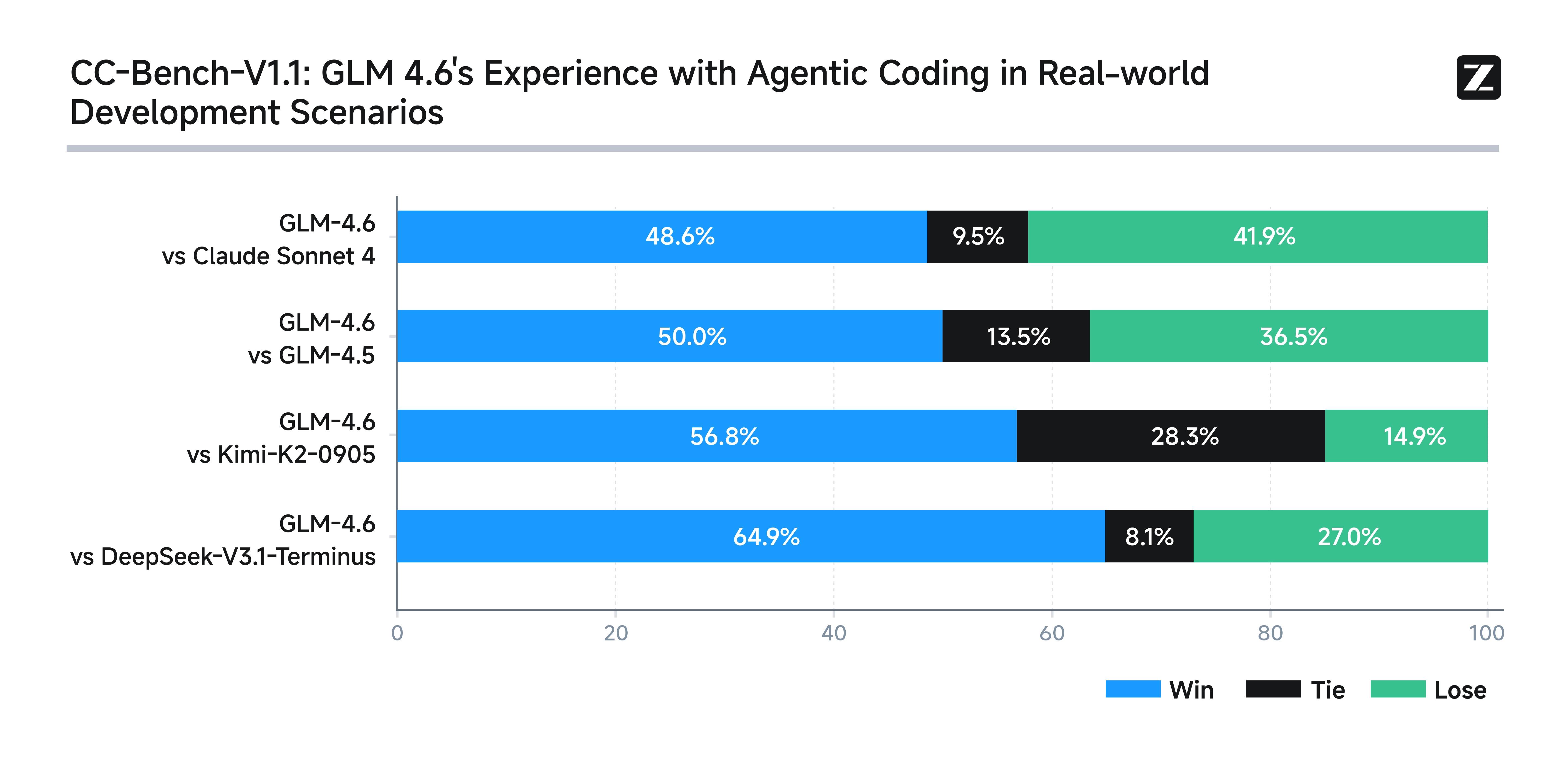 In terms of average token consumption, GLM-4.6 is over 30% more efficient than GLM-4.5, achieving the lowest consumption rate among comparable models.
 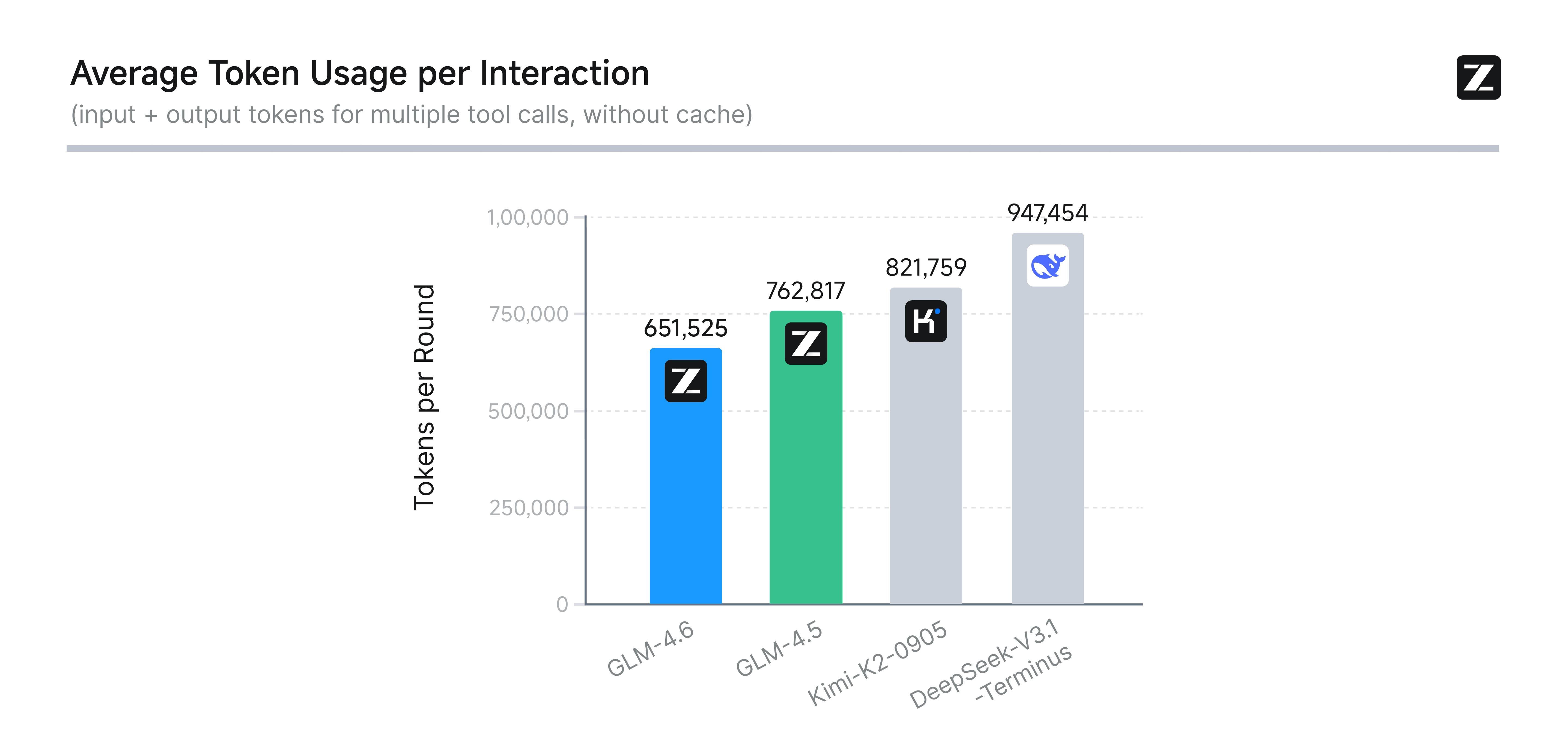 To ensure transparency and credibility, Z.ai has publicly released all test questions and agent trajectories for verification and reproduction. (Link: https://huggingface.co/datasets/zai-org/CC-Bench-trajectories).
Usage
Resources
- API Documentation: Learn how to call the API.
Quick Start
The following is a full sample code to help you onboard GLM-4.6 with ease.
- cURL
- Official Python SDK
- Official Java SDK
- OpenAI Python SDK
Basic Call
curl -X POST "https://api.z.ai/api/paas/v4/chat/completions" \
  -H "Content-Type: application/json" \
  -H "Authorization: Bearer your-api-key" \
  -d '{
    "model": "glm-4.6",
    "messages": [
      {
        "role": "user",
        "content": "As a marketing expert, please create an attractive slogan for my product."
      },
      {
        "role": "assistant",
        "content": "Sure, to craft a compelling slogan, please tell me more about your product."
      },
      {
        "role": "user",
        "content": "Z.AI Open Platform"
      }
    ],
    "thinking": {
      "type": "enabled"
    },
    "max_tokens": 4096,
    "temperature": 1.0
  }'
Streaming Call
curl -X POST "https://api.z.ai/api/paas/v4/chat/completions" \
  -H "Content-Type: application/json" \
  -H "Authorization: Bearer your-api-key" \
  -d '{
    "model": "glm-4.6",
    "messages": [
      {
        "role": "user",
        "content": "As a marketing expert, please create an attractive slogan for my product."
      },
      {
        "role": "assistant",
        "content": "Sure, to craft a compelling slogan, please tell me more about your product."
      },
      {
        "role": "user",
        "content": "Z.AI Open Platform"
      }
    ],
    "thinking": {
      "type": "enabled"
    },
    "stream": true,
    "max_tokens": 4096,
    "temperature": 1.0
  }'
Install SDK
# Install latest version
pip install zai-sdk

# Or specify version
pip install zai-sdk==0.2.3
Verify Installation
import zai
print(zai.__version__)
Basic Call
from zai import ZaiClient

client = ZaiClient(api_key="your-api-key")  # Your API Key

response = client.chat.completions.create(
    model="glm-4.6",
    messages=[
        {"role": "user", "content": "As a marketing expert, please create an attractive slogan for my product."},
        {"role": "assistant", "content": "Sure, to craft a compelling slogan, please tell me more about your product."},
        {"role": "user", "content": "Z.AI Open Platform"}
    ],
    thinking={
        "type": "enabled",
    },
    max_tokens=4096,
    temperature=1.0
)

# Get complete response
print(response.choices[0].message)
Streaming Call
from zai import ZaiClient

client = ZaiClient(api_key="your-api-key")  # Your API Key

response = client.chat.completions.create(
    model="glm-4.6",
    messages=[
        {"role": "user", "content": "As a marketing expert, please create an attractive slogan for my product."},
        {"role": "assistant", "content": "Sure, to craft a compelling slogan, please tell me more about your product."},
        {"role": "user", "content": "Z.AI Open Platform"}
    ],
    thinking={
        "type": "enabled",    # Optional: "disabled" or "enabled", default is "enabled"
    },
    stream=True,
    max_tokens=4096,
    temperature=0.6
)

# Stream response
for chunk in response:
    if chunk.choices[0].delta.reasoning_content:
        print(chunk.choices[0].delta.reasoning_content, end='', flush=True)

    if chunk.choices[0].delta.content:
        print(chunk.choices[0].delta.content, end='', flush=True)
Install SDK Maven
<dependency>
    <groupId>ai.z.openapi</groupId>
    <artifactId>zai-sdk</artifactId>
    <version>0.3.5</version>
</dependency>
Gradle (Groovy)
implementation 'ai.z.openapi:zai-sdk:0.3.5'
Basic Call
import ai.z.openapi.ZaiClient;
import ai.z.openapi.service.model.ChatCompletionCreateParams;
import ai.z.openapi.service.model.ChatCompletionResponse;
import ai.z.openapi.service.model.ChatMessage;
import ai.z.openapi.service.model.ChatMessageRole;
import ai.z.openapi.service.model.ChatThinking;
import java.util.Arrays;

public class BasicChat {
    public static void main(String[] args) {
        // Initialize client
        ZaiClient client = ZaiClient.builder().ofZAI()
            .apiKey("your-api-key")
            .build();

        // Create chat completion request
        ChatCompletionCreateParams request = ChatCompletionCreateParams.builder()
            .model("glm-4.6")
            .messages(Arrays.asList(
                ChatMessage.builder()
                    .role(ChatMessageRole.USER.value())
                    .content("As a marketing expert, please create an attractive slogan for my product.")
                    .build(),
                ChatMessage.builder()
                    .role(ChatMessageRole.ASSISTANT.value())
                    .content("Sure, to craft a compelling slogan, please tell me more about your product.")
                    .build(),
                ChatMessage.builder()
                    .role(ChatMessageRole.USER.value())
                    .content("Z.AI Open Platform")
                    .build()
            ))
            .thinking(ChatThinking.builder().type("enabled").build())
            .maxTokens(4096)
            .temperature(1.0f)
            .build();

        // Send request
        ChatCompletionResponse response = client.chat().createChatCompletion(request);

        // Get response
        if (response.isSuccess()) {
            Object reply = response.getData().getChoices().get(0).getMessage();
            System.out.println("AI Response: " + reply);
        } else {
            System.err.println("Error: " + response.getMsg());
        }
    }
}
Streaming Call
import ai.z.openapi.ZaiClient;
import ai.z.openapi.service.model.ChatCompletionCreateParams;
import ai.z.openapi.service.model.ChatCompletionResponse;
import ai.z.openapi.service.model.ChatMessage;
import ai.z.openapi.service.model.ChatMessageRole;
import ai.z.openapi.service.model.ChatThinking;
import ai.z.openapi.service.model.Delta;
import java.util.Arrays;

public class StreamingChat {
    public static void main(String[] args) {
        // Initialize client
        ZaiClient client = ZaiClient.builder().ofZAI()
            .apiKey("your-api-key")
            .build();

        // Create streaming chat completion request
        ChatCompletionCreateParams request = ChatCompletionCreateParams.builder()
            .model("glm-4.6")
            .messages(Arrays.asList(
                ChatMessage.builder()
                    .role(ChatMessageRole.USER.value())
                    .content("As a marketing expert, please create an attractive slogan for my product.")
                    .build(),
                ChatMessage.builder()
                    .role(ChatMessageRole.ASSISTANT.value())
                    .content("Sure, to craft a compelling slogan, please tell me more about your product.")
                    .build(),
                ChatMessage.builder()
                    .role(ChatMessageRole.USER.value())
                    .content("Z.AI Open Platform")
                    .build()
            ))
            .thinking(ChatThinking.builder().type("enabled").build())
            .stream(true)  // Enable streaming output
            .maxTokens(4096)
            .temperature(1.0f)
            .build();

        ChatCompletionResponse response = client.chat().createChatCompletion(request);

        if (response.isSuccess()) {
            response.getFlowable().subscribe(
                // Process streaming message data
                data -> {
                    if (data.getChoices() != null && !data.getChoices().isEmpty()) {
                        Delta delta = data.getChoices().get(0).getDelta();
                        System.out.print(delta + "\n");
                    }
                },
                // Process streaming response error
                error -> System.err.println("\nStream error: " + error.getMessage()),
                // Process streaming response completion event
                () -> System.out.println("\nStreaming response completed")
            );
        } else {
            System.err.println("Error: " + response.getMsg());
        }
    }
}
Install SDK
# Install or upgrade to latest version
pip install --upgrade 'openai>=1.0'
Verify Installation
python -c "import openai; print(openai.__version__)"
Usage Example
from openai import OpenAI

client = OpenAI(
    api_key="your-Z.AI-api-key",
    base_url="https://api.z.ai/api/paas/v4/"
)

completion = client.chat.completions.create(
    model="glm-4.6",
    messages=[
        {"role": "system", "content": "You are a smart and creative novelist"},
        {"role": "user", "content": "Please write a short fairy tale story as a fairy tale master"}
    ]
)

print(completion.choices[0].message.content)